Documentation Index

Fetch the complete documentation index at: https://docs.mention-me.com/llms.txt

Use this file to discover all available pages before exploring further.

Overview

The Mention Me integration with Bloomreach allows you to receive referral and advocacy-related events into your Bloomreach platform in real time.

What the integration enables

  • Send contact data and opt-ins from Mention Me referred customers to Bloomreach in real time
  • Use referral data to trigger coupon email reminders
  • Enhance marketing performance by segmenting and targeting high-value customers using referral and advocacy data
During setup, Mention Me automatically creates the necessary Customer Attributes and Custom Events in Bloomreach. No manual configuration is required. Event and attribute data is pushed based on customer ID (typically email address). Mention Me sends profile and event data for any prospect or customer who triggers a Mention Me event, regardless of their opt-in status in Bloomreach.

How contact matching works

  • If a customer already exists in Bloomreach:
    • Append Mention Me attributes to their profile
    • Add Mention Me events to their profile
  • If a customer does not exist in Bloomreach:
    • Create their contact profile using email as the ID
    • Append Mention Me attributes to the profile
    • Add relevant Mention Me events
    • Add a consent event only if explicitly captured during a Mention Me journey

Contact Data

How contacts are created

  • Mention Me first checks if the customer already exists using email as the identifier.
    • If the contact does not exist, a new contact will be created.
    • If the contact does exist, Mention Me will update them with Mention Me-specific attributes only.
  • Mention Me will only set the email field if no value is already present in Bloomreach.
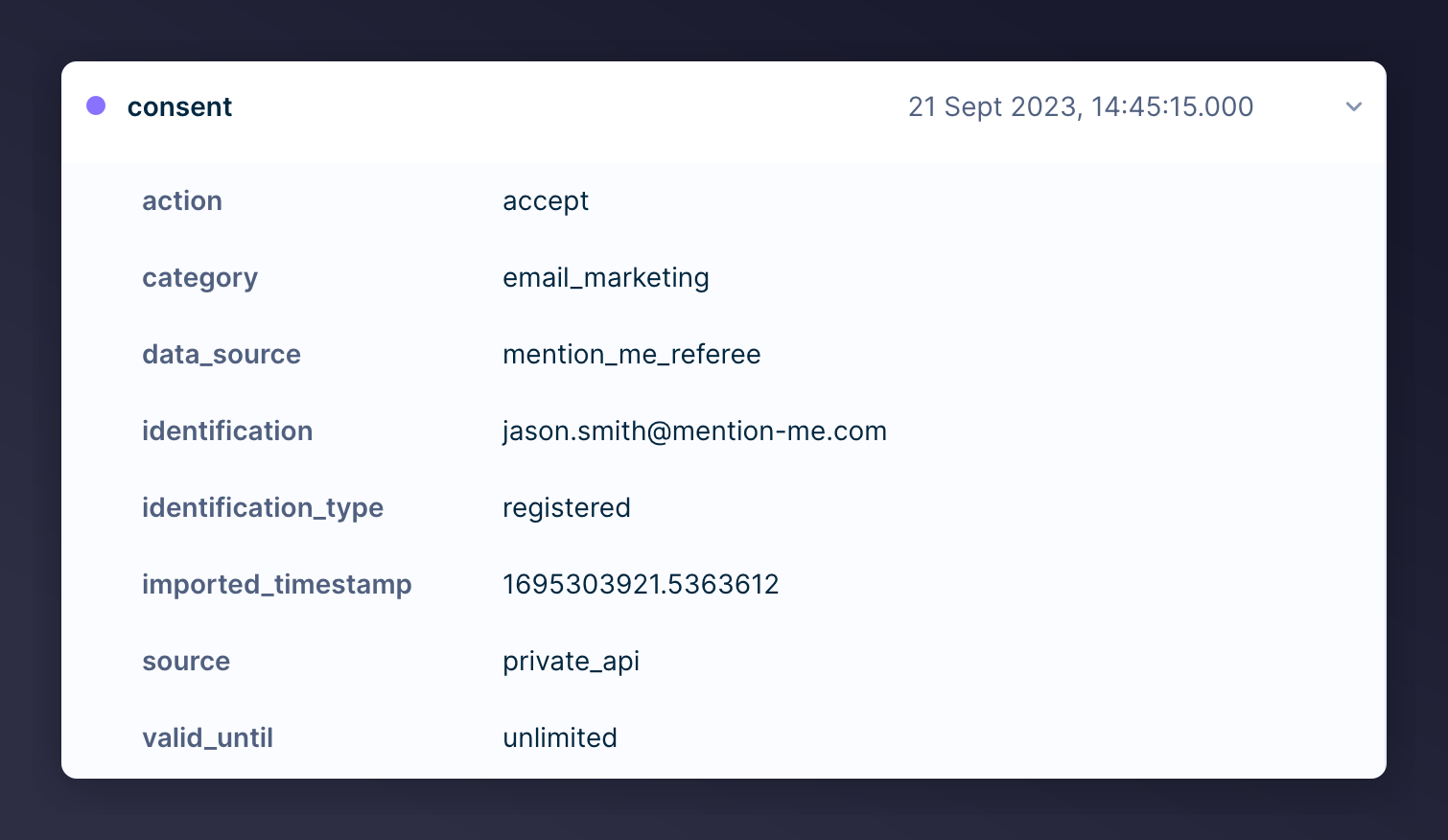
Mention Me can capture newsletter opt-in consent directly and send it to Bloomreach, eliminating the need to export CSVs. When a customer consents through the referee journey or the post-purchase newsletter overlay, an opt-in tracking event is automatically sent to Bloomreach. Customer consent opt-in overlay from Mention Me The opt-in is captured using Bloomreach’s Consent Tracking Event under the consent category chosen during integration setup. Consent metadata includes when and where it was captured:
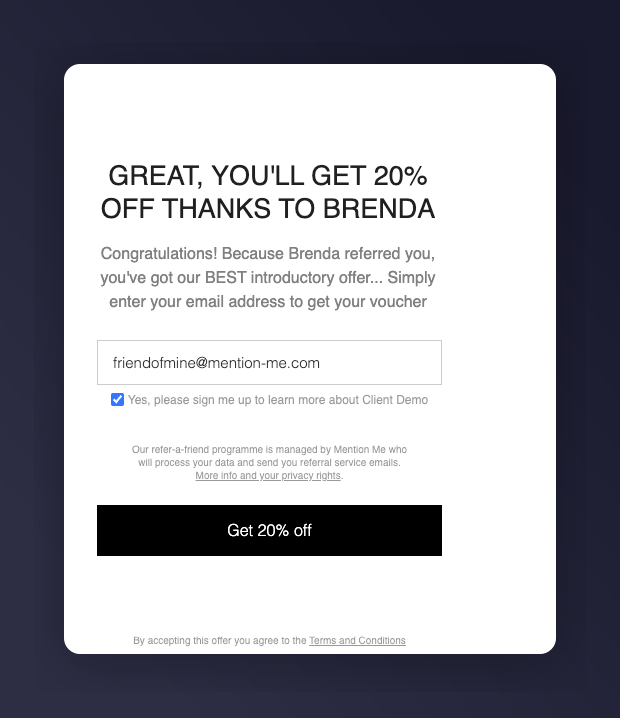
  • mention_me_referee = Referee journey opt-in
  • mention_me_newsletter = Post-purchase newsletter overlay
A customer may have opted in via other sources. Mention Me is not the source of truth for all consent data. Consent tracking event in Bloomreach

Customer profile attributes

The following custom attributes are created or updated on the customer profile in Bloomreach:
Bloomreach Customer FieldDescriptionExample
registeredUnique ID (usually email)jason.jones@mention-me.com
emailEmail address (set only if no value exists)jason.jones@mention-me.com
mention_me_share_linkReferrer’s personal share URL to send to friendshttps://demo.mention-me.com/m/ol/xz3uz-joel-mcfly
mention_me_dashboard_linkReferrer’s dashboard showing referred friendshttps://demo.mention-me.com/d/2674816/9c34b0c2
mention_me_share_sourceChannel used for shareOPEN-LINK
mention_me_referralsTotal successful referrals (includes historical)5
mention_me_total_sharesTotal shares across all channels (includes historical)10
mention_me_email_sharesEmail shares count2
mention_me_facebook_sharesFacebook shares count2
mention_me_facebook_messenger_sharesMessenger shares count2
mention_me_name_sharing_sharesName sharing count1
mention_me_whatsapp_sharesWhatsApp shares count3
mention_me_nps_scoreNPS score at post-purchase8
mention_me_propensity_to_referScore from Smart Experiment (High or Low)High
mention_me_ecr_activityECR activity segment: Active, Dormant, LapsedActive
mention_me_ecr_statusECR value status: High, Medium, LowHigh
mention_me_network_idUnique Network ID from Mention MeN-5051-153480685
mention_me_first_share_dateDate of customer’s first referral share2024-06-03T16:19:08.000Z
mention_me_first_referral_dateDate of customer’s first successful referral2024-06-03T16:19:08.000Z
mention_me_last_share_dateDate when last share was made2024-06-03T16:19:08.000Z
mention_me_last_referral_dateDate when last successful referral occurred2024-06-03T16:19:08.000Z
mention_me_ecr_12m_predictedPredicted ECR status 12 months from now: High, Medium, Low, LapsedHigh
mention_me_referrer_engagedTrue if referrer accepted terms and engaged with the offerYes

Events

The Mention Me integration uses Bloomreach’s custom events functionality to enable trigger-based workflows for email campaigns, segmentation, and automation. These events are automatically created in Bloomreach during setup and are associated with customer profiles via their email (registered ID).
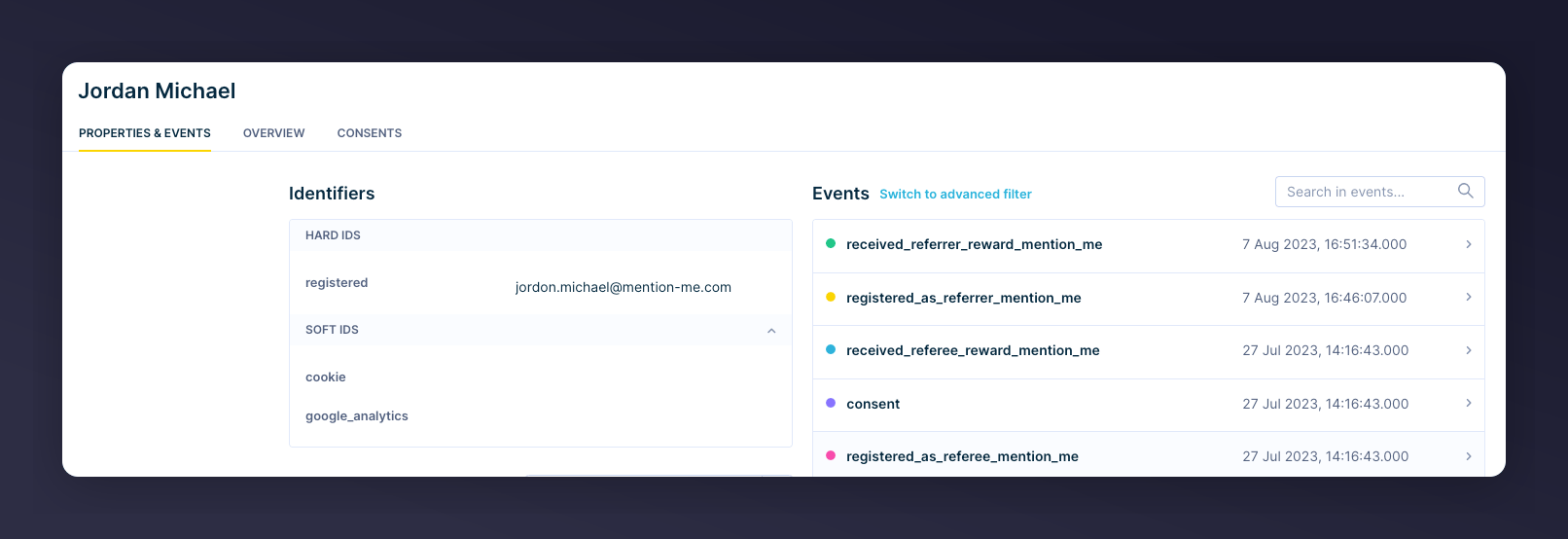
Custom events from Mention Me in Bloomreach
Custom events are how scenario segmentations in Bloomreach can be linked to external triggers. They can be used to add contacts to a scenario, trigger email campaigns, or create dynamic segments.

Summary of events sent to Bloomreach

Mention Me Event NameBloomreach Event NameWhen It Triggers
Registered as a Referee from Mention Meregistered_as_refereeWhen a customer has registered as a referee
Registered as a Referrer from Mention Meregistered_as_referrerWhen a customer has registered as a referrer
Received a Referee Reward from Mention Mereceived_referee_rewardWhen a customer obtained a reward as a referrer’s friend
Received a Referrer Reward from Mention Mereceived_referrer_rewardWhen a customer obtained a reward for referring a friend
Submitted an NPS Score from Mention Me**submitted_nps_scoreWhen a customer has supplied an NPS score at post-purchase
Received a discount on next order from Mention Me**received_reward_next_orderWhen a customer has received a discount to use on their next order
Propensity to Refer from Mention Me**propensity_to_referEach time a customer has their propensity to refer calculated
** If you have the Mention Me add-on enabled

How to use Mention Me data in email templates

The Mention Me data can be inserted into email campaigns to create a personalised email experience using the Bloomreach Jinja syntax. You can use the data in the email Body, Subject line, Sender email, Sender name, Pre-header, and UTM parameters.

Registered As A Referrer (registered_as_referrer)

Each time a customer registers as a referrer, a registration event will be triggered and the associated data will be sent to Bloomreach.
Field NameBloomreach Jinja SyntaxDescriptionExample
email{{ event.email }}Email used to registerrydercollins742@mention-me.com
firstname{{ event.firstname }}First nameRyder
surname{{ event.surname }}SurnameCollins
customer_segment{{ event.customer_segment }}Segment from Mention Me tagsVIP
source{{ event.source }}System sourcemention_me
share_link{{ event.share_link }}Referrer’s share linkhttps://demo.mention-me.com/m/ol/xz3uz-joel-mcfly
dashboard_link{{ event.dashboard_link }}Referrer’s tracking dashboardhttps://demo.mention-me.com/d/2674816/9c34b0c2
campaign_name{{ event.campaign_name }}Internal campaign nameUK Campaign
locale_code{{ event.locale_code }}Locale codeen_GB
experiment_name{{ event.experiment_name }}Internal experiment nameAB Test - Current Vs New Imagery - July 2023
offer_name{{ event.offer_name }}Internal offer nameVariation A
offer_type{{ event.offer_type }}Type of offerreferral
offer_subject_copy{{ event.offer_subject_copy }}Customer-friendly offer descriptionTreat a friend to 20% off and get 20% off for yourself
offer_call_to_action_copy{{ event.offer_call_to_action_copy }}Customer-friendly CTAGive 20% off
referrer_reward{{ event.referrer_reward }}Reward for the referrer20%
referee_reward{{ event.referee_reward }}Reward for the referee£15

Registered As A Referee (registered_as_referee)

Each time a customer registers as a referee, a registration event will be triggered and the associated data will be sent to Bloomreach.
Field NameBloomreach Jinja SyntaxDescriptionExample
email{{ event.email }}Referee’s emailjojohnson378@mention-me.com
firstname{{ event.firstname }}First name (if supplied)Joe
surname{{ event.surname }}Surname (if supplied)Johnson
source{{ event.source }}System sourcemention_me
share_source{{ event.share_source }}Share method usedFORWARDED-EMAILED-LINK
campaign_name{{ event.campaign_name }}Internal campaign nameUK Campaign
locale_code{{ event.locale_code }}Locale Codeen_GB
experiment_name{{ event.experiment_name }}Internal experiment nameAB Test - Current Vs New Imagery - July 2023
offer_name{{ event.offer_name }}Internal offer nameVariation A
offer_type{{ event.offer_type }}Type of offerreferral
offer_subject_copy{{ event.offer_subject_copy }}Customer-friendly offer descriptionTreat a friend to 20% off and get 20% off for yourself
offer_call_to_action_copy{{ event.offer_call_to_action_copy }}Customer-friendly CTAGive 20% off
fulfilled_by{{ event.fulfilled_by }}Reward issuance methodcoupon
reward_amount{{ event.reward_amount }}Reward amount20
reward_type{{ event.reward_type }}Type of rewardpercent
referrer_reward{{ event.referrer_reward }}Reward for the referrer20%
referee_reward{{ event.referee_reward }}Reward for the referee£15

Received A Referee Reward (received_referee_reward)

Each time a referee obtains a reward for being a referrer’s friend, a referee fulfilment event will be triggered.
Field NameBloomreach Jinja SyntaxDescriptionExample
email{{ event.email }}Referee’s emailjojohnson378@mention-me.com
firstname{{ event.firstname }}First nameJoe
surname{{ event.surname }}SurnameJohnson
source{{ event.source }}System sourcemention_me
referrer_first_name{{ event.referrer_first_name }}First name of the referrerRyder
referrer_last_name{{ event.referrer_last_name }}Surname of the referrerCollins
campaign_name{{ event.campaign_name }}Internal campaign nameUK Campaign
locale_code{{ event.locale_code }}Locale Codeen_GB
currency_symbol{{ event.currency_symbol }}Currency symbol£
experiment_name{{ event.experiment_name }}Internal experiment nameAB Test - Current Vs New Imagery - July 2023
offer_name{{ event.offer_name }}Internal offer nameVariation A
offer_type{{ event.offer_type }}Type of offerreferral
offer_subject_copy{{ event.offer_subject_copy }}Customer-facing offer summaryTreat a friend to 20% off and get 20% off for yourself
offer_call_to_action_copy{{ event.offer_call_to_action_copy }}Customer-friendly CTAGive 20% off
fulfilled_by{{ event.fulfilled_by }}Reward issuance methodcoupon
reward_amount{{ event.reward_amount }}Reward amount20
reward_type{{ event.reward_type }}Type of rewardpercent
referrer_reward{{ event.referrer_reward }}Reward for the referrer20%
referee_reward{{ event.referee_reward }}Reward for the referee£15
coupon_code{{ event.coupon_code }}Coupon code issued to the referee10USDOFF-RXAAURVZ
coupon_expiry{{ event.coupon_expiry }}Coupon expiry date. Use Jinja conversion for formatting.2024-09-03T16:19:19.000Z
call_to_action_url{{ event.call_to_action_url }}URL where the customer can spend their rewardwww.mention-me.com

Received A Referrer Reward (received_referrer_reward)

Each time a referrer obtains a reward for referring a friend, a referrer fulfilment event will be triggered.
Field NameBloomreach Jinja SyntaxDescriptionExample
email{{ event.email }}Referrer’s emailjojohnson378@mention-me.com
firstname{{ event.firstname }}First nameJoe
surname{{ event.surname }}SurnameJohnson
source{{ event.source }}System sourcemention_me
referee_first_name{{ event.referee_first_name }}First name of the referred friendRyder
referee_last_name{{ event.referee_last_name }}Surname of the referred friendCollins
campaign_name{{ event.campaign_name }}Internal campaign nameUK Campaign
locale_code{{ event.locale_code }}Locale Codeen_GB
currency_symbol{{ event.currency_symbol }}Currency symbol£
experiment_name{{ event.experiment_name }}Internal experiment nameAB Test - Current Vs New Imagery - July 2023
offer_name{{ event.offer_name }}Internal offer nameVariation A
offer_type{{ event.offer_type }}Type of offerreferral
offer_subject_copy{{ event.offer_subject_copy }}Customer-facing offer summaryTreat a friend to 20% off and get 20% off for yourself
offer_call_to_action_copy{{ event.offer_call_to_action_copy }}Customer-friendly CTAGive 20% off
fulfilled_by{{ event.fulfilled_by }}Reward issuance methodcoupon
reward_amount{{ event.reward_amount }}Reward amount20
reward_type{{ event.reward_type }}Type of rewardpercent
referrer_reward{{ event.referrer_reward }}Reward for the referrer20%
referee_reward{{ event.referee_reward }}Reward for the referee£15
coupon_code{{ event.coupon_code }}Coupon code issued to the referrer10USDOFF-RXAAURVZ
coupon_expiry{{ event.coupon_expiry }}Coupon expiry date. Use Jinja conversion for formatting.2024-09-03T16:19:19.000Z
call_to_action_url{{ event.call_to_action_url }}URL where the referrer can spend their rewardwww.mention-me.com

Submitted An NPS Score (submitted_nps_score)

Each time a customer submits an NPS Score via the Mention Me NPS feature, their response will be sent to Bloomreach.
Field NameBloomreach Jinja SyntaxDescriptionExample
email{{ event.email }}Email used to submitjojohnson378@mention-me.com
firstname{{ event.firstname }}First nameJoe
surname{{ event.surname }}SurnameJohnson
source{{ event.source }}System sourcemention_me
campaign_name{{ event.campaign_name }}Internal campaign nameUK Campaign
locale_code{{ event.locale_code }}Locale Codeen_GB
experiment_name{{ event.experiment_name }}Internal experiment nameAB Test - Current Vs New Imagery - July 2023
offer_name{{ event.offer_name }}Internal offer nameCollect NPS Feedback
offer_type{{ event.offer_type }}Type of offernps-only
offer_subject_copy{{ event.offer_subject_copy }}Customer-facing offer descriptionTreat a friend to 20% off and get 20% off for yourself
offer_call_to_action_copy{{ event.offer_call_to_action_copy }}Customer-friendly CTAGive 20% off
customer_segment{{ event.customer_segment }}Segment from Mention Me tagsVIP
nps_score{{ event.nps_score }}NPS score submitted8

Received A Discount On Next Order (received_reward_next_order)

Each time a customer obtains a reward from a non-referral post-purchase message, a discount on next order fulfilment event will be triggered.
Field NameBloomreach Jinja SyntaxDescriptionExample
email{{ event.email }}Customer’s emailjojohnson378@mention-me.com
firstname{{ event.firstname }}First nameJoe
surname{{ event.surname }}SurnameJohnson
source{{ event.source }}System sourcemention_me
campaign_name{{ event.campaign_name }}Internal campaign nameUK Campaign
locale_code{{ event.locale_code }}Locale Codeen_GB
currency_symbol{{ event.currency_symbol }}Currency symbol£
experiment_name{{ event.experiment_name }}Internal experiment nameAB Test - Current Vs New Imagery - July 2023
offer_name{{ event.offer_name }}Internal offer nameVariation A
offer_type{{ event.offer_type }}Type of offerreferral
offer_subject_copy{{ event.offer_subject_copy }}Customer-facing offer descriptionTreat a friend to 20% off and get 20% off for yourself
offer_call_to_action_copy{{ event.offer_call_to_action_copy }}Customer-friendly CTAGive 20% off
fulfilled_by{{ event.fulfilled_by }}Reward issuance methodcoupon
reward_amount{{ event.reward_amount }}Reward amount20
reward_type{{ event.reward_type }}Type of rewardpercent
discount_reward{{ event.discount_reward }}Combined reward description20%
coupon_code{{ event.coupon_code }}Coupon code10USDOFF-RXAAURVZ
coupon_expiry{{ event.coupon_expiry }}Coupon expiry date. Use Jinja conversion for formatting.2024-09-03T16:19:19.000Z
call_to_action_url{{ event.call_to_action_url }}URL where the customer can redeem their rewardwww.mention-me.com

Propensity To Refer (propensity_to_refer)

Each time a customer has their propensity to refer calculated, their propensity value will be sent to Bloomreach. Only sent if running a Mention Me Smart Experiment.
Field NameBloomreach Jinja SyntaxDescriptionExample
email{{ event.email }}Customer’s emailjojohnson378@mention-me.com
firstname{{ event.firstname }}First nameJoe
surname{{ event.surname }}SurnameJohnson
source{{ event.source }}System sourcemention_me
campaign_name{{ event.campaign_name }}Internal campaign nameUK Campaign
experiment_name{{ event.experiment_name }}Internal experiment nameAB Test - Current Vs New Imagery - July 2023
offer_name{{ event.offer_name }}Internal offer nameVariation A
offer_type{{ event.offer_type }}Type of offerreferral
offer_subject_copy{{ event.offer_subject_copy }}Customer-facing offer descriptionTreat a friend to 20% off and get 20% off for yourself
offer_call_to_action_copy{{ event.offer_call_to_action_copy }}Customer-friendly CTAGive 20% off
propensity_segment{{ event.propensity_segment }}Propensity segment. Values: High or LowHigh

ECR Data Import

Mention Me can automatically send your customers’ Extended Customer Revenue (ECR) data to your Bloomreach account. ECR is only calculated for customers who have made a successful referral. This data is sent on a weekly basis and only includes customers whose ECR segment has changed from the previous week. The following steps explain how to import a full set of ECR data into Bloomreach as a one-off setup before automated syncing begins.

Step 1: Download ECR Data from Mention Me

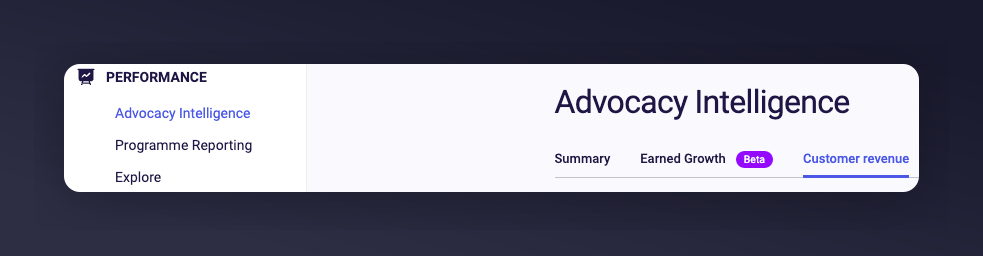
  1. Log in to the Mention Me Platform and go to Customer Revenue under the Advocacy Intelligence section.
Navigating to Customer Revenue page in Mention Me
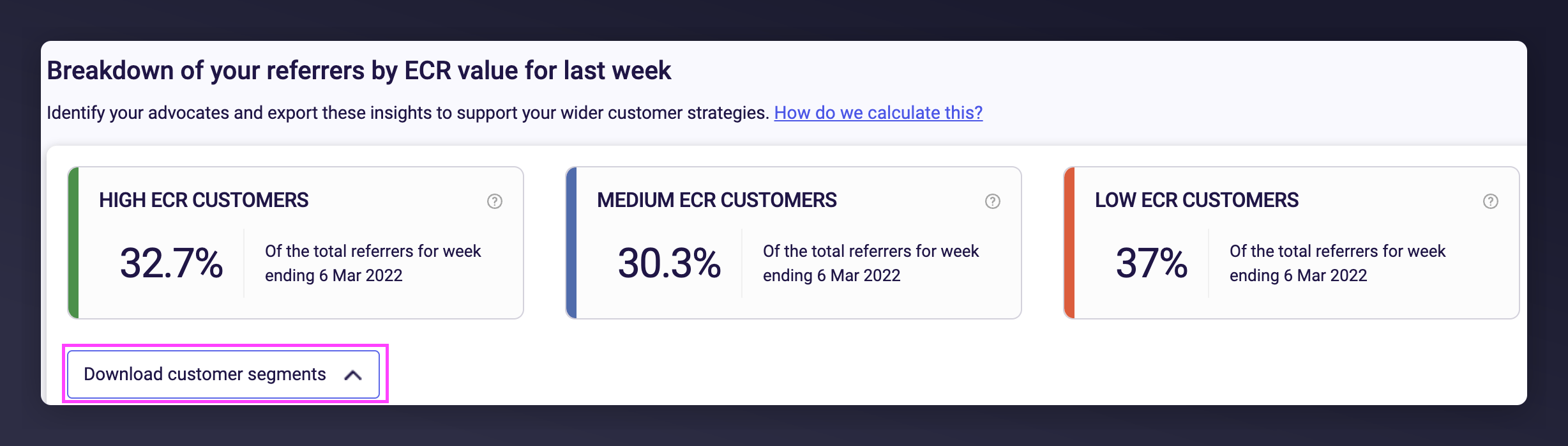
  1. Click the Download customer segments button. If you can’t see the button, contact your Mention Me CSM.
Download customer segments button in Mention Me
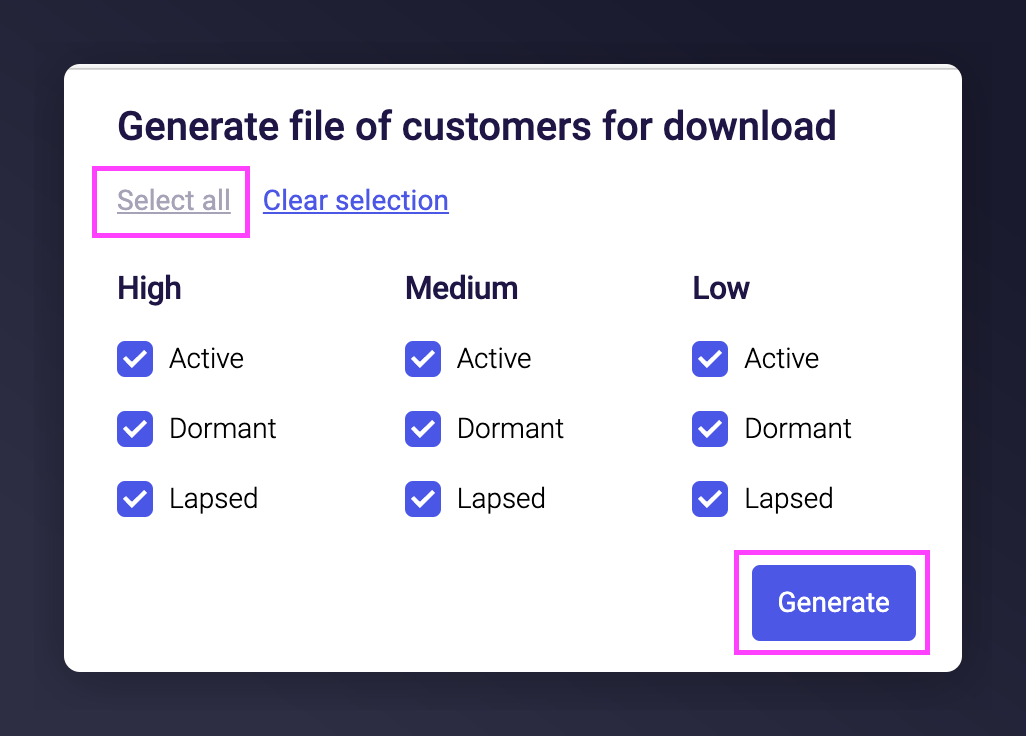
  1. Select all segments and click Generate.
Selecting ECR segments to generate CSV It may take up to 15 minutes to generate. You’ll receive an email when it’s ready.
  1. Click the download link in the email (you may need to log in again to Mention Me).
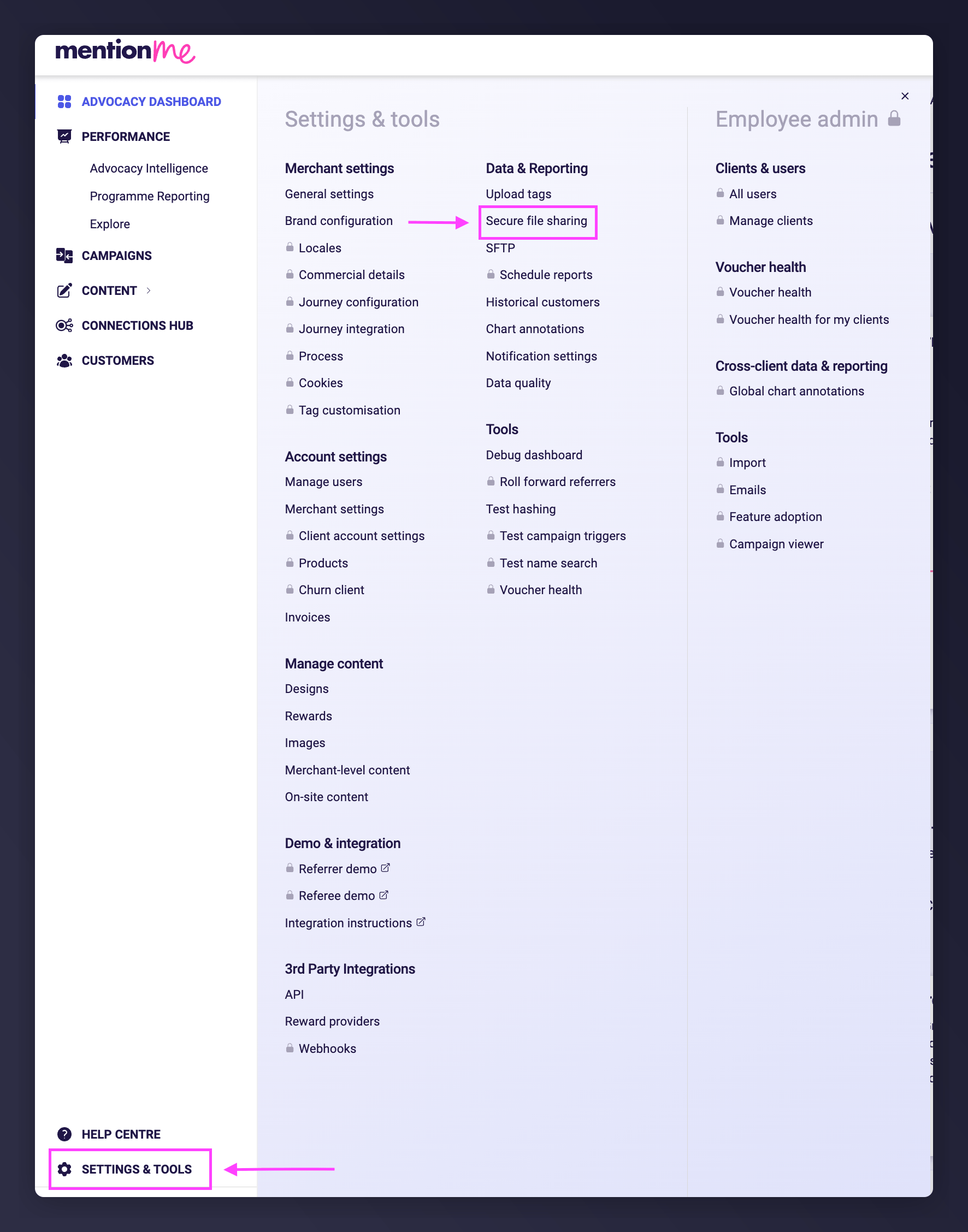
  2. Alternatively, go to Settings & Tools > Secure File Sharing to download the file.
Secure File Sharing page in Mention Me

Step 2: Create a CSV File for Bloomreach

Use any spreadsheet tool, such as Excel or Google Sheets.
  1. Open the downloaded CSV file.
  2. Remove the first three rows so only the headers remain.
  3. Delete unnecessary columns:
    • Individual Revenue
    • Revenue Referred
    • Friends ECR Value
    • Report Currency Code
    • First Name
    • Surname
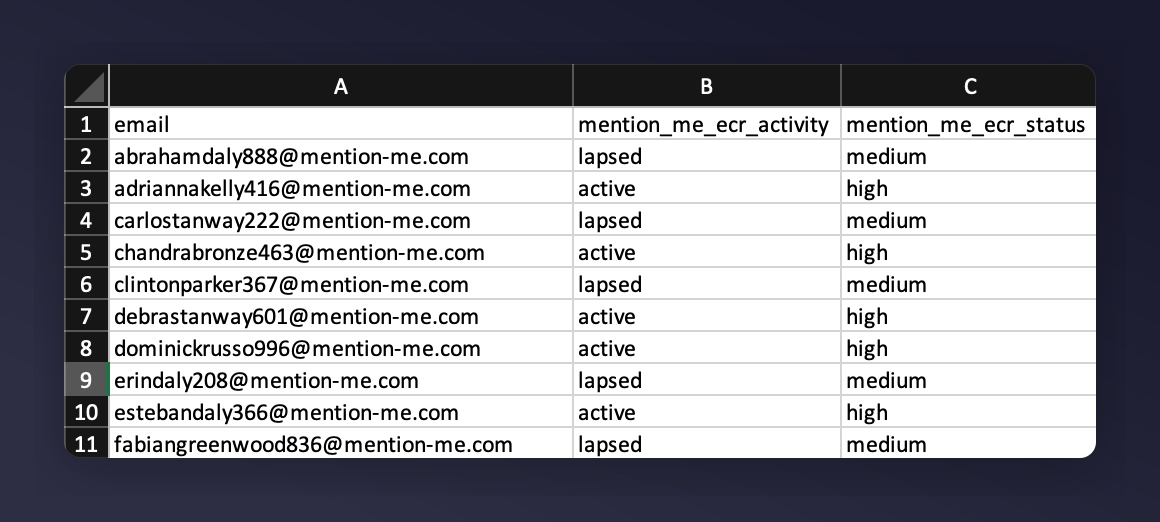
  4. Rename columns:
    • Email address -> email
    • Activity Status -> mention_me_ecr_activity
    • Ecr Segment -> mention_me_ecr_status
Column names are case-sensitive. Incorrect names will cause duplicates in Bloomreach.
  1. Ensure the email column is first.
Formatted CSV column layout for Bloomreach import
  1. Save the file as .csv

Step 3: Upload Your CSV to Bloomreach

For more guidance, visit this Bloomreach help page.
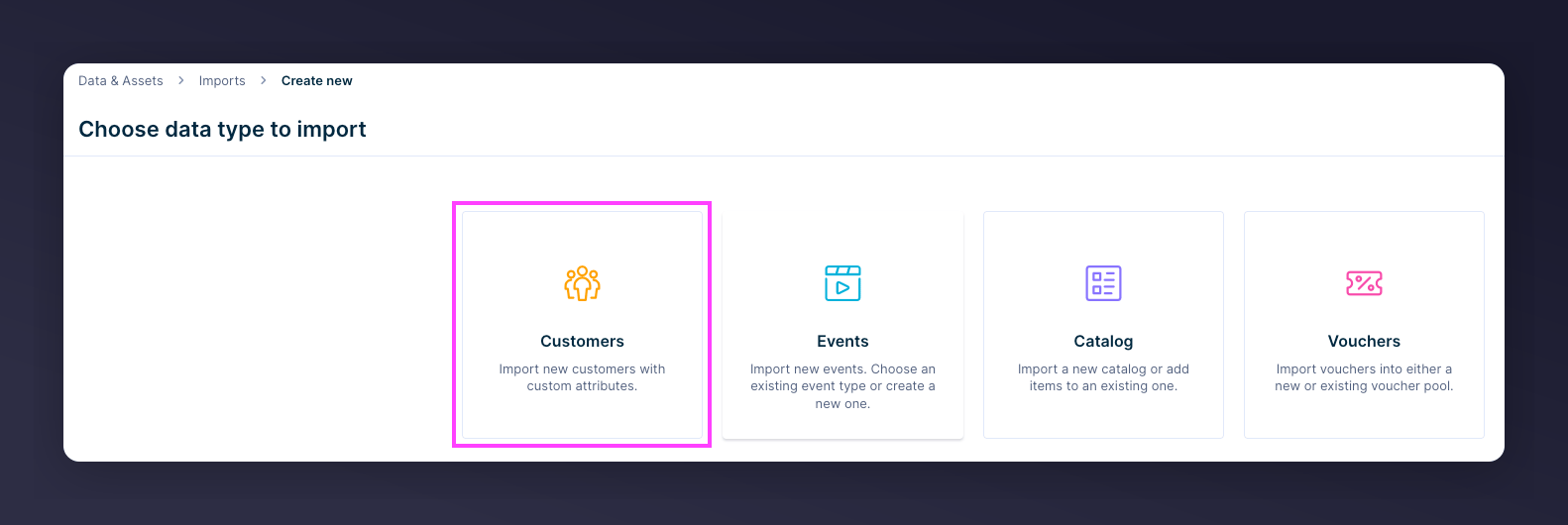
  1. In Bloomreach, go to Data & Assets > Imports > New Import
Bloomreach Imports New Import navigation
  1. Select Customers
Selecting Customers import type
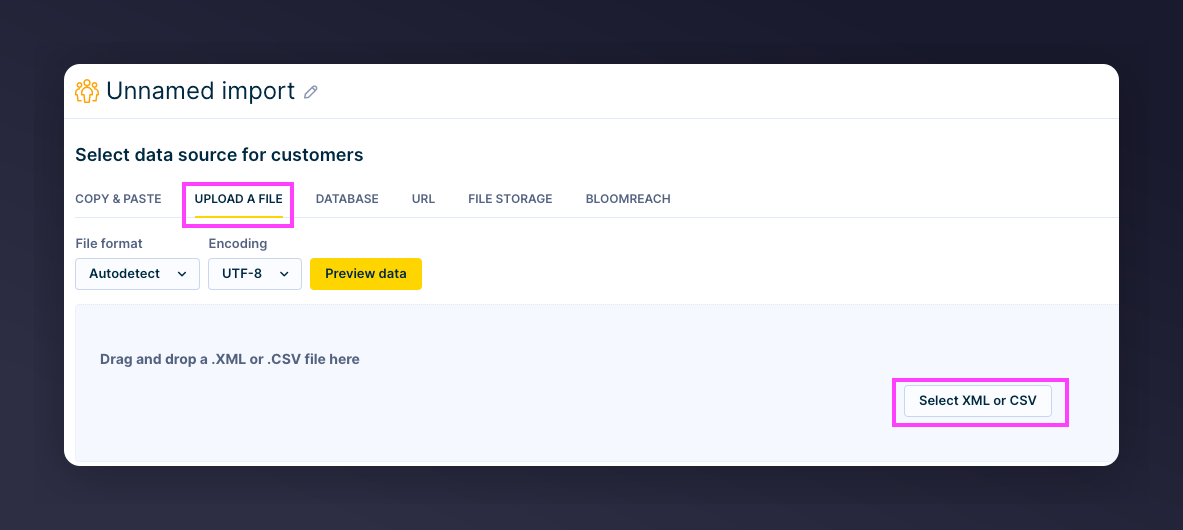
  1. Click Upload a file and select your prepared CSV
Uploading CSV file for Bloomreach import
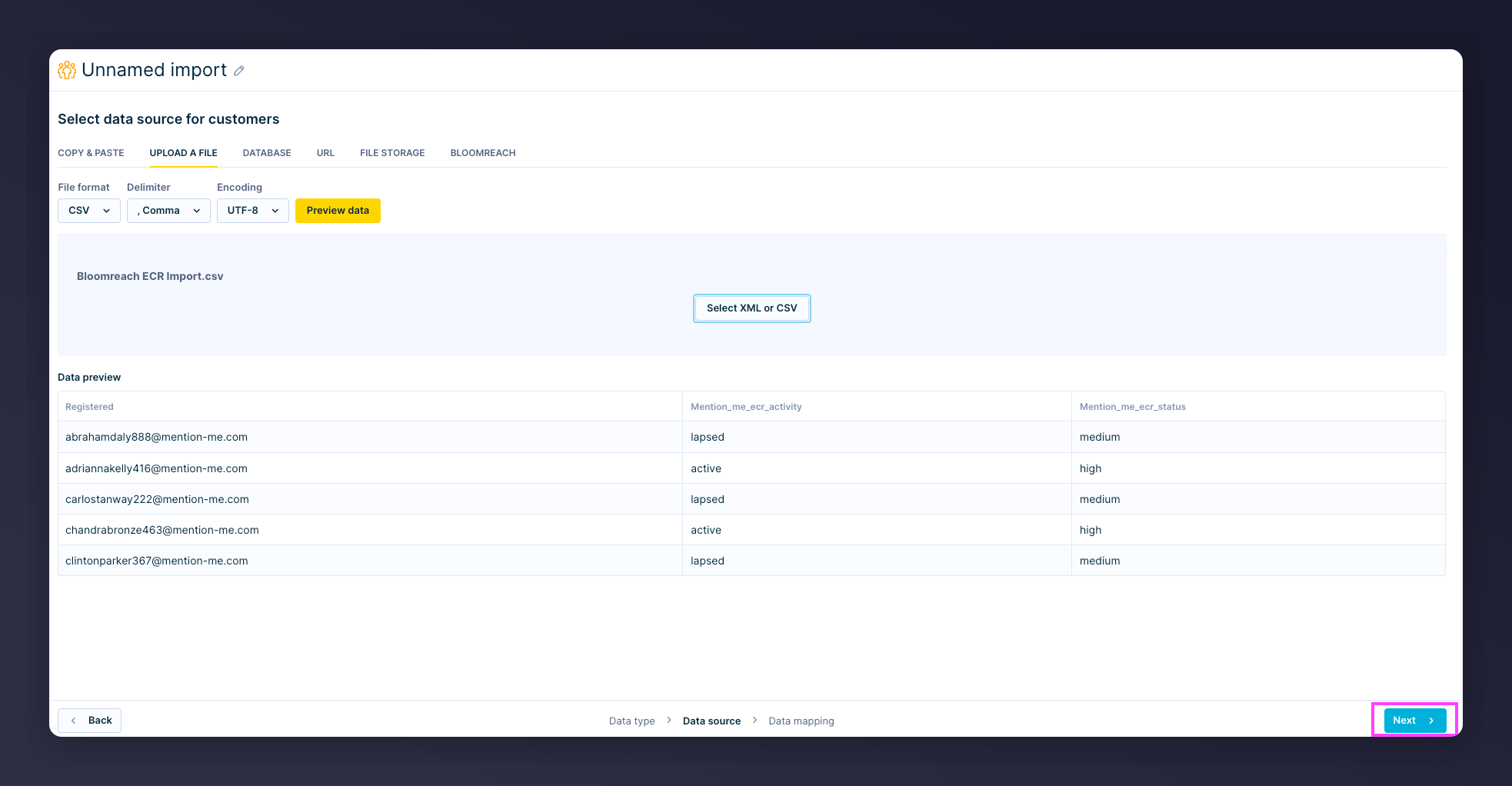
  1. Preview will load automatically. Click Next to proceed to mapping.
Import preview in Bloomreach

Data Mapping

  • De-select the checkbox next to the email field (do not import as a property)
  • Drag email to hard_id identifier column
  • Leave the two custom ECR fields as is — they’ll be added as customer properties
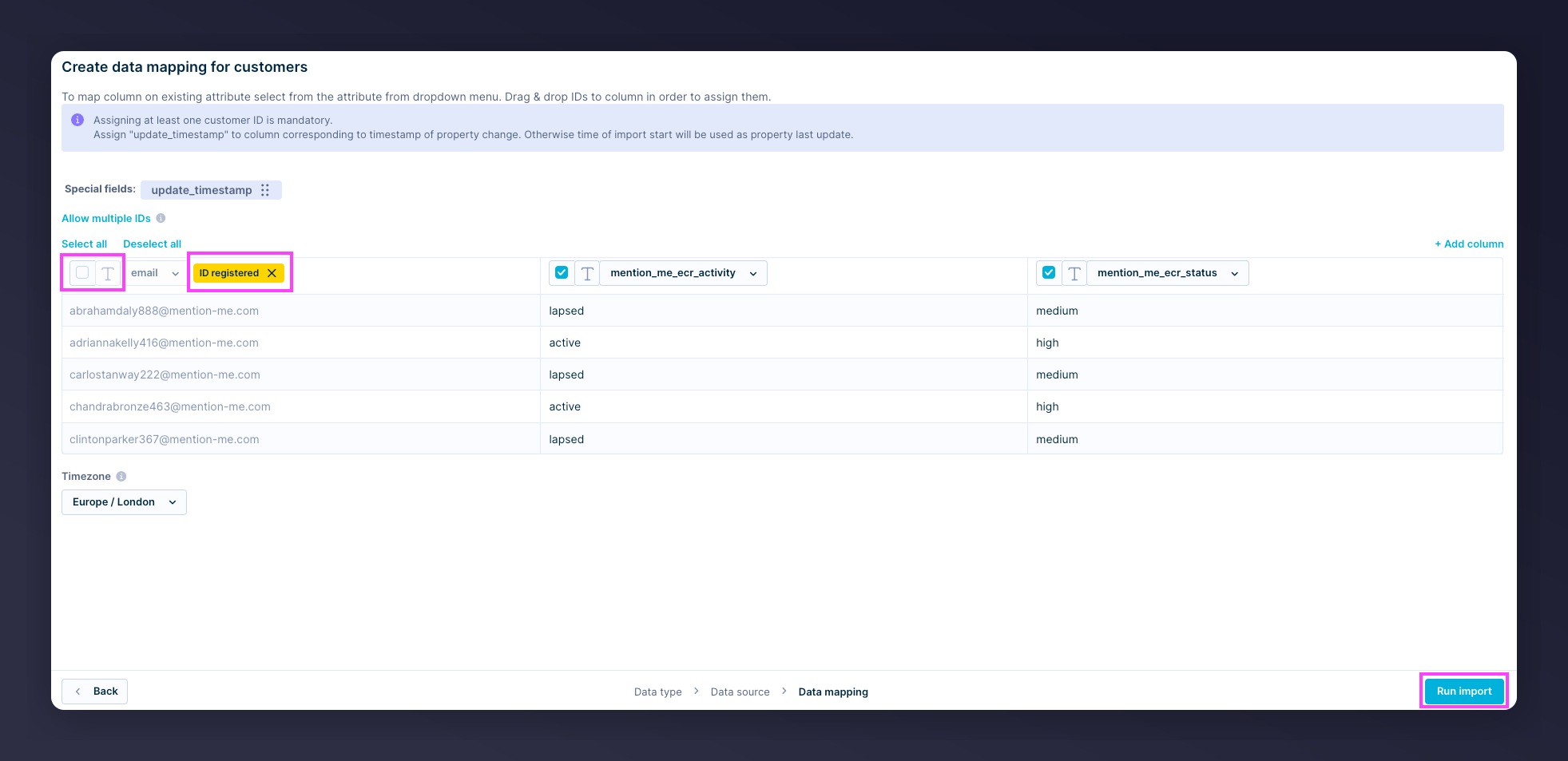
The mapping should appear as follows before you proceed: Data mapping with email as hard_id identifier
  1. Click Run Import
All customers who have successfully referred someone will now have an ECR segment and activity attribute added to their profile in Bloomreach. From here on, Mention Me’s weekly ECR export will only update customers whose ECR status has changed.
Last modified on March 31, 2026