Documentation Index

Fetch the complete documentation index at: https://docs.mention-me.com/llms.txt

Use this file to discover all available pages before exploring further.

Data Extensions

The Mention Me integration uses the SFMC Data Extensions functionality to store event data from Mention Me. This data can be used for trigger-based journeys to generate email campaigns or segmentations. Mention Me automatically sets up the Data Extension events in SFMC as part of the integration setup. A Data Extension is a table within the application database that contains your data. You can use the data to run queries, pull information, and send it to a subset of subscribers.

Summary of Mention Me Data Extensions in SFMC

Data Extension NameExternal KeyWhen it updates
Mention Me Custom FieldsMENTION_ME_CUSTOM_FIELDSWhen there are specific updates to custom properties of a customer profile
Opted-in to Marketing Consent from Mention MeMENTION_ME_MARKETING_OPT_IN_EVENTWhen a customer has opted-in to your marketing during referee or newsletter journeys
Registered as a Referee from Mention MeMENTION_ME_REFEREE_REGISTRATION_EVENTWhen a customer has registered as a referee
Registered as a Referrer from Mention MeMENTION_ME_REFERRER_REGISTRATION_EVENTWhen a customer has registered as a referrer
Received a Referee Reward from Mention MeMENTION_ME_REFEREE_FULFILLMENT_EVENTWhen a customer received a reward as a referee
Received a Referrer Reward from Mention MeMENTION_ME_REFERRER_FULFILLMENT_EVENTWhen a customer received a reward for referring a friend
Submitted an NPS Score from Mention Me**MENTION_ME_NPS_SCORE_EVENTWhen a customer submits an NPS score post-purchase
Received a discount on next order from Mention Me**MENTION_ME_DISCOUNT_ON_NEXT_ORDER_FULFILLMENT_EVENTWhen a customer receives a discount to use on their next order
Propensity to Refer from Mention Me**MENTION_ME_PROPENSITY_TO_REFER_EVENTEach time a customer has their propensity to refer calculated
** If you have the Mention Me add-on enabled

How to use Mention Me data in email templates

Mention Me data stored in Data Extensions can be used in email campaigns to personalise communications using standard merge fields or AMPscript syntax. This includes personalisation in the email body, subject line, sender name, or sender email address.

Mention Me Custom Fields

Mention Me sends updates to custom properties of a customer profile to the Mention Me Custom Fields Data Extension.
Field nameDescriptionExample
EmailEmail address (set only when new contact is created)jason.jones@mention-me.com
Referrer Share linkUnique share link for referrershttps://demo.mention-me.com/m/ol/xz3uz-joel-mcfly
Referrer Dashboard linkLink for referrers to see status of their refereeshttps://demo.mention-me.com/d/2674816/9c34b0c2
Share SourceThe method from which the referral originatedOPEN-LINK
ReferralsTotal number of successful referrals5
Total SharesTotal quantity of all shares (historical + integration-enabled)10
Email SharesNumber of shares made via email2
Facebook SharesNumber of shares made via Facebook2
Facebook Messenger SharesShares made over Facebook Messenger2
Name Sharing SharesNumber of shares using name entry method1
WhatsApp SharesNumber of shares made via WhatsApp3
NPS ScoreNPS score provided by customer post-purchase8
Propensity to ReferEstimated referral likelihood (only with Smart Experiment)High
ECR ActivityECR lifecycle segment: Active, Dormant, LapsedActive
ECR StatusECR performance tier: High, Medium, LowHigh
Created by Mention MeTRUE if contact was created by Mention MeTrue
Network IDMention Me Network the customer belongs toN-5051-153480685
First Share DateDate of the customer’s first share10/14/2022
First Referral DateDate of first successful referral10/20/2022
Last Share DateDate of the most recent share09/15/2023
Last Referral DateDate of the most recent successful referral10/22/2023
Referrer engagedTRUE if referrer accepted T&Cs of the referral offerTrue
Each time a referee requests to receive your newsletter at signup, or post-purchase, a dedicated event is sent to SFMC.
Field nameDescriptionExample
EmailEmail used during registrationrydercollins742@mention-me.com
SourceSource of sign-up (newsletter-signup or referee-registration)referee-registration
Campaign NameInternal campaign name for filteringUK Campaign
Experiment NameInternal experiment nameAB Test - Current Vs New Imagery - July 2023
Offer NameInternal offer nameVariation A
Offer TypeType of offerreferral
Offer Subject CopyCustomer-facing offer descriptionTreat a friend to 20% off and get 20% off for yourself
Offer Call to Action CopyCustomer-facing CTAGive 20% off

Registered as a Referrer from Mention Me

Field nameDescriptionExample
EmailEmail used during registrationrydercollins742@mention-me.com
FirstnameFirst name providedRyder
SurnameSurname providedCollins
Customer SegmentSegment from Mention Me tagsVIP
Campaign NameInternal campaign nameUK Campaign
Experiment NameInternal experiment nameAB Test - Current Vs New Imagery - July 2023
Offer NameInternal offer nameVariation A
Offer TypeType of offerreferral
Offer Subject CopyCustomer-facing offer summaryTreat a friend to 20% off and get 20% off for yourself
Offer Call to Action CopyCustomer-facing CTAGive 20% off

Registered as a Referee from Mention Me

Field nameDescriptionExample
EmailReferee’s emailjojohnson378@mention-me.com
FirstnameFirst name (if provided)Joe
SurnameSurname (if provided)Johnson
Share SourceShare method usedFORWARDED-EMAILED-LINK
Campaign NameInternal campaign nameUK Campaign
Experiment NameInternal experiment nameAB Test - Current Vs New Imagery - July 2023
Offer NameInternal offer nameVariation A
Offer TypeType of offerreferral
Offer Subject CopyCustomer-facing offer descriptionTreat a friend to 20% off and get 20% off for yourself
Offer Call to Action CopyCustomer-facing CTAGive 20% off
Fulfilled ByReward issuance methodcoupon
Reward AmountReward value20
Reward TypeType of rewardpercent

Received a Referee Reward from Mention Me

Field nameDescriptionExample
EmailReferee’s emailjojohnson378@mention-me.com
FirstnameFirst nameJoe
SurnameSurnameJohnson
Referrer First NameFirst name of the referring friendRyder
Referrer Last NameLast name of the referring friendCollins
Campaign NameInternal campaign nameUK Campaign
Currency SymbolCurrency symbol£
Experiment NameInternal experiment nameAB Test - Current Vs New Imagery - July 2023
Offer NameInternal offer nameVariation A
Offer TypeType of offerreferral
Offer Subject CopyCustomer-facing offer descriptionTreat a friend to 20% off and get 20% off for yourself
Offer Call to Action CopyCustomer-facing CTAGive 20% off
Fulfilled ByReward fulfilment methodcoupon
Reward AmountReward quantity20
Reward TypeType of rewardpercent
Referrer RewardReward for the referrer20%
Referee RewardReward for the referee£15
Coupon CodeUnique coupon code10USDOFF-RXAAURVZ
Coupon ExpiryCoupon expiration. Use SFMC Date Formatting for display.2023-08-08T12:32:58+01:00
Call to Action URLURL to redeem the rewardwww.mention-me.com

Received a Referrer Reward from Mention Me

Field nameDescriptionExample
EmailReferrer’s emailjojohnson378@mention-me.com
FirstnameFirst nameJoe
SurnameSurnameJohnson
Referee First NameFirst name of the referred friendRyder
Referee Last NameLast name of the referred friendCollins
Campaign NameInternal campaign nameUK Campaign
Currency SymbolCurrency symbol£
Experiment NameInternal experiment nameAB Test - Current Vs New Imagery - July 2023
Offer NameInternal offer nameVariation A
Offer TypeType of offerreferral
Offer Subject CopyCustomer-facing offer descriptionTreat a friend to 20% off and get 20% off for yourself
Offer Call to Action CopyCustomer-facing CTAGive 20% off
Fulfilled ByReward issuance methodcoupon
Reward AmountReward value20
Reward TypeType of rewardpercent
Referrer RewardCombined referrer reward value20%
Referee RewardCombined referee reward value£15
Coupon CodeCoupon code for redemption10USDOFF-RXAAURVZ
Coupon ExpiryCoupon expiry. Use SFMC Date Formatting.2023-08-08T12:32:58+01:00
Call to Action URLURL to redeem the rewardwww.mention-me.com

Submitted an NPS Score from Mention Me

Field nameDescriptionExample
EmailRespondent’s emailjojohnson378@mention-me.com
FirstnameFirst nameJoe
SurnameSurnameJohnson
Campaign NameInternal campaign nameUK Campaign
Experiment NameInternal experiment nameAB Test - Current Vs New Imagery - July 2023
Offer NameInternal offer nameCollect NPS Feedback
Offer TypeType of offernps-only
Offer Subject CopyCustomer-facing offer lineTreat a friend to 20% off and get 20% off for yourself
Offer Call to Action CopyCTA textGive 20% off
Customer SegmentSegment from Mention Me tagsVIP
NPS ScoreRating submitted (0-10)8

Discount on next order fulfilment

Field nameDescriptionExample
EmailCustomer’s emailjojohnson378@mention-me.com
FirstnameFirst nameJoe
SurnameSurnameJohnson
Campaign NameInternal campaign nameUK Campaign
Currency SymbolCurrency symbol£
Experiment NameInternal experiment nameAB Test - Current Vs New Imagery - July 2023
Offer NameInternal offer nameVariation A
Offer TypeType of offerreferral
Offer Subject CopyCustomer-facing offer descriptionTreat a friend to 20% off and get 20% off for yourself
Offer Call to Action CopyCustomer-facing CTAGive 20% off
Fulfilled ByReward distribution methodcoupon
Reward AmountReward value20
Reward TypeType of rewardpercent
Discount RewardComposite reward description20%
Coupon CodeCoupon for redemption10USDOFF-RXAAURVZ
Coupon ExpiryCoupon expiry. Use SFMC Date Formatting.2023-08-08T12:32:58+01:00
Call to Action URLURL to redeem the rewardwww.mention-me.com

Propensity to refer from Mention Me

Only sent if running a Mention Me Smart Experiment.
Field nameDescriptionExample
EmailCustomer’s emailjojohnson378@mention-me.com
First NameFirst nameJoe
SurnameSurnameJohnson
Propensity SegmentReferral likelihood segment. Values: High or LowHigh

ECR Data Import

Mention Me can automatically send your customers’ Extended Customer Revenue (ECR) data to your SFMC account. ECR is only calculated for customers who have made a successful referral. This data is scheduled to be sent on a weekly basis and will only send ECR data for customers whose ECR has changed from the previous week. The following steps explain how to import all your customers’ ECR data into SFMC as a one-off before Mention Me sends the weekly updates.

Step 1: Download ECR Data from Mention Me

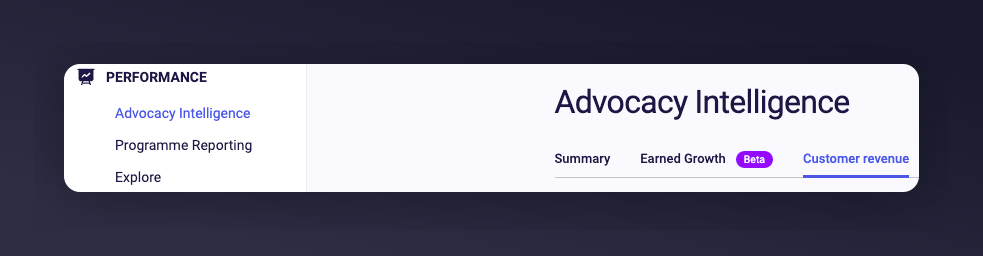
  1. Login to the Mention Me Platform and navigate to the Customer Revenue page in the Advocacy Intelligence section.
Navigating to Customer Revenue page in Mention Me
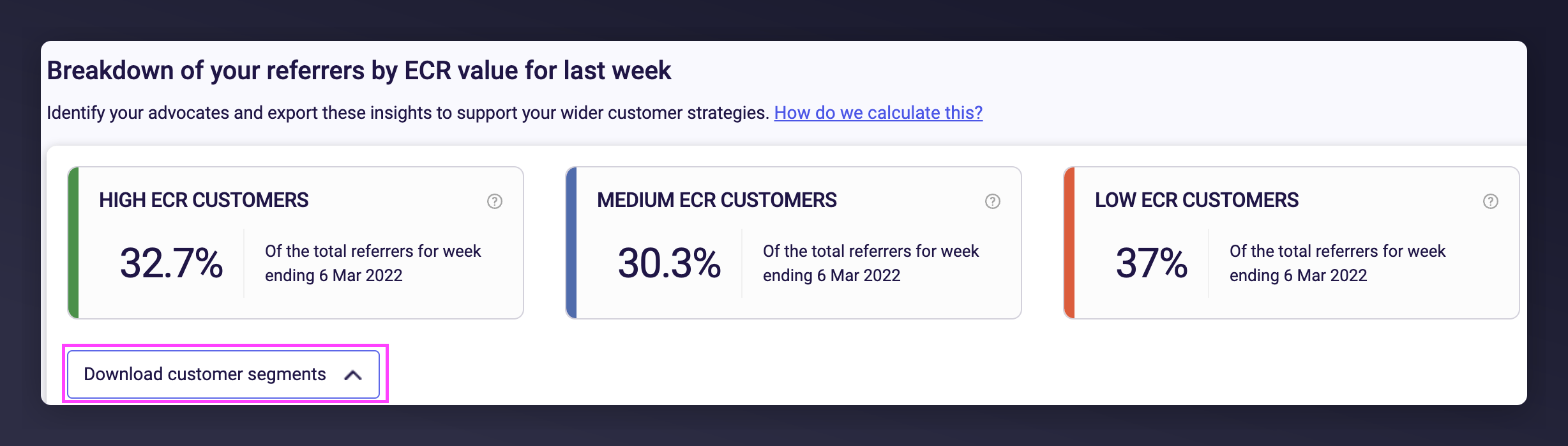
  1. Click the Download customer segments button (if not visible, contact your CSM).
Download customer segments button in Mention Me
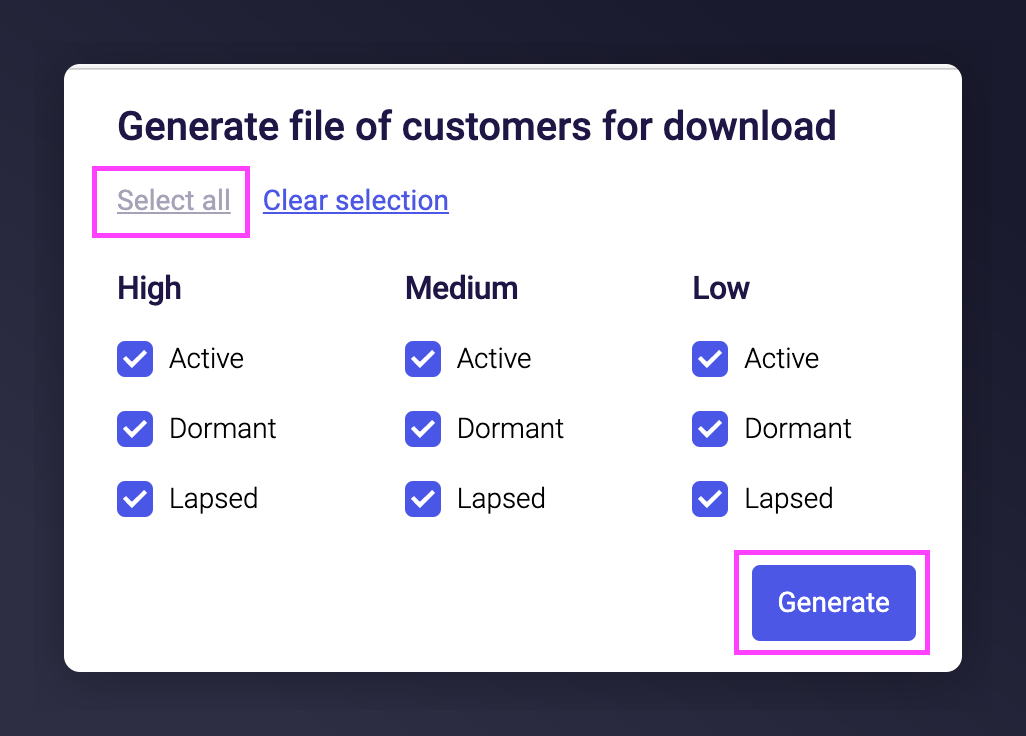
  1. Select all segments and click Generate.
Selecting ECR segments to generate CSV
  1. A CSV file will be generated and emailed to you once ready (within 15 minutes).
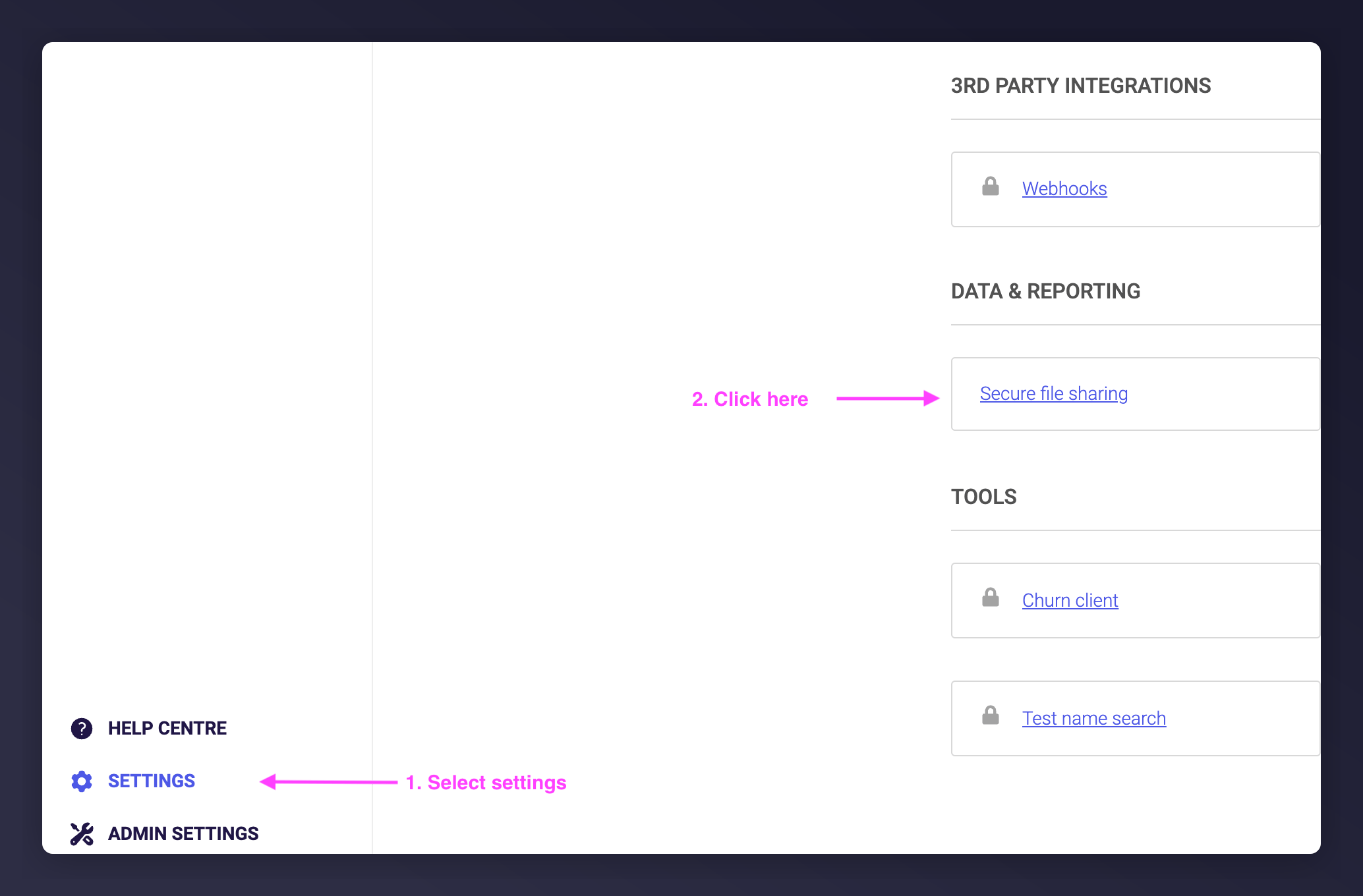
  2. Click the link in the email to download (login may be required). You can also retrieve it under Settings > Secure file transfer.
Secure file transfer download in Mention Me

Step 2: Create a CSV file for SFMC

Use Excel or Google Sheets to format the downloaded CSV file.
  1. Open the downloaded CSV file
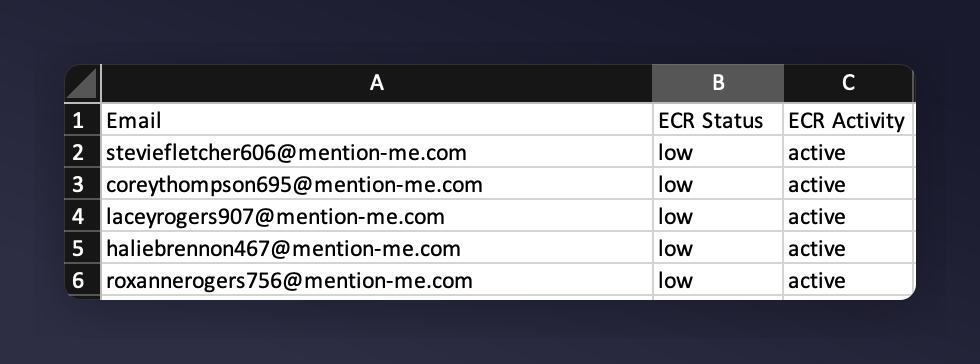
  2. Remove the first 3 rows so only column headers remain
  3. Remove the columns: Individual Revenue, Revenue Referred, Friends Ecr Value, Report Currency Code, First Name, Surname
  4. Rename the remaining columns:
    • Email address -> Email
    • Activity Status -> ECR Activity
    • ECR Segment -> ECR Status
  5. Move the “Email” column to the first column
Formatted CSV column layout for SFMC import
  1. Save your CSV file

Step 3: Upload your CSV to SFMC

Upload the CSV to the Mention Me Custom Fields Data Extension in SFMC. For steps on importing files, see: Import into Data Extension
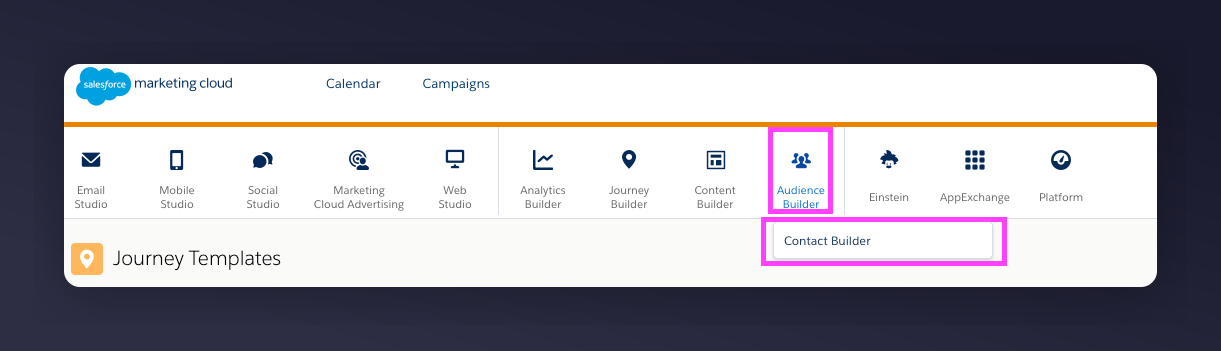
  1. Go to Audience Builder > Contact Builder > Data Extensions in SFMC
Contact Builder Data Extensions in SFMC
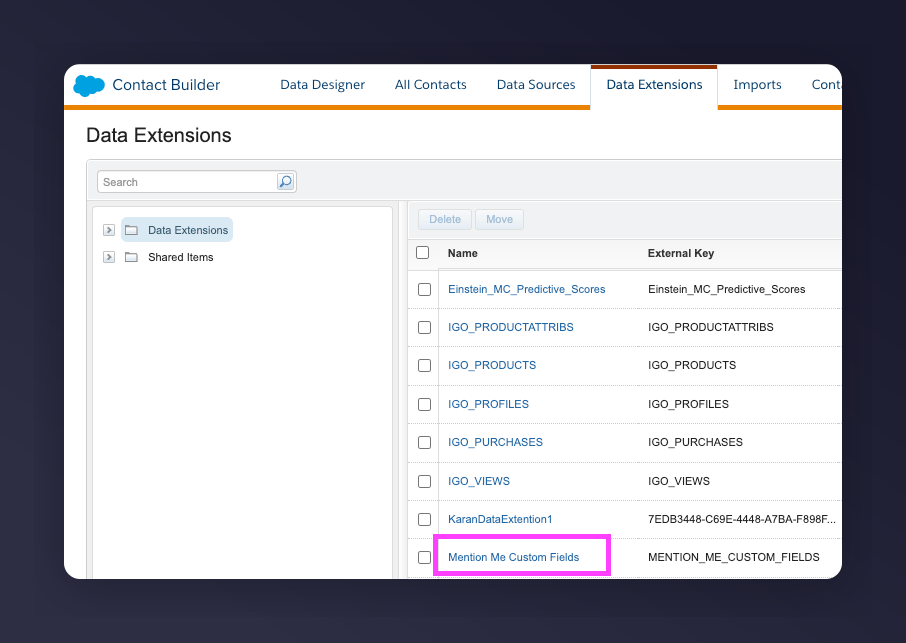
  1. Click Mention Me Custom Fields
Selecting Mention Me Custom Fields data extension
  1. Click Import
Import button in data extension
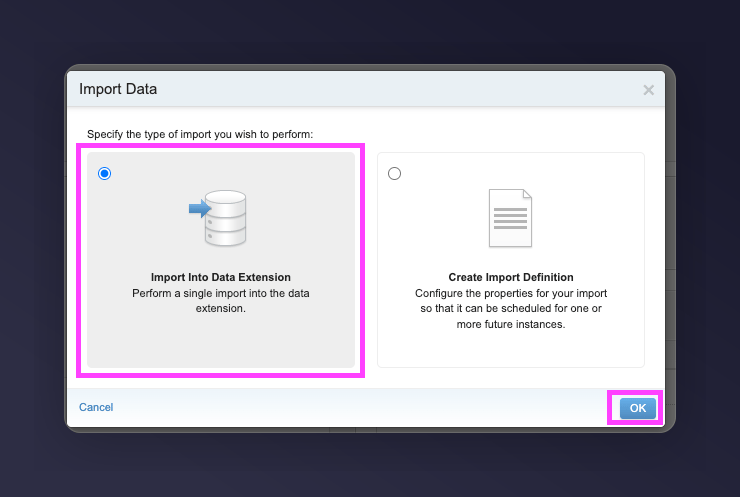
  1. Click Import Into Data Extension and confirm
Import Into Data Extension confirmation
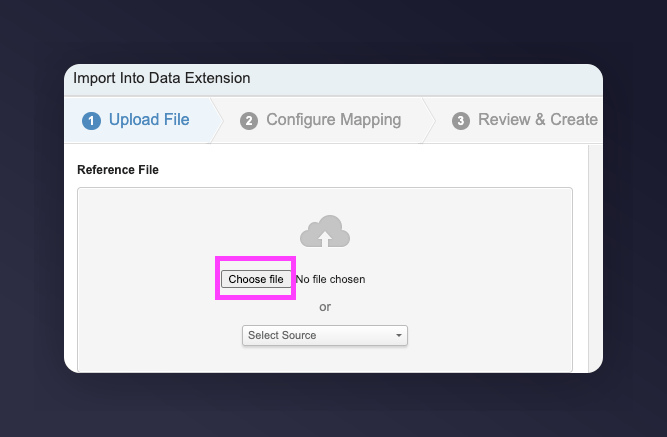
  1. Click Choose File and upload your saved CSV file
Choose File to upload CSV
  1. Under Import Settings, set:
    • Import type = Add and Update
    • Import options = Skip rows in the import file with bad data
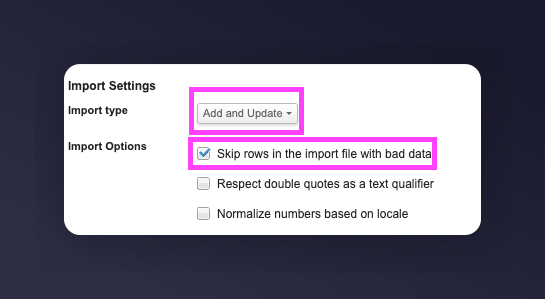
Import settings with Add and Update option
  1. Click Next
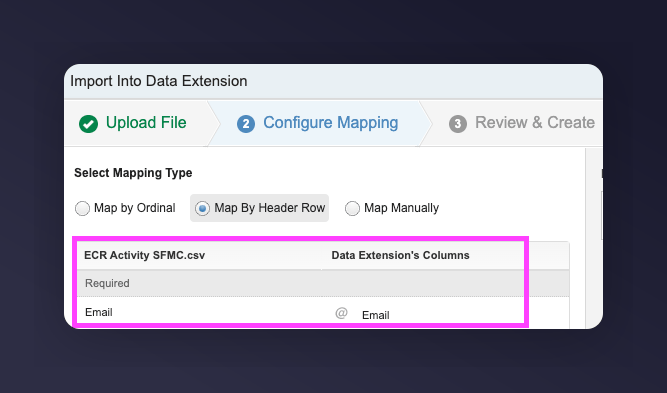
  2. Map the fields ensuring accuracy:
    • Email = Email
    • ECR Status = ECR Status
    • ECR Activity = ECR Activity
Field mapping for ECR data import No need to create fields if using the Mention Me integration — required fields should already exist.
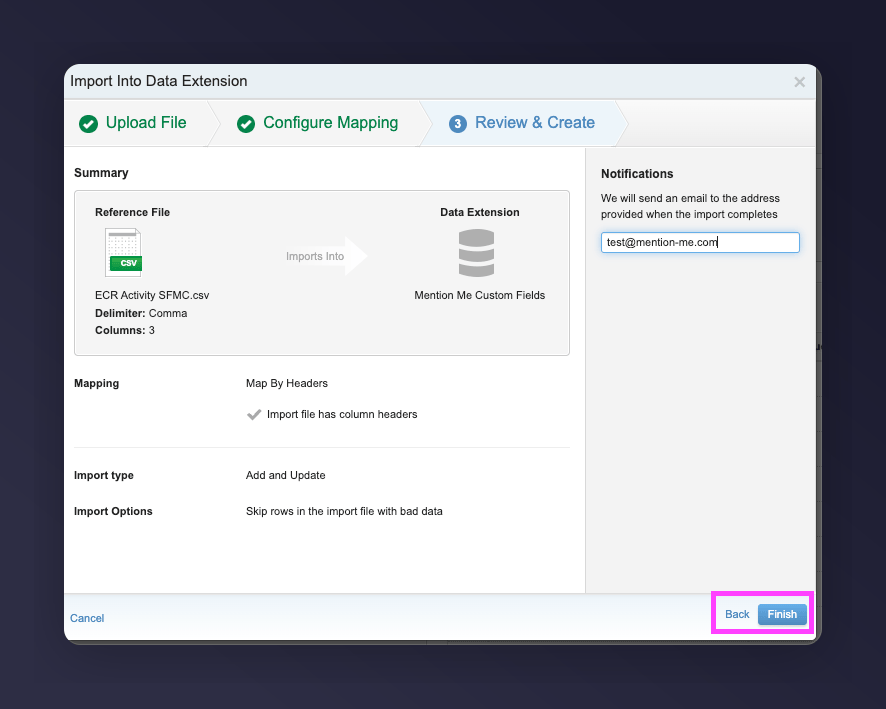
  1. Review and click Finish
Review and finish the ECR import
  1. Your import is now complete!
All customers who’ve made a successful referral will now have an ECR segment and activity within the Mention Me Custom Fields Data Extension in SFMC.
Last modified on March 31, 2026