

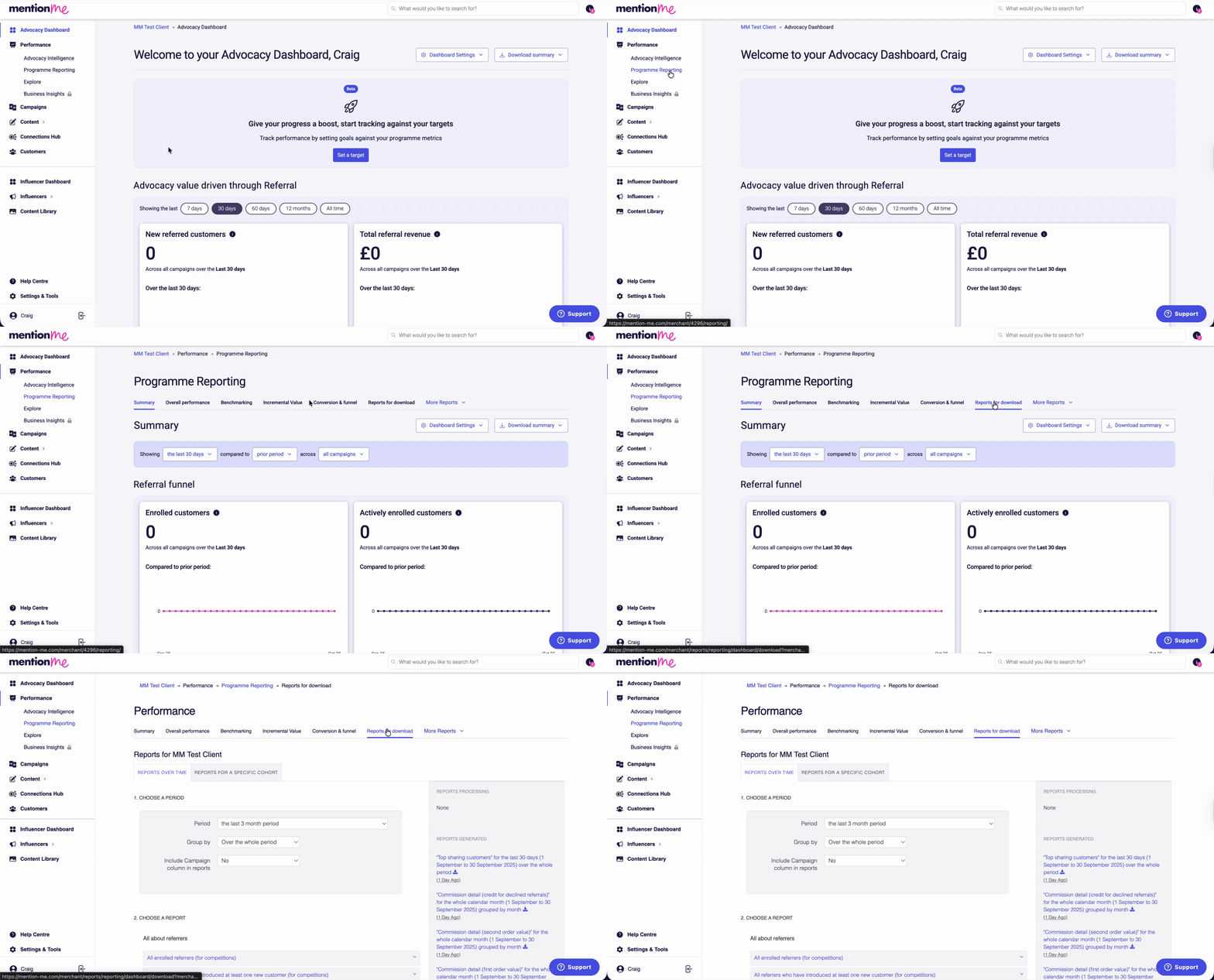
Animated overview of the available reports download interface.
Programme Reporting offers two ways to run these reports: Reports Over Time (a rolling date range across all cohorts) and Reports for a Specific Cohort (a single campaign, experiment, or offer). Some reports are only offered from one of these two views. Reports marked (Cohort tab only) below are only available from Programme Reporting > Reports for a Specific Cohort, and were not previously documented in this article.
Available Reports and Their Data
All About Referrers
- All enrolled referrers (for competitions): Everyone enrolled with a referral offer within a specific campaign or experiment. Columns: Enrolled Date, Merchant, Cohort, Situation, Email, Firstname, Surname.
- All enrolled referrers (with share and dashboard links) (Cohort tab only): Everyone enrolled in a specific campaign, experiment, or offer, including their name and email alongside their share links for each channel and a link to their dashboard. Useful for sending promotional emails to referrers with direct links for them to act on. Columns: MMCustomer Id, Client Customer Id, Email, Firstname, Surname, Offer Id, Offer, Campaign, Merchant, Situation, Quick Link Code, Slug. Can be filtered by offer, experiment, campaign, merchant, client account, and registration date.
- All referrers who have introduced at least one new customer (for competitions): Referrers whose invitees have qualified as new customers. Columns: Enrolled Date, Engaged Date, Qualified Referee Date, Merchant, Cohort, Situation, Referrer and Referee details.
- All referrers who have introduced at least one new or potential customer (for competitions): Similar to the above, but includes all referrers who’ve introduced at least one new or potential customer, regardless of purchase.
- All sharing customers (for competitions): Anyone who made at least one share of a referral offer. Columns: Enrolled Date, Merchant, Cohort, Situation, Email, Firstname, Surname, Number Of Shares.
- All enrolled customers who have not yet shared: All actively enrolled referrers (who enrolled for the first time during the report date range) who have not yet shared, along with the rewards on offer. Where a customer is enrolled in more than one offer, the most recent offer is shown. Columns: Customer Email, First Enrolment Date, First Active Enrolment Date, Most Recent Enrolment Date, Referrer Reward, Referee Reward.
- Enrolled customers who have not shared yet: Recent referrers who have not shared. Includes: Referrer Email, Referrer Reward, Referee Reward.
- Recent successful referrers and the total amount spent by their friends: Latest 10,000 referrers and spend by their referees. Columns: first_registration_date, email, firstname, surname, number_of_offers, number_of_referrals, value_of_referrals.
- Sharing customers and their share behaviour: Sharing customers with email, customer ID, which offers they’ve shared, share type and volume, enrolment and share dates, segment, locale.
- Successful referrers with their thank you vouchers: Referrers rewarded with a voucher code (still valid). Includes: Referrer details, Reward Expiry, Voucher ID, Reward Amount, list of referees, whether voucher has been used, segment.
- Top sharing customers: The 100 top sharers by shares made and responses. Columns: Customer Name, Email, Counted Shares, Counted Share Responses, First Share Date, Last Share Date.
- Top successful referrers: The 100 top referrers by new customers introduced. Columns: Customer Name, Email, First Referral Date, Last Referral Date, Total Referrals.
All About Referees
- New and potential customers ordered by purchase date: Referred and new customers by purchase date. Includes: Registered Date, Purchased Date, Merchant Customer Id, Email, Name, Status, Referrer, Offer, Order Ids, Order Total, Currency, Opt In, custom fields.
- New and potential customers ordered by registration date: Same as above, ordered by registration date.
- New and potential customers with marketing opt-in: Customers who have given marketing permission. Columns: Customer Email, Creation Date, Referee Registration Date, Referee Segment, Locale, Referrer Segments.
- New and potential customers with marketing opt-in and coupons: Same as above, with voucher code, referee expiry date, status, and reward info.
- New and potential customers with marketing opt-in and referee registration timestamp: Gives timestamp for registration. Columns: Customer Email, Creation Date, Referee Registration Timestamp, Segments, Campaign.
- New customers with their first order details: New referred customers and their first order data. Columns: Order Date, Merchant Name, Referee Email, Referee User Id, Ids, Order Identifier, Currency, Total, Coupon Code, Custom Field.
- Potential customers who have not purchased yet: Referred or new customers with valid incentives but no purchase. Columns: Referee Email, Reward Description, Reward Name, Expiry, Referrer First Name, Marketing Opt In, Client Coupon Id.
- Potential customers who have not purchased yet (including expired rewards): Same as above, including expired incentives.
Referrers and Referees Together
- CRM Feed: Export of referral data for CRM integration. Columns: CustomerFirstname, CustomerSurname, CustomerEmail, MerchantCustomerID, CustomerRecognisedDate, ReferredByCustomerEmail, ReferredByMerchantCustomerID, Opted In To Received Merchant Marketing Email, Referred Dates, Situation, ShareType, Segment, SignedUp, Rewarded, Qualified Dates, IsReferrer, ReferrerSegments, Share Counts, Successful Referrals.
- New customers and their referrer: New customers and referrer details. Columns: Order Date, Merchant Name, Referee Email, Referee Ids, Referrer Email, Referrer Ids, Campaign Name & Id, Currency, Total, Order Ids.
NPS Responses
- NPS aggregated score: Merchant/campaign/offer/experiment NPS performance. Columns: Merchant, Offer, Experiment, Campaign, % Promoters, % Detractors, % Passives, NPSScore.
- NPS quantitative feedback: Detailed customer feedback for NPS. Columns: Feedback Date, Merchant, Campaign, Experiment, Offer, Email, First Name, Surname, Answer, NPSClass, Feedback.
Orders and Transactions
- Order / transaction extract: Extract of all received transaction data. Columns: Merchant Order Id, Currency, Total, Order Date, Hashed Email.
Fulfilment Feeds
- Reward audit report: Which customers received which rewards. Columns: Reward Date, Customer Type, Email, Name, Order Ids, Reason, Reward, Amount, Type, Referrer and Referee Info, Fulfilment Type, Coupon Id.
- Reward fulfilment feed: List of rewards to fulfil (client-fulfilled only). Columns: Reward Date, Customer Type, Email, Name, Order Identifiers, Reason, Reward, Amount, Type, Currency, Referrer and Referee Info.
- Reward fulfilment feed for incentivised actions: As above, for non-purchase rewards. Adds Incentivised Action Identifier.
Aggregate Customer Insights
- Referees converting to referrers: Tracks how many new customers go on to participate as referrers, share, refer, and their conversion rate. Columns: Merchant Name, Qualified Referees, Who Engage As Referrer, Who Share At Least Once, Who Refer Successfully, Various Percentages.
- Time between referee given voucher (before purchase) and referee qualified as new customer (Cohort tab only): Distribution of referrals by how long it took from giving the referee a coupon to that referee becoming a qualified new customer. Use this report to understand the dynamics of before-purchase referral.
- Time between referrer registration and referee purchased (Cohort tab only): Distribution of referrals by how long it took from the referrer enrolling in the offer to their referee purchasing for the first time. Use this report to understand the dynamics of end-to-end referral.
- Time between referrer registration and referee qualified as new customer (Cohort tab only): Distribution of referrals by how long it took from the referrer enrolling in the offer to their referee being qualified as a new customer for the first time. Use this report to understand the dynamics of end-to-end referral.
- Time between referrer registration and referee voucher fulfilment (Cohort tab only): Distribution of referrals by how long it took from the referrer entering their email address to their referee being rewarded. Use this report to understand the dynamics of after-purchase referrals.
- Time between share response (click) and referee purchased (Cohort tab only): Distribution of referrals by how long it took from the referee following a share link (or entering a name at checkout) to that referee purchasing for the first time.
- Time between share response (click) and referee qualified as new customer (Cohort tab only): Distribution of referrals by how long it took from the referee following a share link (or entering a name at checkout) to that referee becoming a qualified new customer. Use this report to understand the dynamics of those responding to sharing.
Devices
- Referee devices: Device type, experience, and conversion figures per device for referees. Columns: Merchant, Major Device, Experience, Registered Referees, Incented Referees, Qualified Referees.
- Referee screen sizes: Screen width, height, and conversion figures. Columns: Merchant, Screen Width, Average Screen Height, Experience, Registered Referees, Incented, Qualified.
- Referrer devices: As above, but for referrer enrolment/sharing.
- Referrer screen sizes: As above, focusing on referrers.
Managing Abuse
- All referees and referrers pending approval: A list of all referees and referrers currently pending approval, including those flagged by gaming rules and those requiring standard approval. Approvals can be made in the customer section of the platform or via a feed. Columns: Type, Id, Created Date, Purchase Confirmed Date, Referee Email, Referee Firstname, Referee Surname, Referee Customer Identifier, Referee Order Identifier, Offer Id, Offer Short Name, Requires Approval Reason, Is Gaming, Gaming Score, Referrer Email, Referrer Name.
- Gaming score distribution: Shows how gaming (fraud) scores are distributed and who purchased/registered. Columns: Merchant, Cohort Descriptor, Bucketed Gaming Score, Number Of Referrals, Referee Purchased.
Information Security
- Audit log: Details of user actions and changes within the account, including usernames, email, changes, and timestamps.
- Audit user permissions: List of all users with account access, roles, last login, and status (locked/unlocked).
- Security summary and actions: Summary of key or at-risk actions within your account, who took those actions, and suggested remediation.