Documentation Index
Fetch the complete documentation index at: https://docs.mention-me.com/llms.txt
Use this file to discover all available pages before exploring further.
Overview
The Mention Me integration with Emarsys enables you to receive referral and advocacy-related events in your Emarsys platform in real-time.What the integration enables
- Grow your contact database by sending marketing opt-ins to Emarsys in real time
- Use referral data for personalised email campaigns and coupon reminders
- Improve segmentation with first-party referral data
Contact Data
How contacts are created
- If the customer does not exist in your Emarsys instance, a new contact will be created.
- If the customer does exist, the existing contact will be updated with Mention Me-specific fields only.
Customer opt-ins
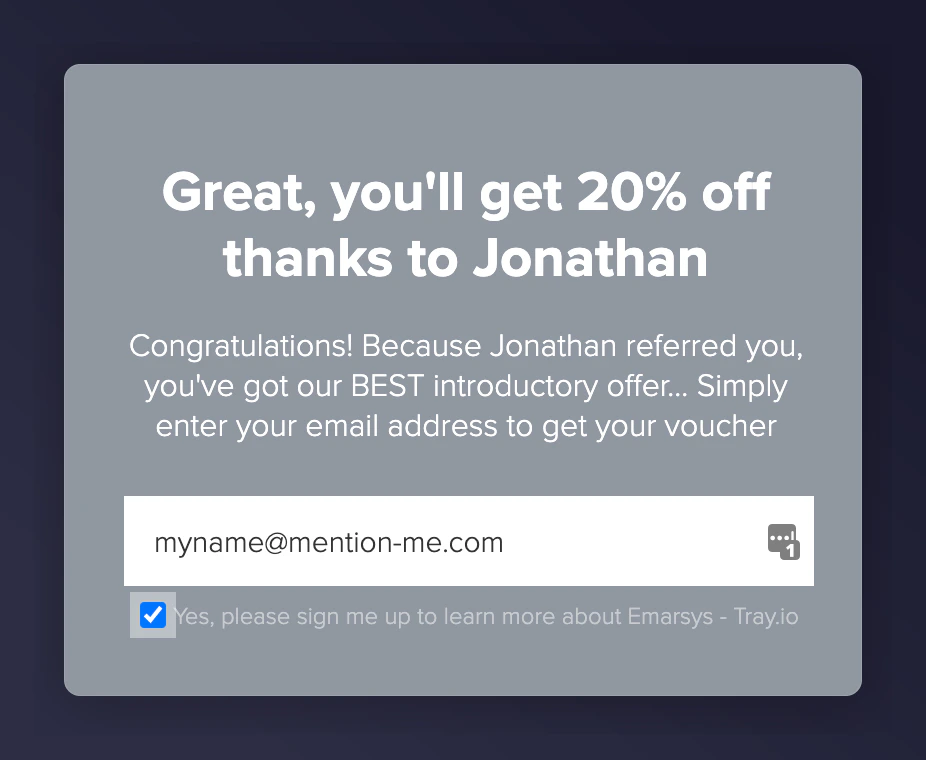
When a customer opts into your newsletter via the referee journey or through a post-purchase overlay, the opt-in request will automatically be sent to Emarsys:- Emarsys opt-in property is set to True only if the user opts-in at registration or post-purchase.
- If they do not opt-in, the opt-in value will not be set (null).
- This will not be set for new Referrers.
- A marketing consent event is sent.
- A dedicated external event (mm:marketing_opt_in) is triggered.
Customer profile attributes
System fields — Mention Me will only update the specific system fields listed below. Custom fields — Mention Me will create the custom contact fields during integration setup and update them whenever applicable data is sent.| Emarsys Contact Field | Field Type | Description | Example |
|---|---|---|---|
| System | Customer’s email address. Set only if a new contact is created. | jason.jones@mention-me.com | |
| First Name | System | First name. Only for new Referrer contacts. Not updated if value exists. | Jason |
| Last Name | System | Last name. Only for new Referrer contacts. Not updated if value exists. | Jones |
| Country | System | Mention Me locale code mapped to Emarsys country. Only set on creation. | France |
| Language | System | Mention Me locale code mapped to Emarsys language. Only set on creation. | English |
| Opt-In | System | Set to TRUE only if customer opts in during referee journey or post-purchase newsletter. Not set for new Referrers. | TRUE |
| Contact Source | System | Always “Manual Input” for contacts created by Mention Me. | Manual Input |
| Registered Date | System | Only set on contact creation. | 24.02.2023 |
| IETF | System | Mention Me locale mapped to Emarsys IETF tag. Only set on creation. | en-FR |
| Mention Me Referred by Customer ID | Custom | ID of the referrer who referred this referee. | 86277 |
| Mention Me Referred by | Custom | Referrer’s name for display to the referee. | Henry |
| Mention Me Share link | Custom | Referrer’s share link to invite friends. | https://demo.mention-me.com/m/ol/xz3uz-joel-mcfly |
| Mention Me Dashboard link | Custom | Referrer’s dashboard for viewing performance. | https://demo.mention-me.com/d/2674816/9c34b0c2 |
| Mention Me Customer ID | Custom | Unique ID assigned by Mention Me. | 33175 |
| Mention Me Referrer ID | Custom | Unique ID of the Referrer. Only set for referrer contacts. | 86277 |
| Mention Me Referee ID | Custom | Unique ID of the Referee. Only set for referee contacts. | 96453 |
| Mention Me Created | Custom | TRUE if the contact was created by Mention Me. | TRUE |
| Mention Me Is customer a Referee? | Custom | TRUE if the customer has registered as a Referee. | TRUE |
| Mention Me Is customer a Referrer? | Custom | TRUE if the customer has registered as a Referrer. | TRUE |
| Mention Me Referee Source | Custom | Method used to refer (e.g. OPEN-LINK, EMAIL). | OPEN-LINK |
| Mention Me Successful Referrals | Custom | Total count of first-time purchases made via this referrer. | 5 |
| Mention Me Total Shares | Custom | Number of times customer shared the referral offer. | 10 |
| Mention Me NPS Score | Custom | NPS score submitted at post-purchase. | 8 |
| Mention Me Propensity to Refer | Custom | Only sent via Smart Experiment. Values: High or Low | High |
| Mention Me ECR Activity | Custom | ECR activity segment: Active, Dormant, Lapsed | Active |
| Mention Me ECR Status | Custom | ECR status: High, Medium, Low | High |
| Mention Me ECR 12m Predicted | Custom | Predicted ECR segment in 12 months. Values: High, Medium, Low, Lapsed | High |
| Mention Me Network ID | Custom | Reference to customer’s Mention Me Network | N-5051-153480685 |
| Mention Me First Share Date | Custom | Date of first share with a friend | 04.10.2022 |
| Mention Me First Referral Date | Custom | Date of first successful referral | 12.10.2022 |
| Mention Me Last Share Date | Custom | Date of last share | 06.09.2023 |
| Mention Me Last Referral Date | Custom | Date of last successful referral | 09.10.2023 |
| Mention Me Referrer Engaged | Custom | Set if referrer has engaged with an offer and accepted T&Cs. | TRUE |
Events
The Mention Me integration uses Emarsys external events functionality for trigger-based workflows to generate email campaigns. Mention Me automatically sets the external events in Emarsys as part of the integration setup. External events are how programs and campaigns in Emarsys can be linked to external triggers. They can be associated with actions outside Emarsys, and can be used to add contacts to an automated program or trigger mobile or email campaigns.Summary of events sent to Emarsys
| Mention Me event name | Emarsys event name | When it triggers |
|---|---|---|
| Registered as a Referee | mm:referrer_registration | When a customer has registered as a referee |
| Registered as a Referrer | mm:referee_registration | When a customer has registered as a referrer |
| Received a Referee Reward | mm:referee_fulfillment | When a customer obtained a reward as a referrer’s friend |
| Received a Referrer Reward | mm:referrer_fulfillment | When a customer obtained a reward for referring a friend |
| Opted into Marketing | mm:marketing_opt_in | When a referee has requested to receive your newsletter at signup or post-purchase |
| Submitted an NPS Score** | mm:nps_score | When a customer has supplied an NPS score at post-purchase |
| Received a discount on next order** | mm:discount_on_next_order_fulfillment | When a customer has received a discount to use on their next order |
| Propensity to Refer** | mm:propensity_to_refer | Each time a customer has their propensity to refer calculated |
How to use Mention Me data in email templates
The Mention Me data can be inserted into email campaigns using the Emarsys Scripting Language (ESL). You can use ESL in the email body, header, preheader, subject, from name, and anywhere personalisation is supported.Registered as a referrer (mm:referrer_registration)
Each time a customer registers as a referrer, a registration event will be triggered and the associated data will be sent to Emarsys.| Attribute | Emarsys ESL Field | Description | Example |
|---|---|---|---|
| Customer | {{event.customer.customerId}} | External customer ID | MI9795903142 |
{{event.customer.email}} | rydercollins742@mention-me.com | ||
{{event.customer.firstname}} | First Name | Ryder | |
{{event.customer.surname}} | Surname | Collins | |
| Customer offer | {{event.customerOffer.id}} | Offer ID | 105 |
{{event.customerOffer.createdDate}} | Offer start date | 2020-04-03T09:39:08+01:00 | |
{{event.customerOffer.expiryDate}} | Offer expiry date | 2020-04-03T09:39:08+01:00 | |
{{event.customerOffer.segment}} | Segment | VIP | |
{{event.customerOffer.situation}} | Where the offer was shown | postpurchase | |
{{event.customerOffer.shareLink}} | Share link | https://demo.mention-me.com/m/ol/xz3uz-joel-mcfly | |
{{event.customerOffer.dashboardLink}} | Dashboard link | https://demo.mention-me.com/d/2674816/9c34b0c2 | |
| Campaign | {{event.campaign.id}} | Campaign ID | 233023 |
{{event.campaign.shortName}} | Internal campaign name | UK Campaign | |
{{event.campaign.state}} | Campaign state | Running | |
| Campaign Locale | {{event.campaign.locale.localeCode}} | Locale Code | en_GB |
{{event.campaign.locale.currencySymbol}} | Currency symbol | £ | |
| Experiment | {{event.experiment.name}} | Internal experiment name | AB Test - Current Vs New Imagery - July 2023 |
| Offer | {{event.offer.shortName}} | Internal offer name | Variation A |
{{event.offer.type}} | Offer type | referral | |
{{event.offer.referrer.headline}} | Customer-facing offer description | Treat a friend to 20% off and get 20% off for yourself | |
{{event.offer.referrer.cta}} | Call-to-action copy | Give 20% off | |
| Reward | {{event.reward.fulfilledBy}} | Reward delivery method | coupon |
{{event.reward.amount}} | Reward amount | 20 | |
{{event.reward.type}} | Reward type | percent | |
{{event.reward.referrerReward}} | Reward for referrer | 20% | |
{{event.reward.referreeReward}} | Reward for referee | £15 |
Registered as a Referee (mm:referee_registration)
Each time a customer registers as a referee, a registration event will be triggered and the associated data will be sent to Emarsys.| Attribute | Emarsys ESL Field | Description | Example |
|---|---|---|---|
| Referee | {{event.referee.email}} | jojohnson378@mention-me.com | |
{{event.referee.firstname}} | First Name | Joe | |
{{event.referee.surname}} | Surname | Johnson | |
{{event.referee.shareSource}} | Share method used | FORWARDED-EMAILED-LINK | |
| Referrer | {{event.referrer.email}} | Referrer’s email | rydercollins742@mention-me.com |
{{event.referrer.firstname}} | First Name | Ryder | |
{{event.referrer.surname}} | Surname | Collins | |
| Campaign | {{event.campaign.shortName}} | Internal campaign name | UK Campaign |
| Offer | {{event.offer.shortName}} | Internal offer name | Variation A |
{{event.offer.type}} | Offer type | referral | |
{{event.offer.referrer.headline}} | Customer-facing headline | Treat a friend to 20% off and get 20% off for yourself | |
{{event.offer.referrer.cta}} | Call-to-action | Give 20% off | |
| Reward | {{event.reward.fulfilledBy}} | Reward issuance method | coupon |
{{event.reward.amount}} | Reward amount | 20 | |
{{event.reward.type}} | Reward type | percent | |
{{event.reward.referrerReward}} | Reward for the referrer | 20% | |
{{event.reward.referreeReward}} | Reward for the referee | £15 |
Received a referee reward (mm:referee_fulfillment)
Each time a referee obtains a reward for being a referrer’s friend, a referee fulfilment event will be triggered and the associated data will be sent to Emarsys. Includes all fields from referee registration plus:| Attribute | Emarsys ESL Field | Description | Example |
|---|---|---|---|
| Reward | {{event.reward.couponCode}} | Coupon code issued to the referee | 10USDOFF-RXAAURVZ |
{{event.reward.expiryDate|localized_date(contact.12, 'full')}} | Expiry date formatted with ESL. See ESL docs. | Tuesday 24 October 2034 | |
{{event.reward.expiryDate|localized_date('en','g') - 'now'|localized_date('en','g')}} | Days remaining until expiry | 8 | |
{{event.reward.callToActionUrl}} | URL where the customer can spend their reward | www.mention-me.com |
Received a referrer reward (mm:referrer_fulfillment)
Each time a referrer obtains a reward for referring a friend, a referrer fulfilment event will be triggered. Same structure as referee fulfilment but with referrer-specific fields (referee_first_name, referee_last_name instead of referrer names).Opted into Marketing (mm:marketing_opt_in)
Each time a referee requests to receive your newsletter at signup or post-purchase, a dedicated event is sent to Emarsys.| Attribute | Field | Description | Example |
|---|---|---|---|
| Customer | {{event.customer.email}} | Email address | rydercollins742@mention-me.com |
{{event.customer.marketingOptIn}} | Marketing opt-in flag | True | |
| Marketing | {{event.marketing.source}} | Source of the sign-up (newsletter-signup or referee-registration) | referee-registration |
Submitted an NPS Score (mm:nps_score)
Each time a customer submits an NPS Score via the Mention Me NPS feature, their response will be sent to Emarsys.| Attribute | Field | Description | Example |
|---|---|---|---|
| NPS | {{event.nps.score}} | NPS score submitted | 8 |
{{event.nps.situation}} | Context where score was collected | postpurchase | |
{{event.nps.segment}} | Customer segment | VIP |
Discount on next order fulfilment (mm:discount_on_next_order_fulfillment)
Each time a customer obtains a reward from a non-referral post-purchase message, a discount on the next order fulfilment event will be triggered. Key fields include incentive-specific offer headline ({{event.offer.incentive.headline}}), CTA ({{event.offer.incentive.cta}}), coupon code, expiry, and call-to-action URL.
Propensity to refer (mm:propensity_to_refer)
Each time a customer has their propensity to refer calculated (Smart Experiment only), the propensity value will be sent to Emarsys.| Attribute | Field | Description | Example |
|---|---|---|---|
| Propensity | {{event.propensity.segment}} | Propensity segment. Values: High or Low | High |
ECR Data Import
Mention Me can automatically send your customers’ Extended Customer Revenue (ECR) data to your Emarsys account. ECR is only calculated for customers who have made a successful referral. This data is sent on a weekly basis and only for customers whose ECR has changed from the previous week. The following steps explain how to import ECR data as a one-off prior to beginning the weekly updates.Step 1: Download ECR Data from Mention Me
- Log in to the Mention Me Platform and go to the Customer Revenue page in the Advocacy Intelligence section.

- Click Download customer segments (if not visible, contact your CSM).

- Select all segments and click Generate.

- A CSV file will be generated (up to 15 minutes). You’ll receive an email notification when it’s ready.
- Click the link in the email to download (login required). You can also find the file under Settings > Secure file transfer.

Step 2: Create a CSV file for Emarsys
- Open the file using Excel, Google Sheets, or similar tool.
- Remove the first 3 rows (keep headers only).
- Delete these columns: Individual Revenue, Revenue Referred, Friends ECR Value, Report Currency Code, First Name, Surname
- Rename columns:
- Email address -> Email
- Activity Status -> Mention Me ECR Activity
- ECR Segment -> Mention Me ECR Status
- Move the Email column to the first position.

- Save your final CSV file.
Step 3: Upload your CSV file to Emarsys
- Go to Contacts > Data Import in Emarsys

- Click Import File

- Click Import file manually

- Click Select a file and upload your formatted CSV.

- On the Settings screen, configure:
- Unique Identifier = Email
- Opt-in declarations = Status not defined

- Click Show Advanced Settings and select Update only

- No need to match columns — Mention Me fields are already created during integration.
- Click Next step

- Click Next step again.
- Name the import ECR Import, click Start Import.

- Import complete! Mention Me ECR segment and activity will now be available in Emarsys.