

Path 1: Use the Programme Success Template
The Programme Success Dashboard template already includes campaign breakdowns.- New dashboard > Browse templates > Programme Success Dashboard.
- Scroll to the breakdown tables. They show revenue and new customer numbers per campaign.
Path 2: Build It Yourself
If you want a focused campaign-comparison dashboard and nothing else, build two tiles.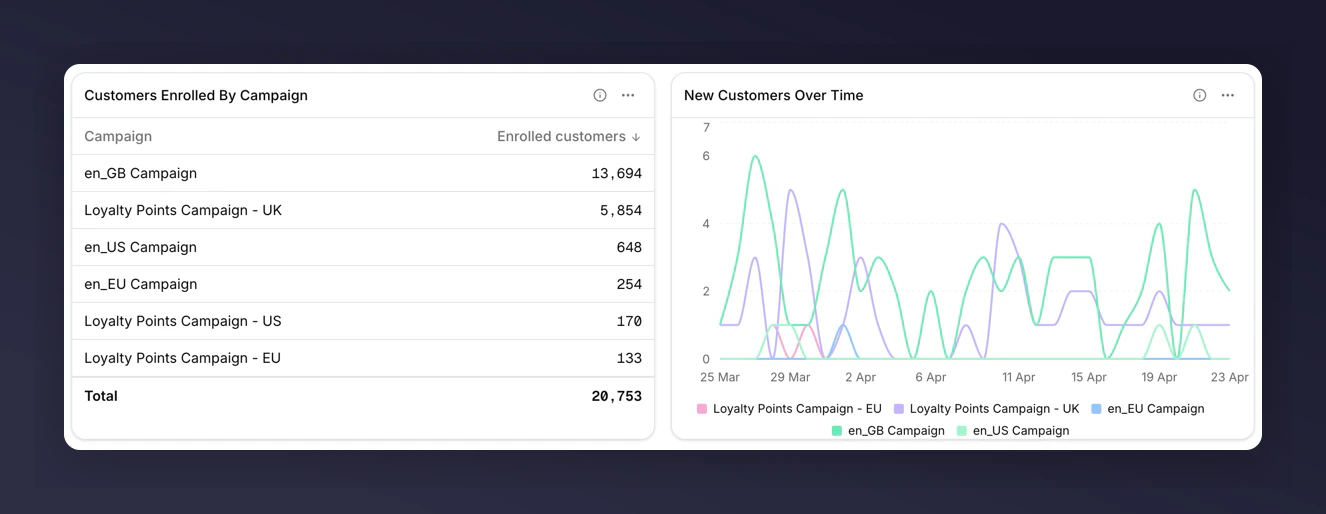
Campaign performance dashboard end state
1. Table with Key Metrics, Split by Campaign
- Add tile > Table.
- Add metrics: New Customers, Total Referral Revenue, Share Rate.
- Set Breakdown to Campaign.
- Save.
2. Line Chart of Revenue over Time, Split by Campaign
- Add tile > Chart.
- Keep chart subtype as Line.
- Add metric: New Customer Revenue.
- Set Breakdown to Campaign.
- Save.
What to Look for
- Outliers in the table. A campaign with unusually high Share Rate but low New Customers may have strong top-of-funnel but a weak incentive.
- Crossover in the chart. A rising campaign overtaking a falling one is usually the most actionable signal.
- Small campaigns in “Other”. The long tail collapses into an “Other” bucket. Export the tile’s CSV to see the raw rows behind it.
Next
Breakdowns
See how top-N and the “Other” bucket work.
Comparisons
Add a vs-last-period number to each campaign (note: requires a second tile per metric, because breakdown and compare are mutually exclusive on one tile).