

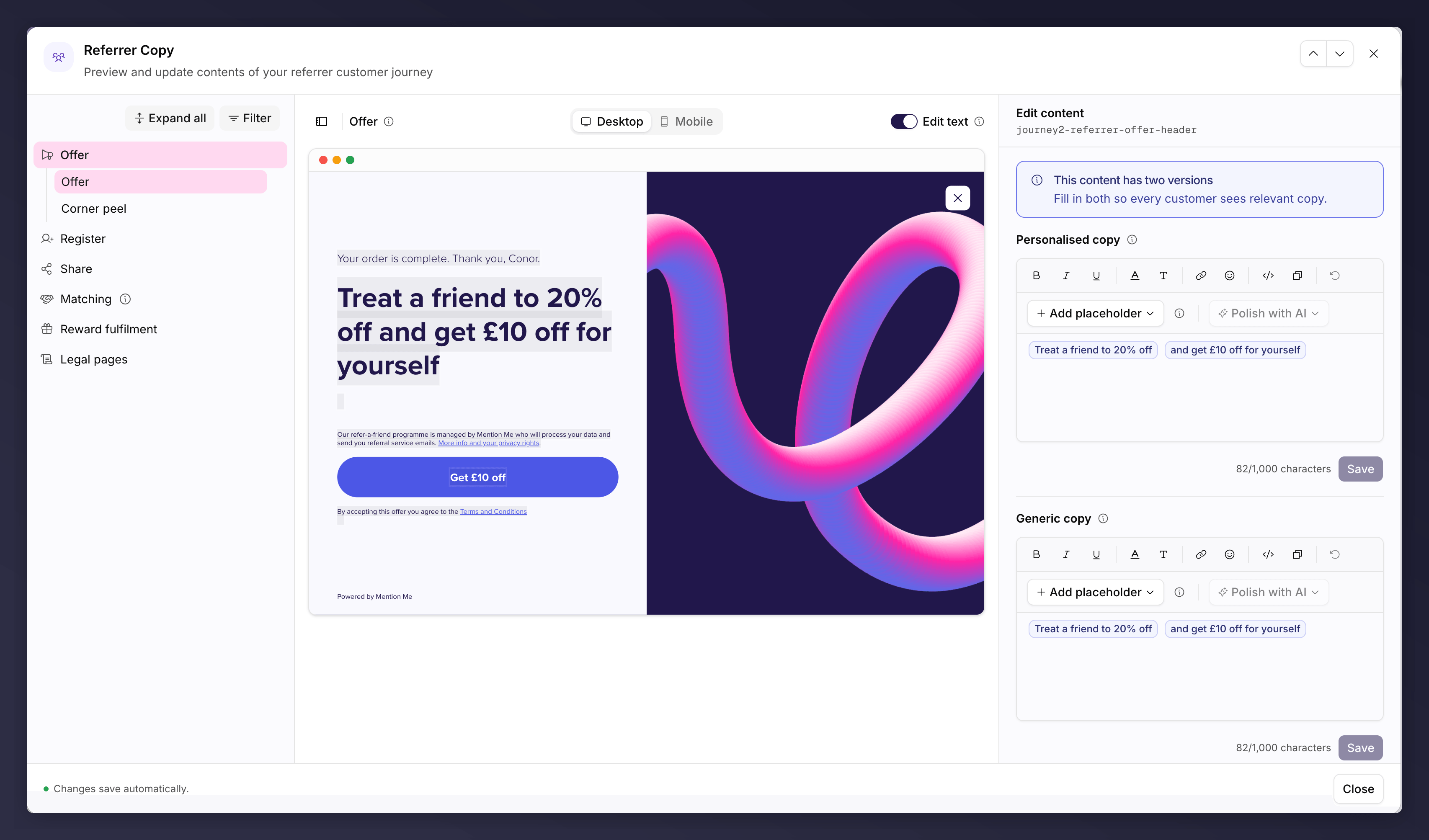
Editing journey copy, with the step list and content editor.
Referrer Copy
What the person making the referral sees. Stages cover the offer, registration, sharing, name matching, reward fulfilment and legal pages.Referee Copy
What the referred friend sees. Stages cover name search, registration, conversion and reward fulfilment.The Pages That Matter Most
A few touchpoints have the biggest effect on conversion, so focus your effort there:- Referrer offer page. The first thing shown after purchase; it encourages sharing.
- Sharing screen. Controls the share message friends receive.
- Referee registration page. A new customer’s first interaction with your brand.
Editing Copy
Open a copy node and pick a step from the sidebar. You edit by clicking straight into the preview, with the side panel holding the content editor for whatever you selected.- Edit text. A toggle in the preview toolbar. Switch it off to see a clean customer-facing preview with no click-to-edit; switch it back on to edit. Turning it off with unsaved edits asks you to discard first.
- Personalised and Generic copy. Each step has two variants: Personalised copy, shown to known customers where placeholders fill in their details, and Generic copy, shown to anonymous visitors.
- Add placeholder. Insert personalisation tokens.
- Polish with AI. Refine the wording. Suggestions come back in the campaign’s own language.
- Step descriptions. The preview header shows the selected page’s name with an info tooltip explaining where and why that page is shown, which helps tell similar pages apart (the referee already-fulfilled, already-claimed and already-redeemed variants, for example).
- Filters. Where a journey has scenarios or touch points to filter by, a Filter button appears above the step list.
Features That Lift Performance
- Social proof. Showing how many rewards were given recently has driven 10-20% higher purchase rates in tests.
- Native share makes sharing easier on mobile by opening the device’s own share menu. See Sharing.
Preview the Journey
Use the preview to walk the full journey as a referrer or referee before you launch, filtering by user, scenario and touchpoint (website, email, social), on mobile or desktop.Where a node is read-only (a live, queued or past version, an A/B test control
variant, or a role without permission), the preview stays in view mode and the
side panel shows a “View only” notice with the reason instead of the editor.
The privacy notice shown before customers act explains how their data is used
and links to your privacy policy. Speak to your legal team if you have
questions about it.
The referrer and referee copy can each be A/B tested. See set up an A/B
test.