

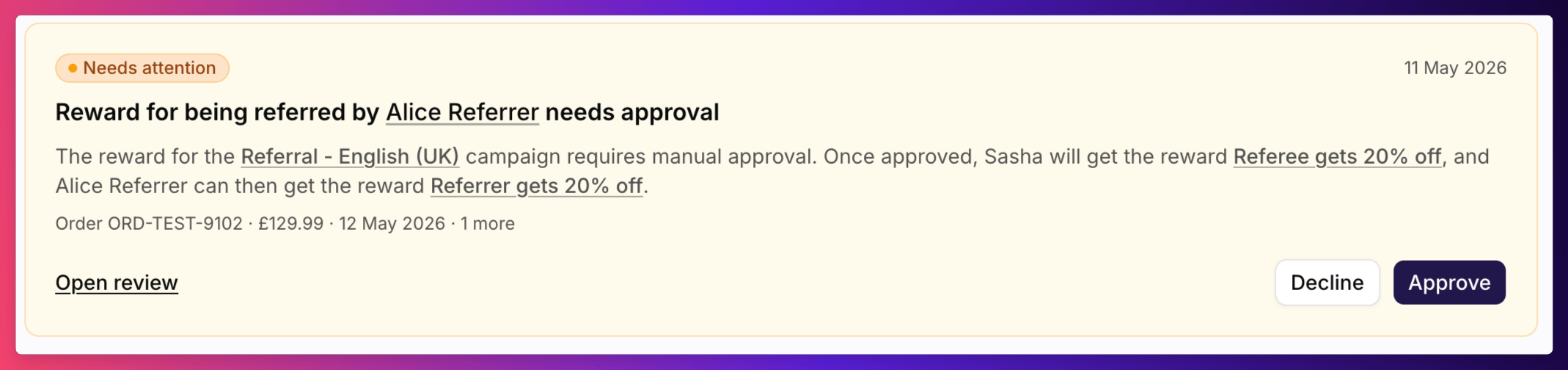
A Needs attention card for a referee's reward
Reading a Card
A reward may also show Waiting for eligibility confirmation. That means your eligibility data feed has run recently but hasn’t processed this reward yet. You can wait for the feed, or decide now.
Acting on a Card
- Approve. Approves the item straight away. If the referral is held for fraud review and its reward needs manual approval, you’re asked whether to Approve and issue reward or Approve only. See Approval review sheet.
- Decline. Opens the decline dialog, with an optional note for your team and a choice of Decline silently or Decline and notify. See Declining a reward.
- Open review. Opens the approval review sheet on this item, with its orders and notes, before you decide.
Other Cards
- Several items of one kind. When a customer has more than five rewards needing approval, or more than five referrals held for fraud review, they’re grouped into one card, such as “8 rewards need your approval”. Click Review all to work through them in the review sheet.
- Skipped by eligibility feed. Your eligibility feed skipped a pending reward. The card shows the feed’s reason. Click Open review to decide on it yourself.
- Marked as suspected of gaming. Sits above the other cards when the customer is marked as suspicious and can still share. See Mark or remove a gaming suspicion.
See Also
Approval review sheet
The detail behind Open review.
Pending Rewards
Every reward waiting on approval, across all customers.
Fraud Review
Every referral held for fraud review.
Approval rules reference
The rules behind each reason.