

Overview
Mention Me supports OpenPGP encryption for files transferred via SFTP, in both directions:- Inbound (you to Mention Me) - you encrypt files with a public key before uploading them, and Mention Me decrypts them on receipt.
- Outbound (Mention Me to you) - Mention Me encrypts reports and data feeds with your public key before delivering them to your SFTP folder.
- Shared key - a single public key shared across all merchants, suitable for basic encryption needs.
- Dedicated keys - PGP keys specific to your account, which you generate and manage yourself in the platform. Dedicated keys support per-folder scoping and key rotation, and are recommended for merchants with stricter data-security requirements.
Managing your keys in the platform
Dedicated keys are managed from the Encryption keys tab on the SFTP page. The tab lists your keys with their direction (inbound or outbound), scope, fingerprint, active state, and creation date, and keeps a full history per scope.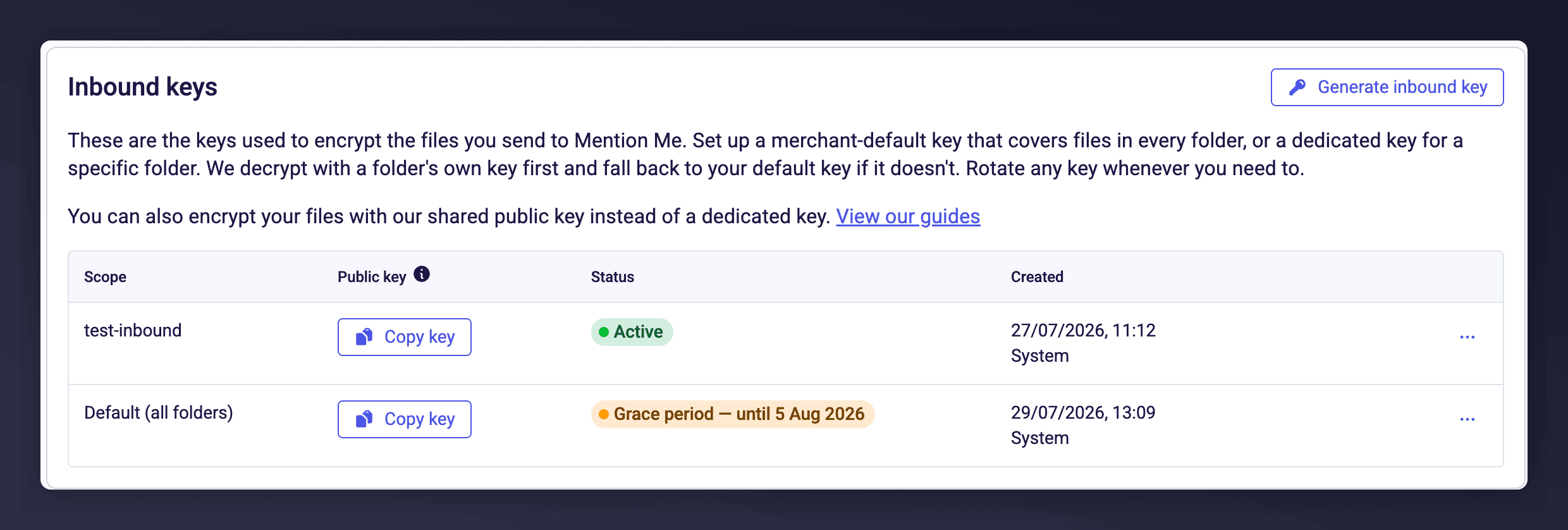
The Inbound keys table, with one folder-scoped key active and the default key inside a rotation grace period.
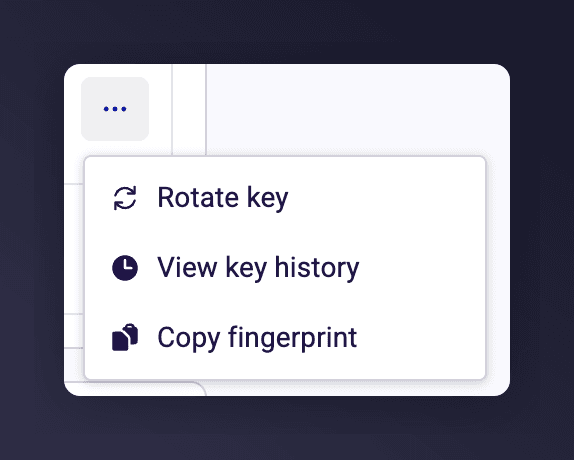
The actions available on a key's row.
- A default key covers every inbound (or outbound) folder that does not have its own key.
- A dedicated key applies to a single folder, so different data feeds can use different keys.
It works the other way round from what you might expect: a folder has to be marked as encrypted before it can be given a key. Only encrypted folders appear in the folder picker when you generate or import one. Mark the folder as encrypted first (see SFTP Setup), then give it a key.
Generate an inbound key
For files you send to Mention Me, use Generate inbound key and choose a folder, or set it as your default key. Mention Me generates a key pair and shows you the public key and its fingerprint, which you can copy or download. Generating a 4096-bit key can take up to 30 seconds. The private key is held securely by Mention Me and is never displayed or downloadable. Encrypt your uploads with the public key shown here (see Inbound encryption).Import an outbound key
For files Mention Me sends to you, use Import outbound key, choose a folder (or set it as your default key), and paste or upload your own armoured public key. Mention Me validates it and shows its fingerprint, then encrypts your outbound files with your key so you can decrypt them with your private key. Only ever share your public key. Never send anyone your private key.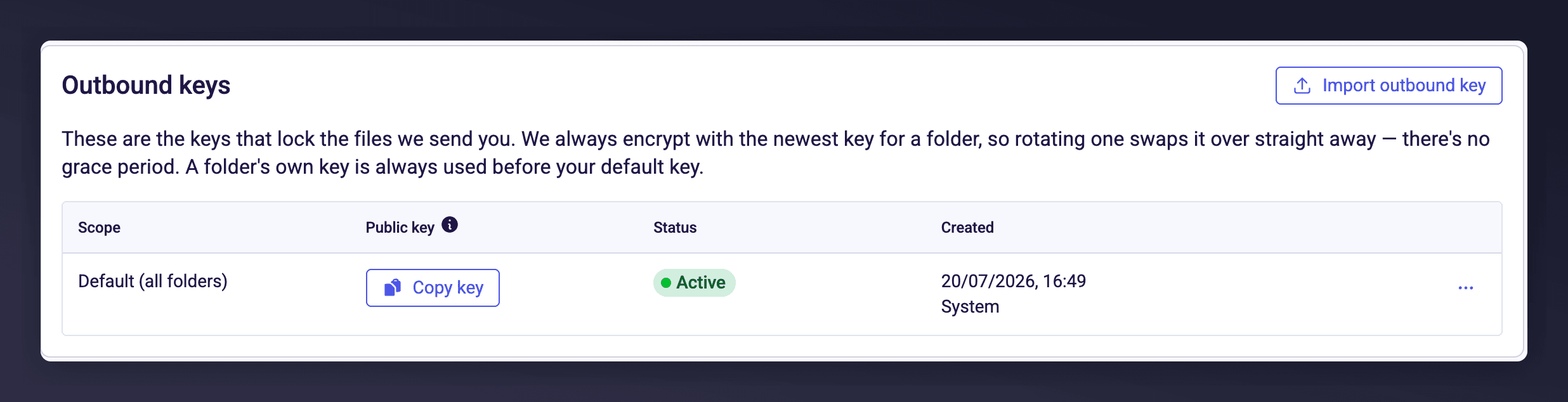
The Outbound keys table. Outbound keys never show a grace period, because delivery always uses the newest key.
Key history
Every key a scope has ever had is kept. Use View key history on the scope’s row to see them, newest first, with the status of each: Active for the live key, Active until [date] for one inside a grace period, and Expired [date] for a retired one. Keys are never deleted, so the history stays a complete record of which key was valid when.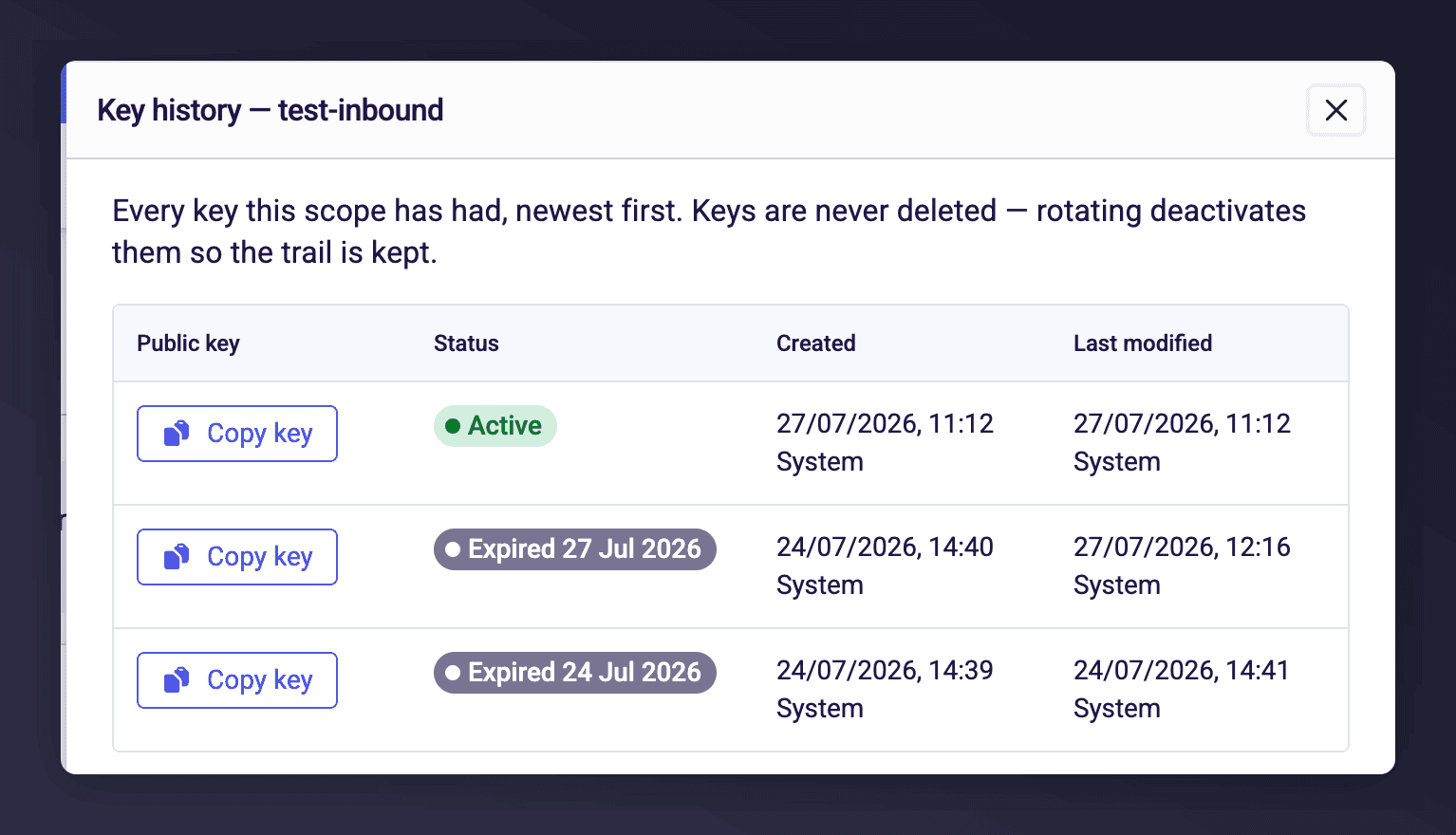
Key history for a folder-scoped key, showing the live key above two retired ones.
Inbound encryption (you to Mention Me)
When you upload files to Mention Me via SFTP, you can encrypt them with PGP first. Mention Me decrypts them automatically on receipt.Using a dedicated key
Generate an inbound key for the folder from the Encryption keys tab, then encrypt your files with the public key shown when you generated it. Example using GPG:Using the shared key
If you do not use dedicated keys, you can encrypt with Mention Me’s shared public key, published at https://mention-me.com/keys/public_batch.key. Download it, import it into your keyring, and encrypt your files before uploading.Strict mode
When a folder is marked as encrypted, plaintext (unencrypted) files uploaded to it are rejected rather than processed. If a file is rejected:- The file is not ingested.
- A rejection notice is written to the folder’s
log/directory, alongside thedata/directory you upload to (see Folder Structure). - The rejection is final for that file, and it is not retried. Encrypt the file and re-upload it under a new filename, because the pipeline treats each filename as processed once.
Outbound encryption (Mention Me to you)
When outbound encryption is enabled for a folder, Mention Me encrypts reports and data feeds with your public key before delivering them.- Import your outbound key for the folder from the Encryption keys tab.
- Once imported, all outbound files for that folder are encrypted automatically.
- Files are ASCII-armoured, with an encryption extension appended to the filename. For example, a report normally delivered as
Fulfilment_20260715.csvis delivered asFulfilment_20260715.csv.asc. - Decrypt the file with your private key.
.asc. If your tooling requires .pgp or .gpg instead, ask the Support Team to configure it. The file content is always ASCII-armoured regardless of the extension.
If a folder is encrypted but has no active outbound key, files are held rather than sent in plaintext, so encrypted folders never expose unencrypted data. Mention Me is alerted and delivery resumes once a key is in place. If an expected file does not arrive, contact the Support Team.
Rotating keys
Keys are rotated from the Encryption keys tab using the Rotate key action on a key’s row. Generate and import only create a scope’s first key; after that, use Rotate key to replace it.Inbound rotation
Rotating generates a new key pair and asks whether to keep the current key active as a grace key, so files encrypted with either the old or the new public key are accepted during the changeover. Under Keep the current key active during a grace period?, choose one of:- No, replace it immediately. All current keys stop being accepted at once. Any file still encrypted with an old key fails to decrypt.
- Yes, for 7, 14, 30, 60 or 90 days. The current key stays active alongside the new one for that period. Mention Me decrypts with the latest active key, falling back to the previous one, so files still encrypted with the old key are decrypted successfully.
Grace periods expire on their own. While one is running, the scope’s row shows Grace period with its end date, and key history shows the outgoing key as Active until [date]. On that date the old key retires itself, with nothing for you to do.
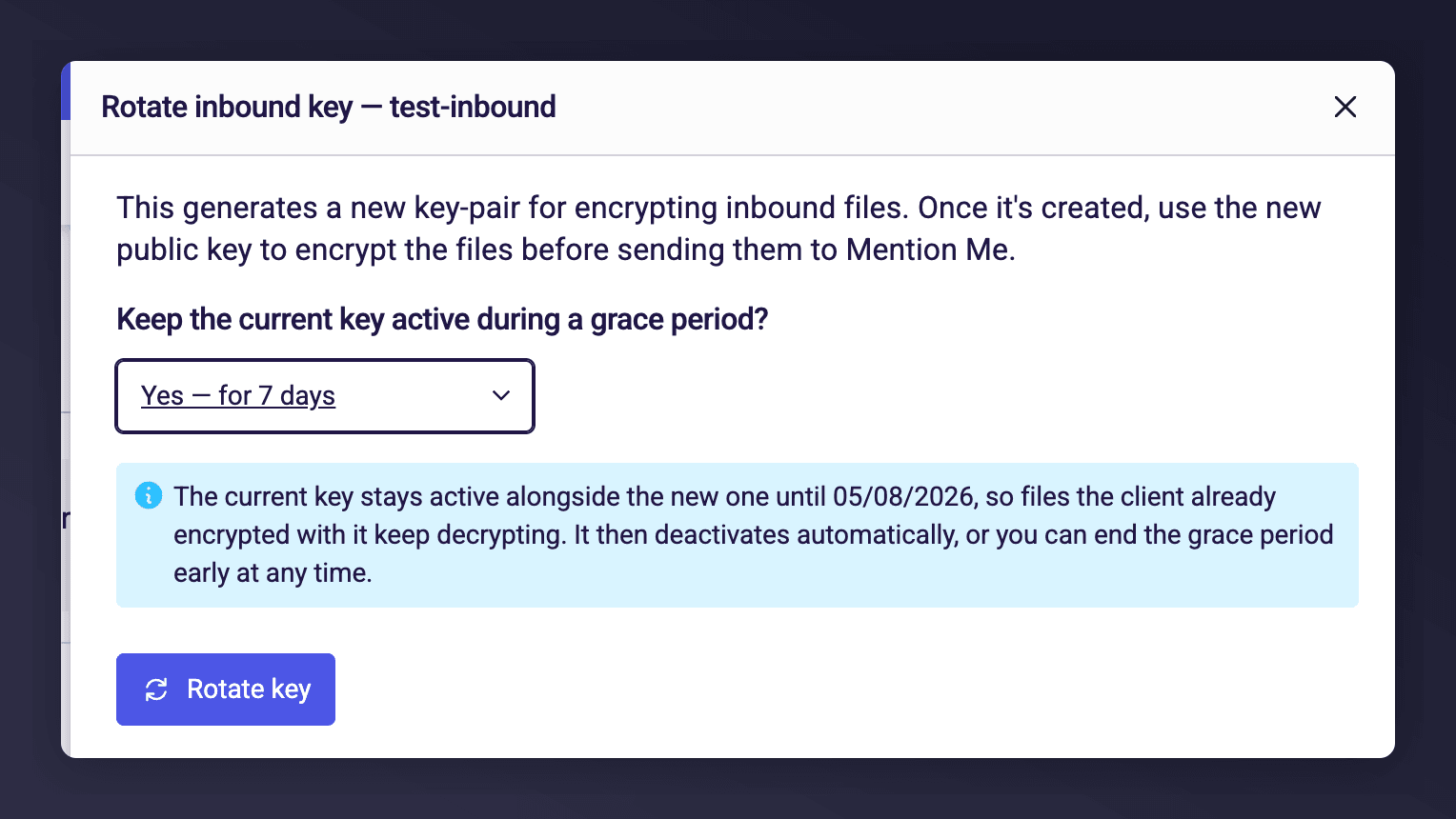
Choosing a grace period when rotating an inbound key. The dialog confirms the date the old key retires.
Outbound rotation
Rotating imports a new public key, and Mention Me encrypts new files with it straight away. There is no grace period for outbound keys, because Mention Me always encrypts with the newest key: the new key takes over immediately and previous keys stop being used. Keep your old private key until you have decrypted any files already delivered. Your chosen file extension carries over.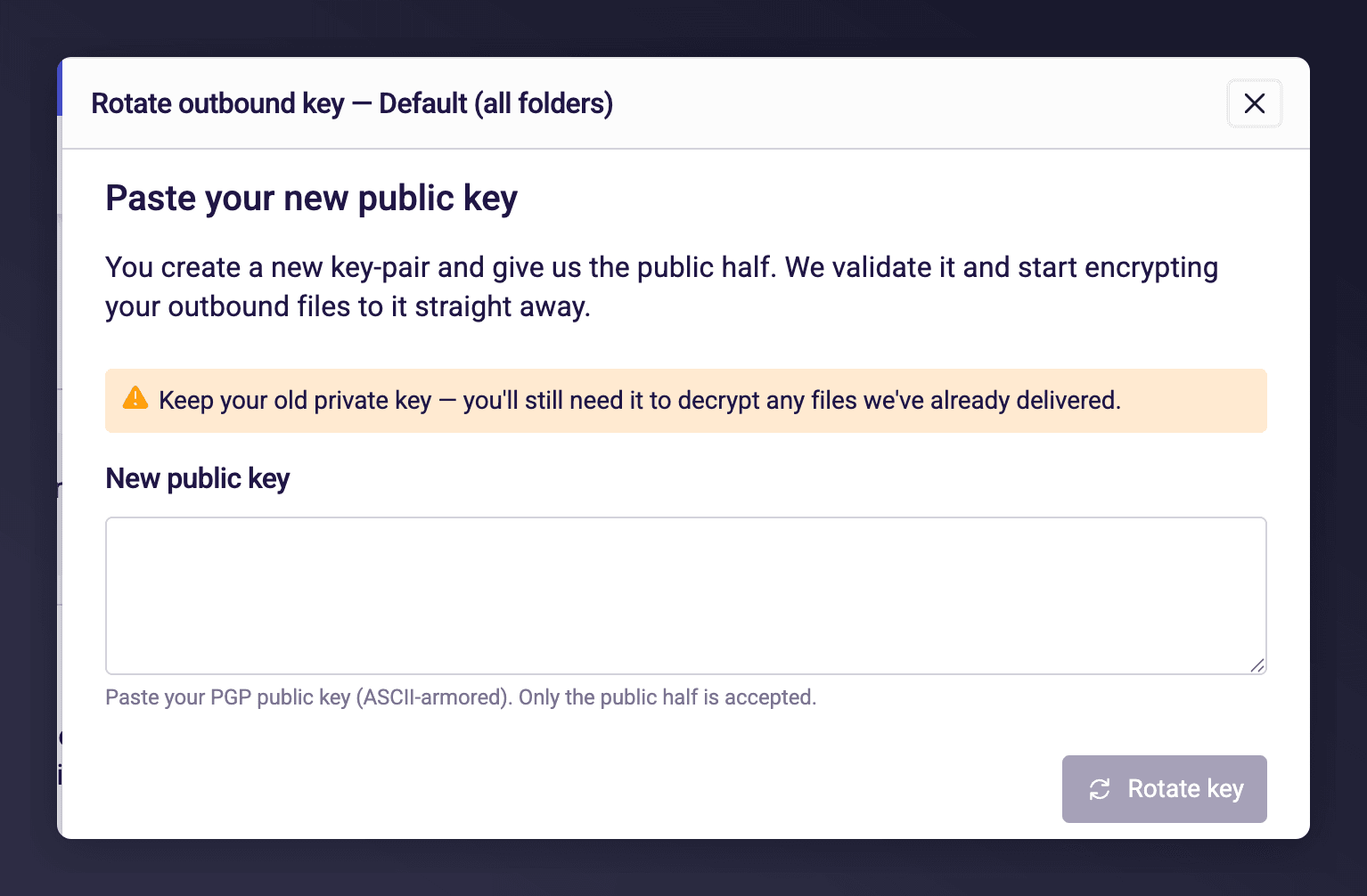
Rotating an outbound key. You supply the new public key, and delivery switches to it immediately.
Generating a PGP key pair
To import an outbound key, you first need your own PGP key pair. We recommend RSA-4096. Example using GPG:my-public-key.asc via Import outbound key. Keep the private key safe and never share it.