> ## Documentation Index
> Fetch the complete documentation index at: https://docs.mention-me.com/llms.txt
> Use this file to discover all available pages before exploring further.

# Legacy Tag Implementation

> Manual tag implementation for Shopify stores not using the Mention Me Shopify App, including referee, landing page, dashboard, and coupon code integration.

This guide covers manual Mention Me tag implementation for Shopify stores that are not using the Mention Me Shopify App. If you have the Shopify App installed, see the [installation guide](/knowledge/shopify/app-installation) instead.

## Referee Tag

The Referee Tag displays a **"Been referred by a friend?"** link, enabling customers to identify who referred them.

<Tip>The Referee experience can also be added to your Shopify Checkout using the [Checkout Extensibility App](/knowledge/shopify/app-installation). This manual approach is for adding the tag to Cart, Basket, or Side Cart pages.</Tip>

### Cart / Basket Page

Add a `<div>` where the link should appear, then add the JavaScript snippet after it.

Locate and edit your cart template (e.g., **cart.liquid**).

#### Add the Div

```html theme={null}
<div id="mmWrappercart"></div>
```

#### Add the Script

```html theme={null}
<script>
var partnerCode = "INSERT_PARTNERCODE";
var situation = "cart";

var urlComponents = ["https://tag.mention-me.com/api/v2/refereefind/", partnerCode];

var queryComponents = [
  ["situation", situation],
  ["locale", Shopify.locale + "_" + Shopify.country]
];

queryComponents = queryComponents.map(qc => qc[0] + "=" + encodeURIComponent(qc[1]));

var url = urlComponents.join("") + "?" + queryComponents.join("&");
var script = document.createElement("script");
script.src = url;
document.getElementsByTagName("head")[0].appendChild(script);
</script>
```

Replace `INSERT_PARTNERCODE` with your actual Mention Me PartnerCode. For locale configuration, see [Shopify: Locales](/knowledge/shopify/locales).

### Sidecart / Popout Cart

If using a slide-out or pop-up cart (e.g., **sidecart.liquid**):
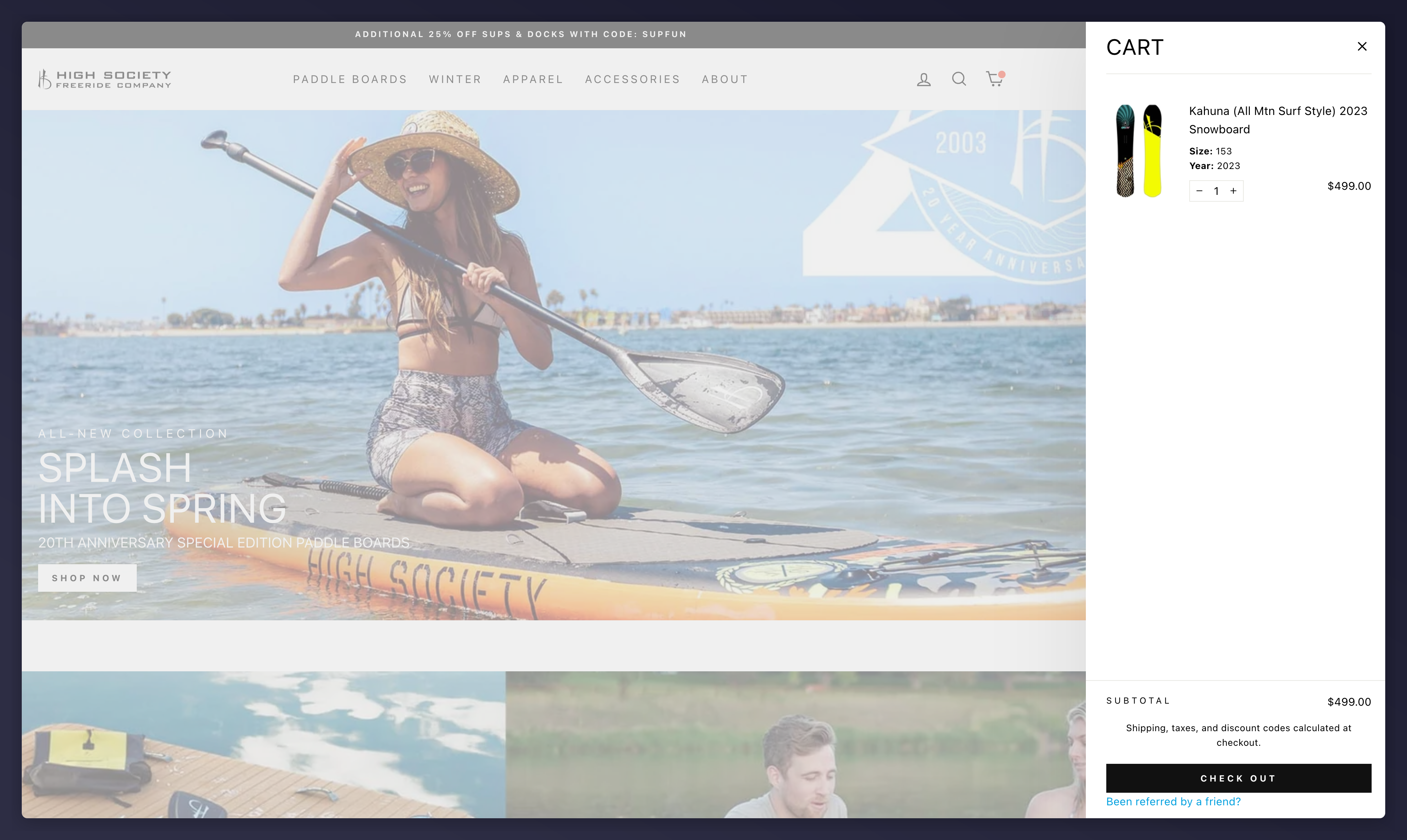
<Frame caption="Sidecart with the 'Been referred by a friend?' link">
  <img src="https://mintcdn.com/mentionme/GjiDi6ZwHP27Pu0w/images/knowledge/shopify/11432823940765.png?fit=max&auto=format&n=GjiDi6ZwHP27Pu0w&q=85&s=28917339be0584ffc1f119c12cbc76e8" alt="Shopify sidecart with &#x22;Been referred by a friend?&#x22; link" width="4136" height="2470" data-path="images/knowledge/shopify/11432823940765.png" />
</Frame>

```html theme={null}
<script>
var partnerCode = "INSERT_PARTNERCODE";
var situation = 'sidecart';
var implementation = 'link';

if (window.MentionMeFiredTags && window.MentionMeFiredTags[implementation + situation]) {
  delete window.MentionMeFiredTags[implementation + situation];
}

var urlComponents = ["https://tag.mention-me.com/api/v2/refereefind/", partnerCode];
var queryComponents = [
  ["situation", situation],
  ["locale", Shopify.locale + "_" + Shopify.country]
];

queryComponents = queryComponents.map(qc => qc[0] + "=" + encodeURIComponent(qc[1]));

var url = urlComponents.join("") + "?" + queryComponents.join("&");
var script = document.createElement("script");
script.src = url;
document.getElementsByTagName("head")[0].appendChild(script);
</script>
```

### Checkout (Shopify Plus only)

Shopify Plus merchants can modify `checkout.liquid`:
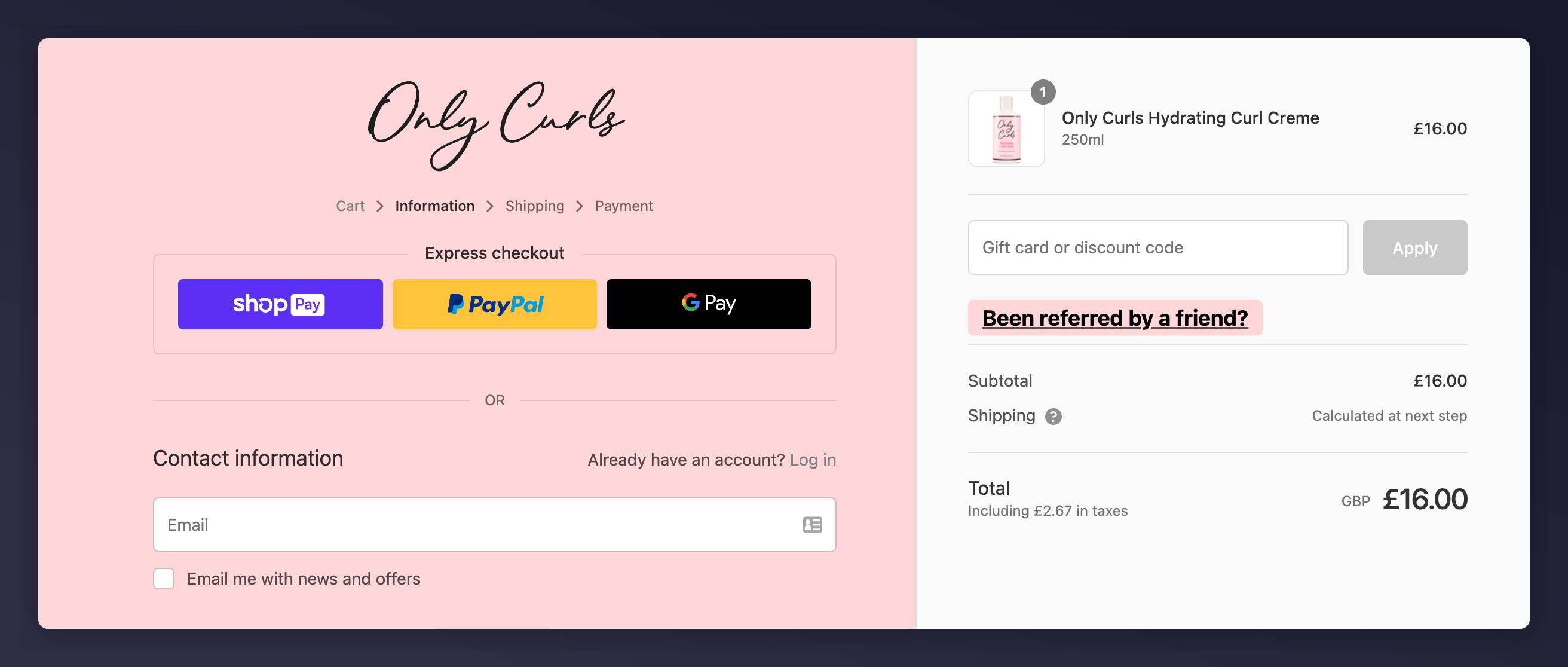
<img src="https://mintcdn.com/mentionme/GjiDi6ZwHP27Pu0w/images/knowledge/shopify/11432868429085.png?fit=max&auto=format&n=GjiDi6ZwHP27Pu0w&q=85&s=37100967ea74918df37e7a9ca15055e6" alt="Shopify Plus checkout.liquid editor" width="2624" height="1116" data-path="images/knowledge/shopify/11432868429085.png" />

```html theme={null}
<script>
var partnerCode = "INSERT_PARTNERCODE";
var situation = "checkout";

var urlComponents = ["https://tag.mention-me.com/api/v2/refereefind/", partnerCode];
var queryComponents = [
  ["situation", situation],
  ["locale", Shopify.locale + "_" + Shopify.country]
];

queryComponents = queryComponents.map(qc => qc[0] + "=" + encodeURIComponent(qc[1]));

var url = urlComponents.join("") + "?" + queryComponents.join("&");
var script = document.createElement("script");
script.src = url;
document.getElementsByTagName("head")[0].appendChild(script);
</script>
```

Planning a move to Shopify Checkout Extensions from `checkout.liquid`? Review the [checkout extensibility guide](/knowledge/shopify/checkout-extensibility).

## Landing Page

A landing page lets customers engage with your referral program without requiring a purchase.
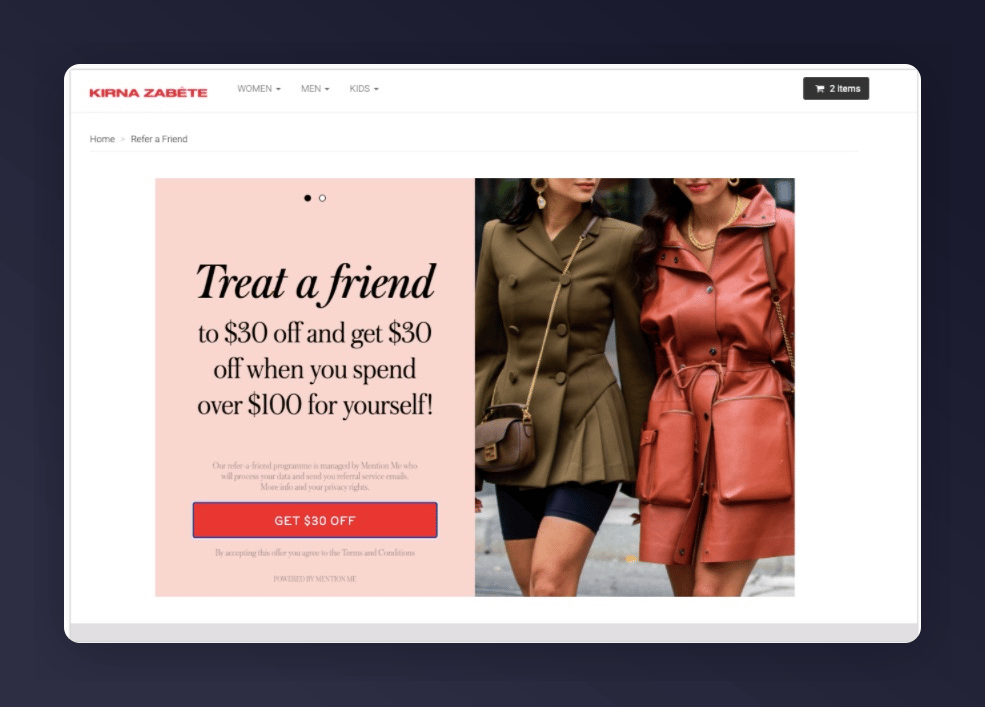
<Frame caption="Referral landing page example">
  <img src="https://mintcdn.com/mentionme/GjiDi6ZwHP27Pu0w/images/knowledge/shopify/11432246692893.jpg?fit=max&auto=format&n=GjiDi6ZwHP27Pu0w&q=85&s=2d9fc9df8b265b9bc2a6158a1aa83801" alt="Mention Me referral landing page example" width="985" height="707" data-path="images/knowledge/shopify/11432246692893.jpg" />
</Frame>

### Creating a Landing Page

<Steps>
  <Step title="Create a new page">
    Log in to your Shopify admin, navigate to Pages, and create a new page (e.g., **Referral Landing Page**). You may set it as Hidden initially.
  </Step>

  <Step title="Add the referral code">
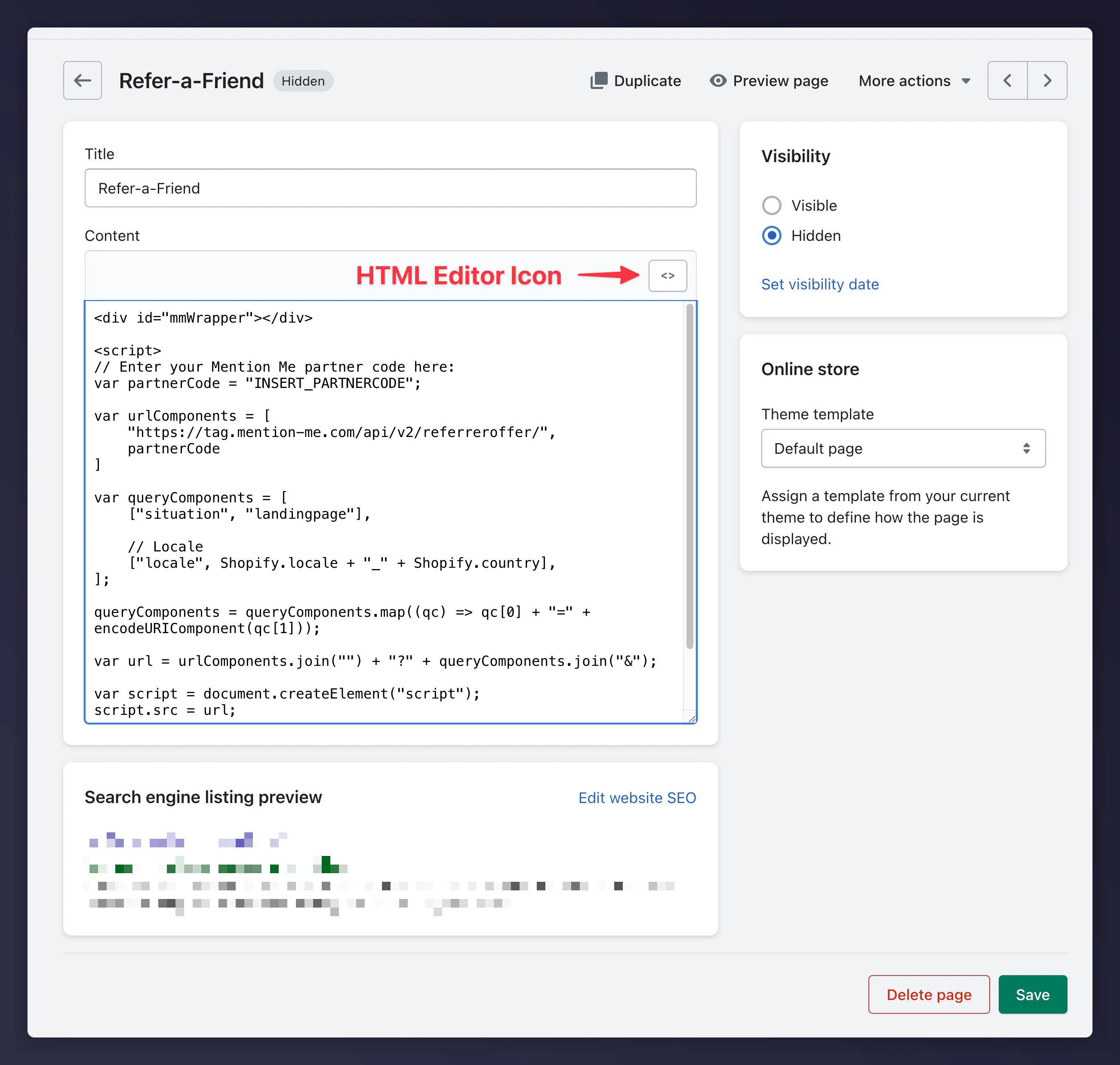
    Open the code editor and paste the following in HTML mode:
    <img src="https://mintcdn.com/mentionme/GjiDi6ZwHP27Pu0w/images/knowledge/shopify/11432357724701.png?fit=max&auto=format&n=GjiDi6ZwHP27Pu0w&q=85&s=4c71bc487ea269c42cf154ae2191458c" alt="Shopify page editor in HTML mode" width="2604" height="2476" data-path="images/knowledge/shopify/11432357724701.png" />
  </Step>
</Steps>

```html theme={null}
<div id="mmWrapper"></div>
<script>
var partnerCode = "INSERT_PARTNERCODE";

var urlComponents = [
  "https://tag.mention-me.com/api/v2/referreroffer/",
  partnerCode
];

var queryComponents = [
  ["situation", "landingpage"],
  ["locale", Shopify.locale + "_" + Shopify.country]
];

queryComponents = queryComponents.map(qc => qc[0] + "=" + encodeURIComponent(qc[1]));

var url = urlComponents.join("") + "?" + queryComponents.join("&");

var script = document.createElement("script");
script.src = url;

document.getElementsByTagName("head")[0].appendChild(script);
</script>
```

Replace `INSERT_PARTNERCODE` with your actual partner code. For locale configuration, see [Shopify: Locales](/knowledge/shopify/locales).

## Dashboard Tag

The referral dashboard allows customers to view referral activity, track rewards, and share offers from their account.
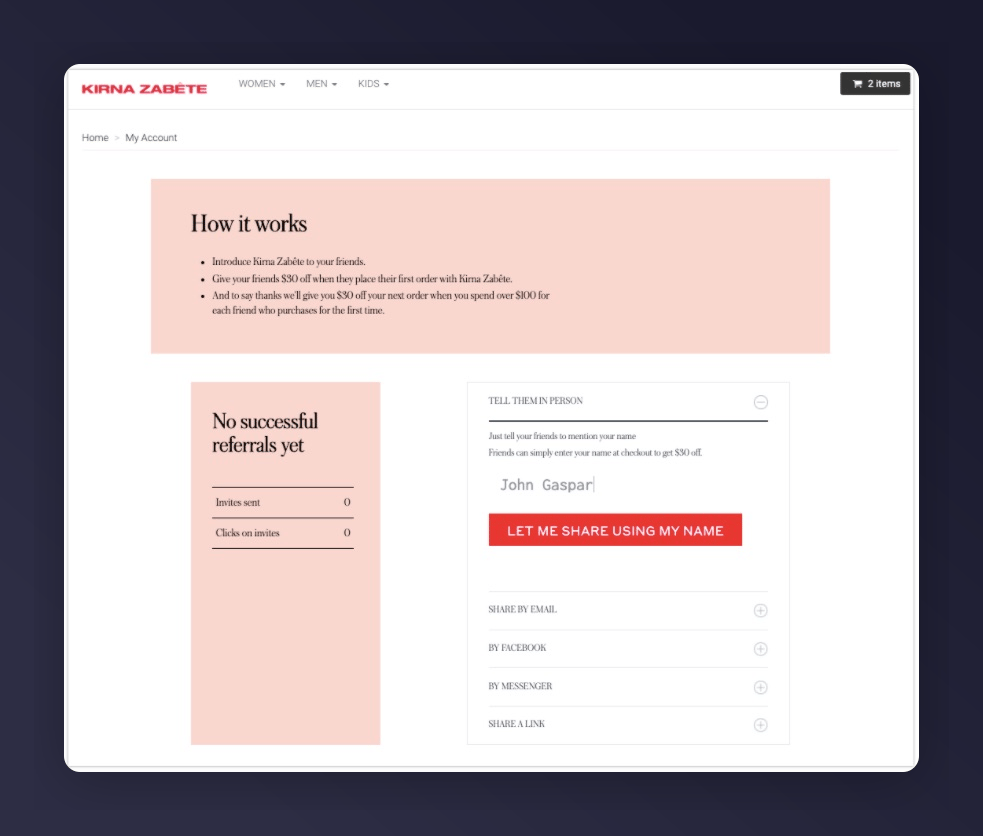
<Frame caption="Referral dashboard in a Shopify store">
  <img src="https://mintcdn.com/mentionme/GjiDi6ZwHP27Pu0w/images/knowledge/shopify/11432911235229.jpg?fit=max&auto=format&n=GjiDi6ZwHP27Pu0w&q=85&s=665f0044dfe8e415d19d25b01e7709d3" alt="Mention Me referral dashboard in a Shopify store" width="983" height="836" data-path="images/knowledge/shopify/11432911235229.jpg" />
</Frame>

### Setup Steps

<Steps>
  <Step title="Create a Page">
    Navigate to **Online Store > Pages > Add Page**, title it "Referral Dashboard".
  </Step>

  <Step title="Create a Page Template">
    Navigate to **Online Store > Themes > Edit code**. Under Templates, create **page.refer.liquid**.
  </Step>

  <Step title="Add the Template Code">
    ```liquid theme={null}
    {% if customer %}
    <div style="width: 100vw; margin-left: calc(-50vw + 50%);">
    <h2 style="text-align: center;">Hi {{ customer.first_name }}, refer your friends and earn!</h2>
    <div id="mmWrapper"></div>
    </div>

    <script type="text/javascript">
    var partnerCode = "PARTNERCODE";

    var email = {% if customer %}"{{ customer.email }}"{% else %}null{% endif %};
    var firstname = {% if customer %}"{{ customer.first_name }}"{% else %}null{% endif %};
    var surname = {% if customer %}"{{ customer.last_name }}"{% else %}null{% endif %};

    var locale = "{{ localization.language.iso_code | upcase }}";

    var country = {% if customer and customer.default_address %}
    "{{ customer.default_address.country_code }}"
    {% else %}
    "{{ localization.country.iso_code }}"
    {% endif %};

    var params = [
    ["situation", "dashboard"],
    ["implementation", "embed"],
    ["email", email],
    ["firstname", firstname],
    ["surname", surname],
    ["locale", locale + "_" + country]
    ];

    var query = params.map(p => p[0] + "=" + encodeURIComponent(p[1])).join("&");

    var script = document.createElement("script");
    script.src = "https://tag.mention-me.com/api/v2/dashboard/" + partnerCode + "?" + query;
    document.head.appendChild(script);
    </script>

    {% else %}
    <div>
      <p>You need to log in or create an account to access the referral dashboard.</p>
      <p><a href="/account/login">Log in</a></p>
    </div>
    {% endif %}
    ```
  </Step>

  <Step title="Assign the Template">
    Go to the page, under "Theme Template" select **refer**, click Save.
  </Step>

  <Step title="Test">
    Visit `/account/login`, log in as a test customer, then go to `/pages/referral-dashboard`.
  </Step>
</Steps>

### Promoting the Page

* Add the page to your website navigation menu
* Include a "Refer a friend and earn" CTA in transactional emails linking to this page

For additional customer attributes, see: [Shopify Liquid Customer Object](https://help.shopify.com/themes/liquid/objects/customer)

## Coupon Code Integration (Legacy)

<Warning>This feature requires a version of Legacy App creation in Shopify that was deprecated in **January 2026**. Use this as a reference for existing integrations only.</Warning>

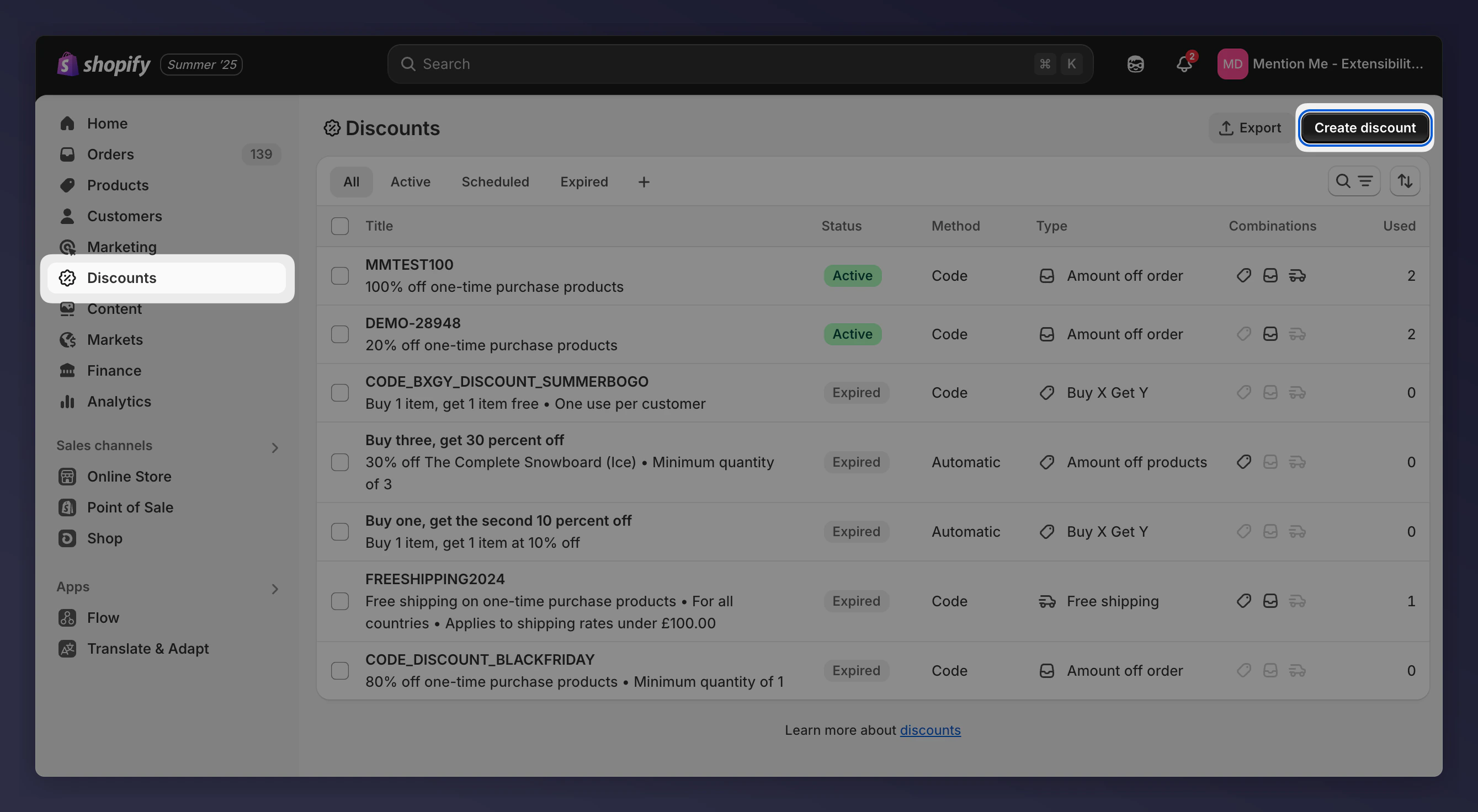
### Set Up Your Discounts

<Steps>
  <Step title="Create a new discount">
    Go to the Shopify Discounts section and create a new discount.
  </Step>

  <Step title="Select discount type">
    Select "Amount off order" as the discount type ("Buy X, Get Y" is not supported).
  </Step>

  <Step title="Choose Discount Code">
    Choose "Discount Code" as the method.
  </Step>

  <Step title="Configure discount value">
    Set the discount value (Percentage or Fixed Amount).
  </Step>

  <Step title="Set usage limits">
    Set Maximum Discount Uses: **Limit to 1 total use** and **Limit to one use per customer**.
  </Step>

  <Step title="Save and repeat">
    Save, then repeat for each reward type.
    <img src="https://mintcdn.com/mentionme/GjiDi6ZwHP27Pu0w/images/knowledge/shopify/28887631383197.png?fit=max&auto=format&n=GjiDi6ZwHP27Pu0w&q=85&s=b5524d7263b5c8fe0c8a420c8d35ea0e" alt="Shopify discount code configuration with usage limits" width="2678" height="1472" data-path="images/knowledge/shopify/28887631383197.png" />
  </Step>
</Steps>

### Creating a Shopify Private App

<Steps>
  <Step title="Open app development">
    Go to **Settings > Apps and sales channels**, click **Develop apps** and accept the prompt.
  </Step>

  <Step title="Create the app">
    Click **Create an app**, name it (e.g., "Mention Me Discount Codes").
  </Step>

  <Step title="Configure API scopes">
    Go to **Configuration > Configure Admin API scopes**. Search for "discount" and set **Discounts and Price rules** to **read and write**.
  </Step>

  <Step title="Install and copy token">
    Go to **API credentials**, click **Install app**. Reveal and copy the API token (only visible once).
  </Step>
</Steps>

### Connect in Mention Me Platform

<Steps>
  <Step title="Open reward providers">
    Go to the [Mention Me platform](https://mention-me.com/merchant/~/reward-providers) and click **Set-up new 3rd Party Provider**.
  </Step>

  <Step title="Select Shopify">
    Select **Shopify** from the list.
  </Step>

  <Step title="Enter credentials">
    Enter your Shopify Store Name (subdomain) and the Admin API token.
  </Step>

  <Step title="Link the integration">
    Contact your Mention Me onboarding or client success manager to link the integration to your rewards setup.
  </Step>
</Steps>
