> ## Documentation Index
> Fetch the complete documentation index at: https://docs.mention-me.com/llms.txt
> Use this file to discover all available pages before exploring further.

# Dashboard Tag

> Add a Mention Me referral dashboard to a Shopify customer account page so referrers can track activity, rewards, and share their offer.

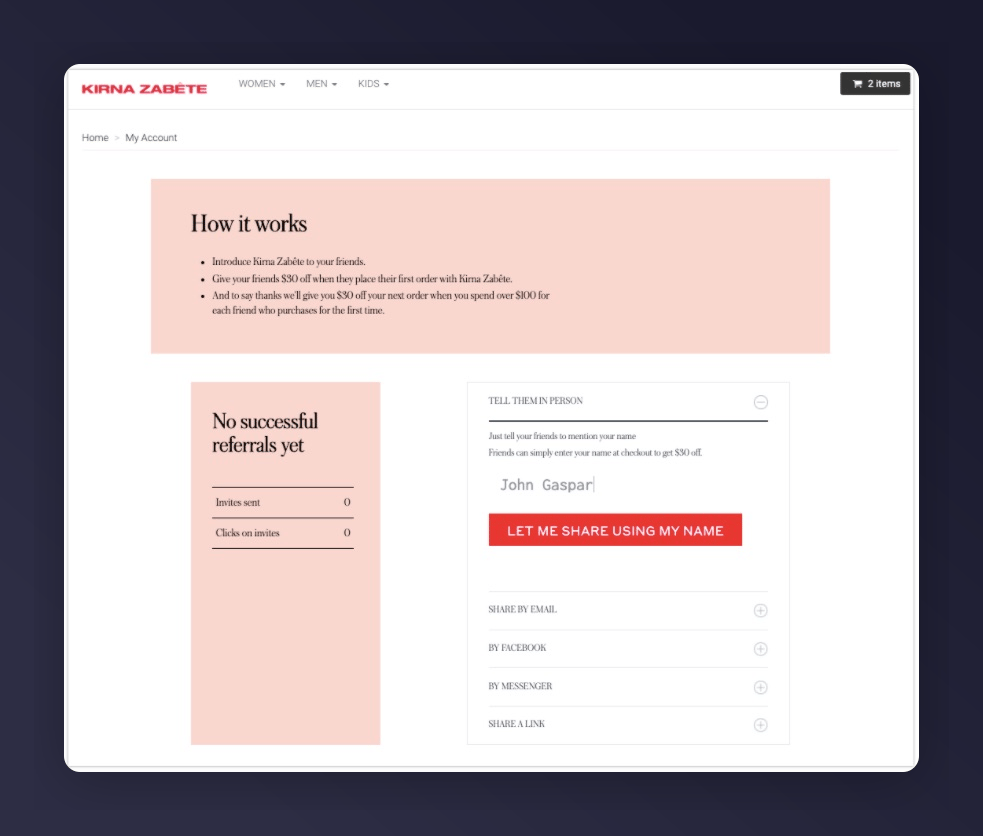
The referral dashboard allows customers to view referral activity, track rewards, and share offers from their account.

<Frame caption="Referral dashboard in a Shopify store">
  <img src="https://mintcdn.com/mentionme/GjiDi6ZwHP27Pu0w/images/knowledge/shopify/11432911235229.jpg?fit=max&auto=format&n=GjiDi6ZwHP27Pu0w&q=85&s=665f0044dfe8e415d19d25b01e7709d3" alt="Mention Me referral dashboard in a Shopify store" width="983" height="836" data-path="images/knowledge/shopify/11432911235229.jpg" />
</Frame>

## Setup Steps

<Steps>
  <Step title="Create a Page">
    Navigate to **Online Store > Pages > Add Page**, title it **Referral Dashboard**.
  </Step>

  <Step title="Create a Page Template">
    Navigate to **Online Store > Themes > Edit code**. Under Templates, create **page.refer.liquid**.
  </Step>

  <Step title="Add the Template Code">
    ```liquid theme={null}
    {% if customer %}
    <div style="max-width: 800px; margin: 0 auto; padding: 30px 16px;">
      <h2 style="text-align: center;">Hi {{ customer.first_name }}, refer your friends and earn!</h2>
      <div id="mmWrapper"></div>
    </div>
    <script type="text/javascript">
      var partnerCode = "PARTNERCODE";
      var email = {% if customer %}"{{ customer.email }}"{% else %}null{% endif %};
      var firstname = {% if customer %}"{{ customer.first_name }}"{% else %}null{% endif %};
      var surname = {% if customer %}"{{ customer.last_name }}"{% else %}null{% endif %};
      var locale = "{{ localization.language.iso_code | upcase }}";
      var country = {% if customer and customer.default_address %}"{{ customer.default_address.country_code }}"{% else %}"{{ localization.country.iso_code }}"{% endif %};
      var params = [
        ["situation", "dashboard"],
        ["implementation", "embed"],
        ["email", email],
        ["firstname", firstname],
        ["surname", surname],
        ["locale", locale + "_" + country]
      ];
      var query = params.map(function (p) { return p[0] + "=" + encodeURIComponent(p[1]); }).join("&");
      var script = document.createElement("script");
      script.src = "https://tag.mention-me.com/api/v2/dashboard/" + partnerCode + "?" + query;
      document.head.appendChild(script);
    </script>
    {% else %}
    <div style="max-width: 800px; margin: 0 auto; padding: 30px 16px; text-align: center;">
      <p>You need to log in or create an account to access the referral dashboard.</p>
      <p><a href="/account/login">Log in</a></p>
    </div>
    {% endif %}
    ```
  </Step>

  <Step title="Assign the Template">
    Go to the page, under **Theme Template** select **refer**, click **Save**.
  </Step>

  <Step title="Test">
    Visit `/account/login`, log in as a test customer, then go to `/pages/referral-dashboard`.
  </Step>
</Steps>

## Promoting the Page

* Add the page to your website navigation menu
* Include a "Refer a friend and earn" CTA in transactional emails linking to this page

For additional customer attributes, see: <a href="https://help.shopify.com/themes/liquid/objects/customer" target="_blank" rel="noopener noreferrer">Shopify Liquid Customer Object</a>