> ## Documentation Index
> Fetch the complete documentation index at: https://docs.mention-me.com/llms.txt
> Use this file to discover all available pages before exploring further.
# Revoke User Access
> How to revoke or change user access in the Mention Me platform to maintain data security.
Maintaining secure access controls protects your business from data breaches, unnecessary exposure to sensitive information, and compliance risks.
## Best practices
1. **Regular access audits** -- Periodically review all users who have access and check that permissions align with their current role.
2. **Remove or downgrade access immediately** -- As soon as someone leaves the company or changes roles, update or revoke their access.
3. **Inactive account locking** -- The Mention Me platform automatically locks accounts after 90 days of inactivity.
## How to revoke or change user access
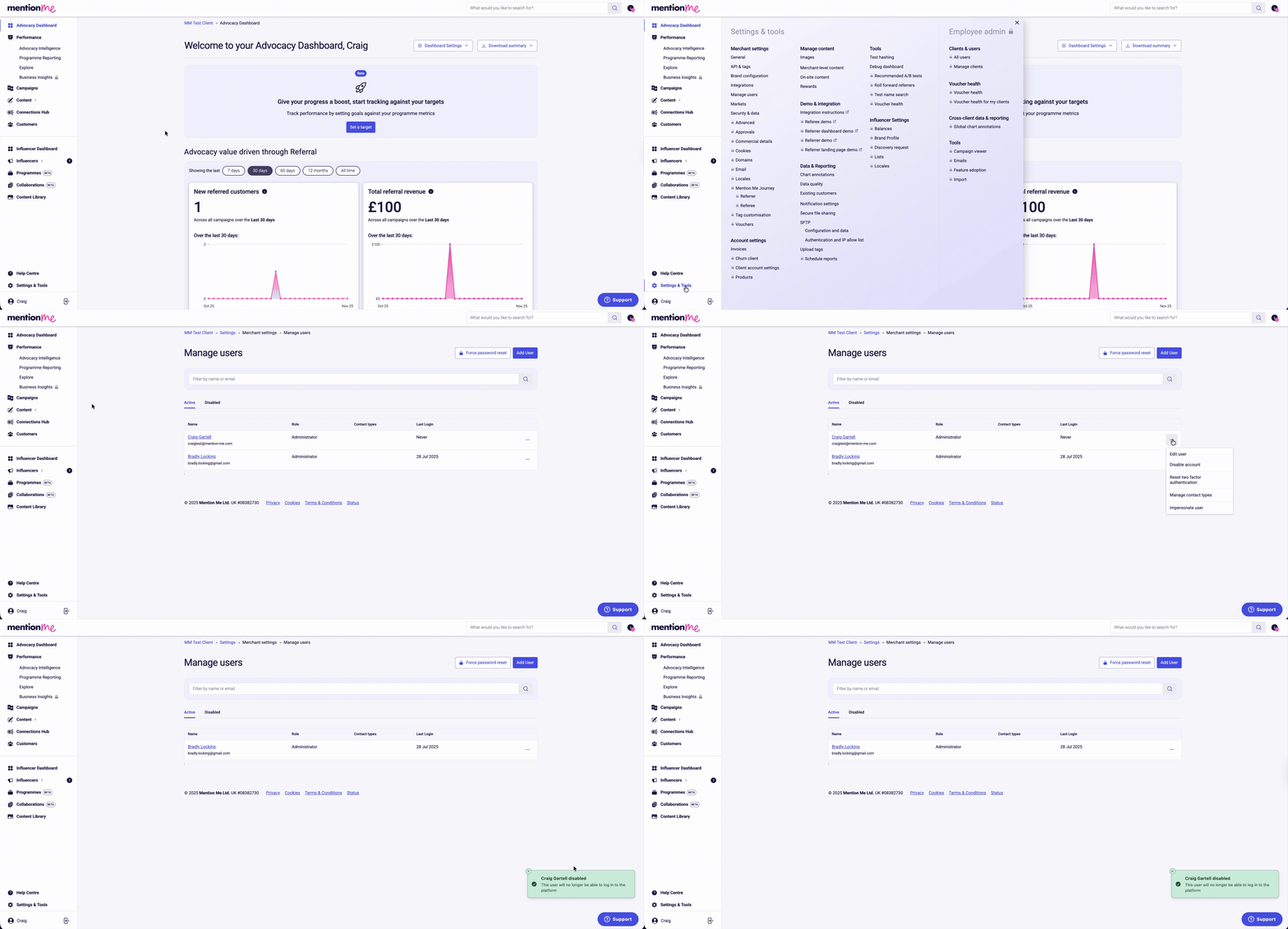
Only users with full Administrator access can make changes to user accounts.
1. Click **Settings & tools**
2. Click **Manage users**
3. Click the user settings menu (3 dots)
4. Click **Disable account**
5. A notification will confirm that the account has been disabled
 If you have questions or need support updating access, reach out to your Client Success Manager or submit a query through the support portal.