> ## Documentation Index
> Fetch the complete documentation index at: https://docs.mention-me.com/llms.txt
> Use this file to discover all available pages before exploring further.
# Market Insights
> How to use Market Insights to view and compare referral performance across multiple markets and regions.
Market Insights allows you to see at a glance how the referral programme is performing across all of your markets within the Mention Me platform.
Using the reporting filters, you can:
* Group campaigns into markets (such as the UK, France, or the US) and further into market groupings (such as Europe or North America)
* View and analyse key referral metrics split by different markets or market groupings
* Identify what's working well in certain markets so you can replicate across others
## Where to Find Market Insights
Market Insights can be accessed under the **Performance -> Programme Reporting** section, under the **Summary** tab, using the Markets and Market Groups filters.
## Setting Up a Market
To access the market filters, you first need to set up your markets:
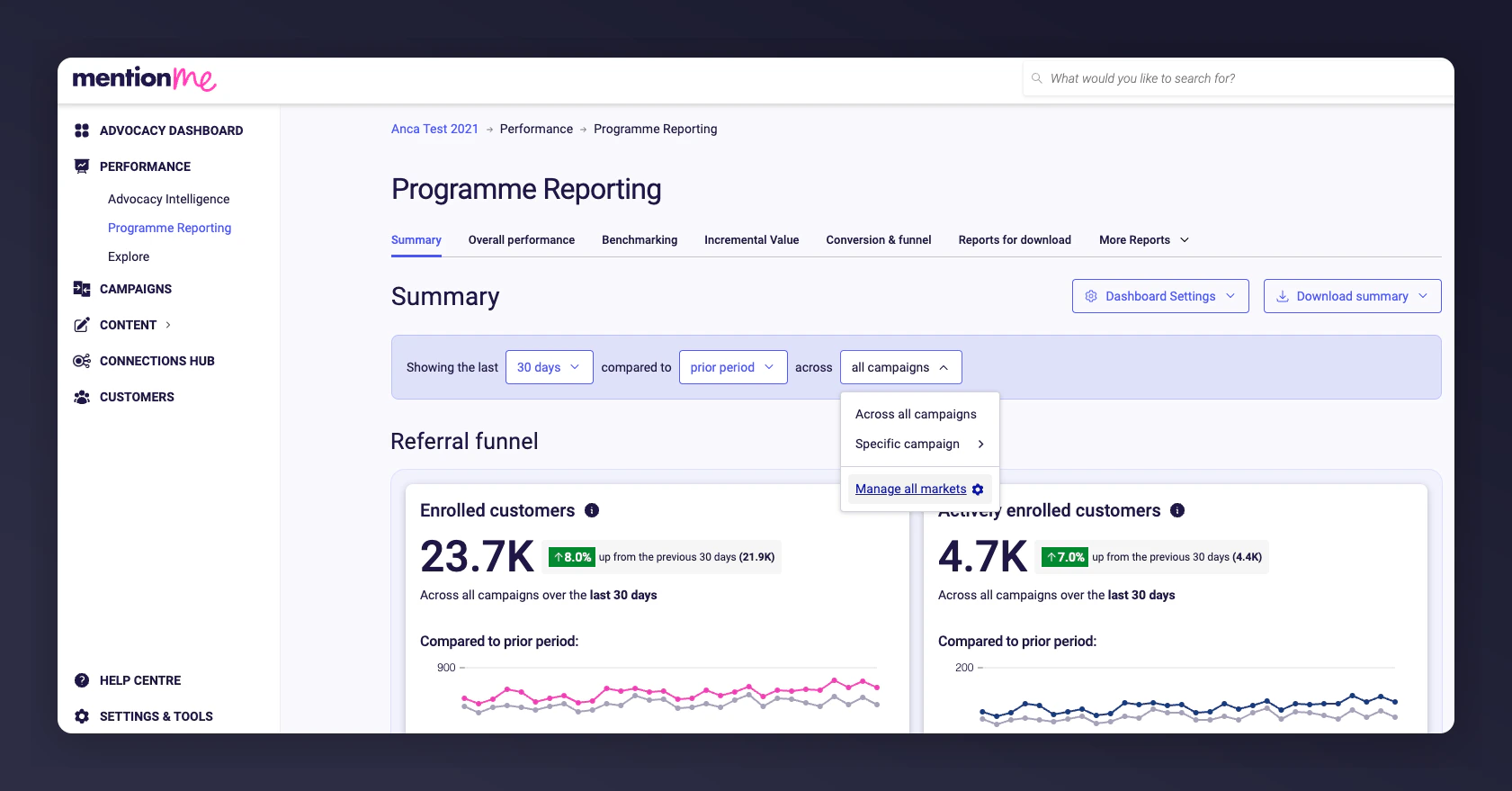
From the drop-down filter on the Programme Reporting Summary tab, go to **Manage all markets** ([or go straight there](https://mention-me.com/merchant/~/markets)).
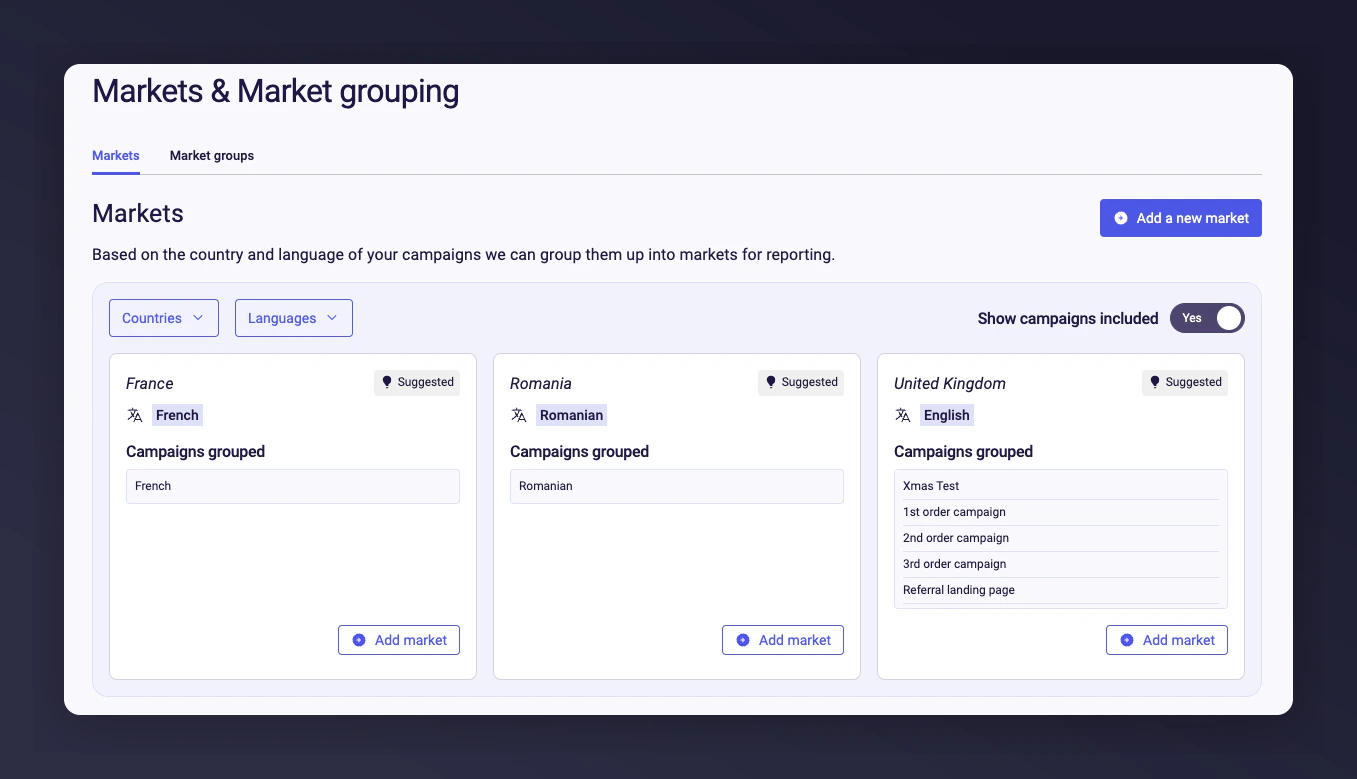
 Review suggested markets based on your current campaigns. Confirm or discard any of the suggestions.
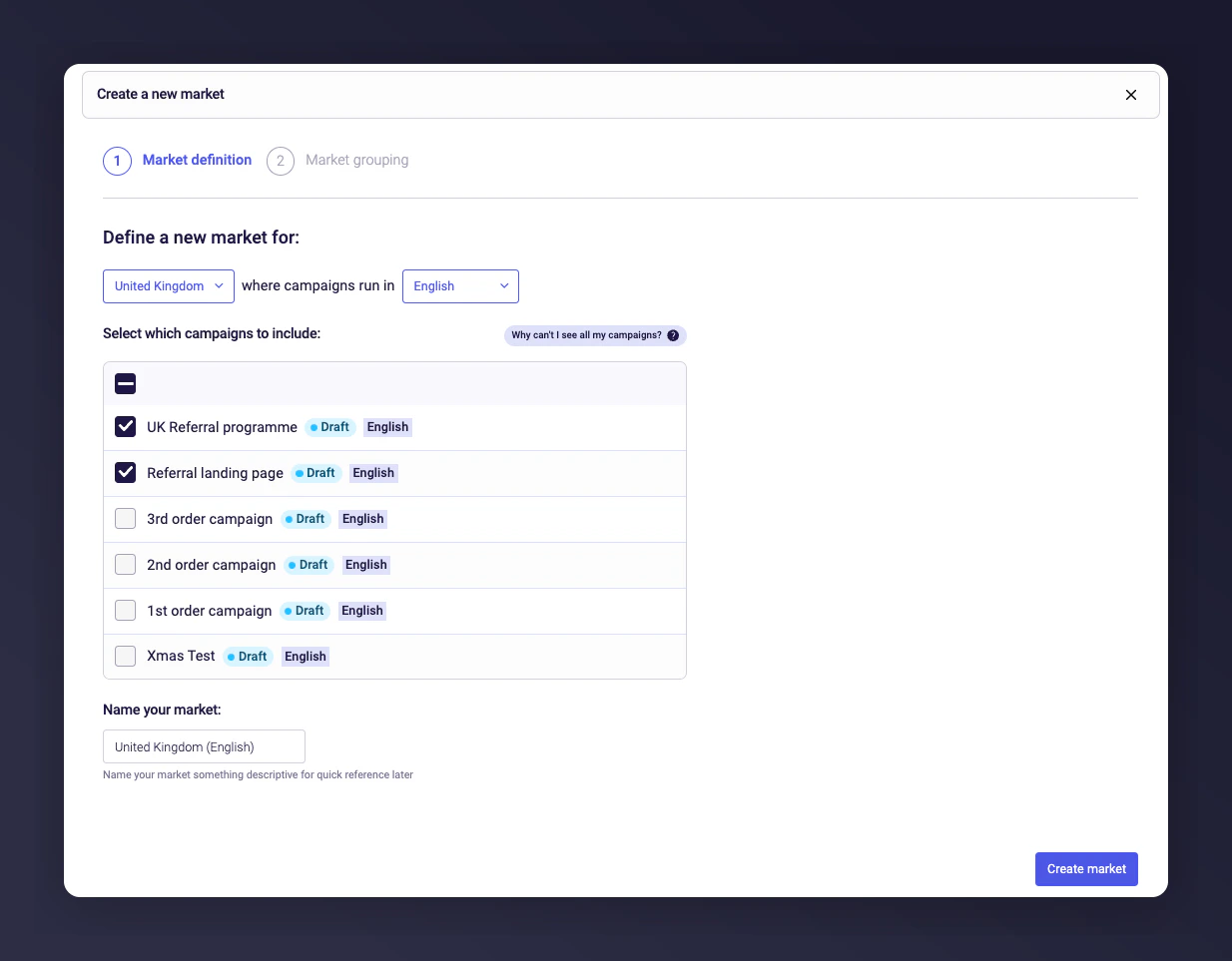
 Click **Add a new market** and follow the steps to configure.
 Re-access your markets via the Programme Reporting Summary tab or by going to **Settings & Tools -> Account Settings -> Markets**.
## Setting Up a Market Grouping
Use market groupings to group different markets together for aggregated reporting across regions like Europe and North America.
* Access Market Groupings via the Programme Reporting Summary filter or **Settings & Tools -> Account Settings -> Markets**. Or [go straight there](https://mention-me.com/merchant/~/market-groups).
* Go to **Market Groups** and click **Add new market grouping**.
* Select the markets you wish to group together.
* Name your grouping and click **Create market grouping**.
Re-access your markets via the Programme Reporting Summary tab or by going to **Settings & Tools -> Account Settings -> Markets**.
## Setting Up a Market Grouping
Use market groupings to group different markets together for aggregated reporting across regions like Europe and North America.
* Access Market Groupings via the Programme Reporting Summary filter or **Settings & Tools -> Account Settings -> Markets**. Or [go straight there](https://mention-me.com/merchant/~/market-groups).
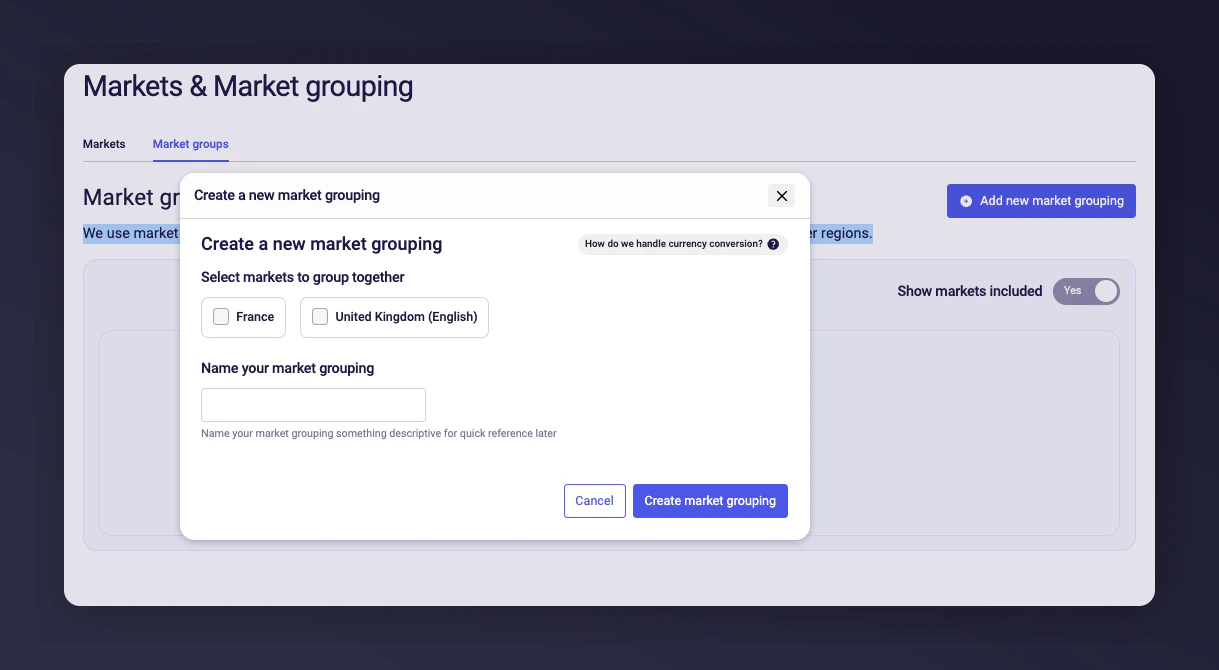
* Go to **Market Groups** and click **Add new market grouping**.
* Select the markets you wish to group together.
* Name your grouping and click **Create market grouping**.
 ## Using Market Filters to View Referral Performance
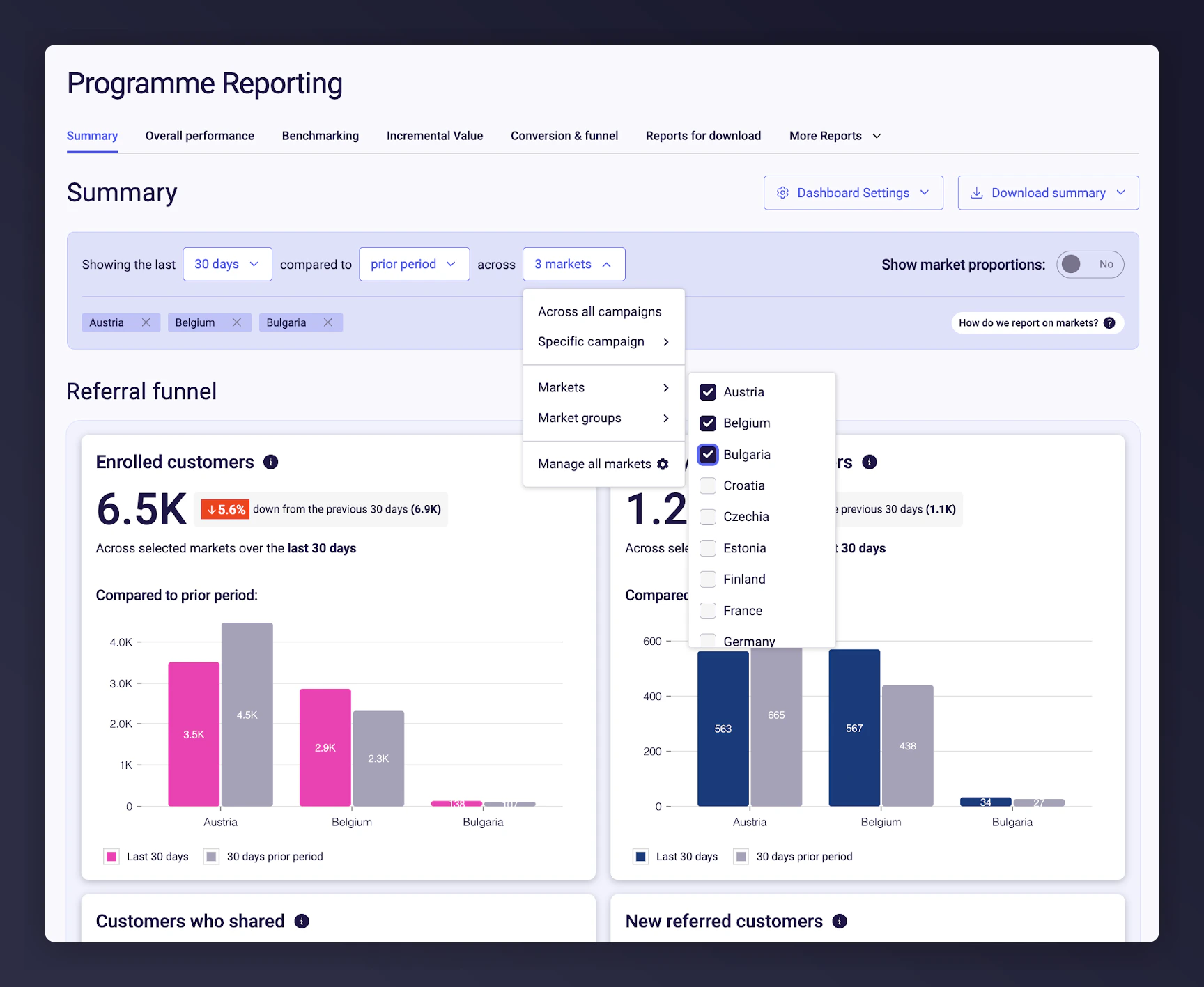
Once you've set up your markets and groupings, use the filter on the Programme Reporting Summary tab to select included countries or groupings.
Referral KPIs will display side by side for up to 12 markets or market groupings.
## Using Market Filters to View Referral Performance
Once you've set up your markets and groupings, use the filter on the Programme Reporting Summary tab to select included countries or groupings.
Referral KPIs will display side by side for up to 12 markets or market groupings.
 ## FAQs
### What criteria can I use for creating a market?
Markets are based on the countries used in each campaign; each country can only exist in one market. You can only create a market for a country if a campaign is set up in that country.
### Is the reporting by market available for referral KPIs only?
Yes, at the moment only referral KPIs can be split by market.
### Can I still view Programme Reporting by campaign?
Yes, campaigns are still available as a filter for the Programme Reporting dashboard, but they cannot be compared side by side.
### What can I compare on the dashboard?
Markets can be compared to Markets; Market Groupings can be compared to Market Groupings. Markets cannot be compared to Market Groupings.
### How many markets can I compare at once?
You can compare up to 12 Markets or Market Groupings in the dashboard at one time.
## FAQs
### What criteria can I use for creating a market?
Markets are based on the countries used in each campaign; each country can only exist in one market. You can only create a market for a country if a campaign is set up in that country.
### Is the reporting by market available for referral KPIs only?
Yes, at the moment only referral KPIs can be split by market.
### Can I still view Programme Reporting by campaign?
Yes, campaigns are still available as a filter for the Programme Reporting dashboard, but they cannot be compared side by side.
### What can I compare on the dashboard?
Markets can be compared to Markets; Market Groupings can be compared to Market Groupings. Markets cannot be compared to Market Groupings.
### How many markets can I compare at once?
You can compare up to 12 Markets or Market Groupings in the dashboard at one time.