> ## Documentation Index
> Fetch the complete documentation index at: https://docs.mention-me.com/llms.txt
> Use this file to discover all available pages before exploring further.
# Understanding Sentiment Analysis
> Understanding share message sentiment analysis and NPS sentiment analysis in Mention Me, including setup, AI insights, and how to drive action from customer feedback.
Mention Me provides two forms of sentiment analysis:
* **Share message sentiment analysis**: Analysis of what referrers say to their friends (the sharing message), giving unique insights into what your brand advocates really think. Use this to optimise your referral and wider marketing.
* **NPS sentiment analysis**: Analysis of what customers think about your brand via Net Promoter Score surveys. Use this to identify pain points and improve customer experience, which drives advocacy.
## Share Message Sentiment Analysis
### Why It Matters
Share Message Analysis gives you real insights shared by your customers when they recommend your brand -- insights you cannot get elsewhere. For the first time, you can monitor and analyse how customers speak to their friends and learn what messages resonate.
Mention Me's generative AI-powered sentiment analysis analyses share messages and pulls out key insights, giving you instant feedback on your USPs to improve tone of voice, marketing campaigns, and positioning.
### Setup Requirements
For share message sentiment analysis, you need:
* "Native share message capture" set up as one of your sharing methods
* At least 20 share messages of 5 words or longer
To request native share message capture setup, use this [form](https://help.mention-me.com/hc/en-gb/requests/new?ticket_form_id=14561653328797) and the Operations team will be in touch.
More information on [native share message capture](/knowledge/referral/offers/sharing-methods) is available.
### Can I See Which Customer Left the Share Message?
Due to PII requirements, this data is anonymised.
### Can We Use Quotes for Social Proof?
As a general rule, this is not possible unless you use your own privacy notice that allows it.
## NPS Sentiment Analysis
### What is NPS?
Net Promoter Score (NPS) is a customer satisfaction metric that measures how likely customers are to recommend a product or service to others.
Customers are asked: "How likely are you to recommend \[your brand] to a friend?" and score on a scale of 0-10. Based on responses, customers are categorised into:
* **Promoters (9 or 10)**: Highly satisfied customers likely to recommend.
* **Passives (7 or 8)**: Neutral customers.
* **Detractors (6 or below)**: Dissatisfied customers.
The NPS score is calculated by subtracting the percentage of detractors from the percentage of promoters.
### Why NPS Sentiment Analysis Matters
NPS helps you understand what customers think about your brand so you can take action to address pain points and improve the customer experience.
Mention Me's generative AI-powered sentiment analysis summarises customer comments into themes with areas to explore, so you can start improving the customer experience straight away.
### Using the Dashboard to Drive Action
Use the "Key Customer Insights" section to understand customer pain points (e.g. website navigation, customer service, price, delivery). Themes are prioritised by comment volume.
Review the provided suggestions for addressing pain points, and examine customer sentiment to understand exactly what customers are saying.
Address the identified pain points.
Monitor NPS score by month. Use NPS distribution charts to check whether the percentage of promoters is increasing and detractors decreasing over time.
### Setting Up NPS Sentiment Analysis
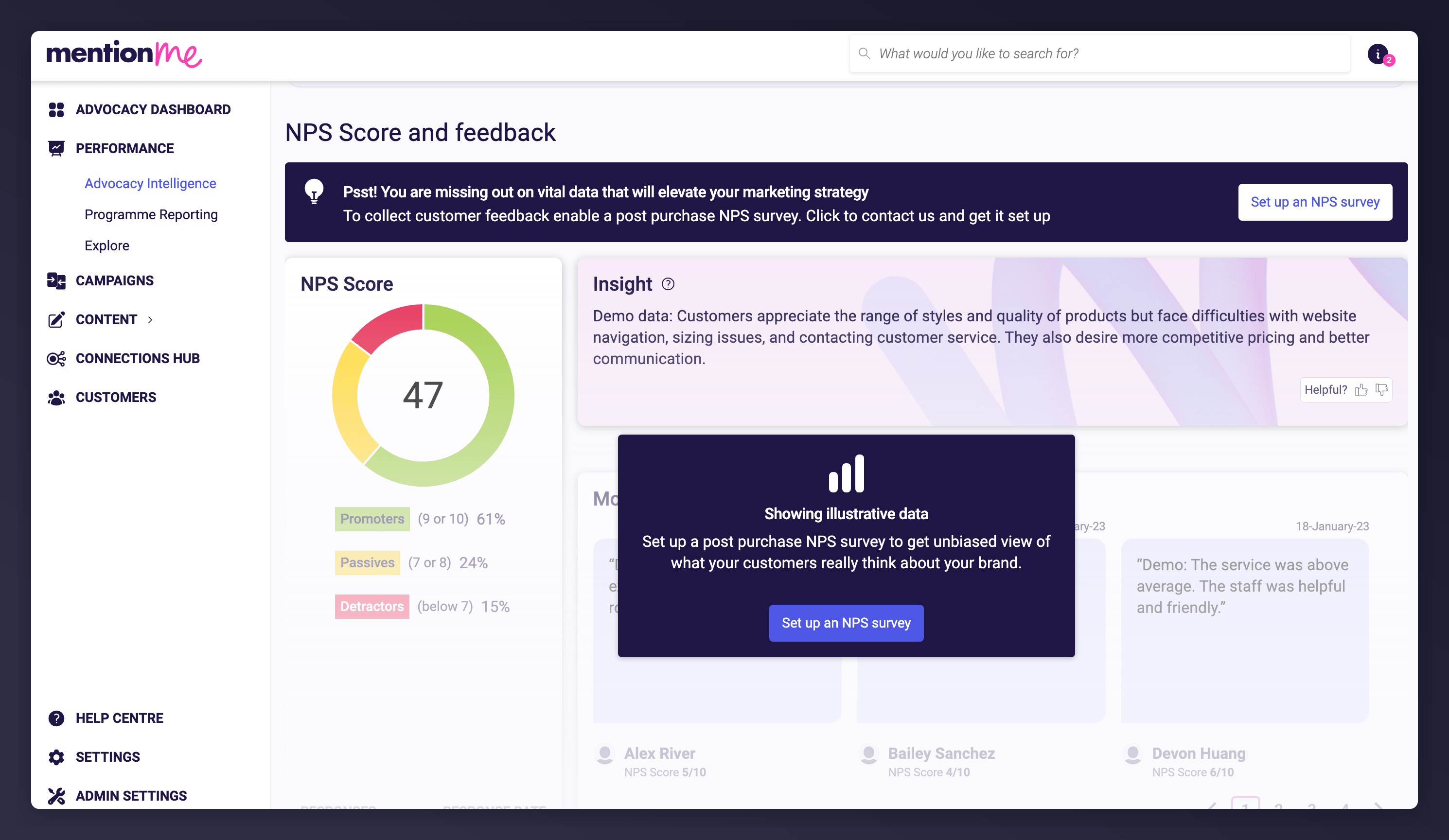
Go to **Performance > Advocacy Intelligence** in the left-hand navigation.
Select **Sentiment Analysis** from the top navigation.
Scroll down to the "NPS score and feedback" section and click **Set up an NPS survey**. This opens a wizard that guides you through the steps to get the NPS survey live. Setup should take around 3 minutes.
 ## Estimating Time Until AI Insights Are Available
When setting up an NPS survey, you need to balance populating your dashboard quickly against the impact on your referral scheme.
20 responses of at least three words are required to produce AI insights. The platform estimates this timeline based on:
* Predicted monthly returning customers
* The percentage split selected during survey setup
* Historical response rate data from other merchants
## Estimating Time Until AI Insights Are Available
When setting up an NPS survey, you need to balance populating your dashboard quickly against the impact on your referral scheme.
20 responses of at least three words are required to produce AI insights. The platform estimates this timeline based on:
* Predicted monthly returning customers
* The percentage split selected during survey setup
* Historical response rate data from other merchants
 ### Impact on Referrals
Customers who see a survey before a referral offer are slightly less likely to refer (about 80% of typical conversion rate). During setup, you can set the NPS threshold for seeing a referral offer to either **7 or above** or **9 or above**. The recommendation is **7 or above** to maximise the number of customers who see referral.
Customers who leave a low NPS score are generally not shown a referral offer, as seeing one after leaving a low score can make the customer feel unheard.
### Impact on Referrals
Customers who see a survey before a referral offer are slightly less likely to refer (about 80% of typical conversion rate). During setup, you can set the NPS threshold for seeing a referral offer to either **7 or above** or **9 or above**. The recommendation is **7 or above** to maximise the number of customers who see referral.
Customers who leave a low NPS score are generally not shown a referral offer, as seeing one after leaving a low score can make the customer feel unheard.
