> ## Documentation Index
> Fetch the complete documentation index at: https://docs.mention-me.com/llms.txt
> Use this file to discover all available pages before exploring further.
# Extended Customer Revenue (ECR)
> Understanding Extended Customer Revenue -- how ECR measures the full value of advocates, including segments, performance tracking, predicted data, and subscription considerations.
## What is Extended Customer Revenue?
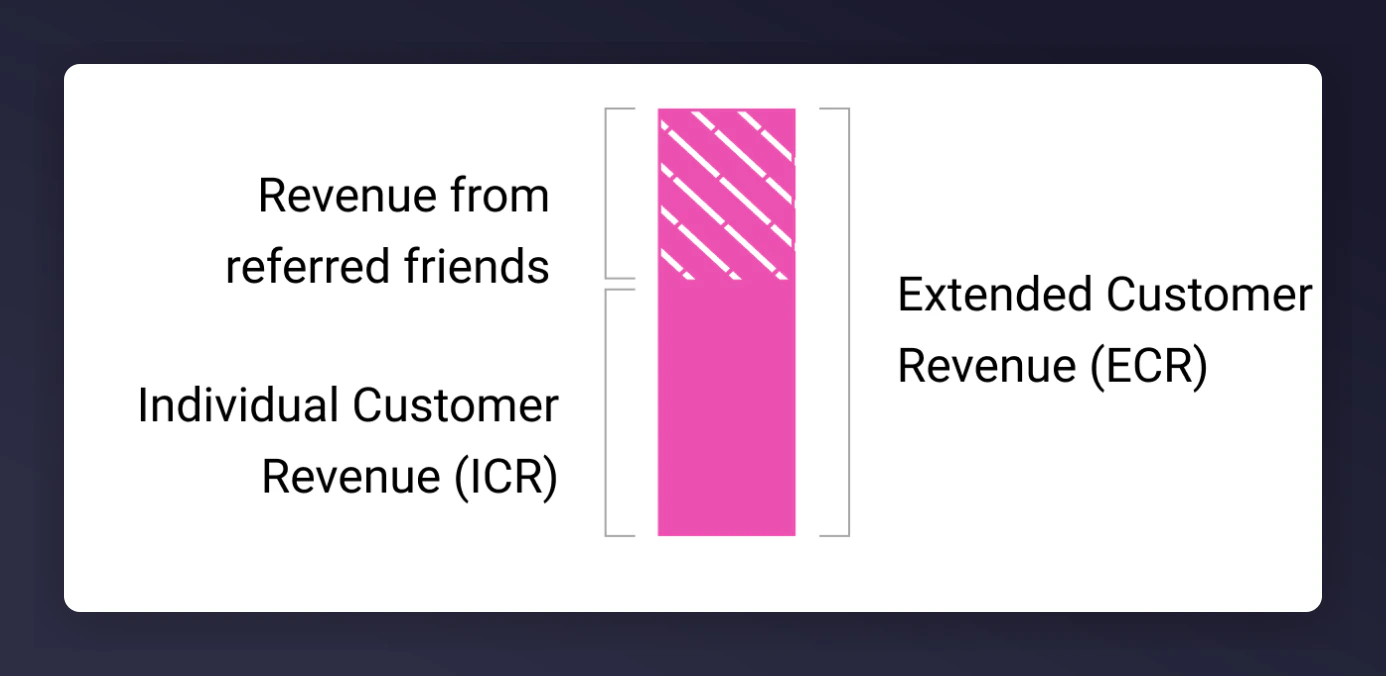
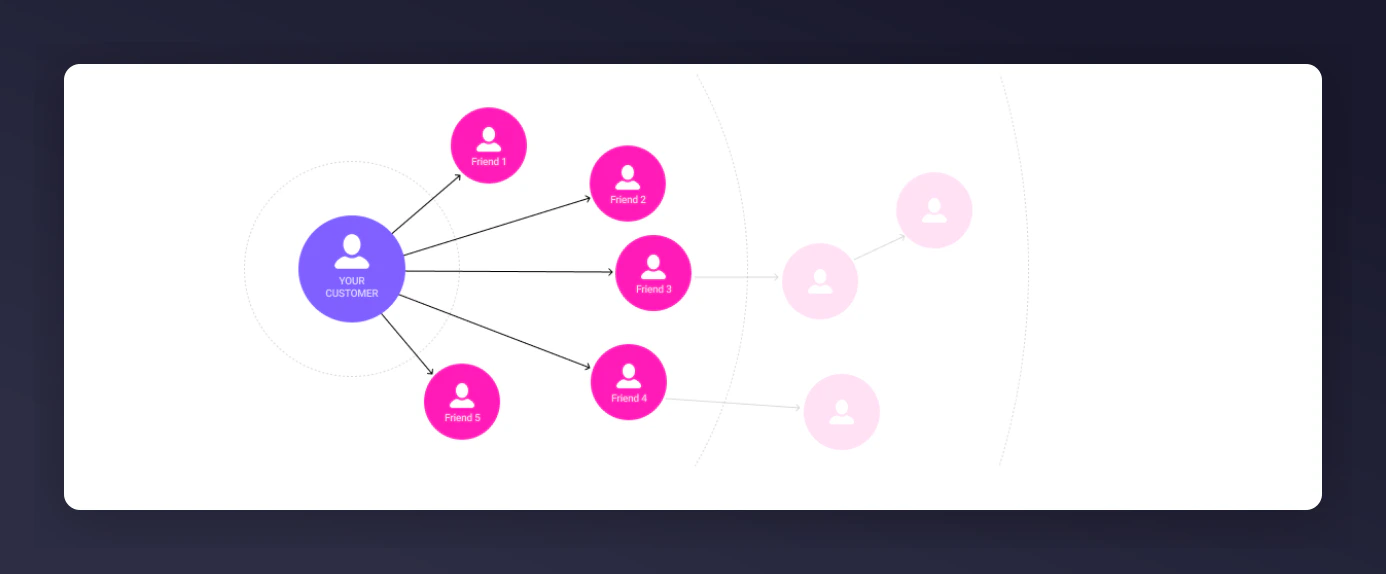
Extended Customer Revenue (ECR) is the revenue a customer spends (their Individual Customer Revenue, or ICR) plus the revenue generated by their referred friends.
 ## Why is ECR Important?
Brands that only focus on their highest spenders could be missing out on their most valuable customers: their brand advocates. ECR allows you to track the additional revenue brought by customers who refer their friends, revealing previously unrecognised value.
## Why is ECR Important?
Brands that only focus on their highest spenders could be missing out on their most valuable customers: their brand advocates. ECR allows you to track the additional revenue brought by customers who refer their friends, revealing previously unrecognised value.
 ## ECR Performance
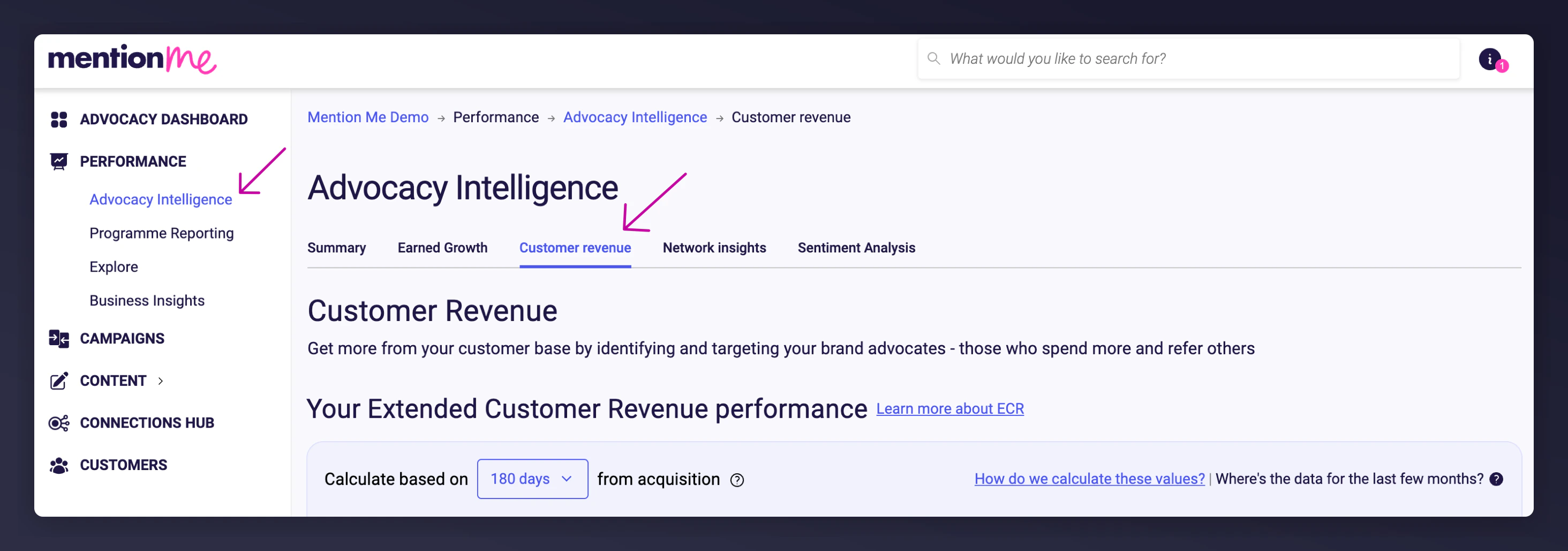
To view ECR performance, navigate to the **Customer Revenue** page in the Performance section of the [Mention Me platform](https://mention-me.com/login?).
### The Acquisition Filter
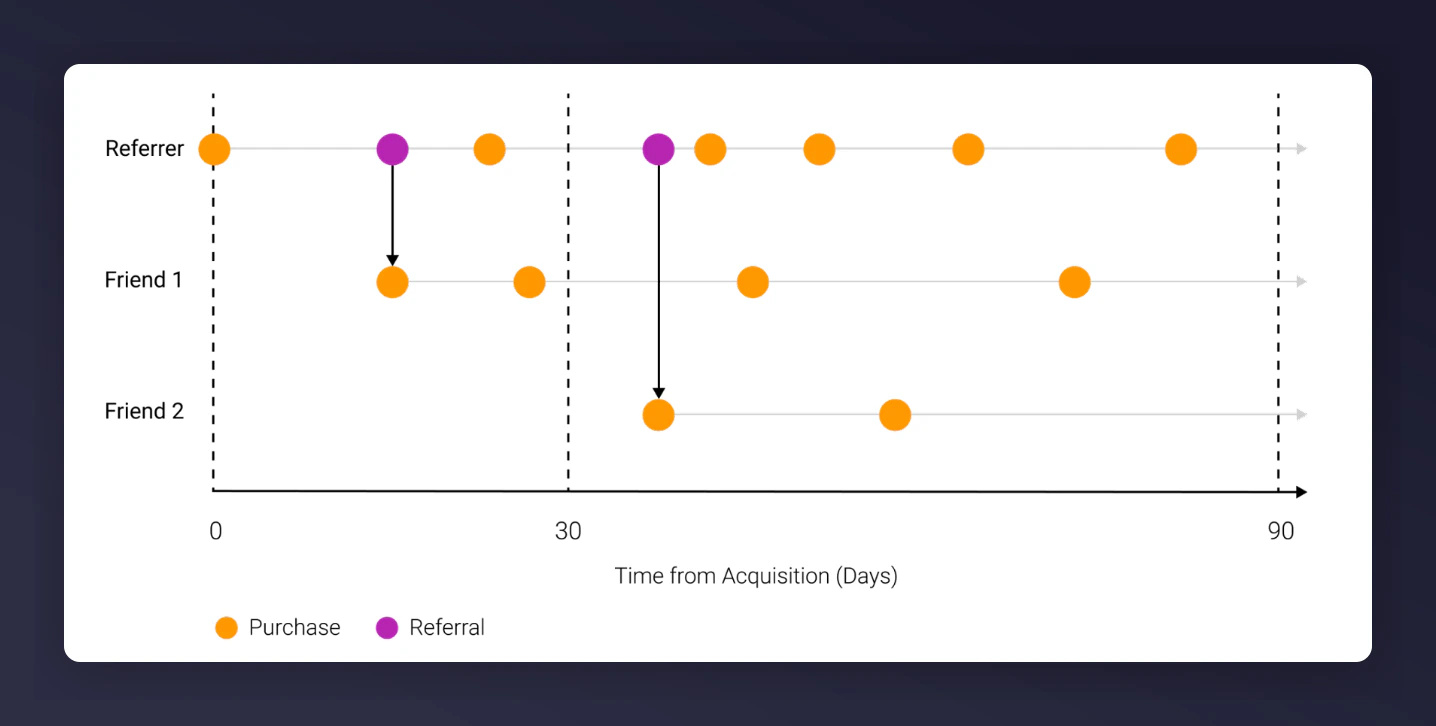
The acquisition filter determines the time period for calculating individual spend and referred friend spend, starting from the acquisition date of the original customer. You can select 30, 90, or 180 day periods.
The longer the time period, the more time there is for the original customer to make additional purchases and refer more friends, and for those friends to purchase.
## ECR Performance
To view ECR performance, navigate to the **Customer Revenue** page in the Performance section of the [Mention Me platform](https://mention-me.com/login?).
### The Acquisition Filter
The acquisition filter determines the time period for calculating individual spend and referred friend spend, starting from the acquisition date of the original customer. You can select 30, 90, or 180 day periods.
The longer the time period, the more time there is for the original customer to make additional purchases and refer more friends, and for those friends to purchase.
 ### Reading the Chart
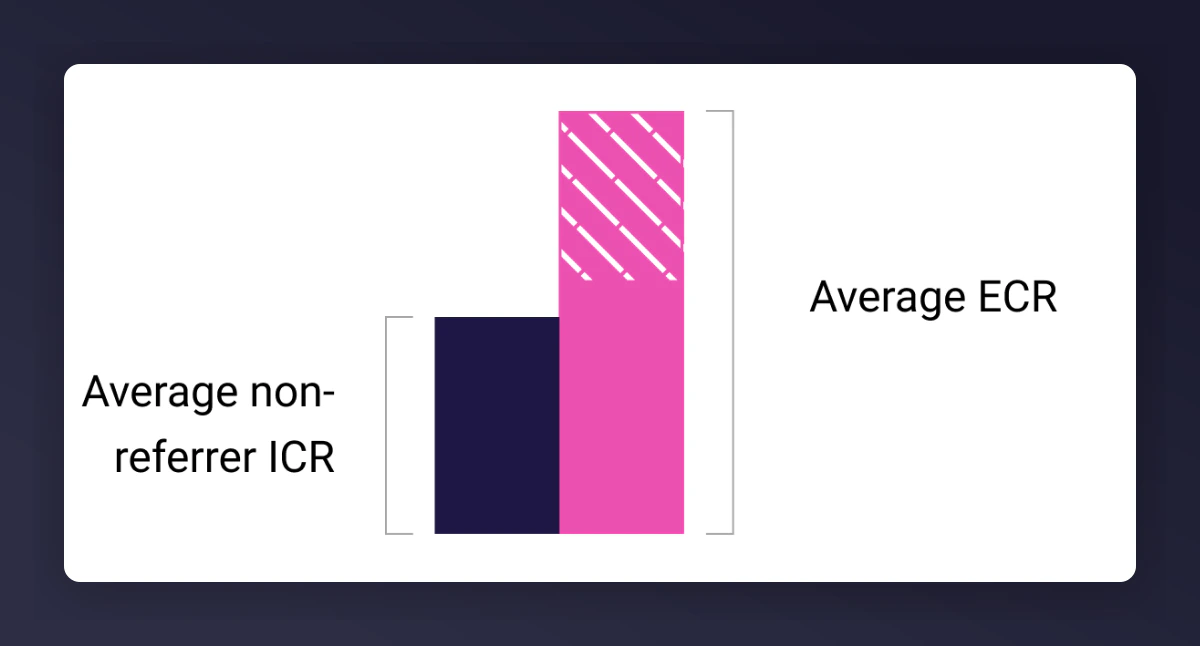
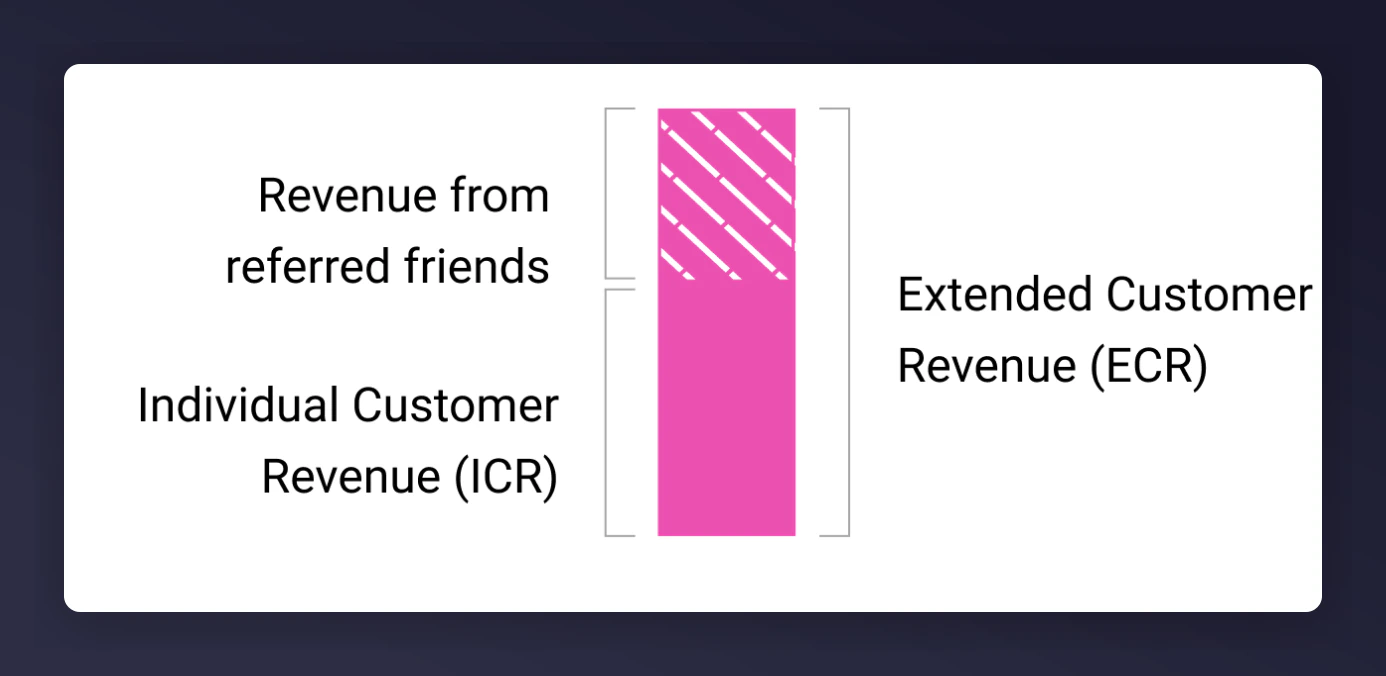 * **Solid pink bar**: The amount customers spend within the selected time period from their first purchase (Individual Customer Revenue / ICR).
* **Shaded pink bar**: Revenue from referred friends within the selected time period.
* **Navy bar**: Individual revenue of non-referrers.
These values are grouped by acquisition month so you can track changes over time.
* **Solid pink bar**: The amount customers spend within the selected time period from their first purchase (Individual Customer Revenue / ICR).
* **Shaded pink bar**: Revenue from referred friends within the selected time period.
* **Navy bar**: Individual revenue of non-referrers.
These values are grouped by acquisition month so you can track changes over time.
 ## High, Medium, and Low ECR Segments
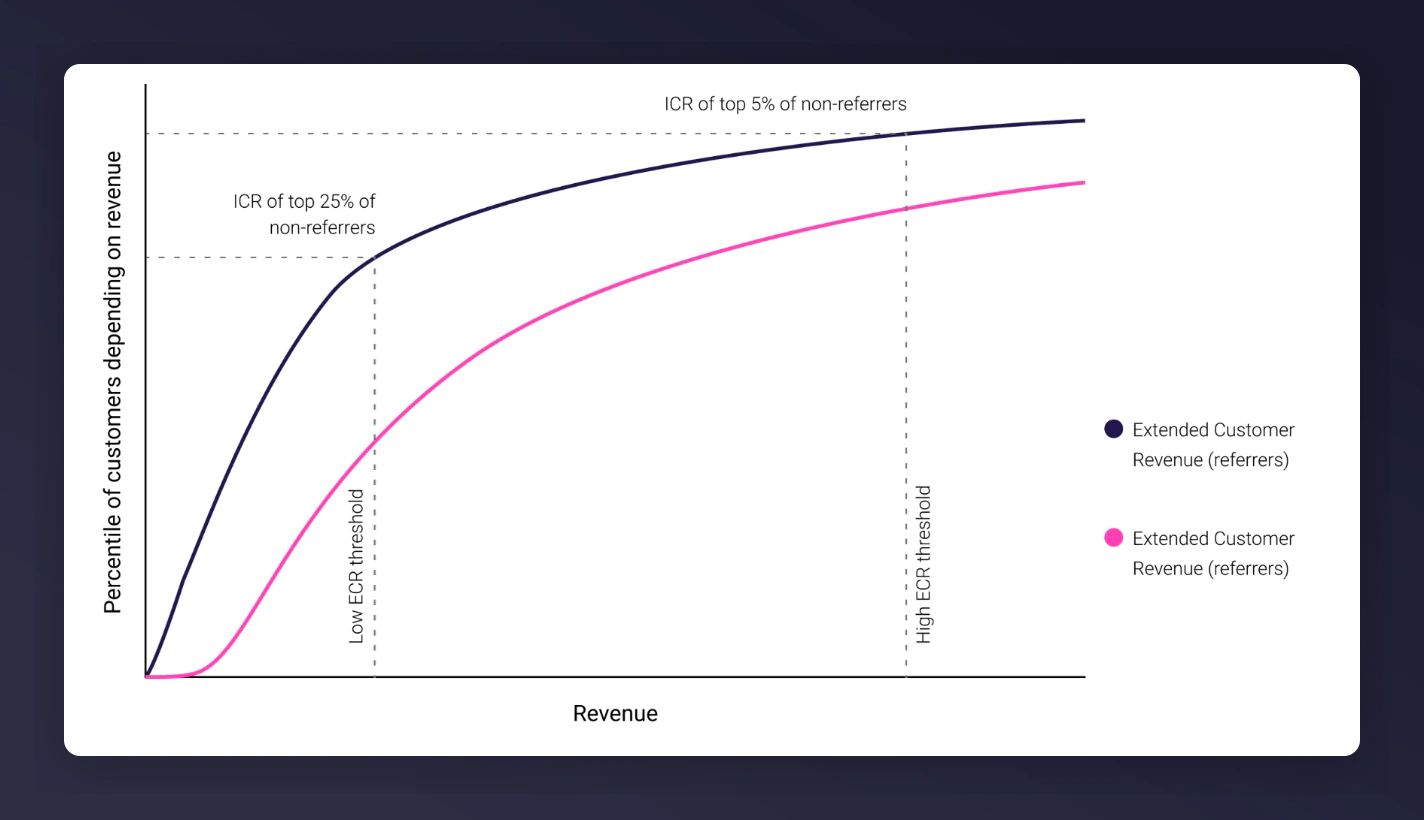
Customers and referrers are segmented into three buckets based on their ECR:
### High ECR Customers
Threshold calculated using the revenue brought by your top 5% non-referring customers.
### Medium ECR Customers
Lower threshold based on your top 25% non-referring customers; upper threshold based on the top 5%.
### Low ECR Customers
Threshold calculated using the revenue brought by your top 25% non-referring customers.
## High, Medium, and Low ECR Segments
Customers and referrers are segmented into three buckets based on their ECR:
### High ECR Customers
Threshold calculated using the revenue brought by your top 5% non-referring customers.
### Medium ECR Customers
Lower threshold based on your top 25% non-referring customers; upper threshold based on the top 5%.
### Low ECR Customers
Threshold calculated using the revenue brought by your top 25% non-referring customers.
 ### Finding Your ECR Values
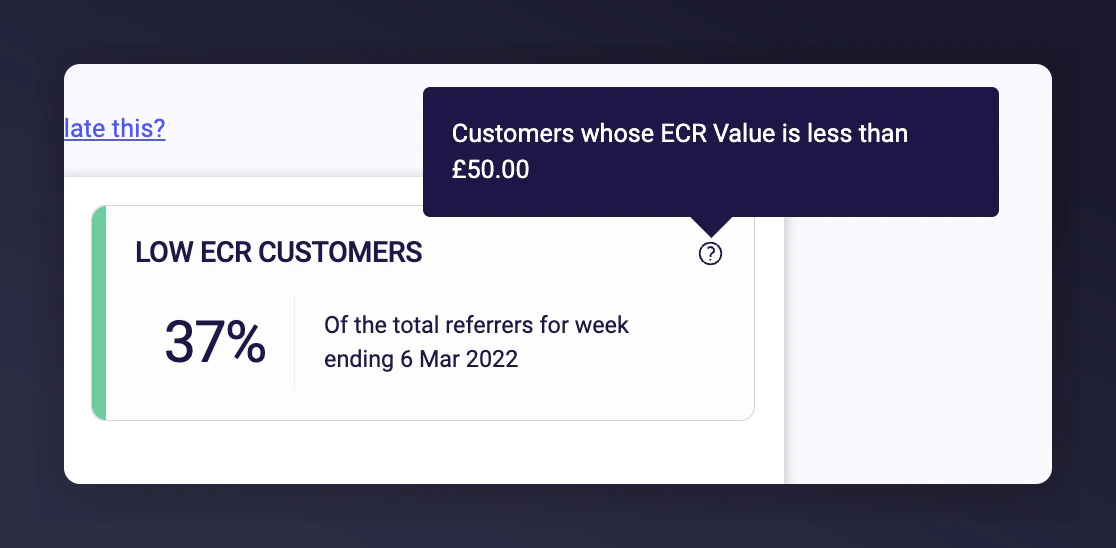
The tooltip on the tile shows your ECR value.
### Finding Your ECR Values
The tooltip on the tile shows your ECR value.
 ### Downloading Customer Segments
This feature is only available on the Optimise, Advanced, or Ultimate package.
Click the **Download customer segments** dropdown in the "Breakdown of your referrers by ECR" section.
### Downloading Customer Segments
This feature is only available on the Optimise, Advanced, or Ultimate package.
Click the **Download customer segments** dropdown in the "Breakdown of your referrers by ECR" section.
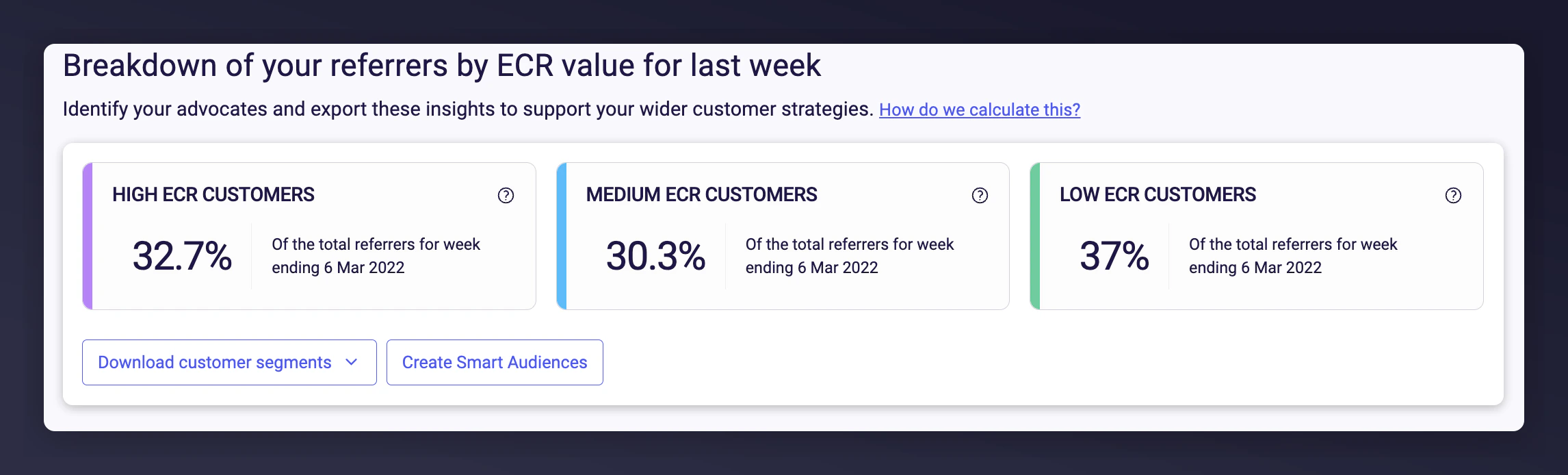 Select the segments you want to download and click **Generate**.
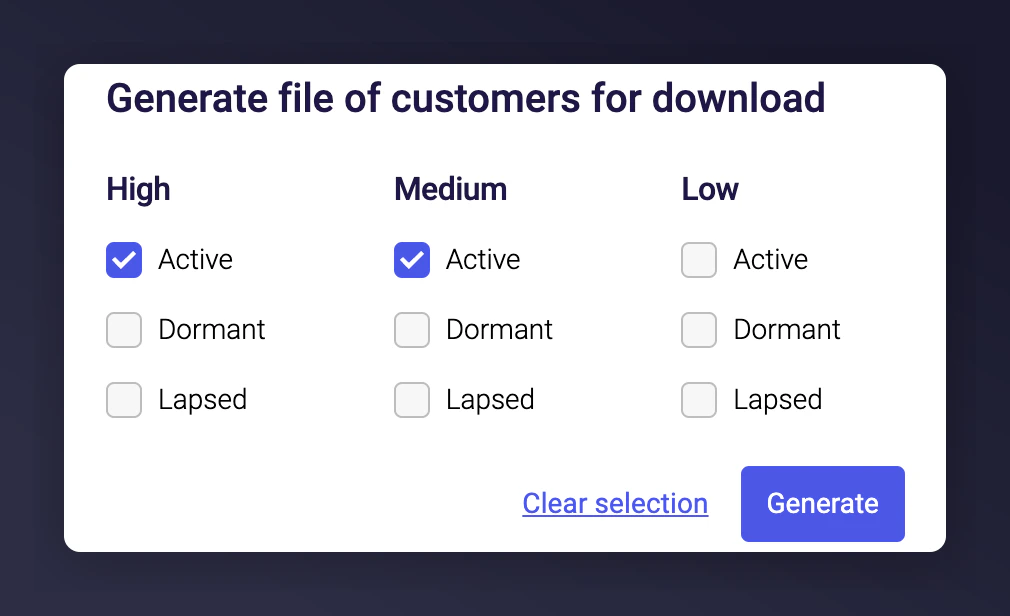 A CSV file with the relevant data will be emailed to you within 15 minutes.
### Active, Dormant, and Lapsed Periods
The active/dormant/lapsed time periods are unique to your business, based on your customers' purchase cycles. You can see the exact values in the "How we've defined Active, Dormant and Lapsed" table at the bottom of the page.
For a customer to fall into active, dormant, or lapsed, they must make either a purchase or a referral within the specified time period.
The periods are calculated using the cumulative sum of subsequent orders in relation to time since the previous order, as a proxy for the average probability of repeat purchases. The Dormant and Lapsed states are found at the intersection of the probability curves with specific statistical thresholds.
## Predicted ECR
Predicted ECR requires the Optimise, Advanced, or Ultimate package.
Predicted ECR is a machine learning model designed to forecast how advocacy is likely to evolve over the next 12 months within your existing customer base.
You can use Predicted ECR to see:
* Which fans are likely to keep advocating
* Which fans are likely to stop advocating
* Who your future advocates are likely to be
### How it is Calculated
Historical patterns are used to predict customer lapsing, purchase, and referral behaviour in the next 12 months. This gives personalised propensities for each customer, enabling calculation of how the make-up of your base might change. The prediction takes into account recency, frequency, and value (RFV) for both orders and referrals.
### Viewing Predicted Advocacy Shift
Navigate to **Advocacy Intelligence -> Customer Revenue** and scroll down past the current ECR breakdown.
A CSV file with the relevant data will be emailed to you within 15 minutes.
### Active, Dormant, and Lapsed Periods
The active/dormant/lapsed time periods are unique to your business, based on your customers' purchase cycles. You can see the exact values in the "How we've defined Active, Dormant and Lapsed" table at the bottom of the page.
For a customer to fall into active, dormant, or lapsed, they must make either a purchase or a referral within the specified time period.
The periods are calculated using the cumulative sum of subsequent orders in relation to time since the previous order, as a proxy for the average probability of repeat purchases. The Dormant and Lapsed states are found at the intersection of the probability curves with specific statistical thresholds.
## Predicted ECR
Predicted ECR requires the Optimise, Advanced, or Ultimate package.
Predicted ECR is a machine learning model designed to forecast how advocacy is likely to evolve over the next 12 months within your existing customer base.
You can use Predicted ECR to see:
* Which fans are likely to keep advocating
* Which fans are likely to stop advocating
* Who your future advocates are likely to be
### How it is Calculated
Historical patterns are used to predict customer lapsing, purchase, and referral behaviour in the next 12 months. This gives personalised propensities for each customer, enabling calculation of how the make-up of your base might change. The prediction takes into account recency, frequency, and value (RFV) for both orders and referrals.
### Viewing Predicted Advocacy Shift
Navigate to **Advocacy Intelligence -> Customer Revenue** and scroll down past the current ECR breakdown.
 The Sankey chart visualises what is expected to happen in a year's time to your existing customers, showing movement between segments.
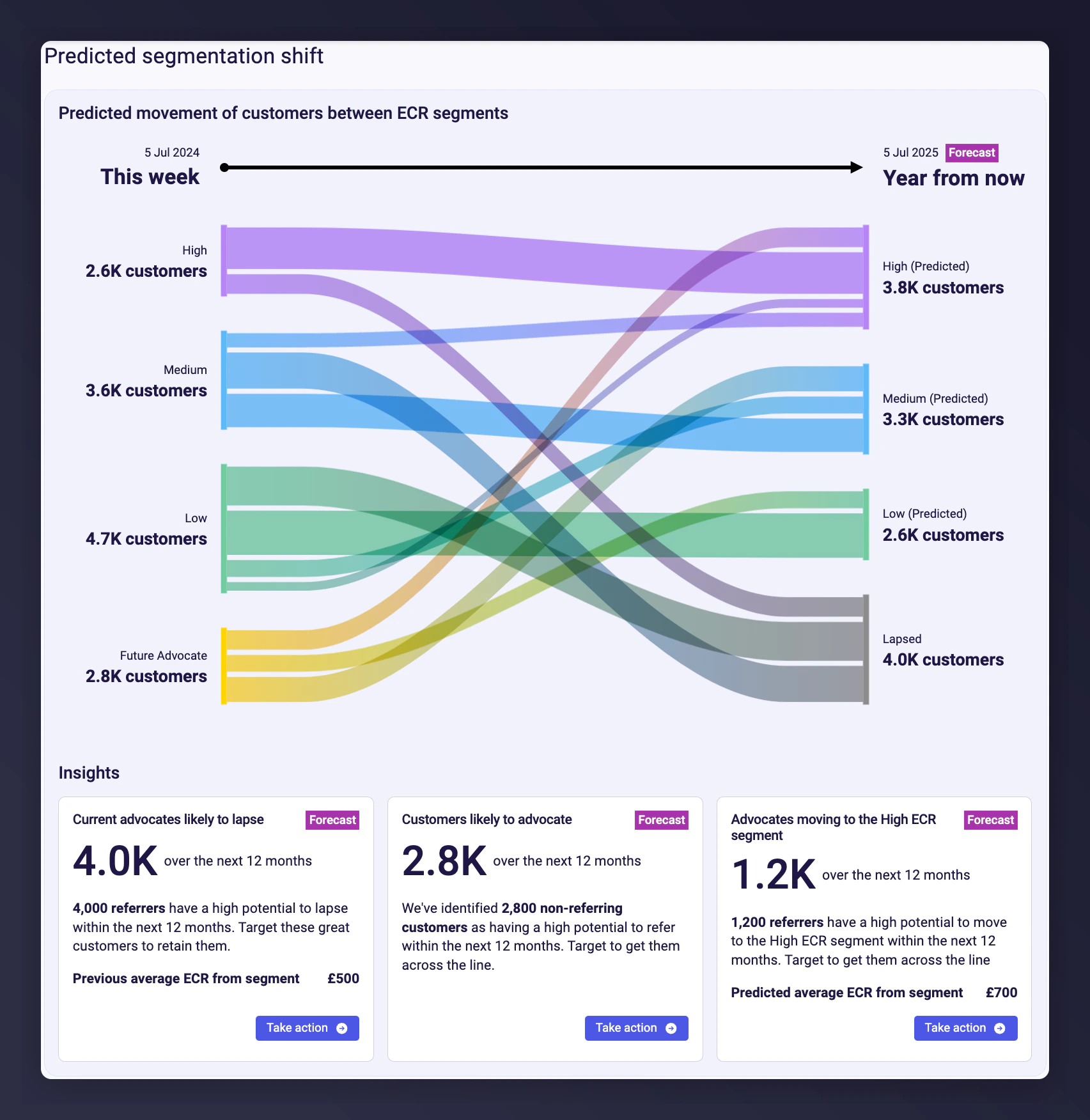 Predictions are only for existing customers. New customers acquired in the next 12 months are not included since there is no data to predict from.
### Key Predicted Segments
Predictions are only for existing customers. New customers acquired in the next 12 months are not included since there is no data to predict from.
### Key Predicted Segments
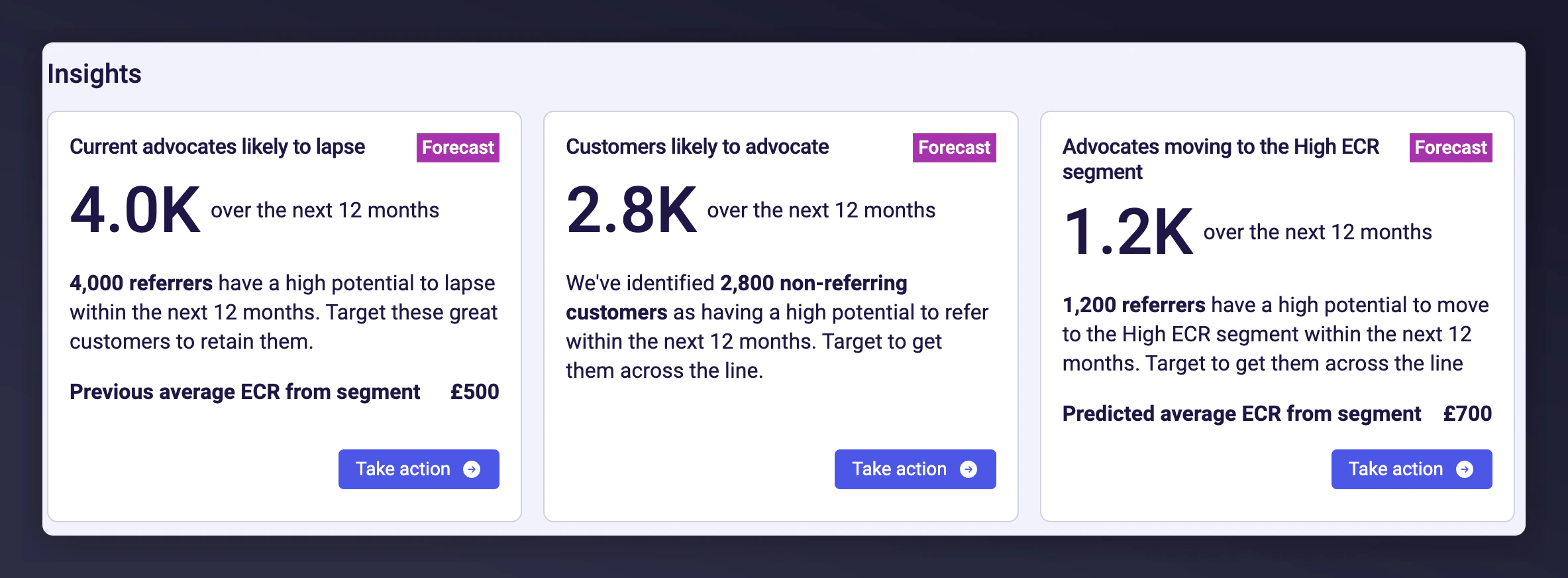 Click **Take Action** to download the customers in these segments:
1. **Future Advocates**: Most likely to advocate this year. Target with calls to action.
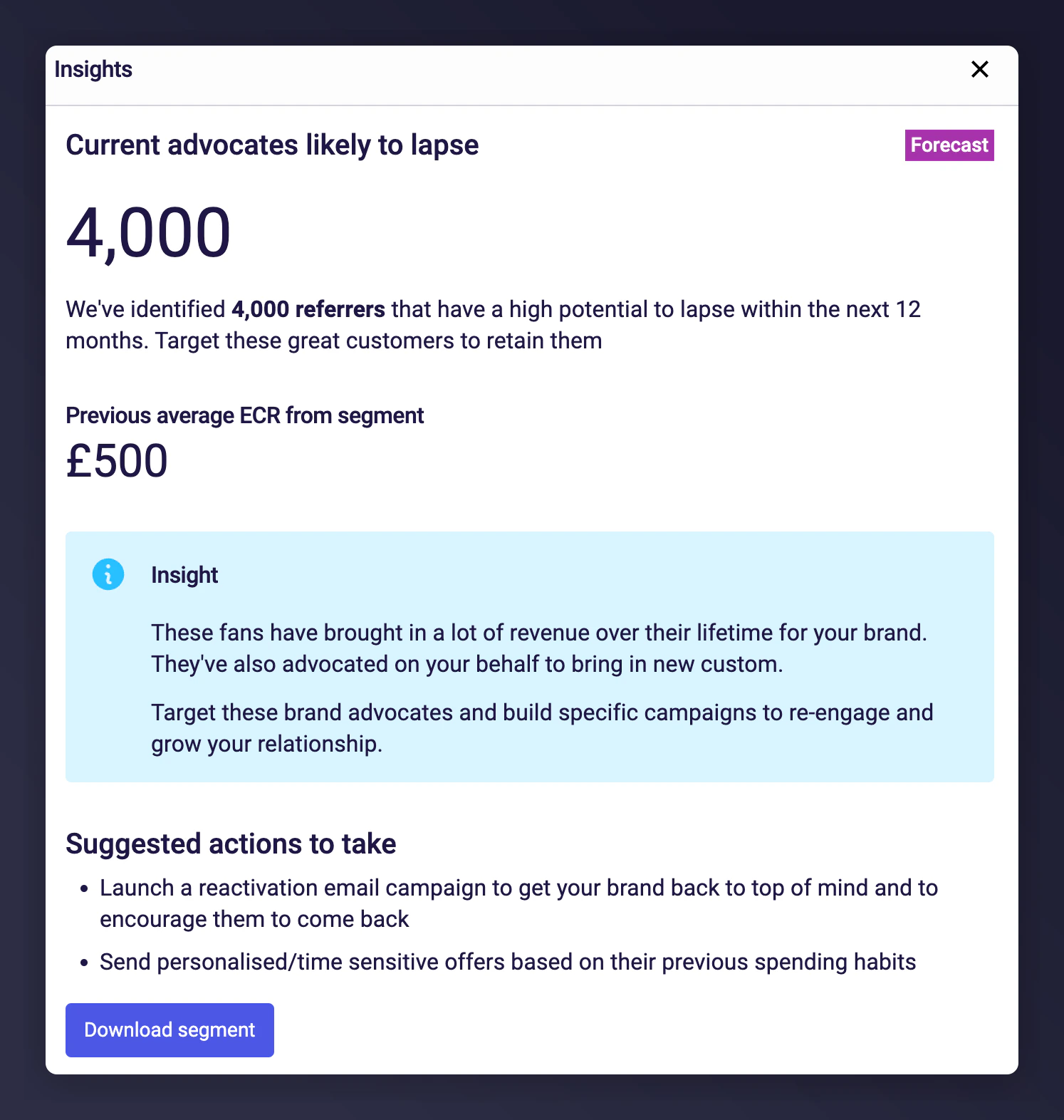
2. **Likely to Lapse**: Predicted to stop purchasing or referring. Target with reactivation campaigns.
3. **Future High Advocates**: Your most valuable advocates. Give them a great experience to maintain advocacy.
Click **Take Action** to download the customers in these segments:
1. **Future Advocates**: Most likely to advocate this year. Target with calls to action.
2. **Likely to Lapse**: Predicted to stop purchasing or referring. Target with reactivation campaigns.
3. **Future High Advocates**: Your most valuable advocates. Give them a great experience to maintain advocacy.
 ### Data Requirements for Predicted ECR
* At least 100k customers (distinct emails) in your data
* 3 years (no gaps) of order data
* 90 days of referral data
* Predictions for subscription businesses are not currently supported
## Subscription Data for ECR
If your business model is subscription-based (or partly so), additional data is needed to get full value from ECR, Network Insights, and Earned Growth. The existing tag integration only captures the initial purchase or signup, meaning subsequent subscription revenue is not visible.
### What is Needed
Send each renewal as a new order so that modelling can calculate the true value of a customer and their referrals.
### Next steps
Provide subscription orders not captured through tags (e.g. renewals).
Then set up a regular SFTP transfer of those orders on a daily or weekly basis. Check your Integration Instructions for SFTP setup guides, or reach out via the [help form](https://help.mention-me.com/hc/en-gb/requests/new).
## FAQ
### What package is required?
* ECR charts are available on any package.
* Predicted ECR and segment downloads require Optimise, Advanced, or Ultimate.
### How do I provide feedback?
Contact our [support team](https://help.mention-me.com/hc/en-gb/requests/new).
### Data Requirements for Predicted ECR
* At least 100k customers (distinct emails) in your data
* 3 years (no gaps) of order data
* 90 days of referral data
* Predictions for subscription businesses are not currently supported
## Subscription Data for ECR
If your business model is subscription-based (or partly so), additional data is needed to get full value from ECR, Network Insights, and Earned Growth. The existing tag integration only captures the initial purchase or signup, meaning subsequent subscription revenue is not visible.
### What is Needed
Send each renewal as a new order so that modelling can calculate the true value of a customer and their referrals.
### Next steps
Provide subscription orders not captured through tags (e.g. renewals).
Then set up a regular SFTP transfer of those orders on a daily or weekly basis. Check your Integration Instructions for SFTP setup guides, or reach out via the [help form](https://help.mention-me.com/hc/en-gb/requests/new).
## FAQ
### What package is required?
* ECR charts are available on any package.
* Predicted ECR and segment downloads require Optimise, Advanced, or Ultimate.
### How do I provide feedback?
Contact our [support team](https://help.mention-me.com/hc/en-gb/requests/new).