> ## Documentation Index
> Fetch the complete documentation index at: https://docs.mention-me.com/llms.txt
> Use this file to discover all available pages before exploring further.
# How to Check Your Reward Validity Period
> Find the referrer and referee offer validity period for any campaign in the Mention Me platform.
Validity periods can vary between campaigns and between experiments, so it's worth checking the current setting before you plan a voucher upload or a promotion.
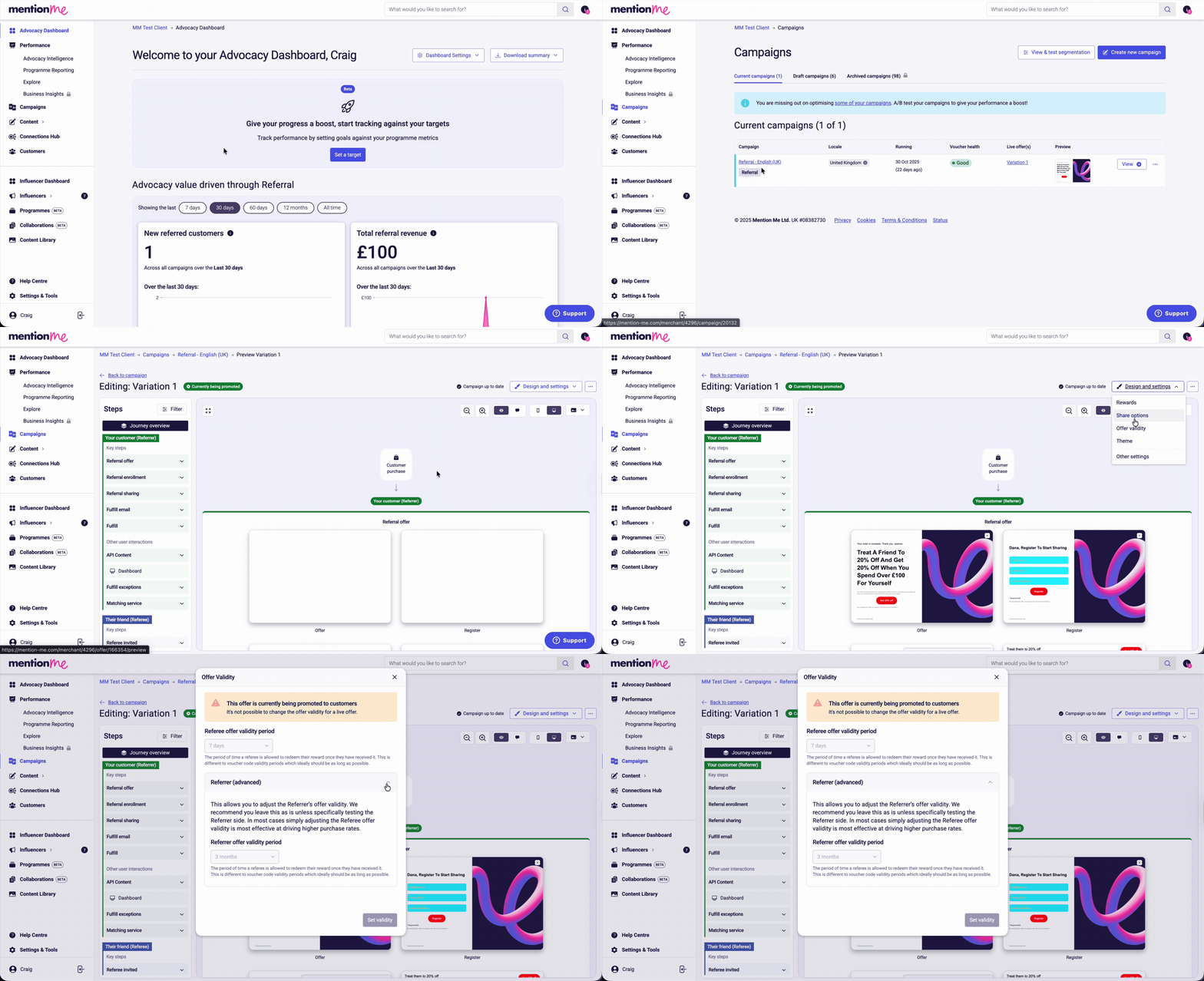
Click **Campaigns**.
Click the name of the campaign you want to review.
Click **Preview / Edit**.
Click **Design and settings**.
Click **Offer validity**. The Referee offer validity period is displayed immediately. Click the down arrow to see the Referrer offer validity period.
 ## Related Articles
What validity periods control and how they're set.
Add a batch of voucher codes for use as rewards.
Push back the expiry date on vouchers already issued.
## Related Articles
What validity periods control and how they're set.
Add a batch of voucher codes for use as rewards.
Push back the expiry date on vouchers already issued.