> ## Documentation Index
> Fetch the complete documentation index at: https://docs.mention-me.com/llms.txt
> Use this file to discover all available pages before exploring further.
# Promotion Points & Situation Parameters
> Track promotion performance using situation parameters on referral URLs and analyse effectiveness via the Promotion Points report.
## How It Works
Mention Me allows you to track promotion performance using `situation` parameters added to referral touchpoint URLs. This enables you to compare the effectiveness of various marketing channels via the **Promotion Points** report.
## The Basics
Use the `?situation=` parameter on your referral URLs to define where the touchpoint took place.
```
https://www.yoursite.com/refer-a-friend?situation=homepage_header
```
This will appear as **homepage\_header** in your reports.
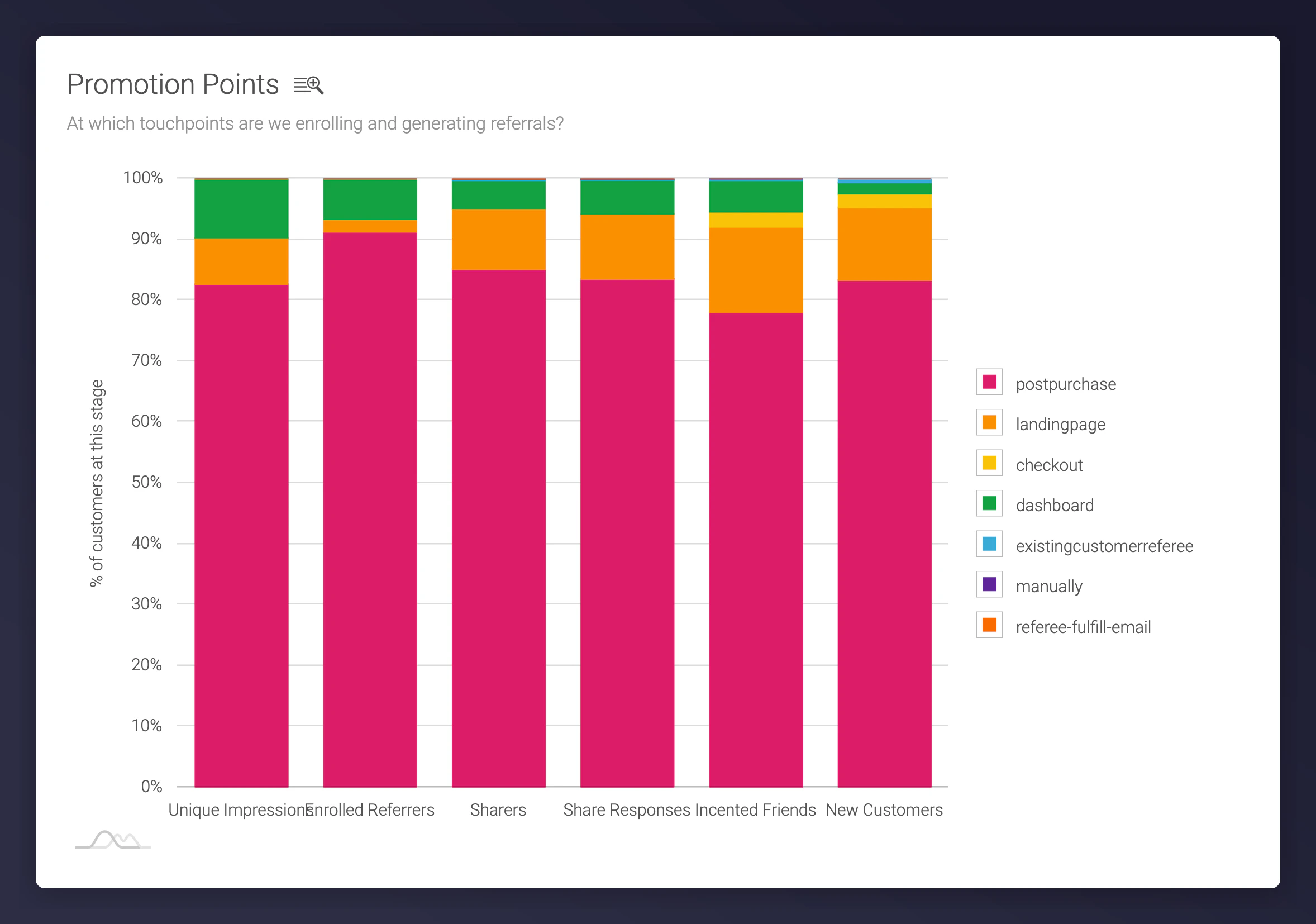
To view performance, go to **Reporting > Conversion & Funnel > Promotion Points** in the Mention Me portal.
 ## Default Promotion Points
Common default situation parameters used within the system:
* **postpurchase:** Customer sees the offer post-checkout
* **landingpage:** Promo triggered from dedicated landing page
* **dashboard:** Customer accesses dashboard directly
* **dashboard-register:** Redirected to offer page (no active campaign)
* **dashboard-first-time-register:** Registered and redirected to dashboard
* **manually:** Customer added manually (e.g. via support)
* **externallink:** Referral initiated via static URL (e.g. blog or FAQ page)
* **\[x]-parallel-campaign:** User enrolled in parallel campaigns
* **batch-enrolled:** Customer uploaded via batch import
* **tag-batch-register / tag-batch-register-silently:** Batch registered via CSV/tag
* **existingcustomerreferee:** Customer tries to refer themselves or is already a customer
* **checkout:** Catch-all when no referrer can be matched
## Creating Custom Promotion Points
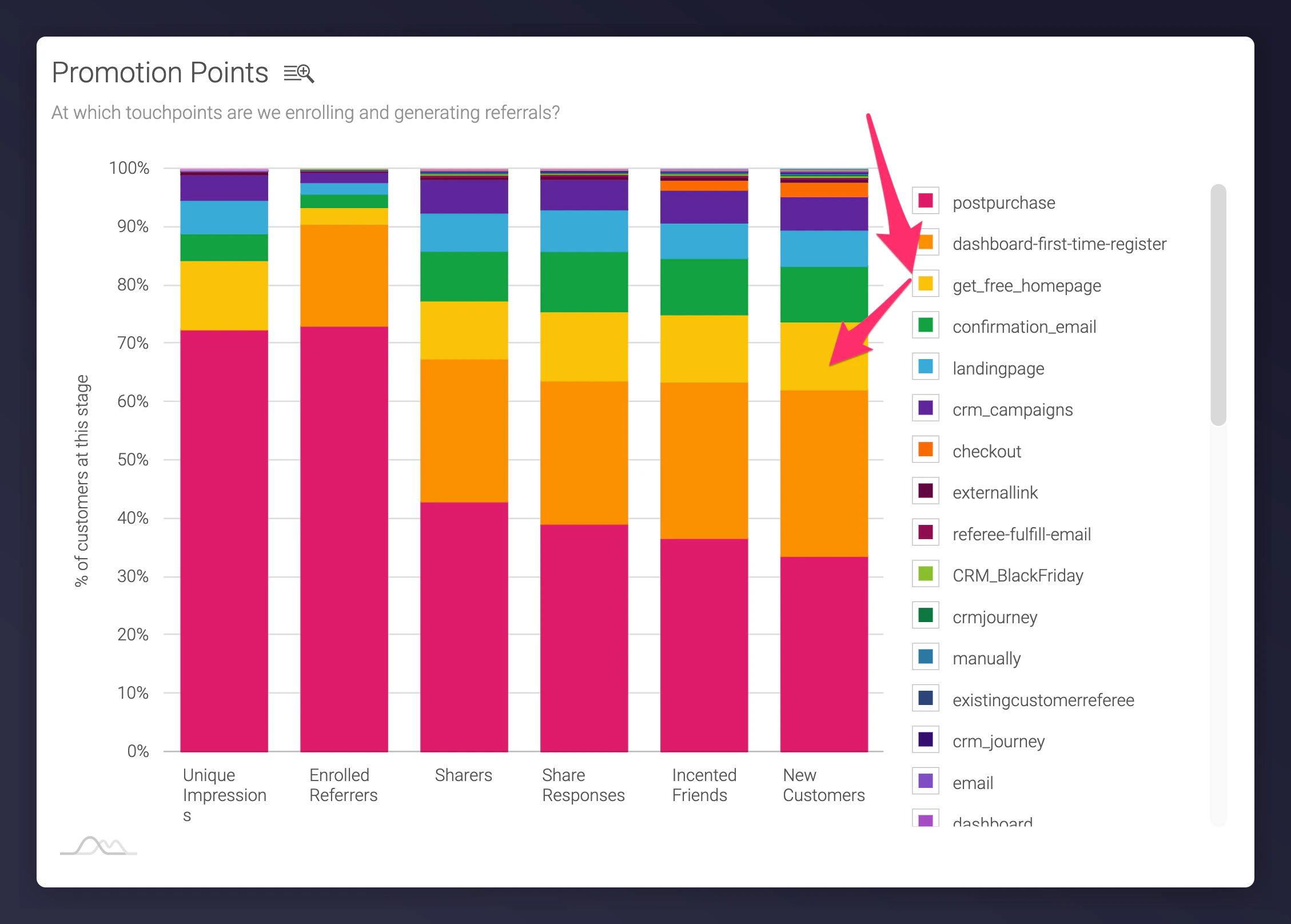
Tailor situation names to track specific emails, banners, page sections, and other promotional touchpoints:
```
.../refer-a-friend?situation=get_free_homepage
```
## Default Promotion Points
Common default situation parameters used within the system:
* **postpurchase:** Customer sees the offer post-checkout
* **landingpage:** Promo triggered from dedicated landing page
* **dashboard:** Customer accesses dashboard directly
* **dashboard-register:** Redirected to offer page (no active campaign)
* **dashboard-first-time-register:** Registered and redirected to dashboard
* **manually:** Customer added manually (e.g. via support)
* **externallink:** Referral initiated via static URL (e.g. blog or FAQ page)
* **\[x]-parallel-campaign:** User enrolled in parallel campaigns
* **batch-enrolled:** Customer uploaded via batch import
* **tag-batch-register / tag-batch-register-silently:** Batch registered via CSV/tag
* **existingcustomerreferee:** Customer tries to refer themselves or is already a customer
* **checkout:** Catch-all when no referrer can be matched
## Creating Custom Promotion Points
Tailor situation names to track specific emails, banners, page sections, and other promotional touchpoints:
```
.../refer-a-friend?situation=get_free_homepage
```
 ## How to Structure Situation Parameters
Use consistent and descriptive naming:
```
main-touchpoint_secondary-touchpoint_optional-extra
```
### Main Touchpoints
* Homepage
* Email
* Social
* Other
### Recommended Secondary Touchpoints
* **Homepage:** Header, Footer, Banner
* **Email:** Newsletter, Lifecycle, Solus
* **Social:** Post, Ad
* **Other:** Insert, Catalogue, Direct Mail
### Examples
* `situation=homepage_header`
* `situation=email_newsletter_lapsedcustomer`
* `situation=social_ad_facebook`
## Full Tracking URL Example
A fully tracked referral URL might include both the situation parameter and Google Analytics (UTM) tracking:
```
https://www.yoursite.com/refer-a-friend?situation=homepage_header&utm_source=mentionme&utm_medium=referral&utm_campaign=referafriend
```
## Integrating Google Analytics Parameters
For deeper insight, combine Mention Me tracking with your own GA setup. Append `utm_source`, `utm_medium`, and `utm_campaign` to referral URLs.
[Read the Google Analytics integration guide here.](/knowledge/tags/google-analytics)
## How to Structure Situation Parameters
Use consistent and descriptive naming:
```
main-touchpoint_secondary-touchpoint_optional-extra
```
### Main Touchpoints
* Homepage
* Email
* Social
* Other
### Recommended Secondary Touchpoints
* **Homepage:** Header, Footer, Banner
* **Email:** Newsletter, Lifecycle, Solus
* **Social:** Post, Ad
* **Other:** Insert, Catalogue, Direct Mail
### Examples
* `situation=homepage_header`
* `situation=email_newsletter_lapsedcustomer`
* `situation=social_ad_facebook`
## Full Tracking URL Example
A fully tracked referral URL might include both the situation parameter and Google Analytics (UTM) tracking:
```
https://www.yoursite.com/refer-a-friend?situation=homepage_header&utm_source=mentionme&utm_medium=referral&utm_campaign=referafriend
```
## Integrating Google Analytics Parameters
For deeper insight, combine Mention Me tracking with your own GA setup. Append `utm_source`, `utm_medium`, and `utm_campaign` to referral URLs.
[Read the Google Analytics integration guide here.](/knowledge/tags/google-analytics)