> ## Documentation Index
> Fetch the complete documentation index at: https://docs.mention-me.com/llms.txt
> Use this file to discover all available pages before exploring further.
# How to Set Up Native Share
> Set up Native Share so referrers can share your referral offer through any app on their mobile device, including Instagram.
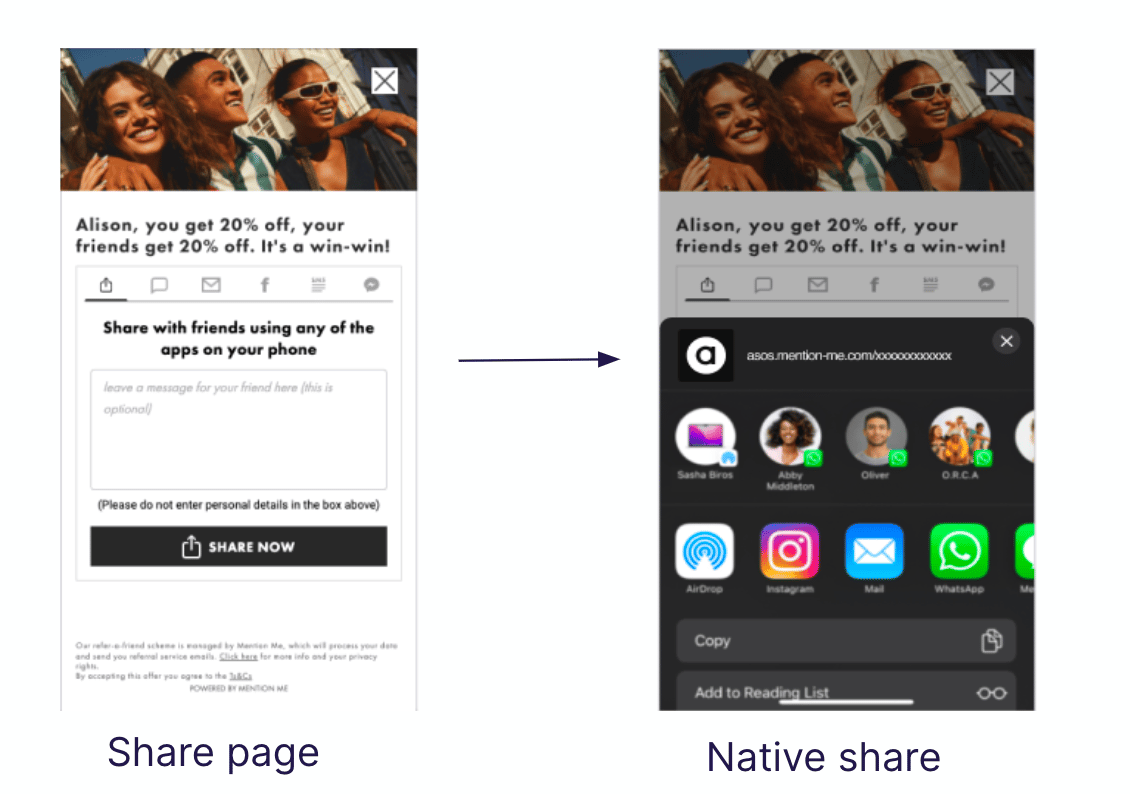
Native Share lets referrers share your referral offer through any app installed on their mobile device, including previously unsupported platforms such as Instagram. This guide covers what Native Share is, why it's worth testing, and how to set it up in a campaign.
## What Native Share Does
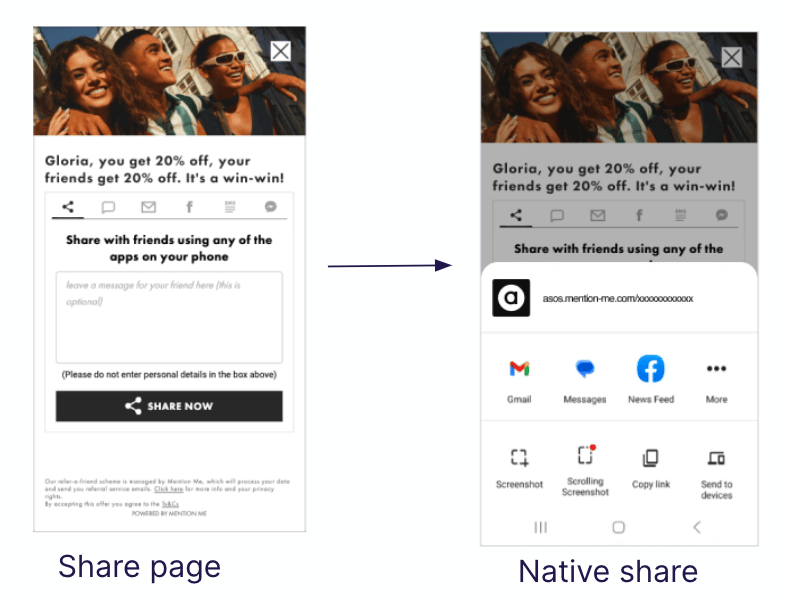
Native Share lets mobile users share your referral offer through any app installed on their device, including Instagram. It works on both iOS and Android.
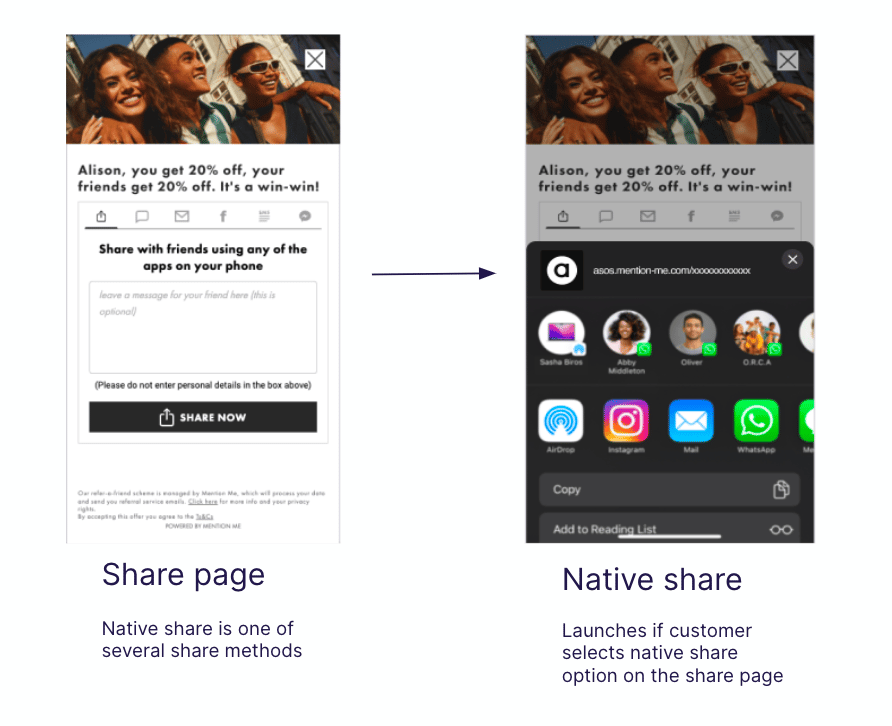 Native Share is available on mobile devices only. It cannot be used on desktop.
Native Share can:
* Boost sharing and conversions, with a typical lift of 5-15%
* Give referrers a personal message option to make shares more compelling
* Use built-in AI to analyse shared messages for customer insights and brand sentiment, see [Understanding How We Use AI](/knowledge/security/data-privacy/ai-and-data)
## Why Test Native Share
* It improves shareability on mobile, delivering 5-15% increases in share and conversion rates
* It supports all apps, expanding share channels to include Instagram and others
* It enables sentiment analysis through captured share messages, see [Understanding Sentiment Analysis](/knowledge/reporting/advocacy/sentiment-analysis)
## How to Set Up Native Share in a Campaign
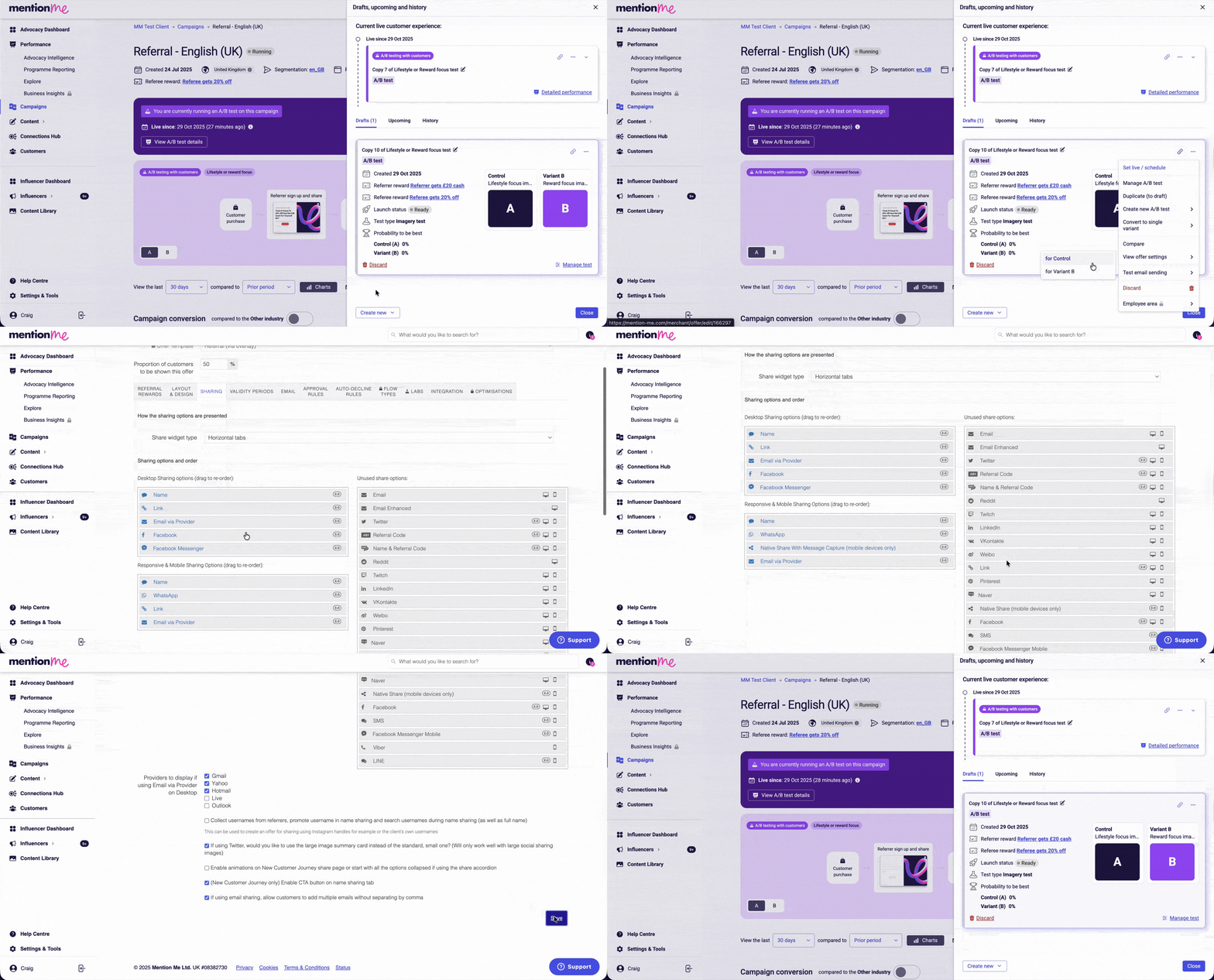
Click **Campaigns** in the main navigation, then click the name of the campaign you want to edit.
Click **Drafts, Upcoming & History**.
Click **experiment actions** (the three dots menu).
Duplicate the current experiment to a draft, or create a new A/B test using one of the variations.
Click **offer actions** (the three dots menu).
Select **View Offer Settings** and choose the variation you want to edit.
Click **Sharing**.
Drag **Native Share with Message Capture** into the active sharing options panel.
Move **Link** share into the inactive list.
Click **Save** to confirm your changes.
Native Share is available on mobile devices only. It cannot be used on desktop.
Native Share can:
* Boost sharing and conversions, with a typical lift of 5-15%
* Give referrers a personal message option to make shares more compelling
* Use built-in AI to analyse shared messages for customer insights and brand sentiment, see [Understanding How We Use AI](/knowledge/security/data-privacy/ai-and-data)
## Why Test Native Share
* It improves shareability on mobile, delivering 5-15% increases in share and conversion rates
* It supports all apps, expanding share channels to include Instagram and others
* It enables sentiment analysis through captured share messages, see [Understanding Sentiment Analysis](/knowledge/reporting/advocacy/sentiment-analysis)
## How to Set Up Native Share in a Campaign
Click **Campaigns** in the main navigation, then click the name of the campaign you want to edit.
Click **Drafts, Upcoming & History**.
Click **experiment actions** (the three dots menu).
Duplicate the current experiment to a draft, or create a new A/B test using one of the variations.
Click **offer actions** (the three dots menu).
Select **View Offer Settings** and choose the variation you want to edit.
Click **Sharing**.
Drag **Native Share with Message Capture** into the active sharing options panel.
Move **Link** share into the inactive list.
Click **Save** to confirm your changes.
 ## Preview and Verify Your Changes
### Preview the Changes
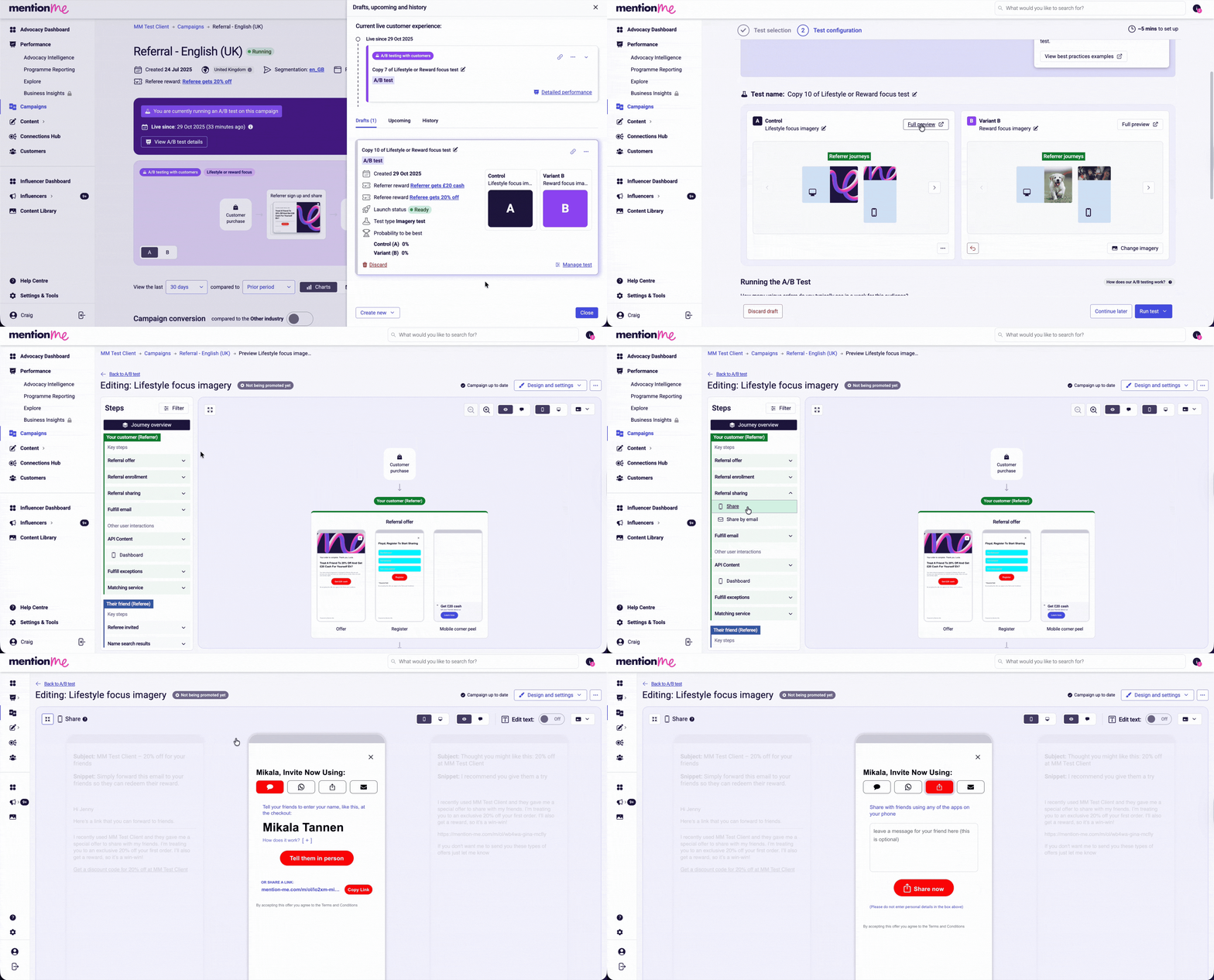
* Click **Manage Test**
* On the edited variation with Native Share applied, click **Full Preview**
* Expand and verify the share module
* Native Share automatically applies your current design
## Preview and Verify Your Changes
### Preview the Changes
* Click **Manage Test**
* On the edited variation with Native Share applied, click **Full Preview**
* Expand and verify the share module
* Native Share automatically applies your current design
 ### Verify Styling
* Check the mobile appearance in the preview
* Contact [Support](https://help.mention-me.com/hc/en-gb/requests/new) if anything looks incorrect
## Launch the Experiment
* Return to the draft overview
* Select **Run Test** and either set the experiment live immediately or schedule it for a later date and time
## Recommended Test Plan
| Test | Aim | Test Setup |
| ------ | ------------------------------------- | ------------------------------------------------------------------------------------------------------------------------------------------------------------------------------------------------------------------------------------------------------------------- |
| Test 1 | Validate Native Share | Control: current setup.
### Verify Styling
* Check the mobile appearance in the preview
* Contact [Support](https://help.mention-me.com/hc/en-gb/requests/new) if anything looks incorrect
## Launch the Experiment
* Return to the draft overview
* Select **Run Test** and either set the experiment live immediately or schedule it for a later date and time
## Recommended Test Plan
| Test | Aim | Test Setup |
| ------ | ------------------------------------- | ------------------------------------------------------------------------------------------------------------------------------------------------------------------------------------------------------------------------------------------------------------------- |
| Test 1 | Validate Native Share | Control: current setup.
Variant: Native Share with Message Capture replacing Link.
Name Share in position 1, Native Share in position 2.
If results aren't positive, try a variant using Native Share without message capture, replacing Link. |
| Test 2 | Optimise share option order | Control: Name Share (1), Native Share with Message Capture (2).
Variant: Native Share with Message Capture (1), Name Share (2). |
| Test 3 | Test only Name Share and Native Share | Control: previous winner setup.
Variant: all other options removed except Name Share and Native Share. |
| Test 4 | Customise the default share message | Control: no default message.
Variant 1: standard default message.
Variant 2: "Tell me the best thing about *brand*". |
## FAQs
### What's the Difference Between Native Share and Native Share with Message Capture?
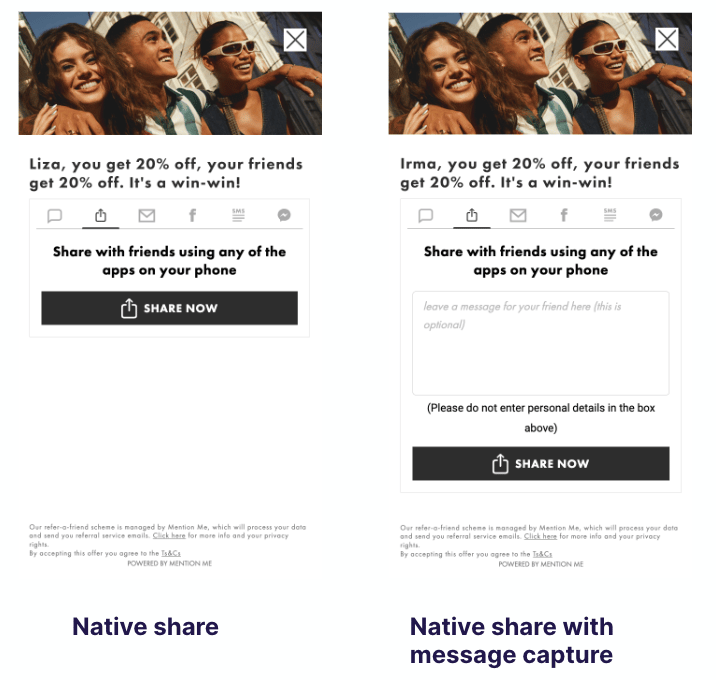
* **Native Share:** lets users share through any app on their phone
* **Message Capture:** adds a prompt for the referrer to write a message, which can improve engagement and conversion
 ### What About Link Share?
We recommend removing Link Share and using Native Share as outlined in the test plan above.
### Which Version Should I Use if There's No Difference in Conversion?
Use **Native Share with Message Capture**. It offers more flexibility for future enhancements.
### I've Tested Native Share but Didn't See Good Results. What Can I Test?
* Set Name Share to position 1 and Native Share to position 2
* Switch from the Message Capture version to standard Native Share, or vice versa
* Test a more engaging default message, for example "Tell me the best thing about *brand*"
### I Saw a Higher Share Rate but a Lower Purchase Rate. What Now?
This can happen. If total conversions are up, it may still be worth it. Otherwise:
* Prioritise Name Share in position 1
* Switch Native Share versions
* Test different default share messages
### What's the Default Share Message with Native Share?
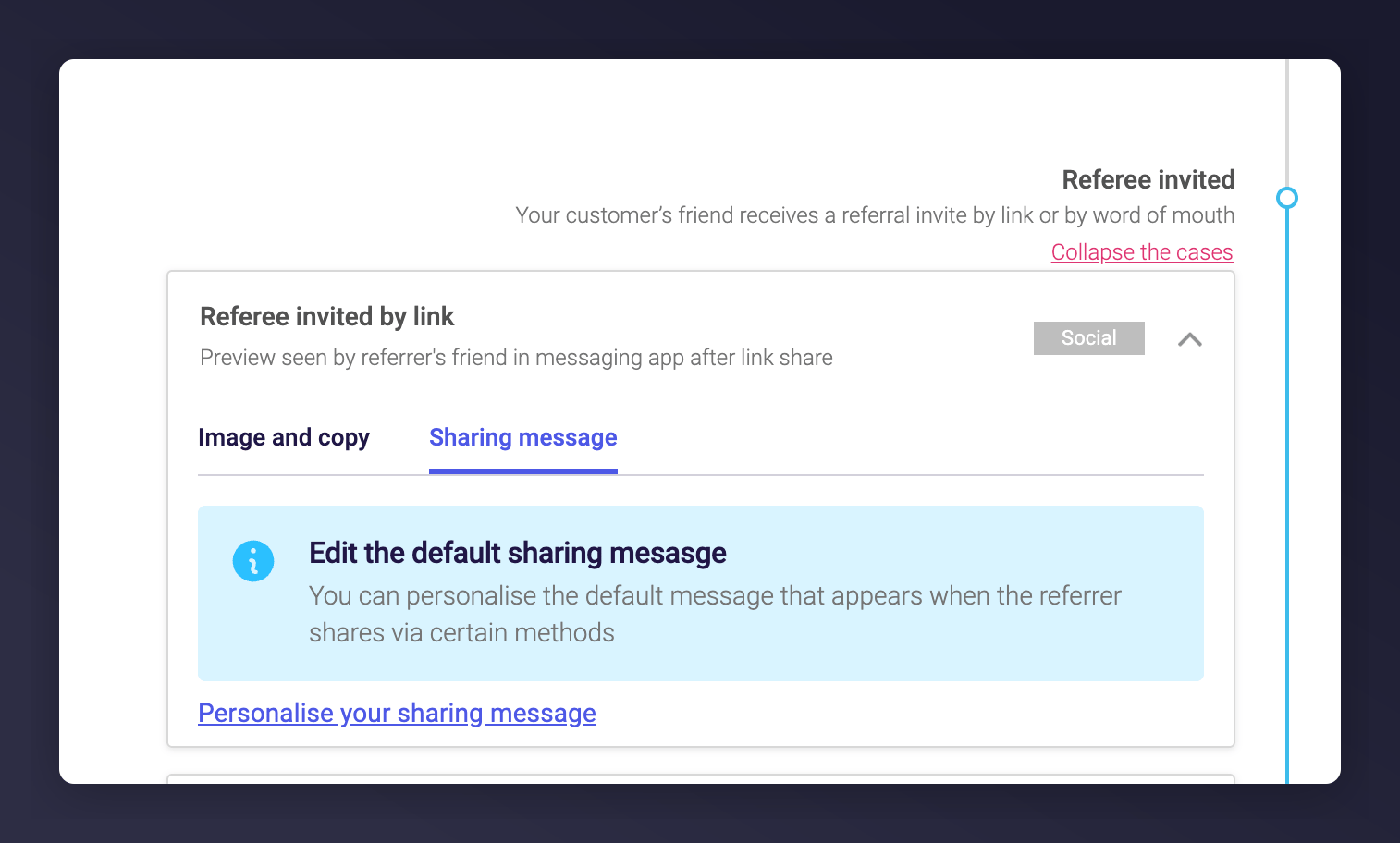
It's blank by default, which typically performs best. You can try alternatives on the Referee "Invited by Link" configuration page.
### What About Link Share?
We recommend removing Link Share and using Native Share as outlined in the test plan above.
### Which Version Should I Use if There's No Difference in Conversion?
Use **Native Share with Message Capture**. It offers more flexibility for future enhancements.
### I've Tested Native Share but Didn't See Good Results. What Can I Test?
* Set Name Share to position 1 and Native Share to position 2
* Switch from the Message Capture version to standard Native Share, or vice versa
* Test a more engaging default message, for example "Tell me the best thing about *brand*"
### I Saw a Higher Share Rate but a Lower Purchase Rate. What Now?
This can happen. If total conversions are up, it may still be worth it. Otherwise:
* Prioritise Name Share in position 1
* Switch Native Share versions
* Test different default share messages
### What's the Default Share Message with Native Share?
It's blank by default, which typically performs best. You can try alternatives on the Referee "Invited by Link" configuration page.
 ### Are There Restrictions on Native Share?
Native Share is mobile only. It cannot be used on desktop.
### Does Native Share Work on Both iOS and Android?
Yes, it's fully supported on both platforms.
### Are There Restrictions on Native Share?
Native Share is mobile only. It cannot be used on desktop.
### Does Native Share Work on Both iOS and Android?
Yes, it's fully supported on both platforms.