> ## Documentation Index
> Fetch the complete documentation index at: https://docs.mention-me.com/llms.txt
> Use this file to discover all available pages before exploring further.
# Reward Fulfilment
> How to manage reward fulfilment in Mention Me, including self-fulfilment, changing fulfilment methods, and managing email notifications.
This guide explains how to manage reward fulfilment and related communications, whether you're using automated fulfilment or handling it manually.
## When to manage fulfilment yourself
You may choose manual fulfilment if:
* You want to include an additional item in a referee's first order
* You need to apply credit to a referrer's account internally
* You already use an in-house reward fulfilment process
* You're running a one-off campaign or competition where you manually select winners
Fulfilment method changes can only be made on offers in **Draft** status. [Learn how to create a draft experiment](/knowledge/referral/offers/setup-reward).
## How to change the fulfilment method
### Step 1: Navigate to the draft offer
* Go to **Campaigns**
* Select the relevant campaign
* Click **Drafts, upcoming and history**
* Click **View and edit**
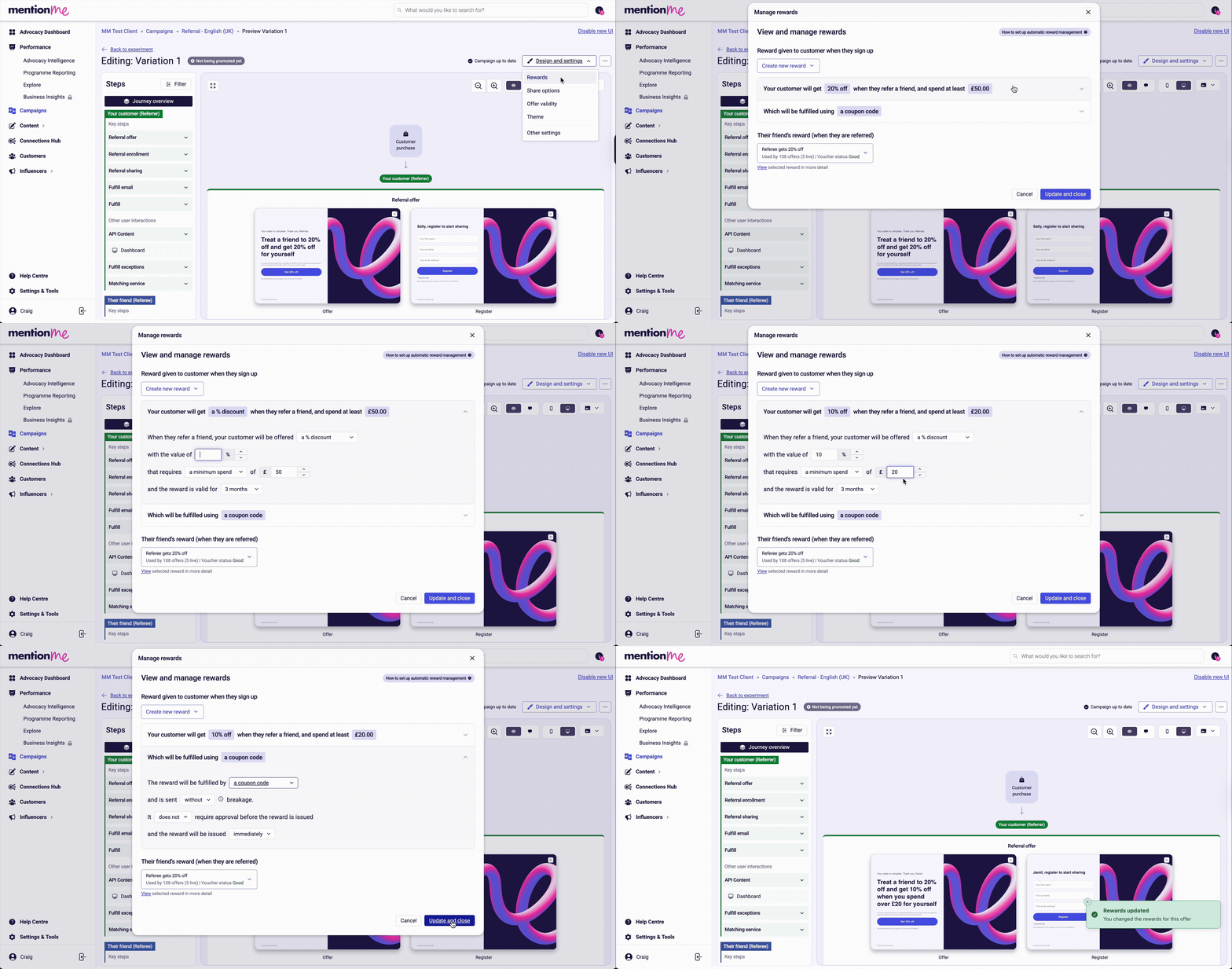
* Click **Design & Settings** → **Rewards**
### Step 2: Choose or create a reward
Select an existing reward that uses your desired fulfilment method, or click **Create a new reward**.
### Step 3: Define reward details
When creating a new reward, set:
* Type (percentage discount, fixed amount, or free item)
* Value
* Minimum spend, if applicable
* Validity period (recommended: use default)
### Step 4: Set the fulfilment method
* Default: **Coupon code**
* Other options: **Coupon link** or **Webhook**
* If using **Webhook**, ensure the connection is set up beforehand
* For custom fulfilment (e.g. external gift cards), contact your Client Success Manager or Operations Team
 ### Step 5: Upload vouchers
Once the reward is created, upload your voucher file to complete configuration. [Follow the voucher upload guide](/knowledge/referral/vouchers/upload-vouchers).
## Managing emails from Mention Me
By default, Mention Me sends automated emails to referrers and referees about reward status, next steps, and fulfilment details.
If you prefer to manage these communications yourself, you can disable Mention Me emails.
### How to manage email communications
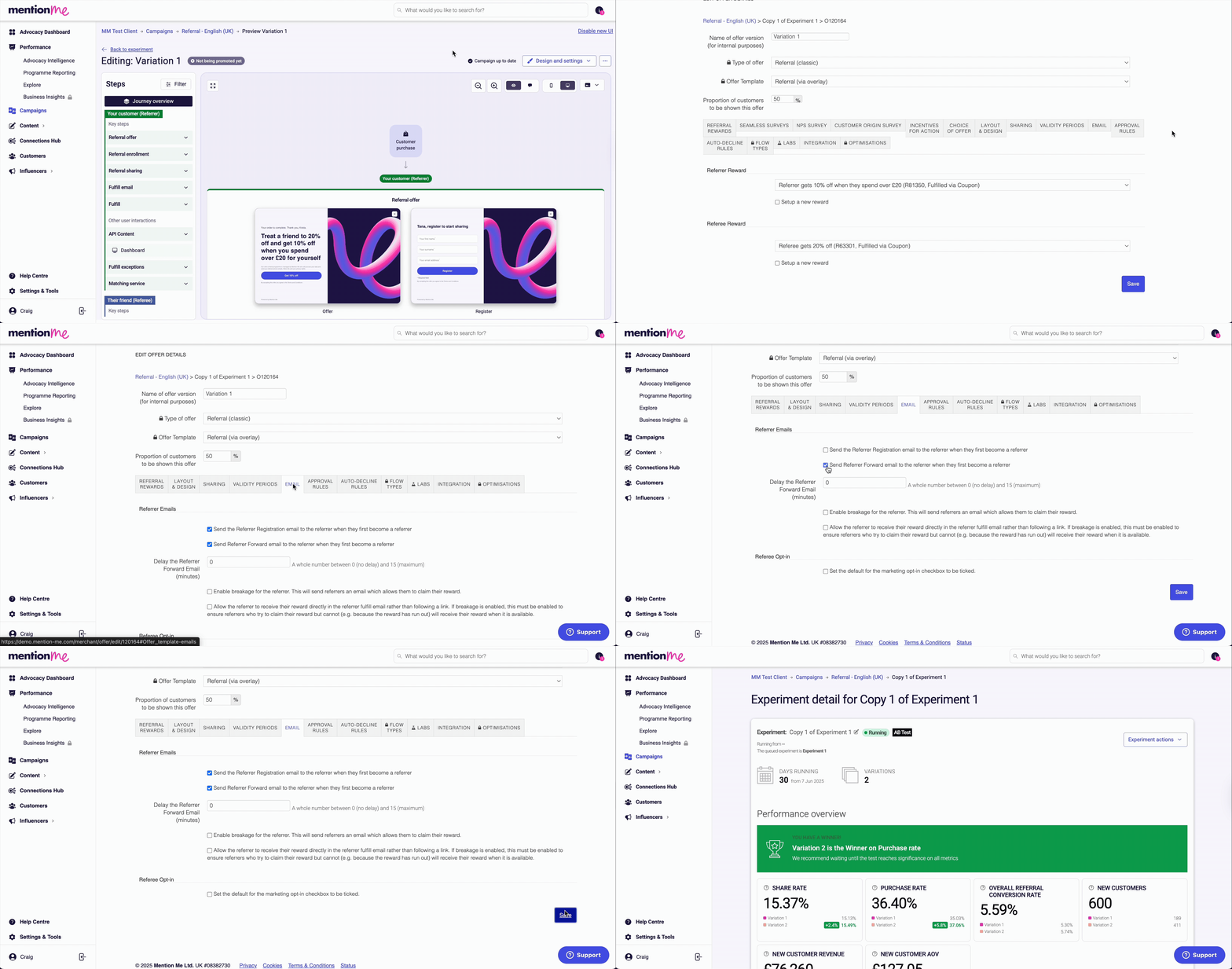
* Open your **Draft Experiment**
* Go to **Design & Settings** → **Other Settings** → **Email**
* Deselect the email options you wish to disable
### Step 5: Upload vouchers
Once the reward is created, upload your voucher file to complete configuration. [Follow the voucher upload guide](/knowledge/referral/vouchers/upload-vouchers).
## Managing emails from Mention Me
By default, Mention Me sends automated emails to referrers and referees about reward status, next steps, and fulfilment details.
If you prefer to manage these communications yourself, you can disable Mention Me emails.
### How to manage email communications
* Open your **Draft Experiment**
* Go to **Design & Settings** → **Other Settings** → **Email**
* Deselect the email options you wish to disable