> ## Documentation Index
> Fetch the complete documentation index at: https://docs.mention-me.com/llms.txt
> Use this file to discover all available pages before exploring further.
# Reviewing Rewards on Your First Campaign
> How to review and update rewards on your first referral campaign in Mention Me.
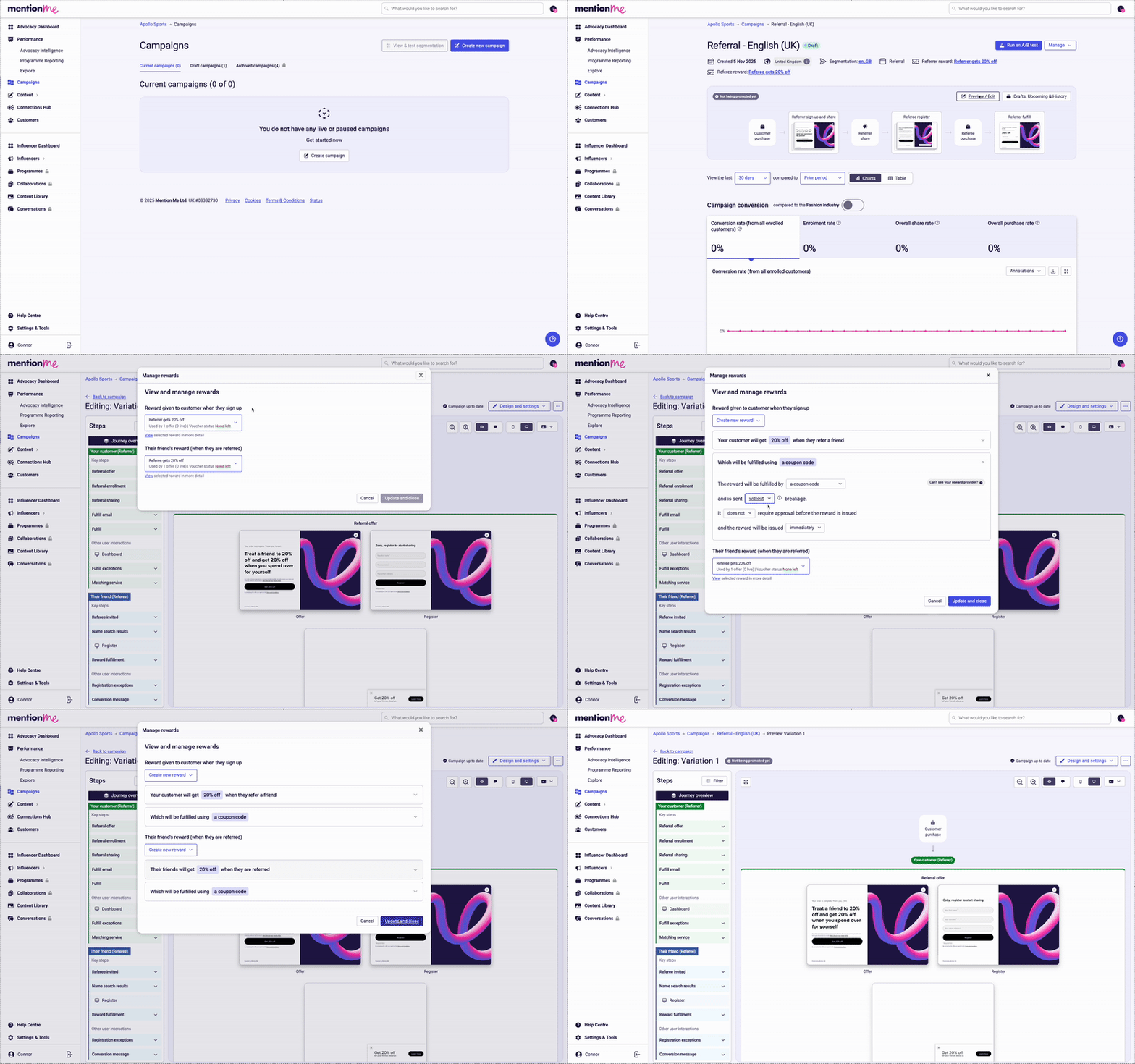 ## How to Review Rewards
Follow the link provided during onboarding, or navigate to the **Campaigns** section in the Mention Me platform.
Click into your pre-created referral campaign.
Click the **Preview / Edit** button above the campaign flow preview.
Select the **Design and Settings** dropdown in the top right corner of the page.
Click **Update Rewards** and make any changes as necessary.
## How to Review Rewards
Follow the link provided during onboarding, or navigate to the **Campaigns** section in the Mention Me platform.
Click into your pre-created referral campaign.
Click the **Preview / Edit** button above the campaign flow preview.
Select the **Design and Settings** dropdown in the top right corner of the page.
Click **Update Rewards** and make any changes as necessary.