> ## Documentation Index
> Fetch the complete documentation index at: https://docs.mention-me.com/llms.txt
> Use this file to discover all available pages before exploring further.
# Setting Up Your First Campaign
> How to create your first referral campaign and configure an A/B test during onboarding.
By the end of these steps, you'll have a standard referral campaign ready and your first A/B test launched -- helping you start measuring performance from day one.
## Start a New Campaign
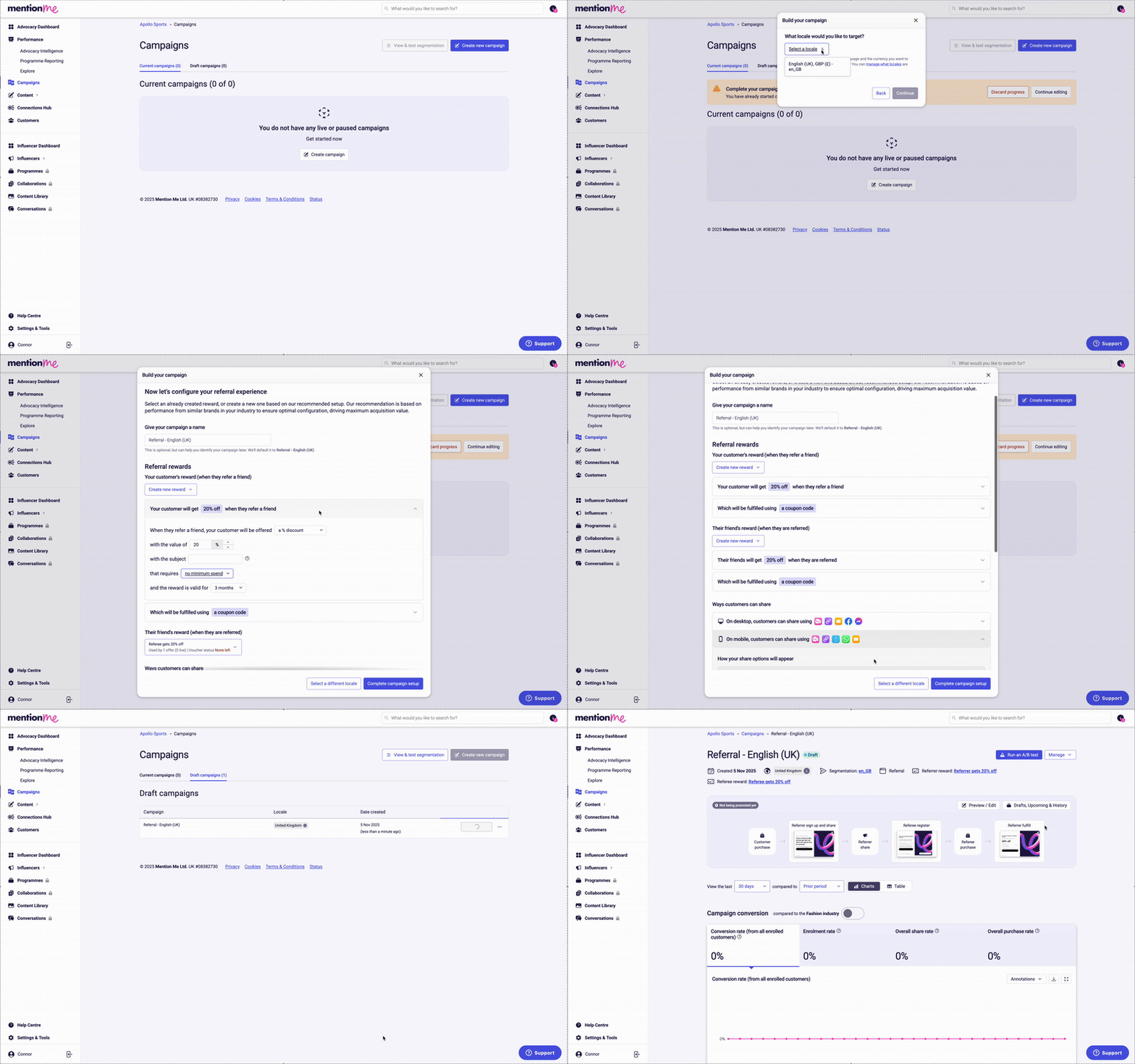 Follow the link provided during onboarding or navigate to the **Campaigns** section in the Mention Me platform.
Click **Create new campaign** in the top right-hand corner.
Work through the onscreen wizard:
1. **Select a campaign type** -- for onboarding, choose **Referral**.
2. **Choose a locale** -- this defines where your campaign runs and the campaign language.
3. **Define the rewards** -- pick what incentives you want to offer. Select from existing rewards or create a new one. Different reward types work better for different businesses, products, and price points. [See our advice for choosing rewards.](/knowledge/referral/offers/what-makes-a-good-reward)
4. **Review share methods** -- recommended sharing methods are set by default based on industry best practice. Learn more about [Name Share](/knowledge/referral/offers/sharing-methods) and [Native Share](/knowledge/referral/offers/sharing-methods).
5. Complete the remaining setup steps as guided by the wizard.
Before continuing to create an A/B test, you may want to review your campaign's content (copy, imagery, and design). During onboarding this is a separate task on your onboarding hub.
## Set Up an A/B Test
Follow the link provided during onboarding or navigate to the **Campaigns** section in the Mention Me platform.
Click **Create new campaign** in the top right-hand corner.
Work through the onscreen wizard:
1. **Select a campaign type** -- for onboarding, choose **Referral**.
2. **Choose a locale** -- this defines where your campaign runs and the campaign language.
3. **Define the rewards** -- pick what incentives you want to offer. Select from existing rewards or create a new one. Different reward types work better for different businesses, products, and price points. [See our advice for choosing rewards.](/knowledge/referral/offers/what-makes-a-good-reward)
4. **Review share methods** -- recommended sharing methods are set by default based on industry best practice. Learn more about [Name Share](/knowledge/referral/offers/sharing-methods) and [Native Share](/knowledge/referral/offers/sharing-methods).
5. Complete the remaining setup steps as guided by the wizard.
Before continuing to create an A/B test, you may want to review your campaign's content (copy, imagery, and design). During onboarding this is a separate task on your onboarding hub.
## Set Up an A/B Test
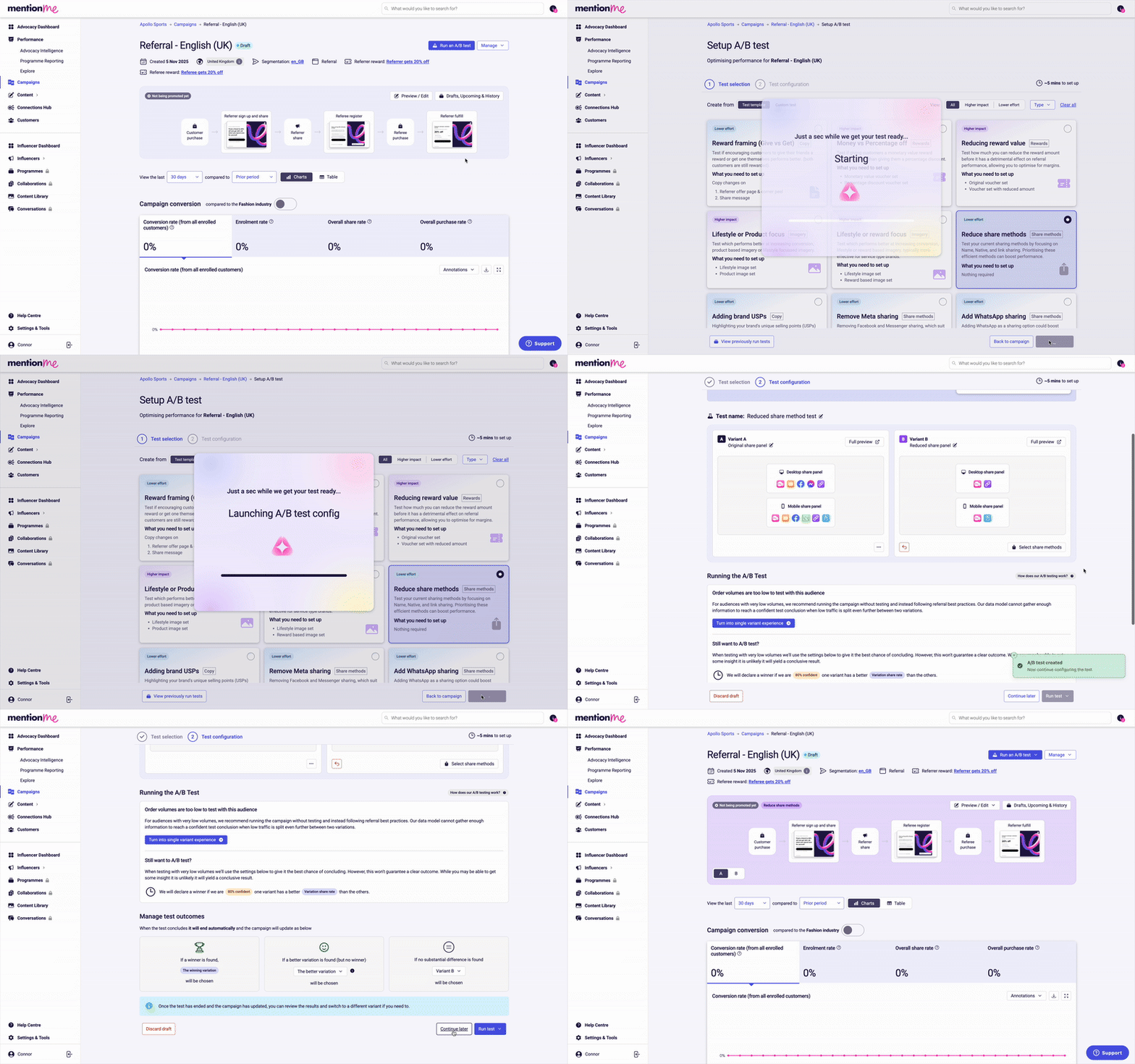 Once your campaign is created, click through to **Manage** your new campaign.
Select **Run an A/B test**.
Follow the onscreen wizard to set up your first A/B test. We recommend starting with the suggested A/B test template to get insights quickly.
Click **Continue later** on the A/B test configuration step -- do not click Run test.
Once your campaign is created, click through to **Manage** your new campaign.
Select **Run an A/B test**.
Follow the onscreen wizard to set up your first A/B test. We recommend starting with the suggested A/B test template to get insights quickly.
Click **Continue later** on the A/B test configuration step -- do not click Run test.