> ## Documentation Index
> Fetch the complete documentation index at: https://docs.mention-me.com/llms.txt
> Use this file to discover all available pages before exploring further.

# SAP Commerce Cloud

> Integrate Mention Me with your SAP Commerce Cloud storefront using Google Tag Manager or direct JavaScript tags.

To integrate Mention Me on your SAP Commerce Cloud website, we recommend using our JavaScript tag-based integration configured via Google Tag Manager.

Alternatively, embed the Mention Me JavaScript tags directly into your SAP Commerce Cloud storefront by following the [standard integration instructions](https://demo.mention-me.com/api-demo/v2/generic/instructions/referrer/postpurchase/popup).

These resources provide guidance on integrating Google Tag Manager with SAP Commerce Cloud:

* [Integrating Web Analytics with your SAP Commerce Cloud Storefront - An Overview](https://www.sap.com/cxworks/article/447589367/integrating_web_analytics_with_your_sap_commerce_cloud_storefront_an_overview)
* [Implementing Google Analytics with SAP Commerce Cloud](https://www.sap.com/cxworks/article/447940261/implementing_google_analytics_with_sap_commerce_cloud#ImplementingGoogleAnalyticswithSAPCommerceCloud-3.GoogleTagManager)

To use Google Tag Manager with Mention Me, include customer and order-related variables in the tag container's data layer. This guide assumes you have implemented the *purchase* action from [Universal Analytics](https://developers.google.com/tag-manager/enhanced-ecommerce) or [GA4 Ecommerce](https://developers.google.com/tag-manager/ecommerce-ga4).

## Referrer integration

Configure the referrer JavaScript tag entirely via Google Tag Manager using variables, a trigger, and a tag.

### Variables

The following variables are needed in the data layer:

| Parameter           | Description                                                                                                                                                     | Example                                                                   |
| ------------------- | --------------------------------------------------------------------------------------------------------------------------------------------------------------- | ------------------------------------------------------------------------- |
| Customer firstname  | Customer's first name (URL-encoded)                                                                                                                             | Monica                                                                    |
| Customer surname    | Customer's surname (URL-encoded)                                                                                                                                | Collins                                                                   |
| Customer email      | Customer's email address (URL-encoded)                                                                                                                          | [monicacollins195@mention-me.com](mailto:monicacollins195@mention-me.com) |
| Order subtotal      | Value excluding tax/shipping in specified currency                                                                                                              | 95.75                                                                     |
| Order currency code | Currency in ISO 4217 format                                                                                                                                     | GBP                                                                       |
| Order ID            | Unique order ID (max 50 chars)                                                                                                                                  | 9947550576                                                                |
| Customer locale     | `language_country` format ([ISO 639-1](https://en.wikipedia.org/wiki/ISO_639-1) + [ISO 3166-1 alpha-2](https://en.wikipedia.org/wiki/ISO_3166-1#Current_codes)) | en\_GB                                                                    |

### Trigger

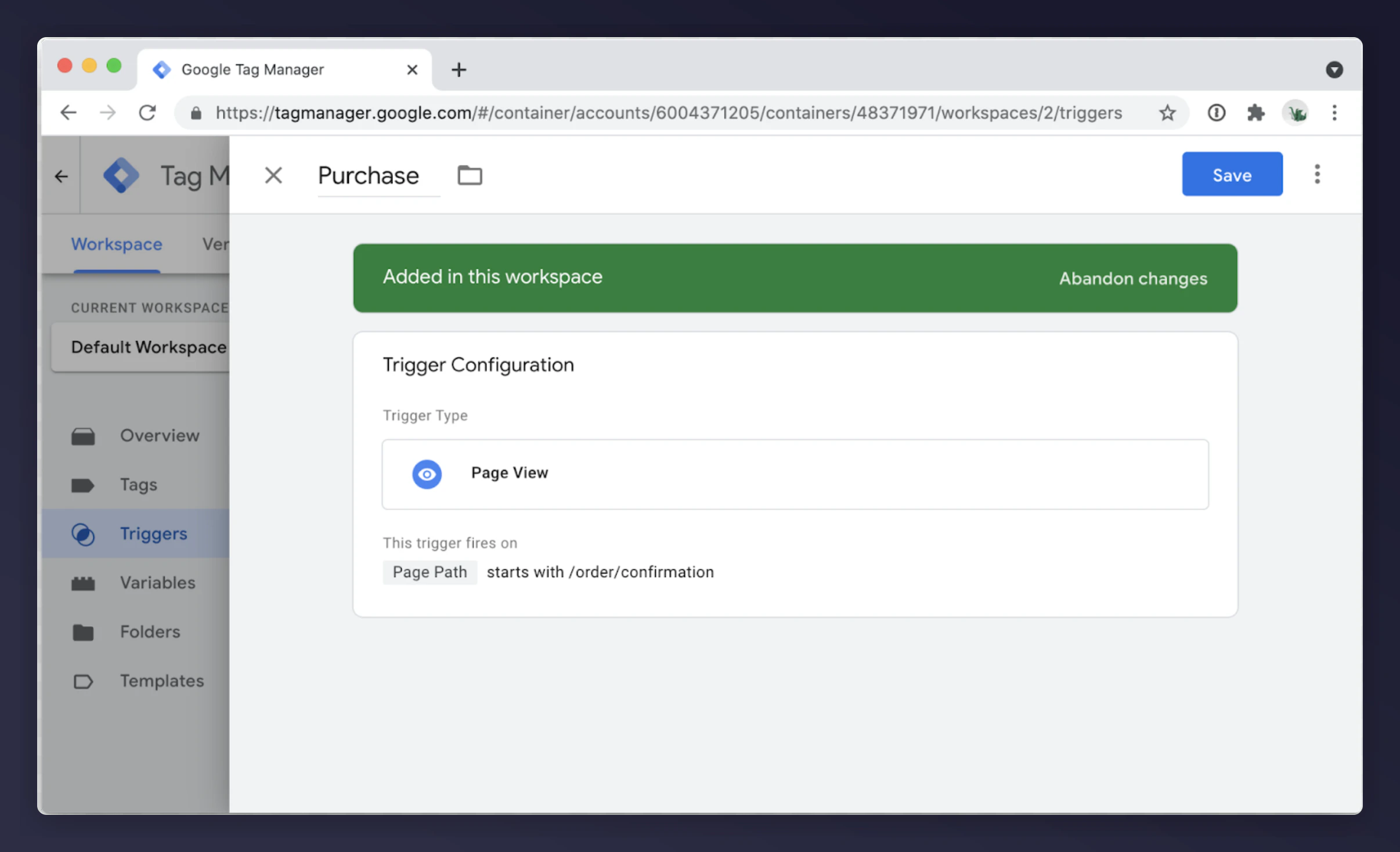
Create a purchase trigger using the "Page View" trigger type on the order confirmation page.

<img src="https://mintcdn.com/mentionme/CnDLFo2wevUDbm0K/images/knowledge/integrations/ecommerce/4404769891985.png?fit=max&auto=format&n=CnDLFo2wevUDbm0K&q=85&s=d106fb5be8c62b3f04172e251cfc6457" alt="GTM purchase trigger configuration for order confirmation page" width="2412" height="1468" data-path="images/knowledge/integrations/ecommerce/4404769891985.png" />

### Tag

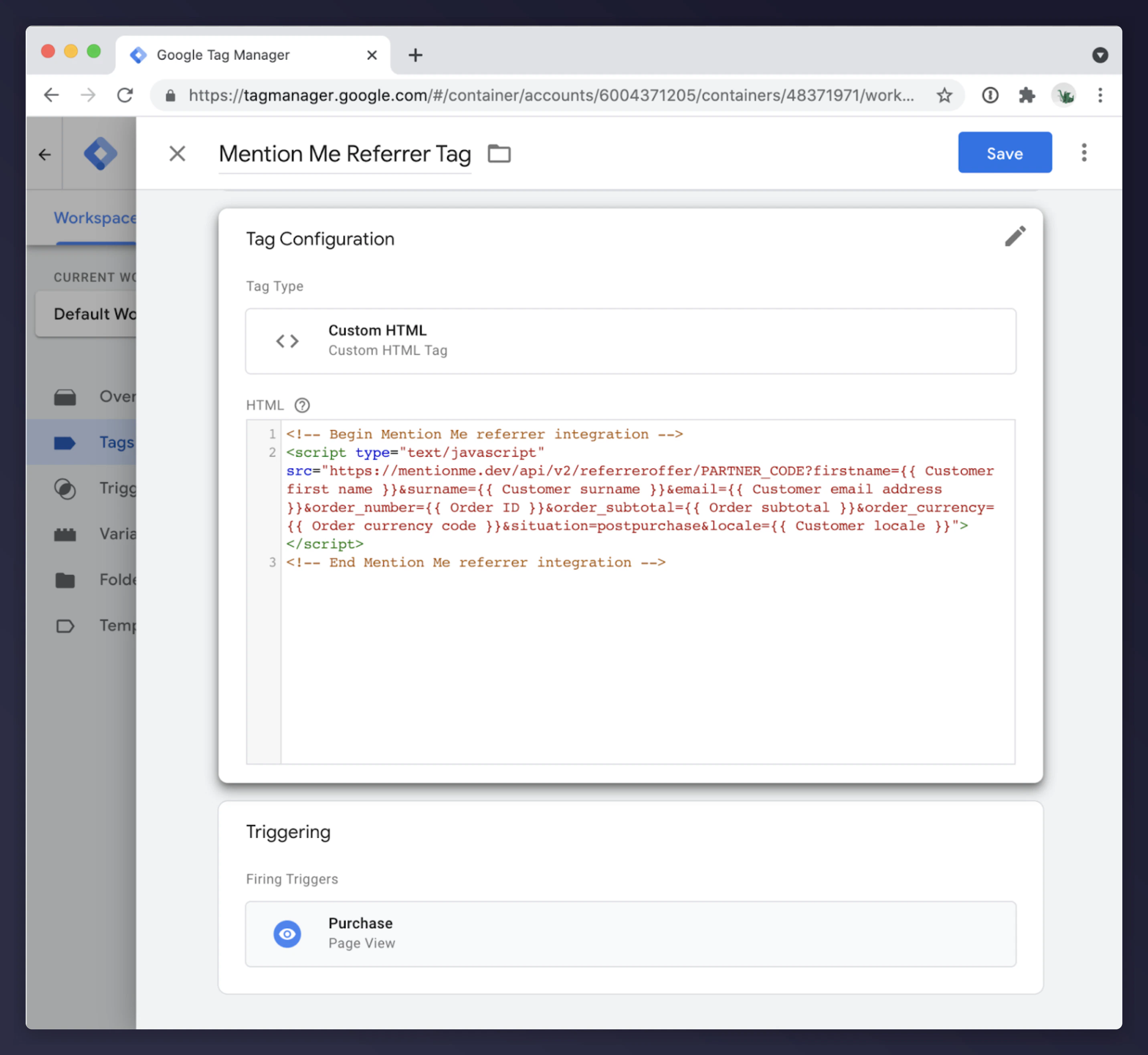
Create a Custom HTML tag:

```html theme={null}
<!-- Begin Mention Me referrer integration -->
<script type="text/javascript" src="https://tag.mention-me.com/api/v2/referreroffer/PARTNER_CODE?firstname={{ Customer first name }}&surname={{ Customer surname }}&email={{ Customer email address }}&order_number={{ Order ID }}&order_subtotal={{ Order subtotal }}&order_currency={{ Order currency code }}&situation=postpurchase&locale={{ Customer locale }}"></script>
<!-- End Mention Me referrer integration -->
```

<Note>Replace `PARTNER_CODE` with your Mention Me partner code (e.g. `mmxxx00000`). Ensure the variable names match those defined in your GTM container's data layer.</Note>

<img src="https://mintcdn.com/mentionme/CnDLFo2wevUDbm0K/images/knowledge/integrations/ecommerce/4404773650833.png?fit=max&auto=format&n=CnDLFo2wevUDbm0K&q=85&s=da079ff722064b191ca99615b0b54cd4" alt="GTM Custom HTML tag with Mention Me referrer script" width="2864" height="2632" data-path="images/knowledge/integrations/ecommerce/4404773650833.png" />

## Referee integration

The referee integration enables Name Share: customers enter their friend's name to claim an introductory reward. Embed the referee tag on the checkout page.

### Variables

| Parameter       | Description                                                                                                                                             | Example |
| --------------- | ------------------------------------------------------------------------------------------------------------------------------------------------------- | ------- |
| Customer locale | `language_COUNTRY` format ([ISO 639-1](https://en.wikipedia.org/wiki/ISO_639-1) + [ISO 3166-1](https://en.wikipedia.org/wiki/ISO_3166-1#Current_codes)) | en\_GB  |

### Trigger

Create a page view trigger on the checkout page.
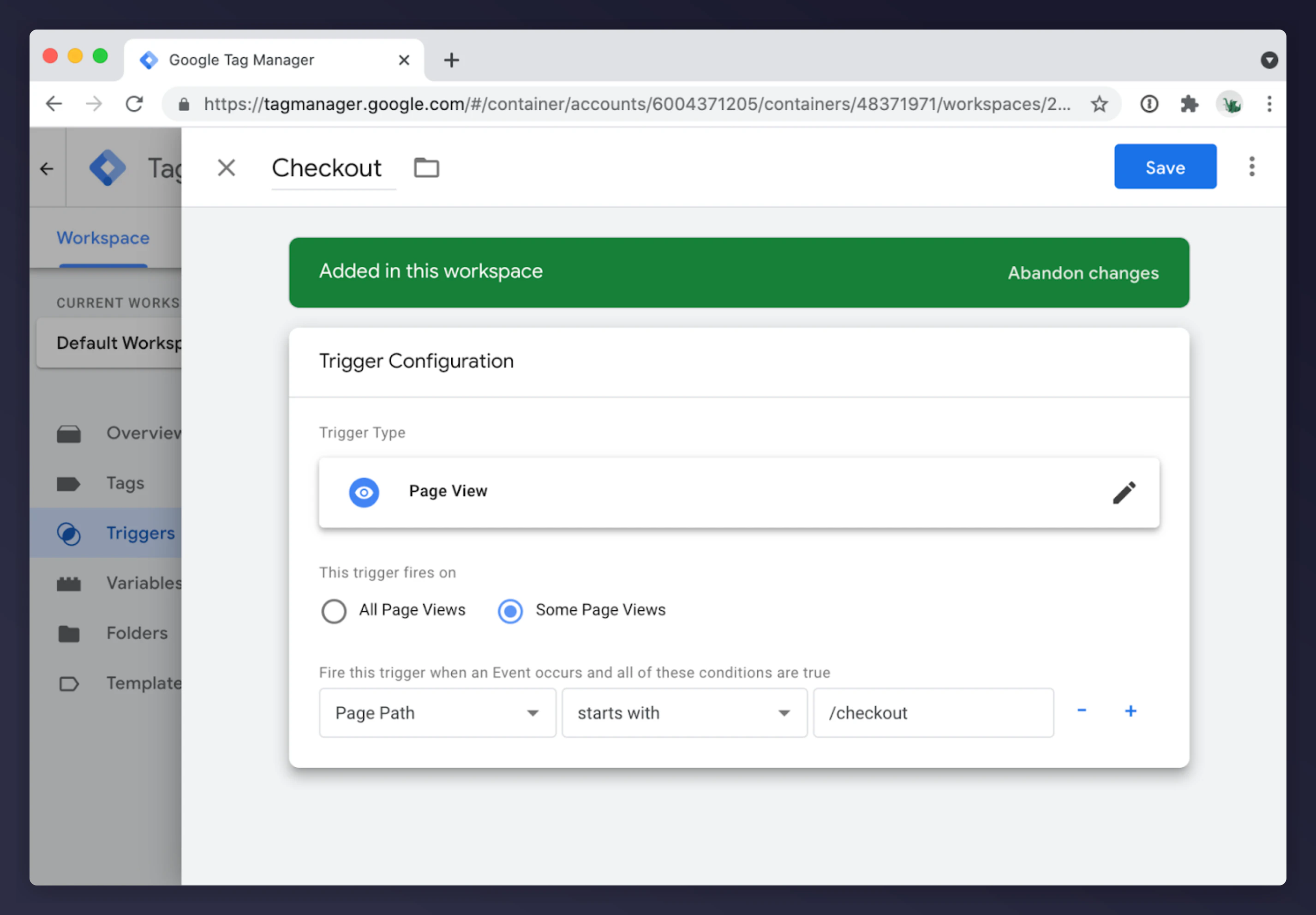
<img src="https://mintcdn.com/mentionme/CnDLFo2wevUDbm0K/images/knowledge/integrations/ecommerce/4404773840529.png?fit=max&auto=format&n=CnDLFo2wevUDbm0K&q=85&s=145843e171c4d9d681f12c2e414a0dd6" alt="GTM page view trigger for checkout page" width="2852" height="1982" data-path="images/knowledge/integrations/ecommerce/4404773840529.png" />

### Tag

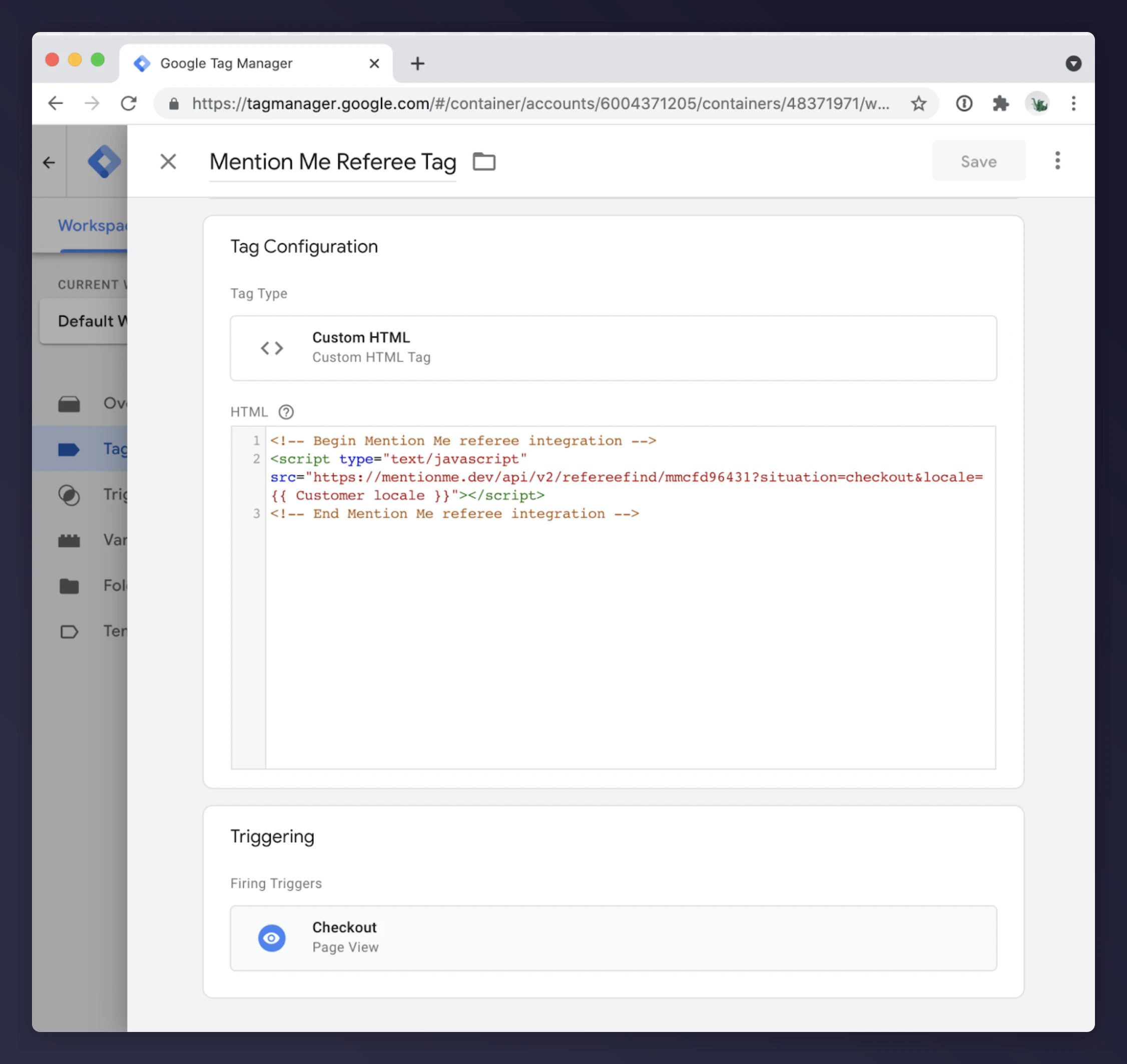
Create a Custom HTML tag:

```html theme={null}
<!-- Begin Mention Me referee integration -->
<script type="text/javascript" src="https://tag.mention-me.com/api/v2/refereefind/PARTNER_CODE?situation=checkout&locale={{ Customer locale }}"></script>
<!-- End Mention Me referee integration -->
```

<Note>Replace `PARTNER_CODE` with your Mention Me partner code. Update `{{ Customer locale }}` to match your data layer variable.</Note>

<img src="https://mintcdn.com/mentionme/CnDLFo2wevUDbm0K/images/knowledge/integrations/ecommerce/4404774047761.png?fit=max&auto=format&n=CnDLFo2wevUDbm0K&q=85&s=d2a458744e6c19dfe767ce028ec1ae4a" alt="GTM Custom HTML tag with Mention Me referee script" width="2252" height="2126" data-path="images/knowledge/integrations/ecommerce/4404774047761.png" />

## HTML changes

Add the following placeholder to the checkout page (typically above the coupon code field):

```html theme={null}
<!-- Begin Mention Me referee placeholder div -->
<div id="mmWrapper"></div>
<!-- End Mention Me referee placeholder div -->
```

If you cannot add this placeholder directly, the Mention Me Onboarding team can help target an existing element on the page.

## SAP Commerce Cloud Accelerators

If using the SAP [Coupon Module](https://help.sap.com/viewer/e1391e5265574bfbb56ca4c0573ba1dc/v2011/en-US/d35c247bac2d4c91a6ca4501b63cb2b4.html), review the documentation for [Coupons in Accelerator](https://help.sap.com/viewer/e1391e5265574bfbb56ca4c0573ba1dc/v2011/en-US/02a8521eb67b4866a632a1a5e79037e3.html).

Update the JSP tag at: `yacceleratorstorefront/web/webroot/WEB-INF/tags/responsive/cart/cartVoucher.tag`

Alternatively, add the integration into: `yacceleratorstorefront/web/webroot/WEB-INF/views/responsive/pages/cart/cartTotalsDisplay.jsp`

## SAP Spartacus

Customise the [Cart Coupon component HTML](https://github.com/SAP/spartacus/blob/eae514f24eb6a9a1e2ecb1c43b0a3f154bd5cbaa/projects/storefrontlib/src/cms-components/cart/cart-coupon/cart-coupon.component.html#L7) and place the Mention Me div wrapper above `<div class="cx-cart-coupon-container">`.