> ## Documentation Index
> Fetch the complete documentation index at: https://docs.mention-me.com/llms.txt
> Use this file to discover all available pages before exploring further.
# Customer Eligibility for Shopify Discount Codes
> Control which customers can use an influencer's Shopify discount code using customer segments.
When your discount provider is set to Shopify, you can control which customers are eligible to use each discount code. This uses Shopify's built-in customer segments to restrict discount usage beyond just having the code.
## Setting eligibility when creating a collaboration
In the collaboration wizard, navigate to the **Actions** step and select **Give discount** as the action type.
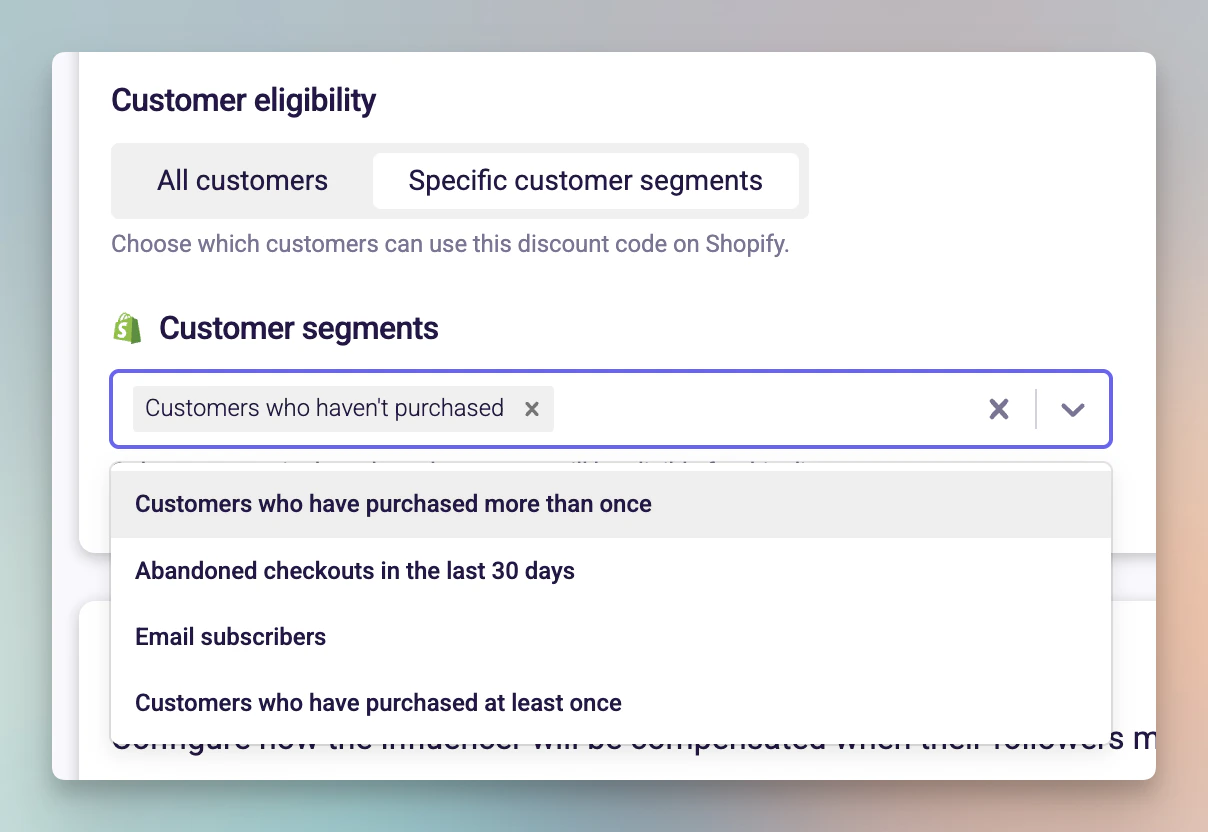
In the **Follower incentive** section, scroll to **Customer eligibility** and choose one of:
* **All customers** -- anyone with the code can use it.
* **Specific customer segments** -- only customers in selected Shopify segments can use it.
If you selected **Specific customer segments**, a dropdown appears listing your Shopify customer segments. Select one or more segments, then continue through the wizard and publish.
 ## Updating eligibility on an existing collaboration
Navigate to the collaboration's edit page.
On the **Actions** step, find the **Customer eligibility** section and change the eligibility setting and update segments as needed.
Save your changes.
When editing a live collaboration, Shopify discount codes that were already created will be automatically updated to reflect the new eligibility rules. Manually assigned codes will not be affected -- see the coupon source card for a breakdown. For more detail, see [Updating discount settings in a live collaboration](/knowledge/influencer/incentives/update-live-collaboration).
## Things to know
* Customer segments are fetched directly from your Shopify store.
* If you don't see a segment you expect, check that it exists in your Shopify admin under **Customers > Segments**.
* This setting only appears when Shopify is your configured discount provider.
* Customer eligibility is set per collaboration, not globally.
## Updating eligibility on an existing collaboration
Navigate to the collaboration's edit page.
On the **Actions** step, find the **Customer eligibility** section and change the eligibility setting and update segments as needed.
Save your changes.
When editing a live collaboration, Shopify discount codes that were already created will be automatically updated to reflect the new eligibility rules. Manually assigned codes will not be affected -- see the coupon source card for a breakdown. For more detail, see [Updating discount settings in a live collaboration](/knowledge/influencer/incentives/update-live-collaboration).
## Things to know
* Customer segments are fetched directly from your Shopify store.
* If you don't see a segment you expect, check that it exists in your Shopify admin under **Customers > Segments**.
* This setting only appears when Shopify is your configured discount provider.
* Customer eligibility is set per collaboration, not globally.