> ## Documentation Index
> Fetch the complete documentation index at: https://docs.mention-me.com/llms.txt
> Use this file to discover all available pages before exploring further.
# Creating and Managing Influencer Collaborations
> Create, configure, and manage collaborations that define the work and rewards for your influencers.
Collaborations define the work you want influencers to do for your brand, whether that's sharing discount codes, posting content, or creating assets. Each collaboration is a self-contained brief with its own reward structure, terms, and content requirements.
## Core concepts
| Type | What it does | When to use it |
| ------------------ | -------------------------------------------------------------- | ------------------------------------------------------ |
| **Sales** | Influencers share a personal discount code with their audience | You want to track revenue driven by each influencer |
| **Post content** | Influencers post branded content to their social channels | You need content published on influencer accounts |
| **Create content** | Influencers create content for your brand to repurpose | You want assets for your own channels, ads, or website |
## Creating a collaboration
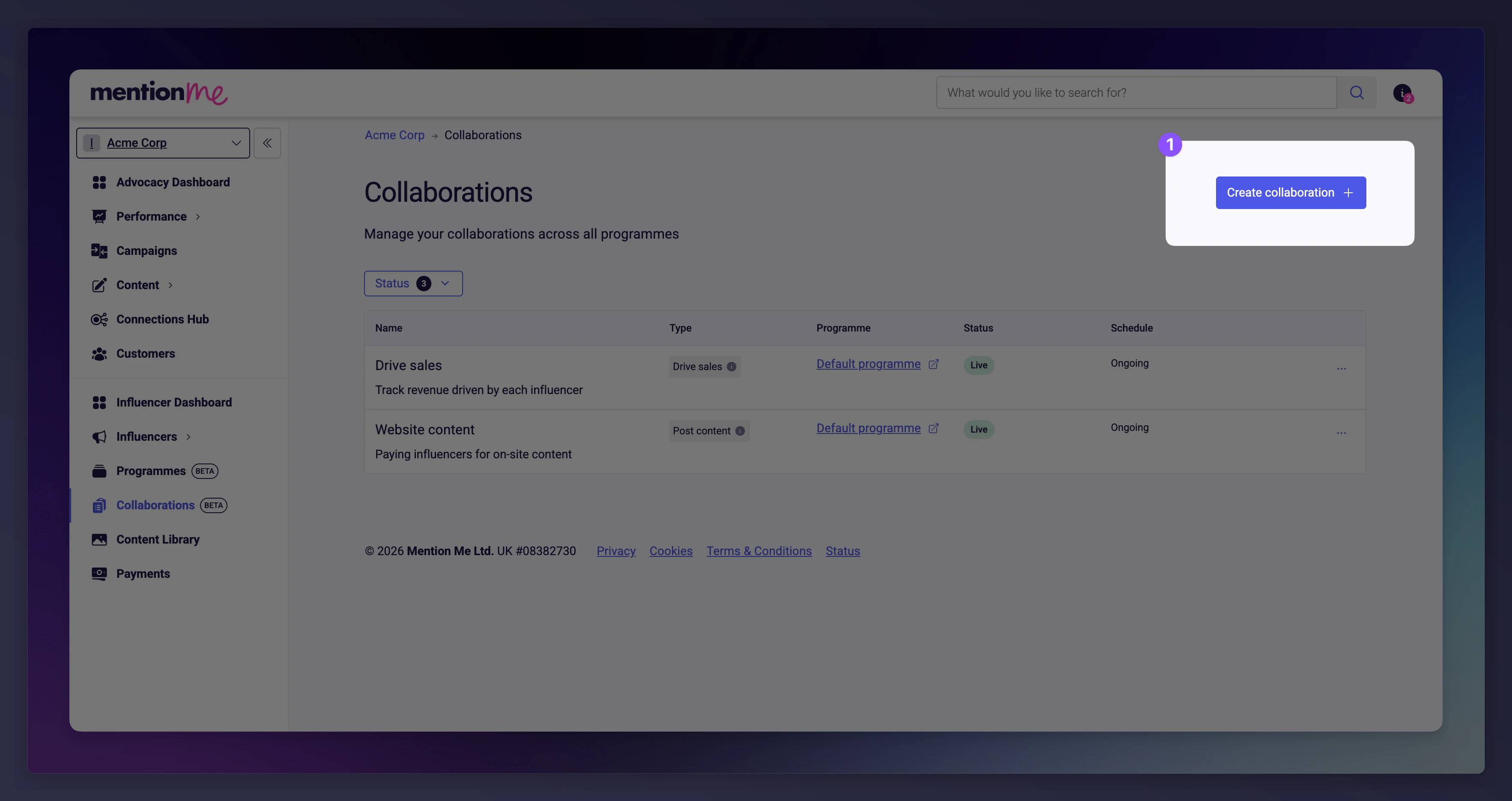
Navigate to [**Collaborations**](https://mention-me.com/merchant/~/influencers/collaborations) and click **Create collaboration**.
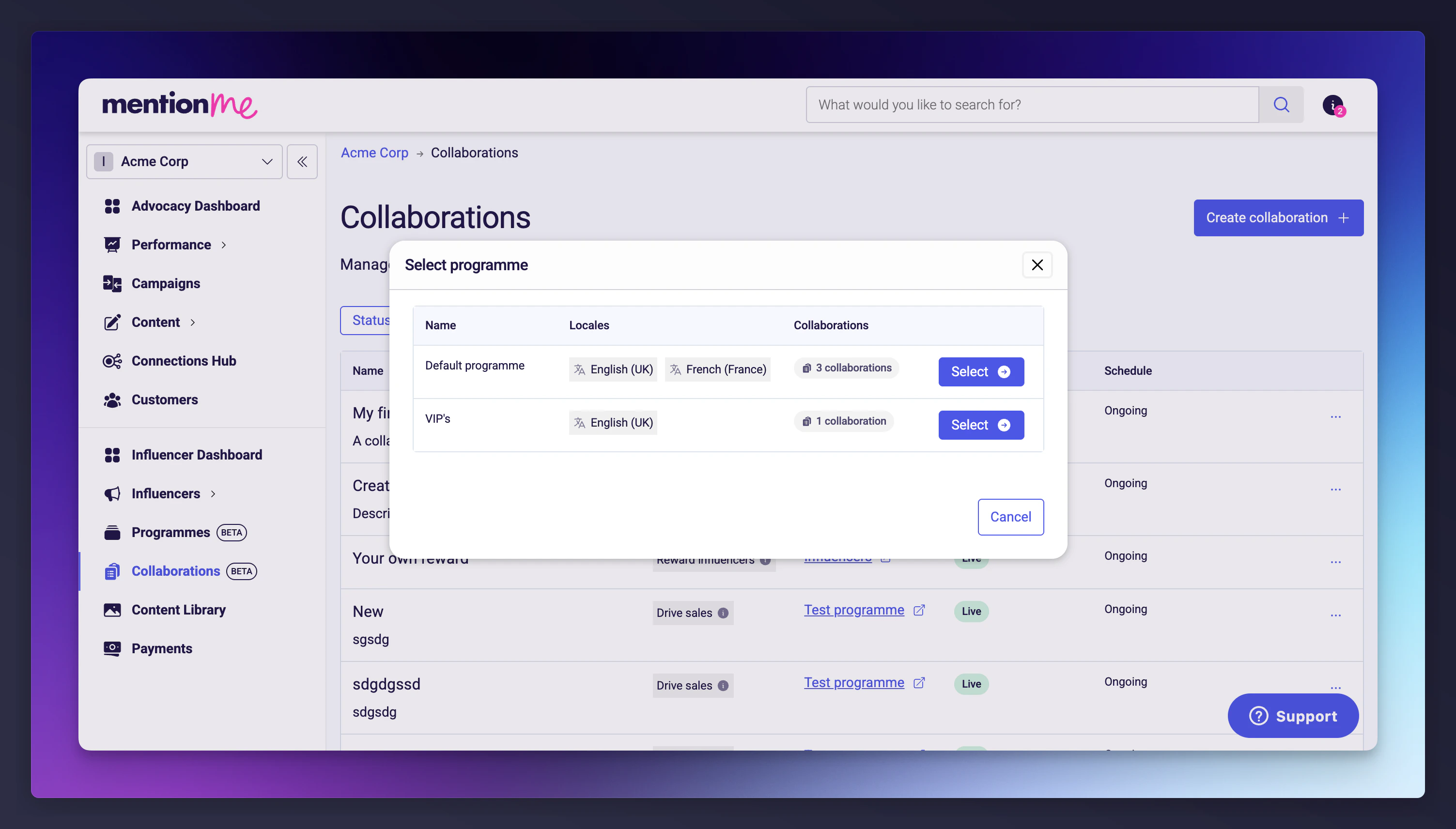
 Select which **programme** the collaboration belongs to. Programmes are the top-level container for organising your influencer activity.
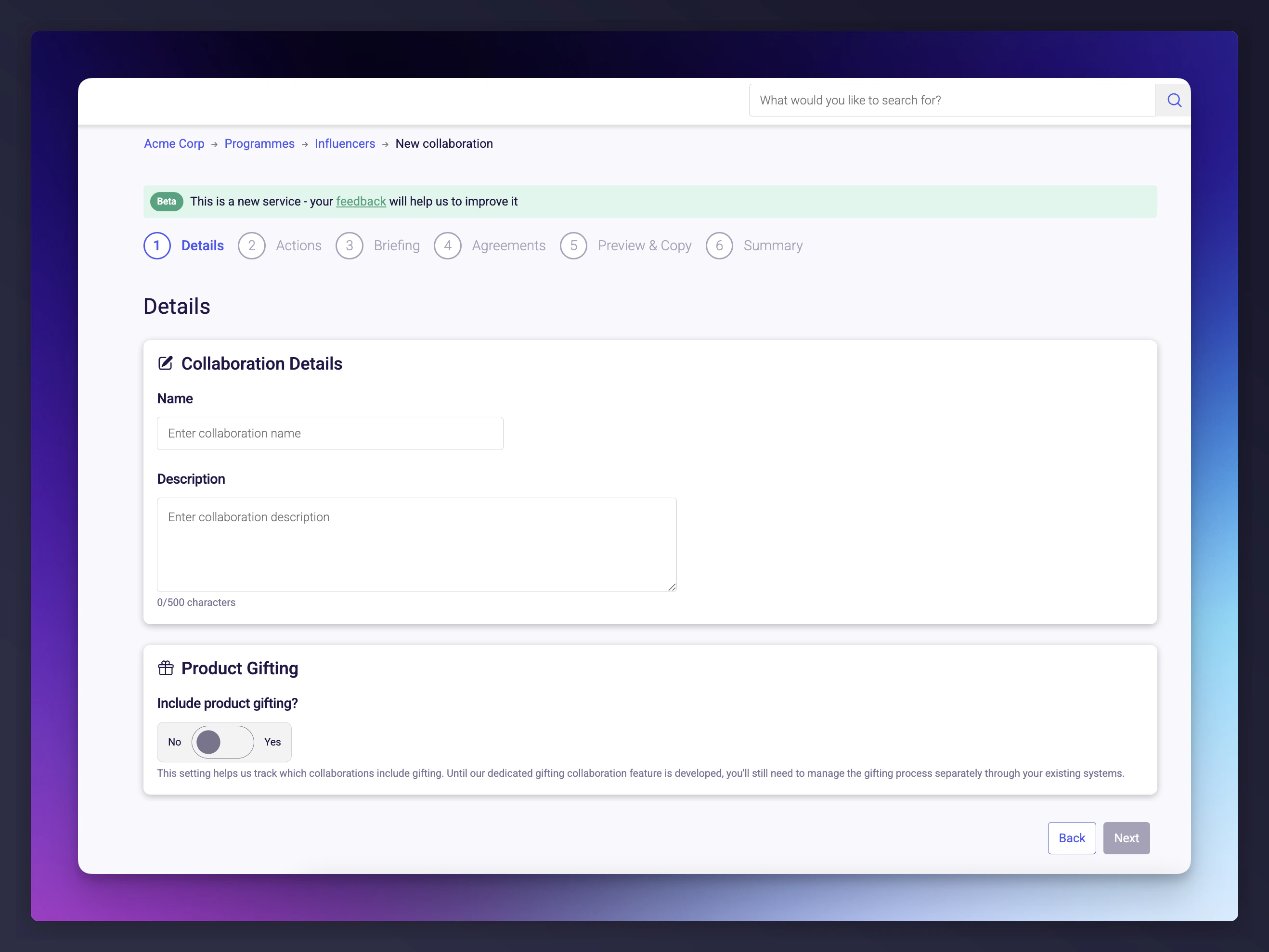
 Choose a collaboration type to enter the setup wizard.
| Field | Required | Description |
| ------------------- | -------- | -------------------------------------------------------------------------------------------------------------------------------------------- |
| **Name** | Yes | Internal name for this collaboration. Influencers won't see this. |
| **Description** | No | Optional internal description (up to 500 characters). |
| **Product gifting** | No | Toggle on if the collaboration includes sending physical products to the influencer. Tracked for reporting but managed outside the platform. |
Choose a collaboration type to enter the setup wizard.
| Field | Required | Description |
| ------------------- | -------- | -------------------------------------------------------------------------------------------------------------------------------------------- |
| **Name** | Yes | Internal name for this collaboration. Influencers won't see this. |
| **Description** | No | Optional internal description (up to 500 characters). |
| **Product gifting** | No | Toggle on if the collaboration includes sending physical products to the influencer. Tracked for reporting but managed outside the platform. |
 Configure what the influencer does and how they're compensated. Options depend on the collaboration type.
 #### Follower incentive
For **sales** collaborations, define the discount the influencer's audience receives.
| Option | Description |
| ----------------------- | ---------------------------------------------------------- |
| **Percentage discount** | A percentage off the order (1-100%). |
| **Fixed amount** | A fixed monetary discount. |
| **Minimum spend** | Optional minimum basket value before the discount applies. |
#### Follower incentive
For **sales** collaborations, define the discount the influencer's audience receives.
| Option | Description |
| ----------------------- | ---------------------------------------------------------- |
| **Percentage discount** | A percentage off the order (1-100%). |
| **Fixed amount** | A fixed monetary discount. |
| **Minimum spend** | Optional minimum basket value before the discount applies. |
 #### Influencer compensation
| Option | Description |
| ------------------- | -------------------------------------------------------------------------- |
| **Fixed fee** | A one-off payment in GBP, USD, or EUR. |
| **No compensation** | No direct payment. You can optionally require approval before work begins. |
#### Content requirements
| Option | Description |
| ------------------------- | ------------------------------------------------------- |
| **No restriction** | No limit on the number of posts. |
| **Total number of posts** | A single cap across all platforms. |
| **Posts per platform** | Separate limits for Instagram and TikTok. |
| **Posts per type** | Granular limits by format (Feed posts, Reels, Stories). |
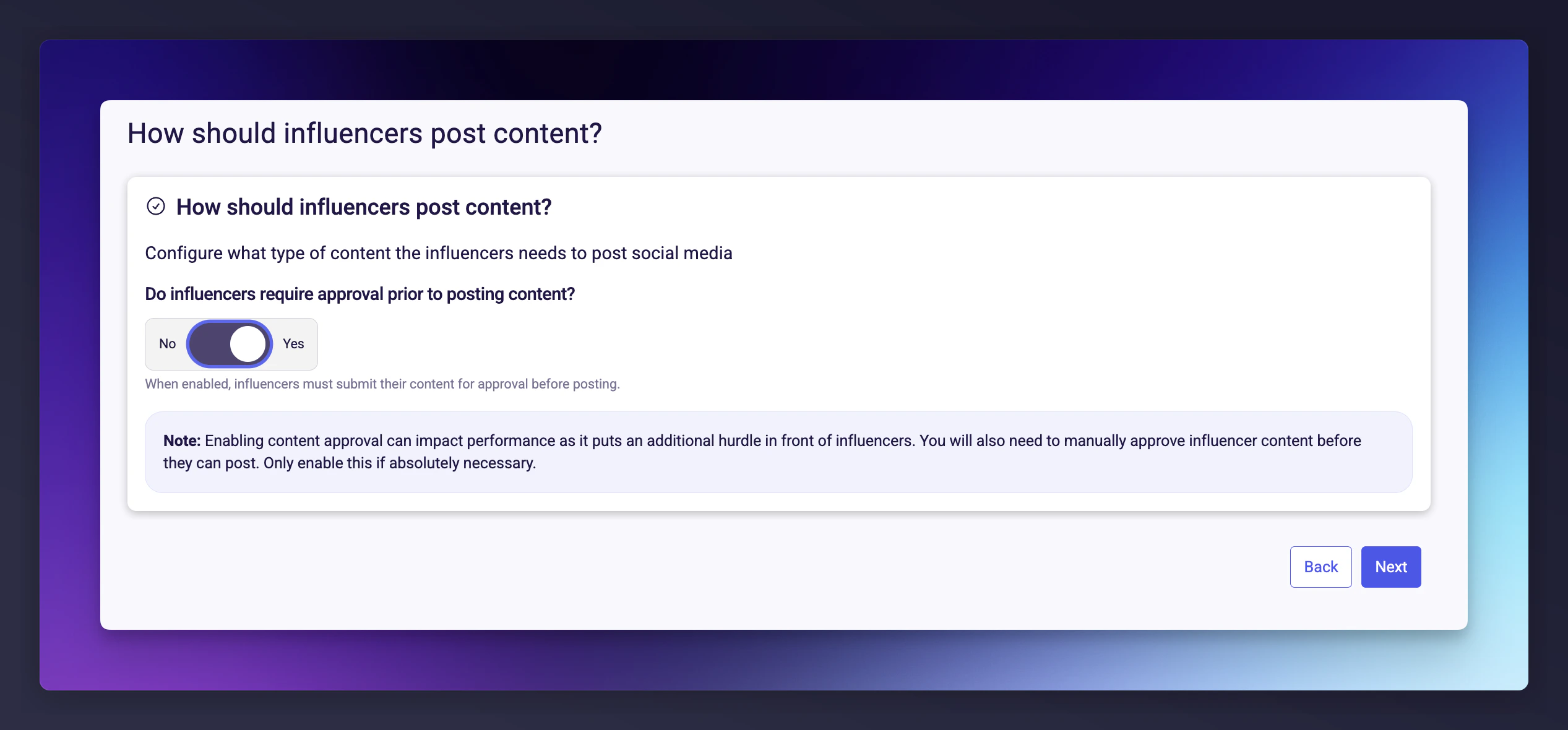
Toggle **content approval** to require influencers to submit content for review before publishing.
#### Influencer compensation
| Option | Description |
| ------------------- | -------------------------------------------------------------------------- |
| **Fixed fee** | A one-off payment in GBP, USD, or EUR. |
| **No compensation** | No direct payment. You can optionally require approval before work begins. |
#### Content requirements
| Option | Description |
| ------------------------- | ------------------------------------------------------- |
| **No restriction** | No limit on the number of posts. |
| **Total number of posts** | A single cap across all platforms. |
| **Posts per platform** | Separate limits for Instagram and TikTok. |
| **Posts per type** | Granular limits by format (Feed posts, Reels, Stories). |
Toggle **content approval** to require influencers to submit content for review before publishing.
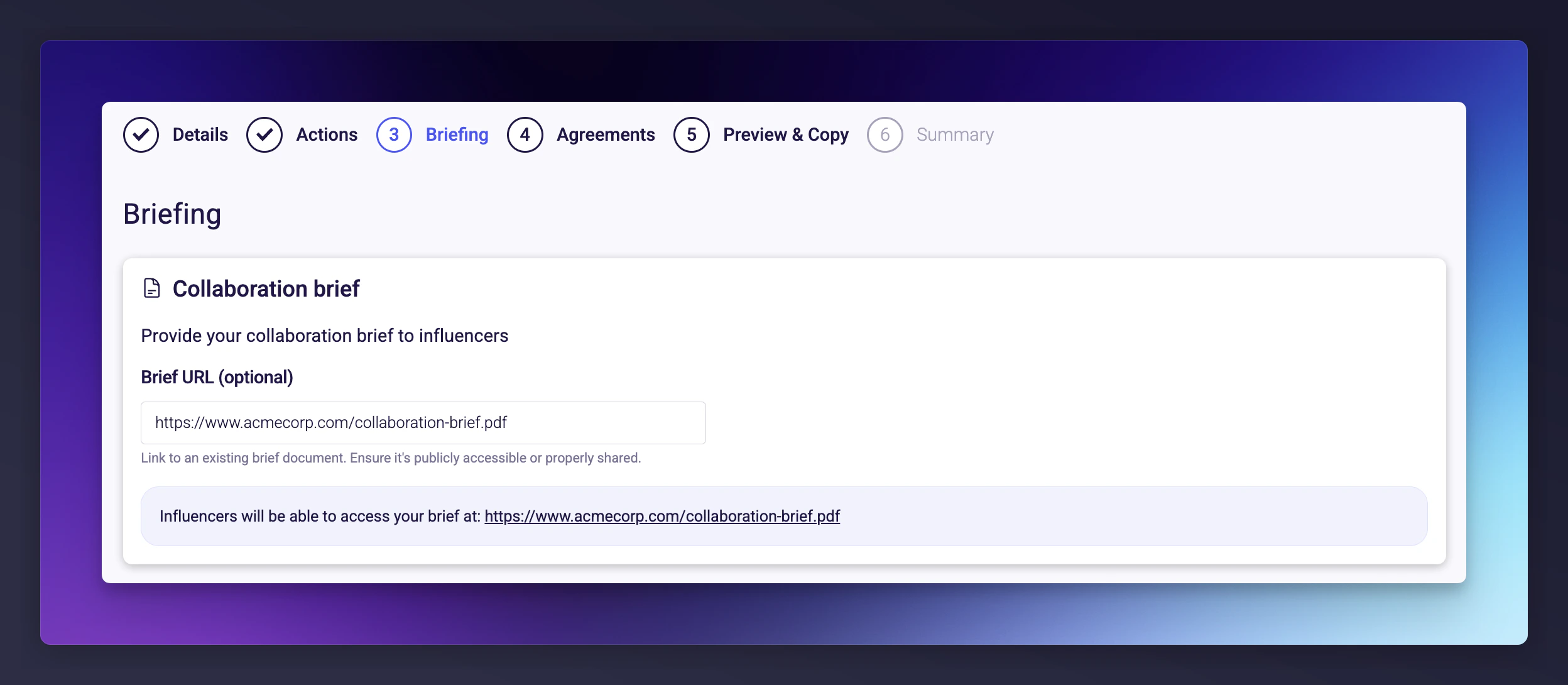
 Provide influencers with a creative brief. You can link to an external document (Google Doc, Notion page, PDF, or any publicly accessible URL).
A strong brief includes brand guidelines, key messages, do's and don'ts, and example content.
Provide influencers with a creative brief. You can link to an external document (Google Doc, Notion page, PDF, or any publicly accessible URL).
A strong brief includes brand guidelines, key messages, do's and don'ts, and example content.
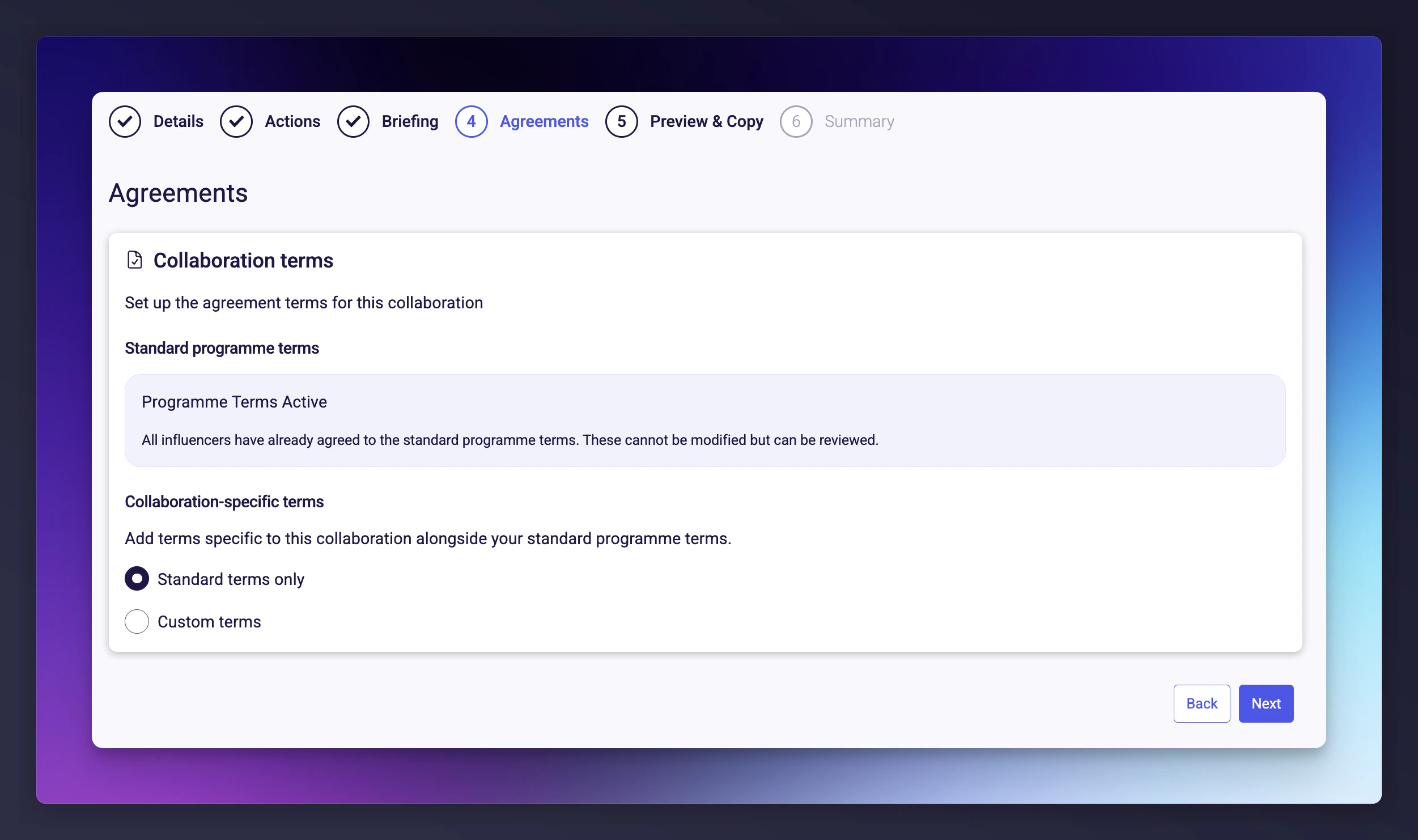
 Define the terms that govern this collaboration. When an influencer accepts, it creates a binding agreement.
| Option | Description |
| ------------------------------- | -------------------------------------------------------------------- |
| **Standard programme terms** | Default terms set at the programme level. |
| **Custom terms** | Additional collaboration-specific terms on top of standard terms. |
| **Custom terms with free text** | Both structured terms and a free-text field for unique requirements. |
When using custom terms, you must confirm that you have reviewed and approved the terms, have the authority to bind your organisation, and that influencers can begin work immediately upon accepting.
Once an influencer accepts a collaboration, the agreement becomes binding. Finalise your terms before setting the collaboration live.
Define the terms that govern this collaboration. When an influencer accepts, it creates a binding agreement.
| Option | Description |
| ------------------------------- | -------------------------------------------------------------------- |
| **Standard programme terms** | Default terms set at the programme level. |
| **Custom terms** | Additional collaboration-specific terms on top of standard terms. |
| **Custom terms with free text** | Both structured terms and a free-text field for unique requirements. |
When using custom terms, you must confirm that you have reviewed and approved the terms, have the authority to bind your organisation, and that influencers can begin work immediately upon accepting.
Once an influencer accepts a collaboration, the agreement becomes binding. Finalise your terms before setting the collaboration live.
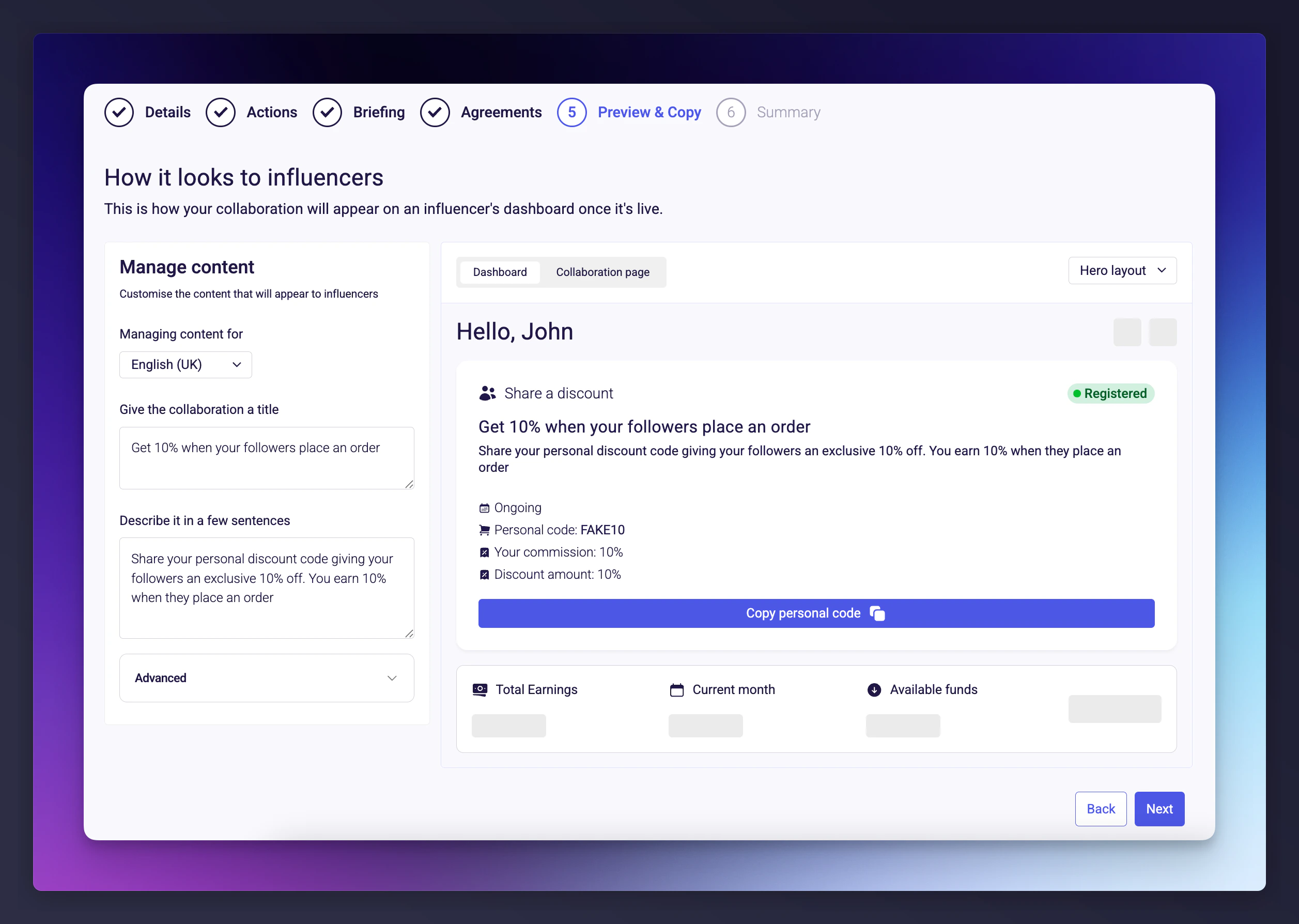
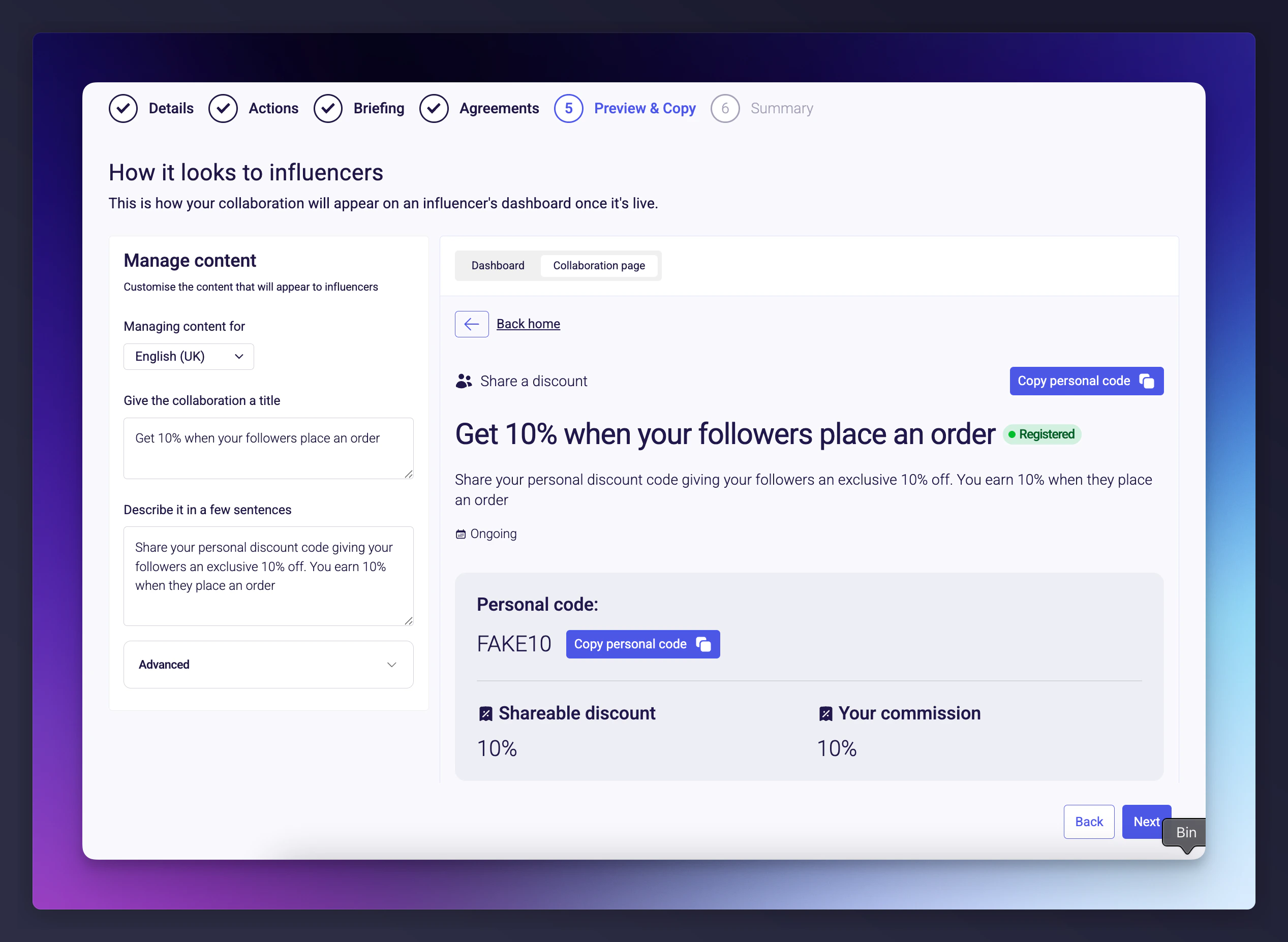
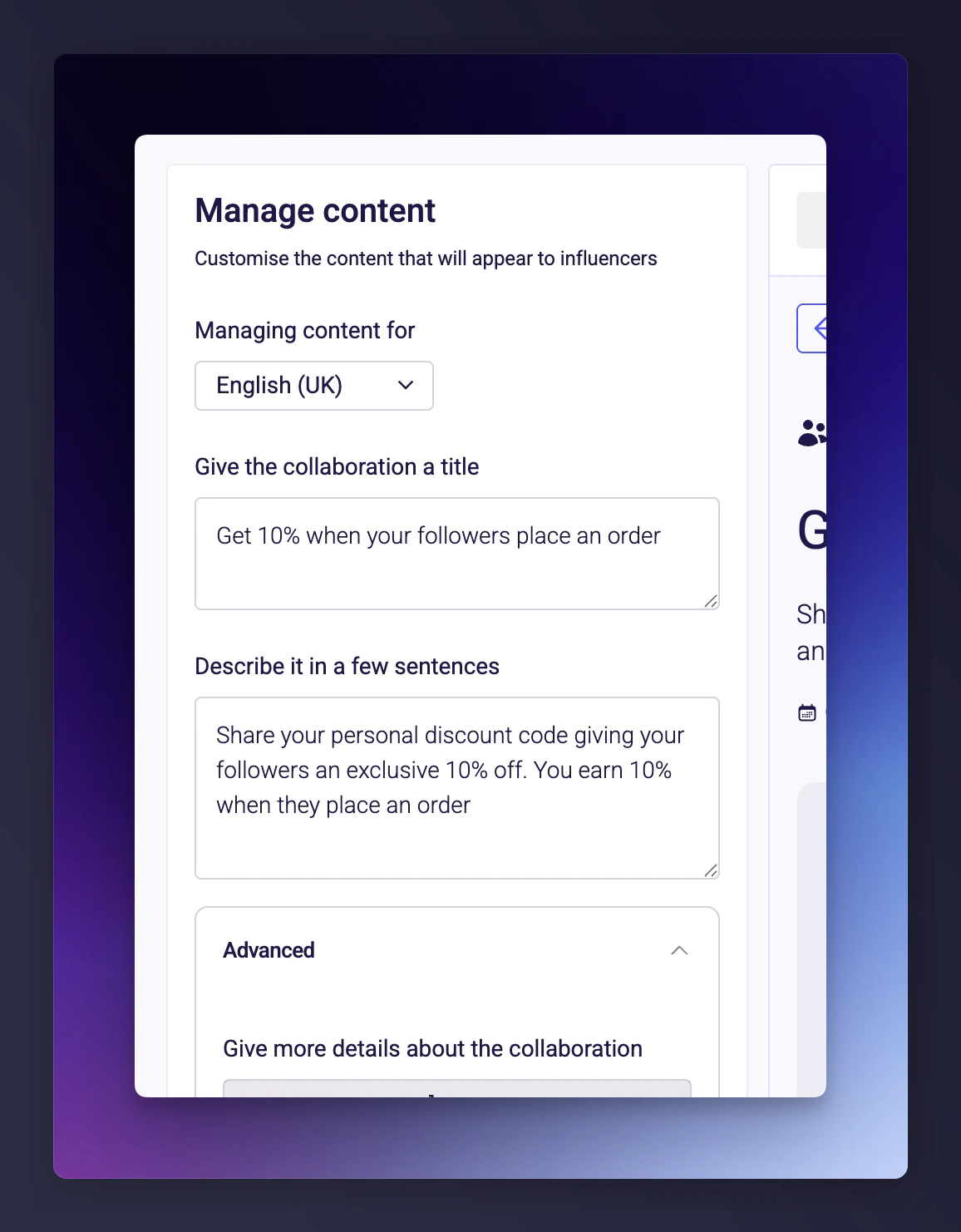
 See how your collaboration will appear to influencers and customise the copy for each locale.
You can switch between **Dashboard view** (how it appears in the collaboration list) and **Collaboration page view** (the full detail page).
Every piece of text shown to influencers is editable: title, description, action type label, reward and commission info, tooltips, call-to-action button text, and "Learn more" content (supports markdown).
If your programme supports multiple locales, tailor the copy per locale.
See how your collaboration will appear to influencers and customise the copy for each locale.
You can switch between **Dashboard view** (how it appears in the collaboration list) and **Collaboration page view** (the full detail page).
Every piece of text shown to influencers is editable: title, description, action type label, reward and commission info, tooltips, call-to-action button text, and "Learn more" content (supports markdown).
If your programme supports multiple locales, tailor the copy per locale.
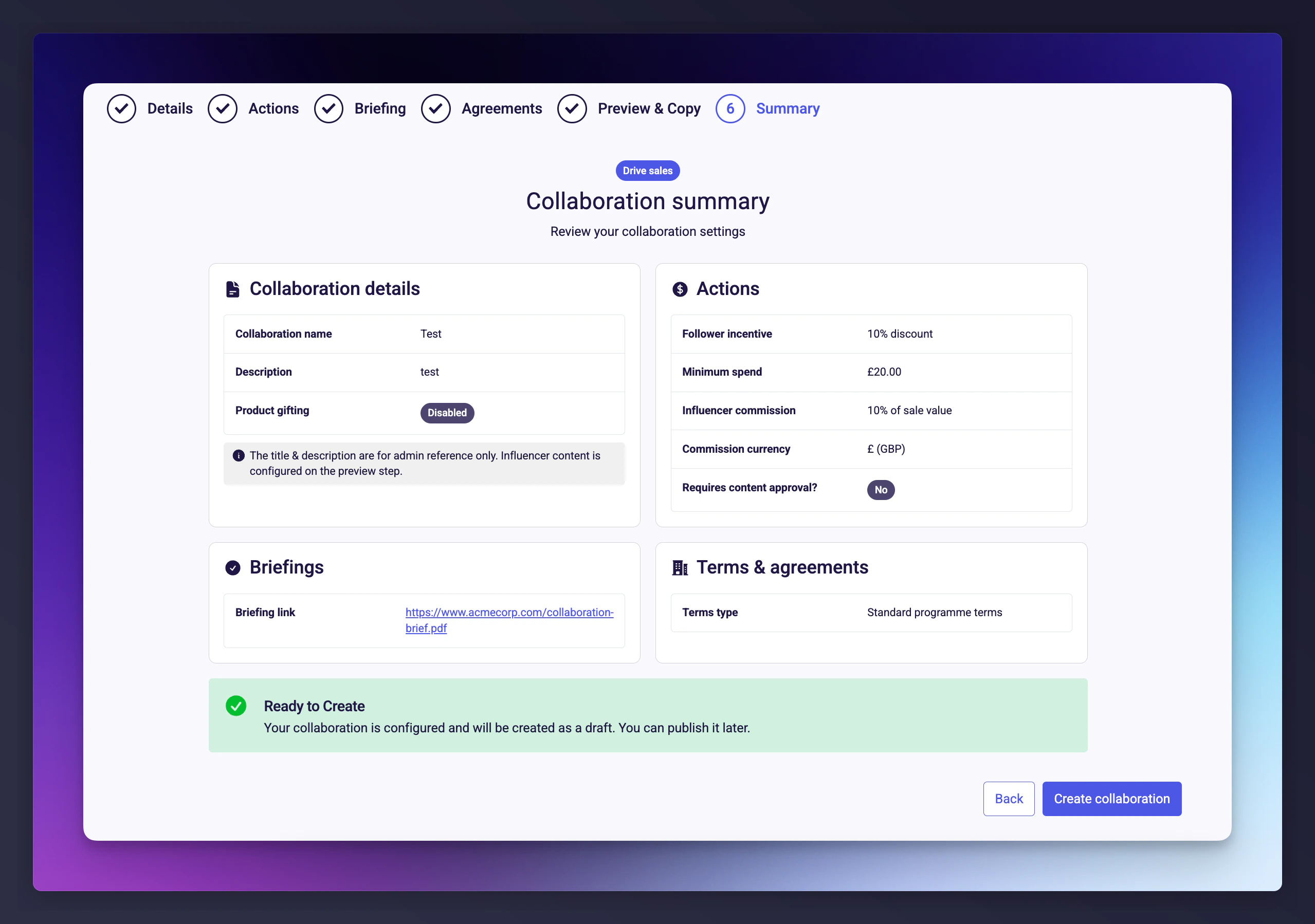
 Review all settings across four cards: Details, Actions, Briefing, and Agreements. Click **Create collaboration** to save in **Draft** status. It won't be visible to influencers until you explicitly set it live.
 ## Collaboration lifecycle
| Status | What it means | What you can do |
| ------------ | ------------------------------------------------------- | --------------------------- |
| **Draft** | Saved but not visible to influencers. Fully editable. | Edit, set live, or archive. |
| **Live** | Published and visible to influencers. Read-only. | Stop or view (no edits). |
| **Stopped** | Paused. No longer visible but preserves all data. | Resume or archive. |
| **Archived** | Hidden from all views. Cannot be edited or reactivated. | View only. |
Once a collaboration is live, you can't edit it directly. Stop the collaboration first, then create a new one with updated settings.
## Managing the collaborations list
The **Collaborations** page shows all collaborations in a sortable, filterable table. Each row displays:
| Column | Description |
| ------------- | ------------------------------------------------------------ |
| **Name** | The internal name |
| **Type** | Collaboration type (e.g., Sales, Post content) |
| **Programme** | Which programme it belongs to |
| **Status** | Current lifecycle status |
| **Schedule** | Start and end dates, if set |
| **Actions** | Quick actions dropdown (edit, set live, stop, archive, etc.) |
By default the list filters to Live, Draft, and Stopped collaborations. Adjust the filter to include archived collaborations if needed.
## Discount codes
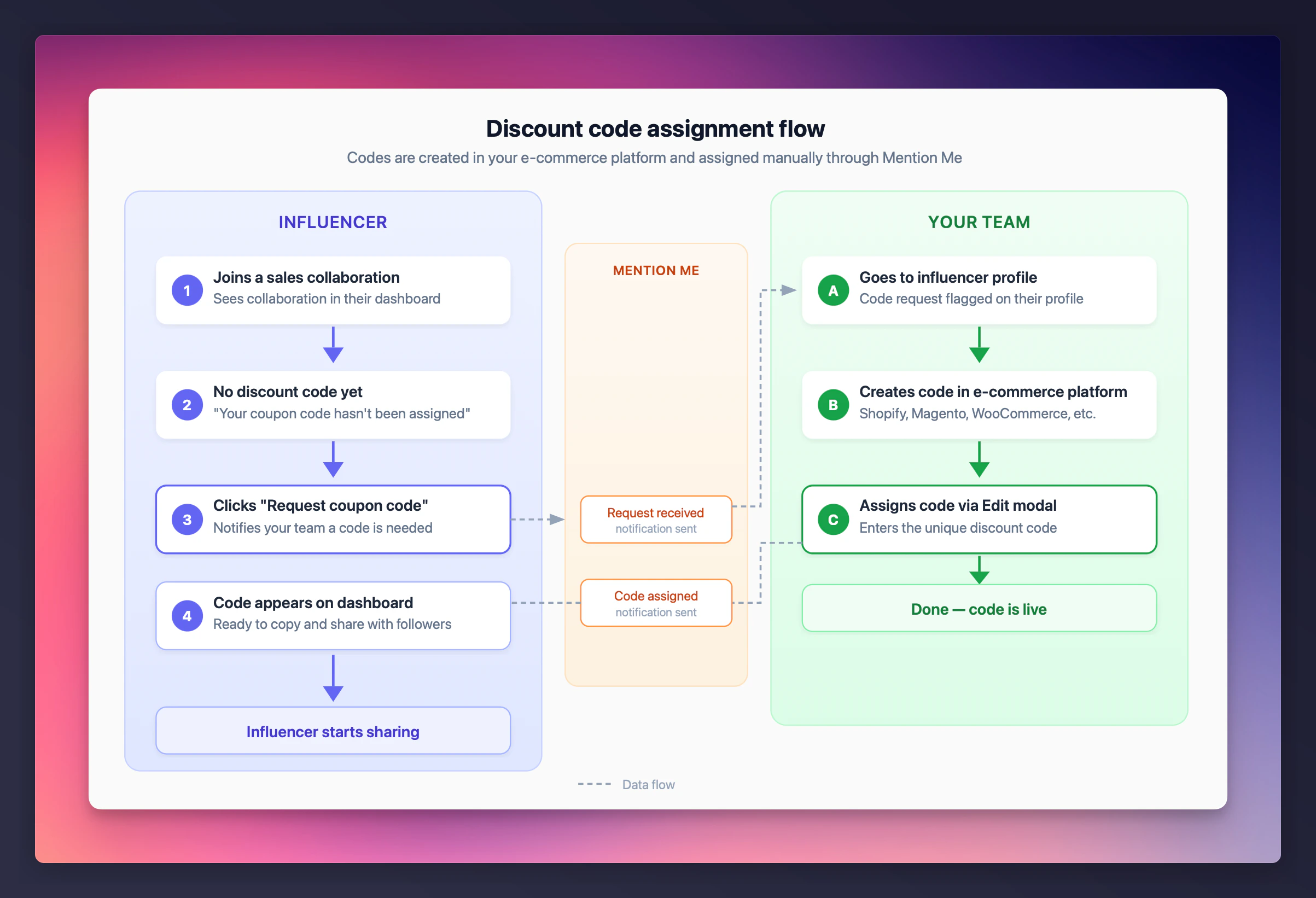
For **sales** collaborations, each influencer gets a personal discount code. Codes are not generated automatically by default -- they are assigned by your team from your e-commerce platform (Shopify, Magento, etc.). If you use Shopify, you can enable [automatic discount code generation](/knowledge/influencer/incentives/shopify-discount-setup).
## Collaboration lifecycle
| Status | What it means | What you can do |
| ------------ | ------------------------------------------------------- | --------------------------- |
| **Draft** | Saved but not visible to influencers. Fully editable. | Edit, set live, or archive. |
| **Live** | Published and visible to influencers. Read-only. | Stop or view (no edits). |
| **Stopped** | Paused. No longer visible but preserves all data. | Resume or archive. |
| **Archived** | Hidden from all views. Cannot be edited or reactivated. | View only. |
Once a collaboration is live, you can't edit it directly. Stop the collaboration first, then create a new one with updated settings.
## Managing the collaborations list
The **Collaborations** page shows all collaborations in a sortable, filterable table. Each row displays:
| Column | Description |
| ------------- | ------------------------------------------------------------ |
| **Name** | The internal name |
| **Type** | Collaboration type (e.g., Sales, Post content) |
| **Programme** | Which programme it belongs to |
| **Status** | Current lifecycle status |
| **Schedule** | Start and end dates, if set |
| **Actions** | Quick actions dropdown (edit, set live, stop, archive, etc.) |
By default the list filters to Live, Draft, and Stopped collaborations. Adjust the filter to include archived collaborations if needed.
## Discount codes
For **sales** collaborations, each influencer gets a personal discount code. Codes are not generated automatically by default -- they are assigned by your team from your e-commerce platform (Shopify, Magento, etc.). If you use Shopify, you can enable [automatic discount code generation](/knowledge/influencer/incentives/shopify-discount-setup).
 ### From the influencer's side
The influencer joins a sales collaboration and sees a message that their code hasn't been assigned yet.
They click **Request coupon code** to notify your team.
Once assigned, the code appears on their dashboard with a copy button.
### From the influencer's side
The influencer joins a sales collaboration and sees a message that their code hasn't been assigned yet.
They click **Request coupon code** to notify your team.
Once assigned, the code appears on their dashboard with a copy button.
 ### From the merchant's side
The influencer's code request is visible on their profile.
Go to the [influencers page](https://mentionme.dev/merchant/~/influencers/lists/active), select **View profile** on the influencer, then click **View full profile** from the sidebar that opens.
Click to open the **Edit discount code** modal, enter the unique discount code from your e-commerce platform, and save. The code is immediately visible to the influencer.
### From the merchant's side
The influencer's code request is visible on their profile.
Go to the [influencers page](https://mentionme.dev/merchant/~/influencers/lists/active), select **View profile** on the influencer, then click **View full profile** from the sidebar that opens.
Click to open the **Edit discount code** modal, enter the unique discount code from your e-commerce platform, and save. The code is immediately visible to the influencer.

 Each discount code must be unique. The system validates this to prevent duplicates.
### Where influencers see their code
Once assigned, the influencer sees their personal code on their collaboration detail page, along with:
* The code itself (with a one-click copy button)
* A "How to use your code" guide
* The discount value their audience receives
Each discount code must be unique. The system validates this to prevent duplicates.
### Where influencers see their code
Once assigned, the influencer sees their personal code on their collaboration detail page, along with:
* The code itself (with a one-click copy button)
* A "How to use your code" guide
* The discount value their audience receives
 ## Best practices
* **Keep collaboration names descriptive.** Names are internal, so use them to help your team distinguish similar collaborations. For example: "Summer 2025 -- Instagram Reels -- 20% off" is more useful than "Summer collab".
* **Set up your brief before going live.** Influencers see the brief immediately when a collaboration goes live.
* **Use custom terms sparingly.** Standard programme terms cover most scenarios. Extra complexity can slow down influencer acceptance.
* **Assign discount codes promptly.** Influencers can't start driving sales until they have their code.
* **Review before going live.** Double-check compensation amounts, content requirements, and terms -- once live, you'll need to create a new collaboration to make changes.
## Best practices
* **Keep collaboration names descriptive.** Names are internal, so use them to help your team distinguish similar collaborations. For example: "Summer 2025 -- Instagram Reels -- 20% off" is more useful than "Summer collab".
* **Set up your brief before going live.** Influencers see the brief immediately when a collaboration goes live.
* **Use custom terms sparingly.** Standard programme terms cover most scenarios. Extra complexity can slow down influencer acceptance.
* **Assign discount codes promptly.** Influencers can't start driving sales until they have their code.
* **Review before going live.** Double-check compensation amounts, content requirements, and terms -- once live, you'll need to create a new collaboration to make changes.