> ## Documentation Index
> Fetch the complete documentation index at: https://docs.mention-me.com/llms.txt
> Use this file to discover all available pages before exploring further.
# How to Promote Referral from Ometria
> Send customers to a personalised referral landing page from your Ometria emails and configure your Mention Me campaign to recognise them.
When sending emails via Ometria, you may want to promote your referral programme. You can direct customers to your landing page, but if the link isn't personalised, the customer will need to enter their name and email address before they can take part.
As Ometria already holds this information, you can use a special Ometria and Mention Me link to give your customers a personalised experience instead.
To set this up, you need to:
1. Include the link in your Ometria email template.
2. Make sure your Mention Me campaign triggering rules will show the right offer.
## Prerequisites
* A working referral landing page on your website with the Mention Me referral tag implemented
## The Link
Include the following link in your Ometria email:
```text theme={null}
https://api.ometria.com/connect/mentionme/{{ email.account_hash }}/redirect?profile={{ profile.hash }}
```
Ometria automatically updates this link for each customer, so no further configuration is needed in the email itself.
## The Campaign Triggering Rules
When a customer clicks the link, they're sent to a Mention Me landing page with their name and email address already filled in.
The link also passes through the following values from Ometria:
* Ometria Country Code
* Ometria Store ID
* Ometria Lifecycle
* Ometria Segments
You can use these values in the [Triggering Rules](/knowledge/referral/campaigns/triggering-rules) section of the Mention Me platform to automatically show the right campaign to each customer.
For example, the campaign below is shown to a customer when *either* the Locale is `en_GB` *or* the Ometria Country Code is `GB`.
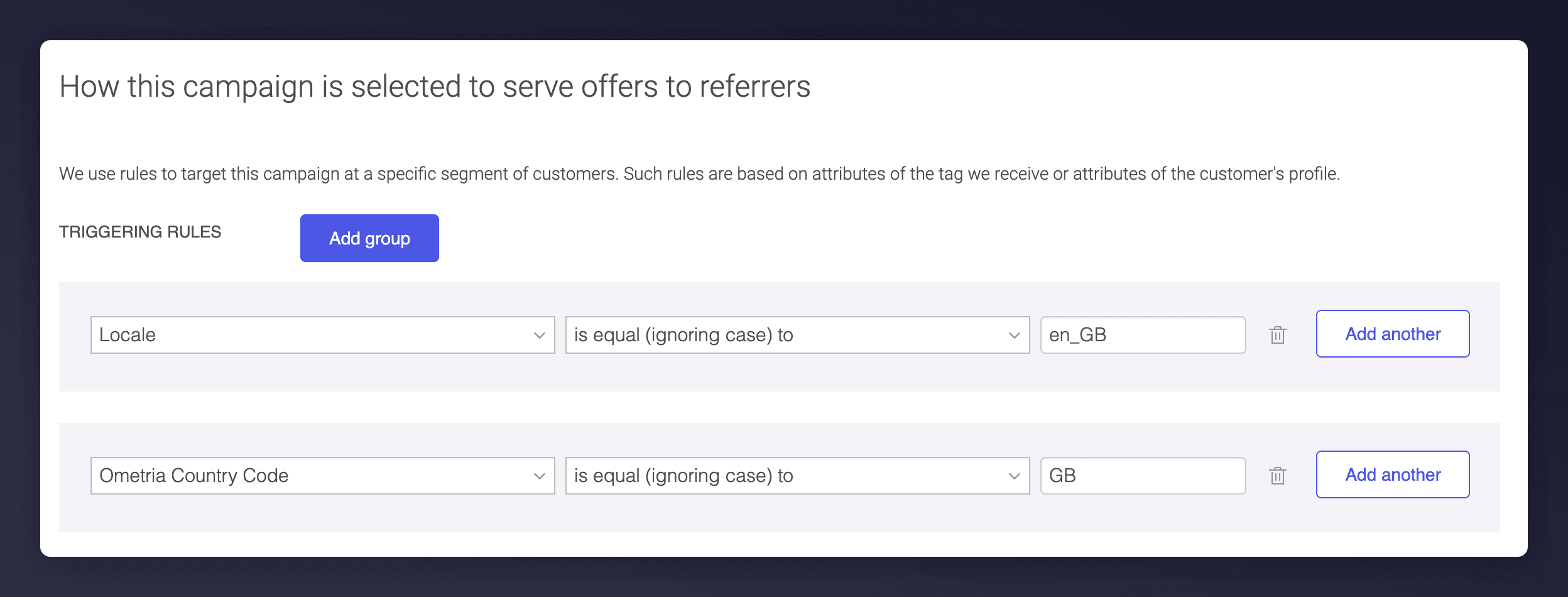 With this combination of rules, the campaign is shown to customers with an `en_GB` locale outside of Ometria, for example on your landing page or post-purchase pages. When a customer arrives from Ometria, the campaign is shown as long as their country code is GB, regardless of locale.