> ## Documentation Index
> Fetch the complete documentation index at: https://docs.mention-me.com/llms.txt
> Use this file to discover all available pages before exploring further.
# Coupon Reminder Flows in Klaviyo
> Set up pre-built Klaviyo flows to remind referrers and referees to use their Mention Me coupon codes.
## About these flows
These Klaviyo flows remind customers to use their Mention Me coupon codes. The referee flow targets prospective customers who received a referral coupon, while the referrer flow targets existing customers who earned a reward for referring a friend.
The flows use Mention Me event data passed to Klaviyo through the integration, leveraging Klaviyo's [Flows feature](https://help.klaviyo.com/hc/en-us/articles/115002774932). Pre-built flows include suggested copy and variables from [Mention Me events](/knowledge/esp-crm/klaviyo/data-reference) and [customer attributes](/knowledge/esp-crm/klaviyo/data-reference).
## Prerequisites
1. An active Mention Me referral programme that rewards customers
2. The latest version of the Mention Me x Klaviyo integration is enabled. Check the integration status [here](https://mention-me.com/merchant/~/integrations/klaviyo):
* **Enabled** — you're all set.
* **Not Connected** — follow [this guide](/knowledge/esp-crm/klaviyo/setup).
3. Familiarity with [Klaviyo personalisation variables](https://help.klaviyo.com/hc/en-us/articles/4408802648731)
## Supported channels
* Email
## Referee flow
This flow helps you remind prospective customers (referees) to use their coupon codes after being referred to your brand.
By implementing this flow, you can:
* Drive first purchase
* Increase average order value
### Basic workflow
1. The referee receives a coupon in the initial email sent by Mention Me.
* Due to GDPR, Mention Me cannot send follow-ups — set those up in Klaviyo.
2. If the referee hasn't purchased yet, send reminder emails.
3. Continue reminders if they remain inactive.
 ### Step 1: Install the flow
1. Log in to Klaviyo and go to [Flows](https://www.klaviyo.com/flows/create)
2. Select Mention Me under Integrations
3. Choose **Referee Coupon Reminder**
### Step 1: Install the flow
1. Log in to Klaviyo and go to [Flows](https://www.klaviyo.com/flows/create)
2. Select Mention Me under Integrations
3. Choose **Referee Coupon Reminder**
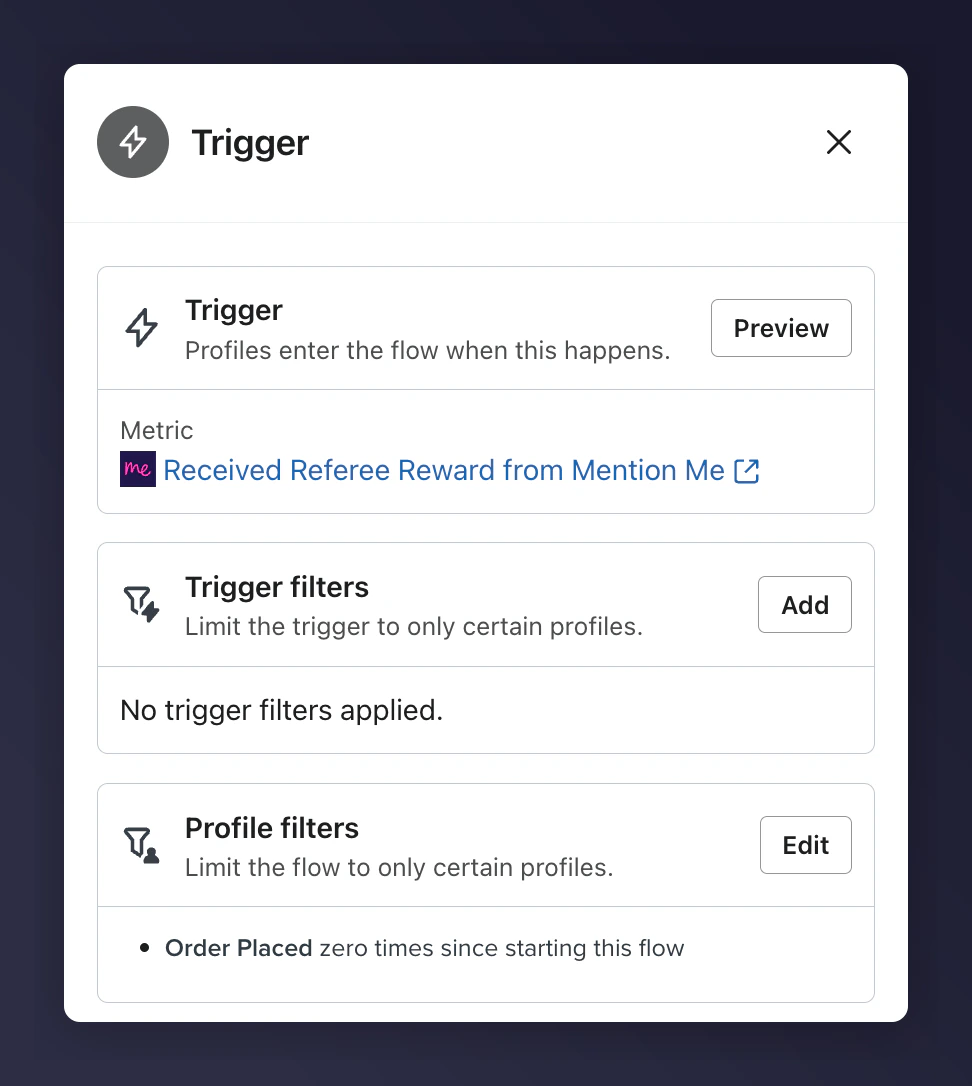
 ### Step 2: Add a "Placed Order" filter
1. Edit the Trigger block
2. Add a filter: users who have placed **0 orders** since entering the flow
This ensures emails go only to referees who've not yet converted.
### Step 2: Add a "Placed Order" filter
1. Edit the Trigger block
2. Add a filter: users who have placed **0 orders** since entering the flow
This ensures emails go only to referees who've not yet converted.
 ### Step 3: Add email content
1. Update email branding: images, fonts, colours
2. Use Mention Me default copy with dynamic variables
3. Add product recommendations to increase conversion
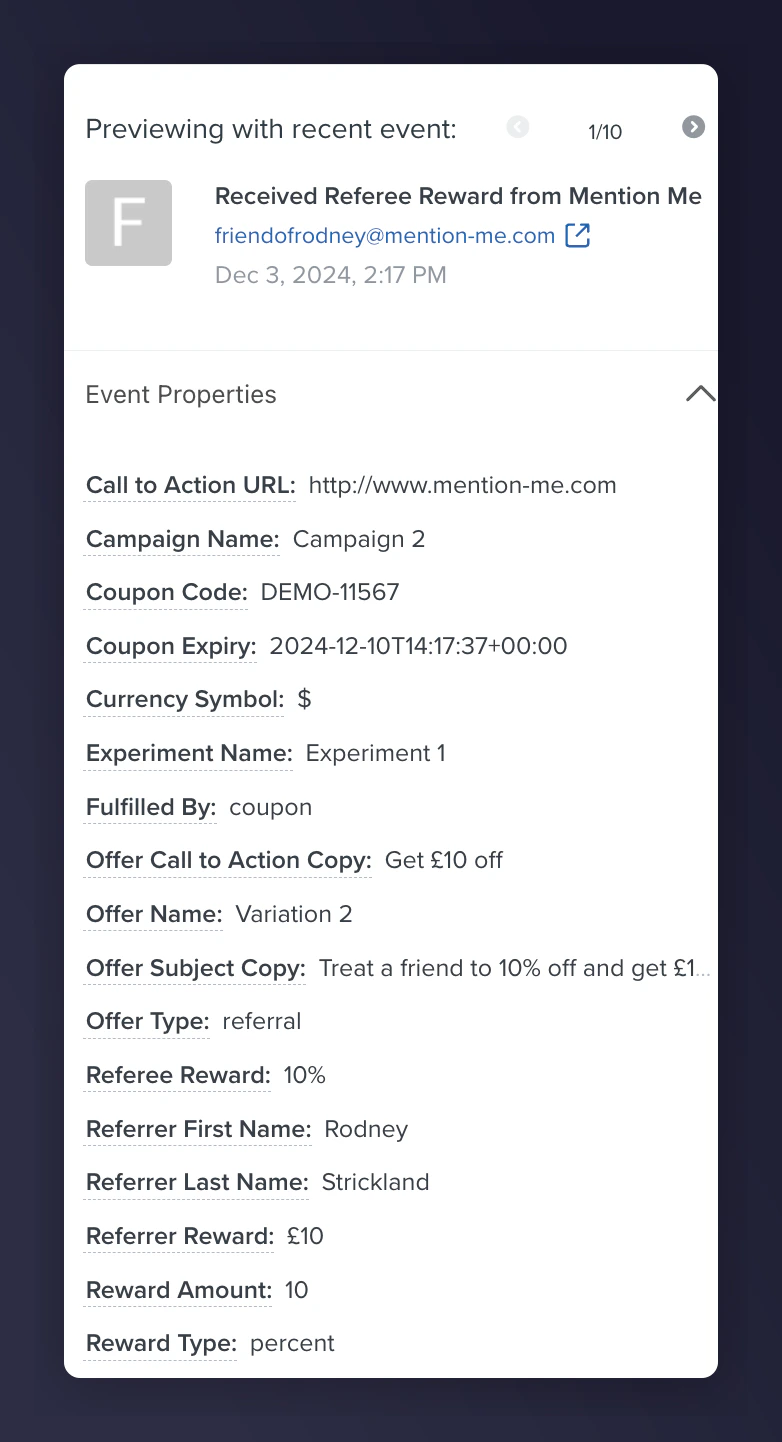
#### Dynamic variables
| Variable | Description | Example |
| ----------------------------------------------------------------------- | ------------------------------------------ | ----------------------------------------------- |
| `{{ first_name\|default:'there' }}` | Referee's first name fallback | "Ryder" or "there" |
| `{{ event\|lookup:'Referee Reward'\|default:'' }}` | Award value offered | £15 |
| `{{ event\|lookup:'Coupon Code' }}` | The unique coupon code assigned | 10USDOFF-RXAAURVZ |
| `{{ event\|lookup:'Coupon Expiry'\|format_date_string\|date:'d F o' }}` | Coupon expiry in reader-friendly format | Wednesday, 19 July 2023 |
| `{{ event\|lookup:'Call to Action URL' }}` | Direct reward landing URL (for CTA button) | [www.mention-me.com](http://www.mention-me.com) |
### Step 4: Preview the email
1. Select "Preview & Test"
2. Choose a test profile who has met trigger conditions
3. Confirm dynamic content is accurate before continuing
### Step 3: Add email content
1. Update email branding: images, fonts, colours
2. Use Mention Me default copy with dynamic variables
3. Add product recommendations to increase conversion
#### Dynamic variables
| Variable | Description | Example |
| ----------------------------------------------------------------------- | ------------------------------------------ | ----------------------------------------------- |
| `{{ first_name\|default:'there' }}` | Referee's first name fallback | "Ryder" or "there" |
| `{{ event\|lookup:'Referee Reward'\|default:'' }}` | Award value offered | £15 |
| `{{ event\|lookup:'Coupon Code' }}` | The unique coupon code assigned | 10USDOFF-RXAAURVZ |
| `{{ event\|lookup:'Coupon Expiry'\|format_date_string\|date:'d F o' }}` | Coupon expiry in reader-friendly format | Wednesday, 19 July 2023 |
| `{{ event\|lookup:'Call to Action URL' }}` | Direct reward landing URL (for CTA button) | [www.mention-me.com](http://www.mention-me.com) |
### Step 4: Preview the email
1. Select "Preview & Test"
2. Choose a test profile who has met trigger conditions
3. Confirm dynamic content is accurate before continuing
 ### Step 5: Activate the flow
Once you're satisfied, activate by clicking **Review and turn on**.
### Step 5: Activate the flow
Once you're satisfied, activate by clicking **Review and turn on**.
 If you need assistance, please [contact the Support team](https://help.mention-me.com/hc/en-gb/requests/new?ticket_form_id=8840645829405).
## Referrer flow
This flow reminds existing customers (referrers) to use their coupon codes received after referring a friend.
By implementing this flow, you can:
* Increase active customer revenue
* Increase premium customer revenue
* Improve long-term retention
### Basic workflow
1. The referrer gets a coupon when referring a friend (initial email is sent by Mention Me).
* Per GDPR, Mention Me cannot send follow-up emails — set those up in Klaviyo.
2. Reminder emails are sent (subject to marketing consent) if no purchase has been made.
3. Additional reminders are sent at different intervals if the coupon remains unused.
Suggested wait times are longer than for referees due to longer coupon expiry windows, but you can adjust as needed for your brand.
If you need assistance, please [contact the Support team](https://help.mention-me.com/hc/en-gb/requests/new?ticket_form_id=8840645829405).
## Referrer flow
This flow reminds existing customers (referrers) to use their coupon codes received after referring a friend.
By implementing this flow, you can:
* Increase active customer revenue
* Increase premium customer revenue
* Improve long-term retention
### Basic workflow
1. The referrer gets a coupon when referring a friend (initial email is sent by Mention Me).
* Per GDPR, Mention Me cannot send follow-up emails — set those up in Klaviyo.
2. Reminder emails are sent (subject to marketing consent) if no purchase has been made.
3. Additional reminders are sent at different intervals if the coupon remains unused.
Suggested wait times are longer than for referees due to longer coupon expiry windows, but you can adjust as needed for your brand.
 ### Step 1: Install the flow
1. Log in to Klaviyo and go to the [Flows section](https://www.klaviyo.com/flows/create).
2. Select **Mention Me** from the Integrations menu.
3. Choose **Referrer Coupon Reminder**
### Step 1: Install the flow
1. Log in to Klaviyo and go to the [Flows section](https://www.klaviyo.com/flows/create).
2. Select **Mention Me** from the Integrations menu.
3. Choose **Referrer Coupon Reminder**
 ### Step 2: Add a Placed Order filter
1. Edit the flow trigger
2. Add a profile filter to include only referrers who have **Placed Order = 0** times since entering the flow.
Use the **Placed Order** event from your eCommerce platform (e.g., Shopify, BigCommerce).
### Step 2: Add a Placed Order filter
1. Edit the flow trigger
2. Add a profile filter to include only referrers who have **Placed Order = 0** times since entering the flow.
Use the **Placed Order** event from your eCommerce platform (e.g., Shopify, BigCommerce).
 ### Step 3: Add email content
1. Update design and branding: add your own images, colour, layout
2. Include Mention Me recommended variables (see below)
3. Add product recommendations if relevant
#### Dynamic variables
| Variable | Description | Example |
| ----------------------------------------------------------------------- | ---------------------------------------------- | ----------------------------------------------- |
| `{{ first_name\|default:'there' }}` | Pulls the referrer's name. Defaults to "there" | Ryder or "there" |
| `{{ event\|lookup:'Referrer Reward' }}` | The reward the referrer received | £15 or 30% |
| `{{ event\|lookup:'Coupon Code' }}` | The actual coupon code granted | 10USDOFF-RXAAURVZ |
| `{{ event\|lookup:'Coupon Expiry'\|format_date_string\|timeuntil }}` | Time left until expiry | 1 week and 5 days |
| `{{ event\|lookup:'Coupon Expiry'\|format_date_string\|date:'d F o' }}` | Date of expiry in full format | Wednesday, 19 July 2023 |
| `{{ event\|lookup:'Call to Action URL' }}` | URL where the discount can be used | [www.mention-me.com](http://www.mention-me.com) |
### Step 4: Test each email
1. Click **Preview & Test** for each email in the flow
2. Select a test user who meets the flow criteria
3. Confirm personalisation and formatting appears as expected
### Step 3: Add email content
1. Update design and branding: add your own images, colour, layout
2. Include Mention Me recommended variables (see below)
3. Add product recommendations if relevant
#### Dynamic variables
| Variable | Description | Example |
| ----------------------------------------------------------------------- | ---------------------------------------------- | ----------------------------------------------- |
| `{{ first_name\|default:'there' }}` | Pulls the referrer's name. Defaults to "there" | Ryder or "there" |
| `{{ event\|lookup:'Referrer Reward' }}` | The reward the referrer received | £15 or 30% |
| `{{ event\|lookup:'Coupon Code' }}` | The actual coupon code granted | 10USDOFF-RXAAURVZ |
| `{{ event\|lookup:'Coupon Expiry'\|format_date_string\|timeuntil }}` | Time left until expiry | 1 week and 5 days |
| `{{ event\|lookup:'Coupon Expiry'\|format_date_string\|date:'d F o' }}` | Date of expiry in full format | Wednesday, 19 July 2023 |
| `{{ event\|lookup:'Call to Action URL' }}` | URL where the discount can be used | [www.mention-me.com](http://www.mention-me.com) |
### Step 4: Test each email
1. Click **Preview & Test** for each email in the flow
2. Select a test user who meets the flow criteria
3. Confirm personalisation and formatting appears as expected
 ### Step 5: Activate the flow
Once you've tested and approved all the content, click **Review and Turn On**.
### Step 5: Activate the flow
Once you've tested and approved all the content, click **Review and Turn On**.
 Need more help? Contact our [Support Team](https://help.mention-me.com/hc/en-gb/requests/new?ticket_form_id=8840645829405).