> ## Documentation Index
> Fetch the complete documentation index at: https://docs.mention-me.com/llms.txt
> Use this file to discover all available pages before exploring further.
# Understanding the Customers Section
> Overview of the Customers section in the Mention Me dashboard, including available actions and related guides.
**A redesigned Customers experience is available in beta.** If you see a "Customers beta" banner on your Customers pages, click it to try the new experience on app.mention-me.com. It includes richer customer profiles, improved fraud discovery, and easier approvals. See the [new Customers documentation](/knowledge-v2/customers/overview) for details.
The Customers section in your dashboard allows you or anyone on your team with the right access to perform a range of actions on individual customers.
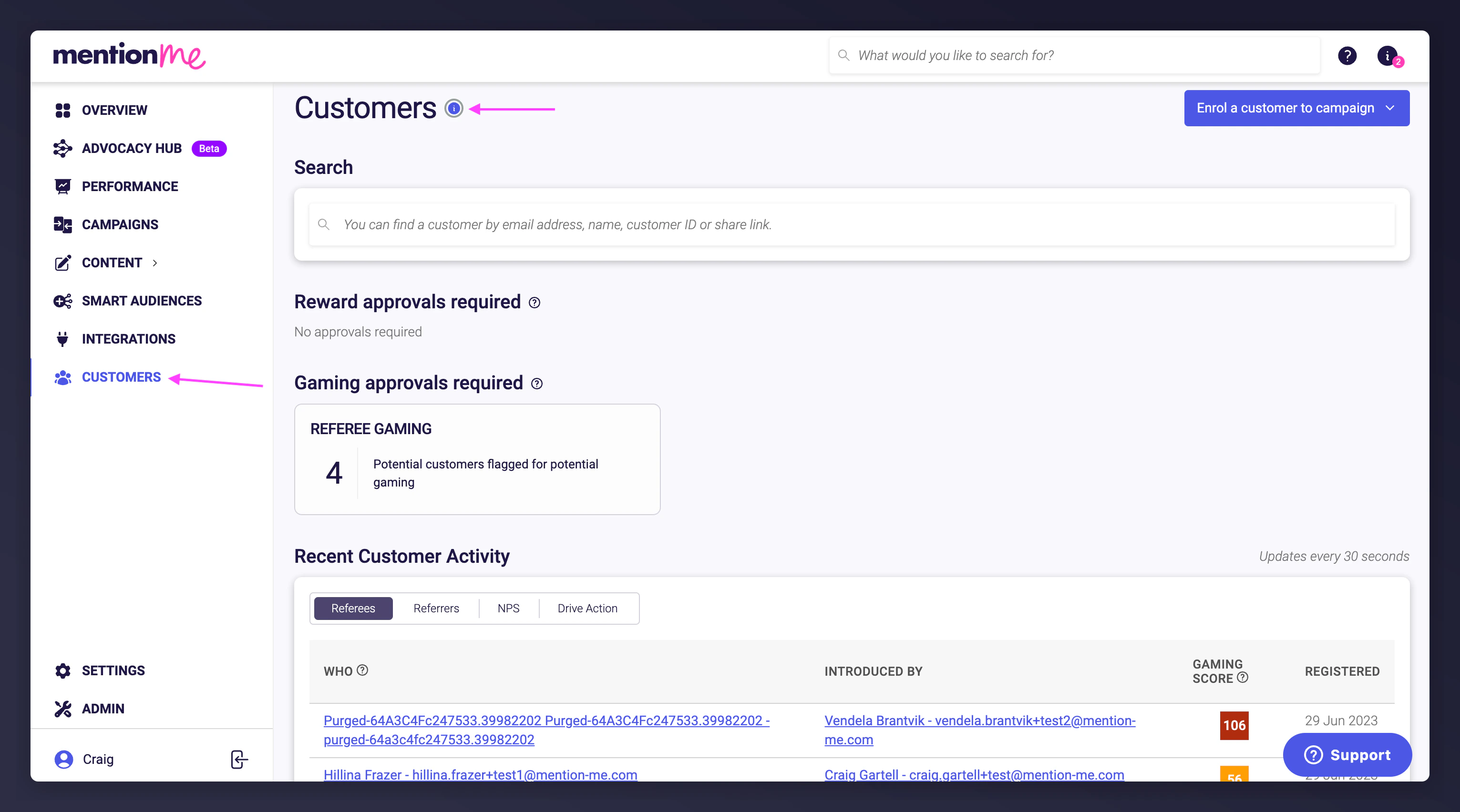 ## Available Actions
### Search for a Customer
From a customer's profile, you can:
* Enrol them into an offer
* Mark as suspected of gaming
* Turn emails off for them
* Confirm purchase
* Reissue a coupon code for a reward that has expired, been barred, or is fully used
* Purge them (GDPR deletion)
* Add a friend under their name
### View Customer Information
* **Basic info** — name, email, short link for their share links, customer type, date first seen in Mention Me, who introduced them and on which offer
* **Activity timeline** — dates and times of their interactions with any offers
* **Active offers** — current and expired offers being shared with the customer
* **Offer views** — how many times they have seen an offer
* **Rewards** — reward and voucher codes issued to them
* **Emails** — emails sent to them
* **Pending approvals** — any approval pending for them as referrer, referee, or to drive action
## Related Guides
### Customers
* [How to search, add & link customers](/knowledge/referral/customers/search-add-link)
* [How to confirm a customer purchase](/knowledge/referral/customers/check-referral-status)
### Rewards
* [How to search for a reward code](/knowledge/referral/offers/fulfilment)
* [How to resend a customer reward email](/knowledge/referral/offers/fulfilment)
* [How to claim a customer reward](/knowledge/referral/offers/fulfilment)
### Reward Upload
* [How to upload new rewards to your offer](/knowledge/referral/vouchers/upload-vouchers)
* [How to assign rewards to multiple offers](/knowledge/referral/vouchers/assign-to-offers)
* [How to extend the validity of your existing rewards](/knowledge/referral/vouchers/extend-vouchers)
### Gaming
* [How to mark, approve or decline a customer as suspected of gaming](/knowledge/referral/gaming/approve-decline-suspects)
### Data
* [How to delete customer data](/knowledge/referral/customers/purge-data)
* [How to unsubscribe a customer](/knowledge/referral/customers/unsubscribe)
### Copy
* [How to edit copy](/knowledge/referral/design/managing-copy)
### Account
* [How to add and unlock users within your account](/knowledge/security/account/user-management)
## Available Actions
### Search for a Customer
From a customer's profile, you can:
* Enrol them into an offer
* Mark as suspected of gaming
* Turn emails off for them
* Confirm purchase
* Reissue a coupon code for a reward that has expired, been barred, or is fully used
* Purge them (GDPR deletion)
* Add a friend under their name
### View Customer Information
* **Basic info** — name, email, short link for their share links, customer type, date first seen in Mention Me, who introduced them and on which offer
* **Activity timeline** — dates and times of their interactions with any offers
* **Active offers** — current and expired offers being shared with the customer
* **Offer views** — how many times they have seen an offer
* **Rewards** — reward and voucher codes issued to them
* **Emails** — emails sent to them
* **Pending approvals** — any approval pending for them as referrer, referee, or to drive action
## Related Guides
### Customers
* [How to search, add & link customers](/knowledge/referral/customers/search-add-link)
* [How to confirm a customer purchase](/knowledge/referral/customers/check-referral-status)
### Rewards
* [How to search for a reward code](/knowledge/referral/offers/fulfilment)
* [How to resend a customer reward email](/knowledge/referral/offers/fulfilment)
* [How to claim a customer reward](/knowledge/referral/offers/fulfilment)
### Reward Upload
* [How to upload new rewards to your offer](/knowledge/referral/vouchers/upload-vouchers)
* [How to assign rewards to multiple offers](/knowledge/referral/vouchers/assign-to-offers)
* [How to extend the validity of your existing rewards](/knowledge/referral/vouchers/extend-vouchers)
### Gaming
* [How to mark, approve or decline a customer as suspected of gaming](/knowledge/referral/gaming/approve-decline-suspects)
### Data
* [How to delete customer data](/knowledge/referral/customers/purge-data)
* [How to unsubscribe a customer](/knowledge/referral/customers/unsubscribe)
### Copy
* [How to edit copy](/knowledge/referral/design/managing-copy)
### Account
* [How to add and unlock users within your account](/knowledge/security/account/user-management)