> ## Documentation Index
> Fetch the complete documentation index at: https://docs.mention-me.com/llms.txt
> Use this file to discover all available pages before exploring further.
# Editing the layout
> Drag, resize, and arrange tiles on the dashboard grid.
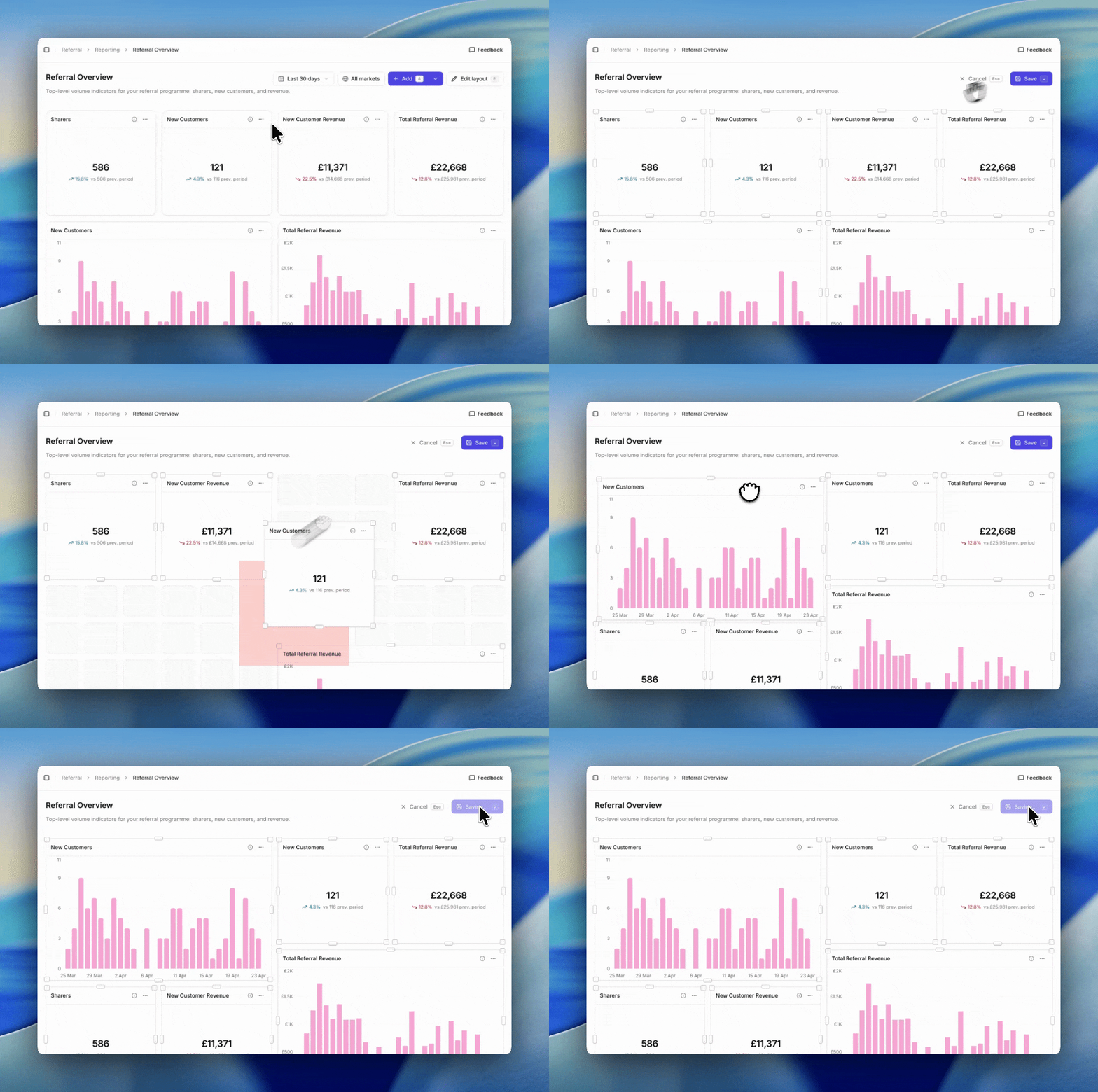
Rearrange tiles, change their size, and shape a dashboard visually. Layout editing is a dedicated mode so accidental drags in normal view don't rearrange the dashboard.
 ## Enter edit mode
Click **Edit layout** in the top right of the dashboard, or press `E`.
In edit mode:
* Tiles get drag handles and resize corners.
* Hover any tile to see the handles.
* The dashboard filter bar is disabled while editing.
## Move a tile
Click and drag a tile by its header to a new position on the grid. Other tiles shuffle out of the way to make room.
## Resize a tile
Grab the bottom-right corner of a tile and drag. Each tile type has a minimum size enforced by the grid:
* **Metric**. Minimum 2 columns × 2 rows.
* **Chart**. Minimum 3 columns × 3 rows. Funnel charts require at least 6 columns.
* **Table**. Minimum 3 columns × 3 rows.
* **Markdown**. Minimum 2 columns × 1 row.
The grid has 12 columns on desktop, 6 on tablet, and collapses to a single column on mobile. Layout editing is only available on desktop and tablet.
## Save or cancel
Click **Save** to commit the new layout or **Cancel** to discard changes. Keyboard shortcuts work in edit mode too: `Enter` saves, `Esc` cancels.
Group related tiles together. A markdown tile labelled `## Revenue` or `## Funnel` above each cluster makes the dashboard read top-to-bottom like a story.
## Keyboard shortcuts
* `E`. Enter edit mode from the view page.
* `A`. Add a tile (works from view mode only).
See [keyboard shortcuts](/knowledge-v2/referral/reporting/reference/keyboard-shortcuts).
## Enter edit mode
Click **Edit layout** in the top right of the dashboard, or press `E`.
In edit mode:
* Tiles get drag handles and resize corners.
* Hover any tile to see the handles.
* The dashboard filter bar is disabled while editing.
## Move a tile
Click and drag a tile by its header to a new position on the grid. Other tiles shuffle out of the way to make room.
## Resize a tile
Grab the bottom-right corner of a tile and drag. Each tile type has a minimum size enforced by the grid:
* **Metric**. Minimum 2 columns × 2 rows.
* **Chart**. Minimum 3 columns × 3 rows. Funnel charts require at least 6 columns.
* **Table**. Minimum 3 columns × 3 rows.
* **Markdown**. Minimum 2 columns × 1 row.
The grid has 12 columns on desktop, 6 on tablet, and collapses to a single column on mobile. Layout editing is only available on desktop and tablet.
## Save or cancel
Click **Save** to commit the new layout or **Cancel** to discard changes. Keyboard shortcuts work in edit mode too: `Enter` saves, `Esc` cancels.
Group related tiles together. A markdown tile labelled `## Revenue` or `## Funnel` above each cluster makes the dashboard read top-to-bottom like a story.
## Keyboard shortcuts
* `E`. Enter edit mode from the view page.
* `A`. Add a tile (works from view mode only).
See [keyboard shortcuts](/knowledge-v2/referral/reporting/reference/keyboard-shortcuts).