> ## Documentation Index
> Fetch the complete documentation index at: https://docs.mention-me.com/llms.txt
> Use this file to discover all available pages before exploring further.
# Trigger
> Set when a campaign runs and which customers are eligible, using eligibility rules and qualifying purchase rules.
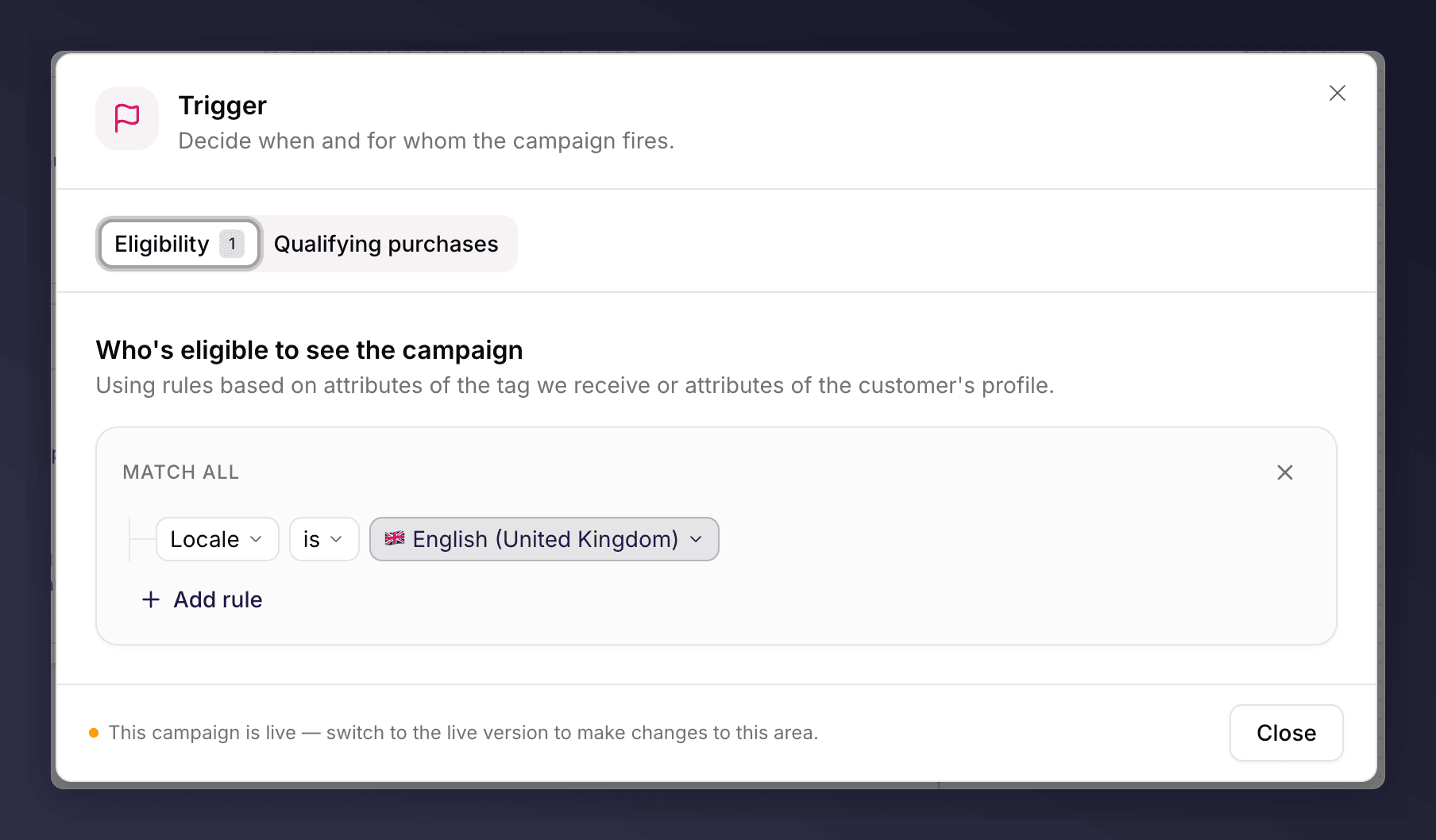
The **Trigger** section defines when the campaign runs and who qualifies. It sits at the top of the canvas because it decides who enters the journey. With no rules set, everyone is eligible.
 ## What You Can Set
The editor has two tabs:
* **Eligibility**. Who is eligible to see the campaign, based on attributes of the tag we receive or the customer's profile.
* **Qualifying purchases**. Which purchases count as a qualifying referral.
## How Rules Combine
Rules are organised into groups:
* Rules **within a group** use AND logic: all of them must match (this is the **Match all** group).
* **Separate groups** use OR logic: a customer qualifies if they match any group.
This lets you express targeting like "UK customers who have ordered before, OR customers who have spent over £100". Click **Add rule** to add a condition, and add another group for an OR branch.
## Rules You Can Use
Eligibility rules draw on the data in your tag and the customer's profile. The main categories:
| Category | Rules you can build from |
| ----------------------------------------- | ----------------------------------------------------------------------------------------------------------------------------------------------------------- |
| **Tag data** (from your website tag) | Order total, currency, order ID, customer ID, customer email, city, country, segment, locale, implementation, situation, merchant custom field, coupon code |
| **Customer facts** (stored by Mention Me) | Last order date, share count |
| **Historical facts** | Previously identified segment (last 6 months, 12 months, or all time) |
| **Combined tag and fact** | Total spend (previous and current order), customer order number, segment from a customer upload, has been successfully referred |
| **Gender** | Likely male, likely female, or unknown |
Rules support comparisons such as is / is not, greater than / less than, contains, and regex matching for flexible values within a string.
## Target a Segment, or Everyone
For most programmes a single campaign shown to everyone works well when the offer is consistent. Restrict to a segment when you have distinct customer types that should see different offers (for example new versus loyal customers, or different product categories). If you run several products with different economics, consider separate campaigns.
## Qualifying Purchases and Referee Rules
Use qualifying purchase rules to define what counts as a successful referral, for example a minimum order value before the referrer is rewarded.
Most programmes do not add referee restrictions. Extra conditions can reduce the number of successful referrals, so understand the impact before applying them.
## A Campaign-Scoped Section
The Trigger is shared across the whole campaign, not a single version, so editing it works differently from the other sections. On a draft of a campaign that is already live the Trigger is locked; you edit it on the live version, where changes take effect immediately for all customers. For the full rules and the exact messages, see [what you can and can't edit](/knowledge-v2/referral/campaigns/manage/the-campaign-editor#what-you-can-and-cannot-edit).
A new campaign can't go live for the first time with no eligibility rules, so add at least one before you launch. Once the campaign is live, this becomes a warning rather than a blocker. See [troubleshooting](/knowledge-v2/referral/campaigns/manage/troubleshooting).
## What You Can Set
The editor has two tabs:
* **Eligibility**. Who is eligible to see the campaign, based on attributes of the tag we receive or the customer's profile.
* **Qualifying purchases**. Which purchases count as a qualifying referral.
## How Rules Combine
Rules are organised into groups:
* Rules **within a group** use AND logic: all of them must match (this is the **Match all** group).
* **Separate groups** use OR logic: a customer qualifies if they match any group.
This lets you express targeting like "UK customers who have ordered before, OR customers who have spent over £100". Click **Add rule** to add a condition, and add another group for an OR branch.
## Rules You Can Use
Eligibility rules draw on the data in your tag and the customer's profile. The main categories:
| Category | Rules you can build from |
| ----------------------------------------- | ----------------------------------------------------------------------------------------------------------------------------------------------------------- |
| **Tag data** (from your website tag) | Order total, currency, order ID, customer ID, customer email, city, country, segment, locale, implementation, situation, merchant custom field, coupon code |
| **Customer facts** (stored by Mention Me) | Last order date, share count |
| **Historical facts** | Previously identified segment (last 6 months, 12 months, or all time) |
| **Combined tag and fact** | Total spend (previous and current order), customer order number, segment from a customer upload, has been successfully referred |
| **Gender** | Likely male, likely female, or unknown |
Rules support comparisons such as is / is not, greater than / less than, contains, and regex matching for flexible values within a string.
## Target a Segment, or Everyone
For most programmes a single campaign shown to everyone works well when the offer is consistent. Restrict to a segment when you have distinct customer types that should see different offers (for example new versus loyal customers, or different product categories). If you run several products with different economics, consider separate campaigns.
## Qualifying Purchases and Referee Rules
Use qualifying purchase rules to define what counts as a successful referral, for example a minimum order value before the referrer is rewarded.
Most programmes do not add referee restrictions. Extra conditions can reduce the number of successful referrals, so understand the impact before applying them.
## A Campaign-Scoped Section
The Trigger is shared across the whole campaign, not a single version, so editing it works differently from the other sections. On a draft of a campaign that is already live the Trigger is locked; you edit it on the live version, where changes take effect immediately for all customers. For the full rules and the exact messages, see [what you can and can't edit](/knowledge-v2/referral/campaigns/manage/the-campaign-editor#what-you-can-and-cannot-edit).
A new campaign can't go live for the first time with no eligibility rules, so add at least one before you launch. Once the campaign is live, this becomes a warning rather than a blocker. See [troubleshooting](/knowledge-v2/referral/campaigns/manage/troubleshooting).