> ## Documentation Index
> Fetch the complete documentation index at: https://docs.mention-me.com/llms.txt
> Use this file to discover all available pages before exploring further.
# Images
> Set the hero images and email imagery for the journey, with a default image and per-step overrides.
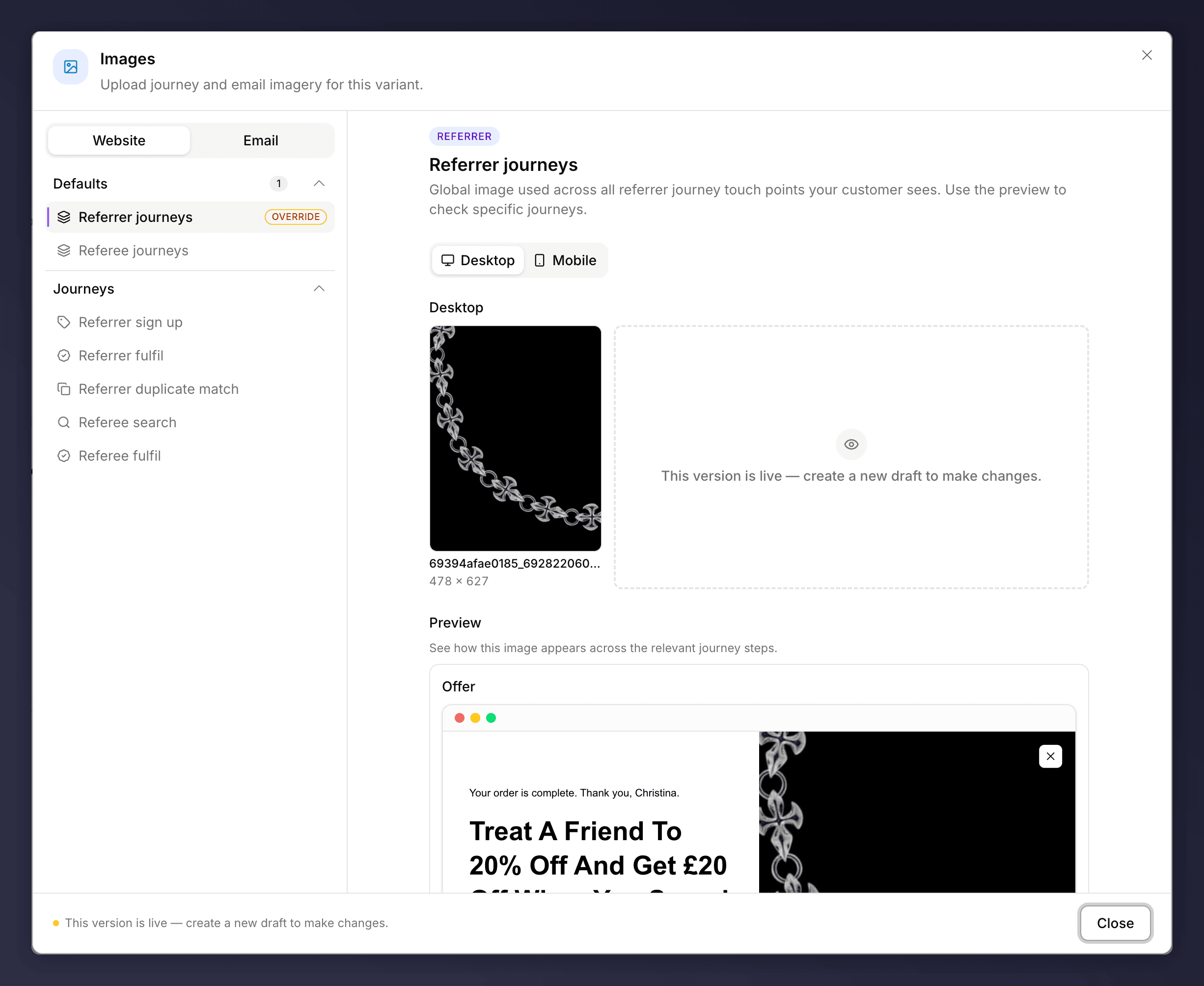
The **Images** section sets the imagery used across the journey and emails. Imagery is one of the highest-impact elements on your referral screens because of its size and prominence, so it is well worth getting right.
 ## How It's Organised
* **Website** and **Email** imagery are managed on separate tabs.
* Set a **default** image used across all referrer or referee touch points, or **override** individual steps (sign up, fulfilment, matching, search).
* Provide separate **desktop** and **mobile** assets, and use the preview to check how an image looks across the journey.
## Choosing Imagery
Pick a style that suits your brand and keeps the offer readable:
* **Simple**. A clean or solid-colour background makes overlaid text easy to read.
* **Product**. Put the product in focus and make it look desirable.
* **Social**. Hint at sharing and friendship (two people, two coffees).
* **Emotional**. Faces and positive expressions draw people in.
* **Illustrated**. Brand illustrations work well where typography carries the message.
A few tips: use the correct dimensions for each slot so nothing is cropped awkwardly, keep enough clear space and contrast for the text and call to action, and for full-width layouts keep the focus to one side so it does not clash with the copy.
The Images section can be A/B tested, for example lifestyle versus product imagery. See [set up an A/B test](/knowledge-v2/referral/campaigns/ab-testing/set-up-an-ab-test).
## How It's Organised
* **Website** and **Email** imagery are managed on separate tabs.
* Set a **default** image used across all referrer or referee touch points, or **override** individual steps (sign up, fulfilment, matching, search).
* Provide separate **desktop** and **mobile** assets, and use the preview to check how an image looks across the journey.
## Choosing Imagery
Pick a style that suits your brand and keeps the offer readable:
* **Simple**. A clean or solid-colour background makes overlaid text easy to read.
* **Product**. Put the product in focus and make it look desirable.
* **Social**. Hint at sharing and friendship (two people, two coffees).
* **Emotional**. Faces and positive expressions draw people in.
* **Illustrated**. Brand illustrations work well where typography carries the message.
A few tips: use the correct dimensions for each slot so nothing is cropped awkwardly, keep enough clear space and contrast for the text and call to action, and for full-width layouts keep the focus to one side so it does not clash with the copy.
The Images section can be A/B tested, for example lifestyle versus product imagery. See [set up an A/B test](/knowledge-v2/referral/campaigns/ab-testing/set-up-an-ab-test).