> ## Documentation Index
> Fetch the complete documentation index at: https://docs.mention-me.com/llms.txt
> Use this file to discover all available pages before exploring further.
# Campaigns
> Build, launch, test and monitor your referral campaigns at app.mention-me.com.
**Early access.** This section documents the Campaigns experience on **app.mention-me.com**, currently available as a beta. For the classic documentation, see [The Campaigns & Preview Section](/knowledge/referral/campaigns/campaigns-page).
Campaigns is where you set up what your referral programme offers, who sees it, and how it looks, then launch it, test it, and watch it perform. It works at two levels: the **campaigns list**, where you see and manage every campaign, and the **campaign editor**, where you build and run a single campaign's versions.
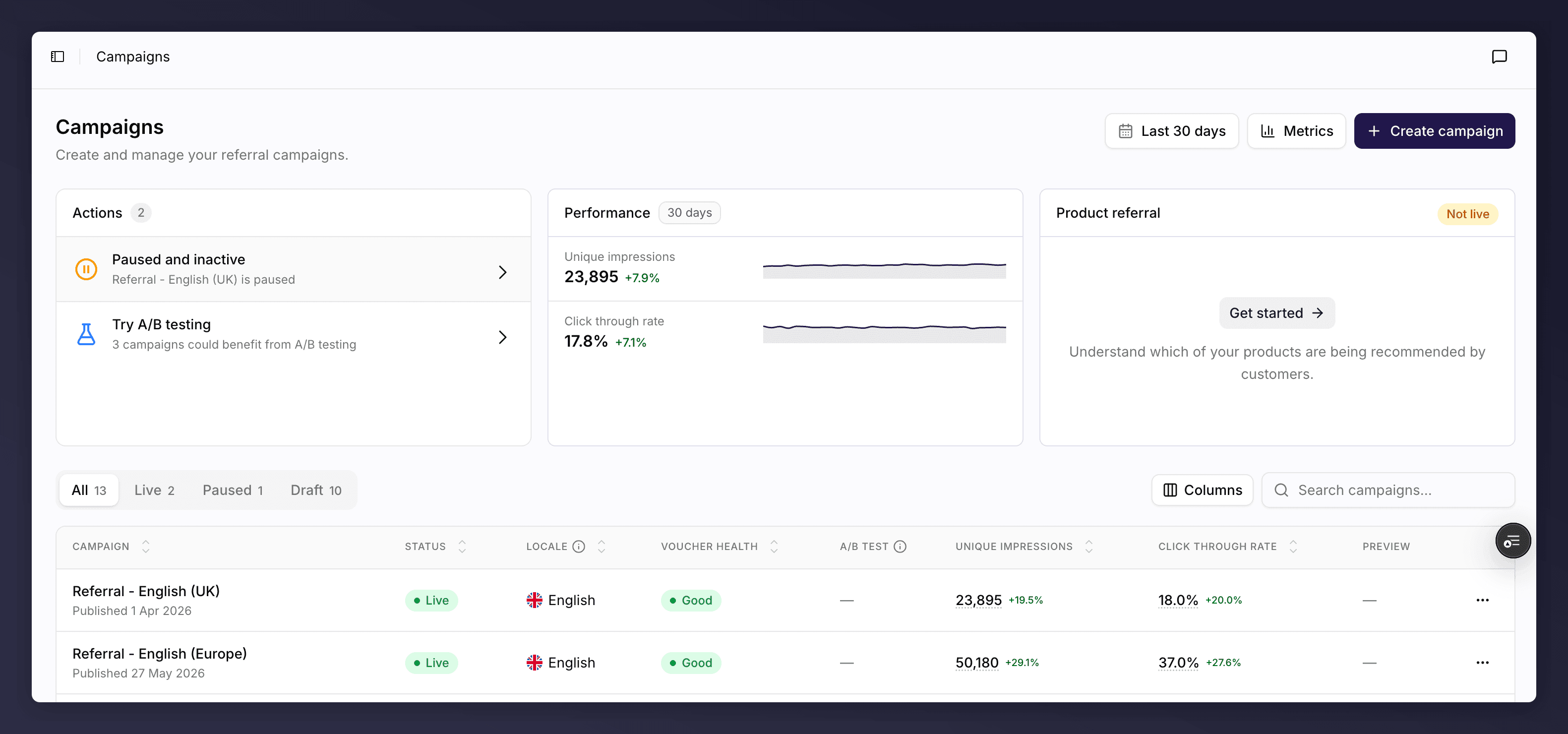 ## Manage Your Campaigns
Start from the campaigns list: a view of every campaign with its status, health and performance.
See every campaign, create a new one, and pause, duplicate or delete from the list.
The model behind it all: how campaigns, versions and promotions relate, and the statuses a version moves through.
## Work Inside a Campaign
Open a campaign to edit its versions on the canvas, then launch, test and monitor them.
Edit the customer journey on the canvas: triggering, rewards, sharing, branding, images and copy.
Go live now, queue a version behind the current one, or schedule a time-limited promotion.
Run A/B tests to find the version that converts best, and let the winner roll out automatically.
Track a live version's metrics, review recommendations, and act on rewards and fraud.
## Key Concepts
* **Campaign**. The top-level container for a referral programme in a single locale (language and region). A campaign holds many versions but only one is live at a time.
* **Version**. A single iteration of a campaign that you edit on the canvas. Versions move through statuses (draft, live, queued, past) as you roll them out.
* **Promotion**. A time-limited version with a start date, an end date, and a last date for friends to qualify. Use it for seasonal or limited-run offers.
* **Section**. A card on the canvas representing one part of the journey, for example Rewards or Sharing. Click a section to edit it.
* **A/B test**. A version split into variants so traffic is divided between them and the best performer wins. See [how A/B tests work](/knowledge-v2/referral/campaigns/ab-testing/how-ab-tests-work).
* **Variant**. One side of an A/B test. The starting point is the **control**; you edit the alternative to test against it.
## Where to Go Next
The home of this section.
If you're new to the model, start here.
For when you're ready to go live.
A quick how-to for creating a campaign.
A quick how-to for running a time-limited promotion.
A quick how-to for running an A/B test.
For when you get stuck.
## Manage Your Campaigns
Start from the campaigns list: a view of every campaign with its status, health and performance.
See every campaign, create a new one, and pause, duplicate or delete from the list.
The model behind it all: how campaigns, versions and promotions relate, and the statuses a version moves through.
## Work Inside a Campaign
Open a campaign to edit its versions on the canvas, then launch, test and monitor them.
Edit the customer journey on the canvas: triggering, rewards, sharing, branding, images and copy.
Go live now, queue a version behind the current one, or schedule a time-limited promotion.
Run A/B tests to find the version that converts best, and let the winner roll out automatically.
Track a live version's metrics, review recommendations, and act on rewards and fraud.
## Key Concepts
* **Campaign**. The top-level container for a referral programme in a single locale (language and region). A campaign holds many versions but only one is live at a time.
* **Version**. A single iteration of a campaign that you edit on the canvas. Versions move through statuses (draft, live, queued, past) as you roll them out.
* **Promotion**. A time-limited version with a start date, an end date, and a last date for friends to qualify. Use it for seasonal or limited-run offers.
* **Section**. A card on the canvas representing one part of the journey, for example Rewards or Sharing. Click a section to edit it.
* **A/B test**. A version split into variants so traffic is divided between them and the best performer wins. See [how A/B tests work](/knowledge-v2/referral/campaigns/ab-testing/how-ab-tests-work).
* **Variant**. One side of an A/B test. The starting point is the **control**; you edit the alternative to test against it.
## Where to Go Next
The home of this section.
If you're new to the model, start here.
For when you're ready to go live.
A quick how-to for creating a campaign.
A quick how-to for running a time-limited promotion.
A quick how-to for running an A/B test.
For when you get stuck.