> ## Documentation Index
> Fetch the complete documentation index at: https://docs.mention-me.com/llms.txt
> Use this file to discover all available pages before exploring further.
# How to Run a Promotion
> Set up and launch a time-limited promotion, with an optional follow-on so the campaign keeps promoting after it ends.
A promotion is a version that runs only between set dates, for example a seasonal or limited-run offer. For how promotions fit the model, see [campaigns, versions and promotions](/knowledge-v2/referral/campaigns/manage/campaigns-versions-and-promotions).
## Create the Promotion
In the campaign's version picker, click **New version**, then turn on **Time limited promotion**.
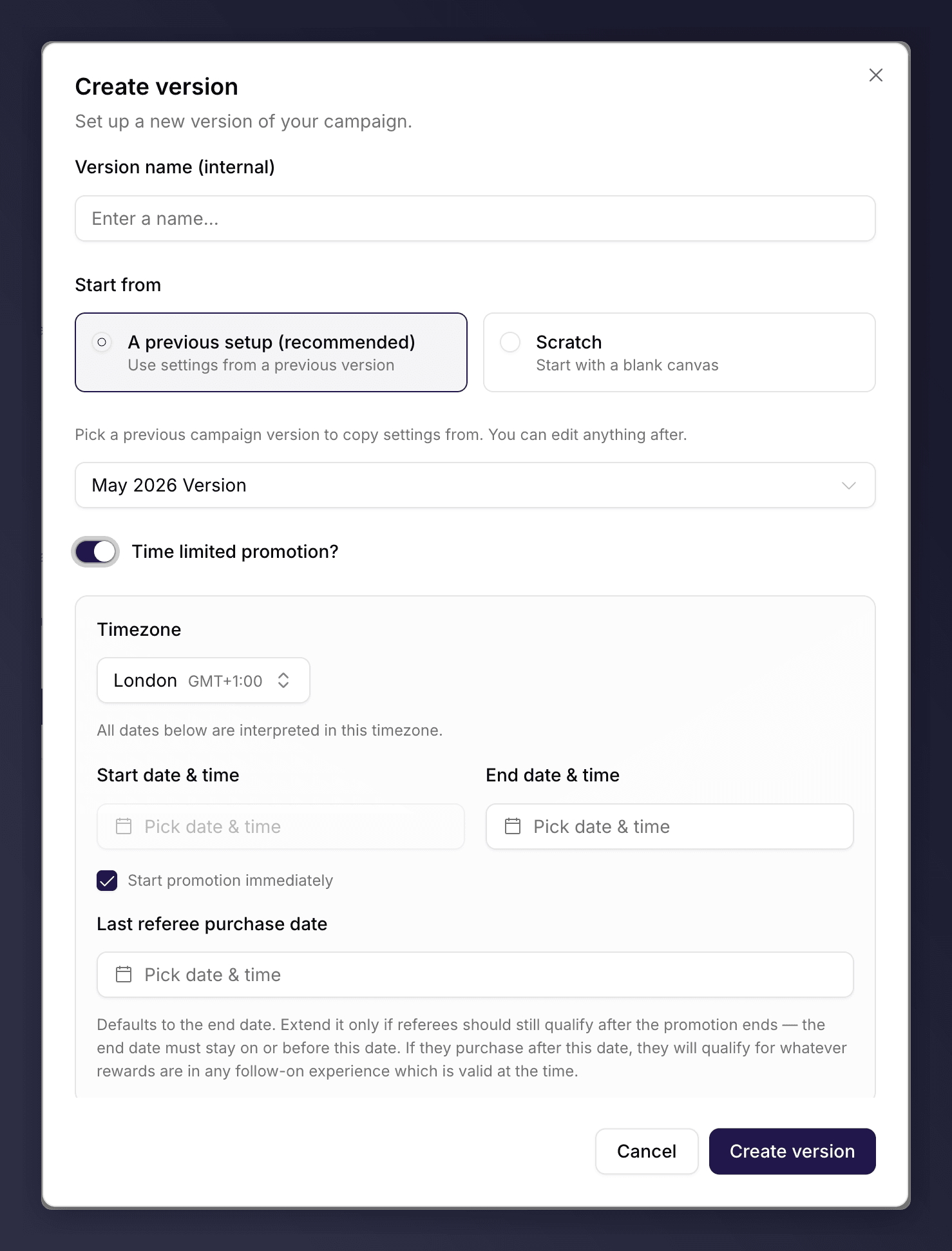 Choose a **Timezone**, then set the end date and the **Last referee purchase date** (the cut-off for friends to qualify). Leave **Start promotion immediately** ticked to begin the moment you launch, or untick it to schedule a start date.
Edit the sections as usual. See [the campaign editor](/knowledge-v2/referral/campaigns/manage/the-campaign-editor).
You can also turn a standard version into a promotion at launch: the launch wizard's **Schedule** step offers **Time-limited promotion**. A promotion cannot run an A/B test.
## Launch It
Click **Launch**, work through the steps, and choose **Schedule launch** for a future start, or launch now.
Tick **Continue with "\[live version]" after this ends** so Mention Me queues a copy of the current live version to resume automatically when the promotion finishes. Without a follow-on, the campaign stops promoting when the promotion ends.
For the full launch flow, see [launch a campaign and version](/knowledge-v2/referral/campaigns/manage/launch-a-version).
## Extend a Live Promotion
While the promotion is live, click **Extend promotion** to push the end date and last-referee-purchase date further out without creating a new version.
Choose a **Timezone**, then set the end date and the **Last referee purchase date** (the cut-off for friends to qualify). Leave **Start promotion immediately** ticked to begin the moment you launch, or untick it to schedule a start date.
Edit the sections as usual. See [the campaign editor](/knowledge-v2/referral/campaigns/manage/the-campaign-editor).
You can also turn a standard version into a promotion at launch: the launch wizard's **Schedule** step offers **Time-limited promotion**. A promotion cannot run an A/B test.
## Launch It
Click **Launch**, work through the steps, and choose **Schedule launch** for a future start, or launch now.
Tick **Continue with "\[live version]" after this ends** so Mention Me queues a copy of the current live version to resume automatically when the promotion finishes. Without a follow-on, the campaign stops promoting when the promotion ends.
For the full launch flow, see [launch a campaign and version](/knowledge-v2/referral/campaigns/manage/launch-a-version).
## Extend a Live Promotion
While the promotion is live, click **Extend promotion** to push the end date and last-referee-purchase date further out without creating a new version.