> ## Documentation Index
> Fetch the complete documentation index at: https://docs.mention-me.com/llms.txt
> Use this file to discover all available pages before exploring further.
# The Campaigns List
> Browse every campaign, create a new one, and manage campaigns from the list.
The campaigns list is where you land when you open **Campaigns**. It shows every campaign in your account with its status, health and performance, and it is where you create a campaign or act on one as a whole. To work inside a single campaign, open it to reach [the campaign editor](/knowledge-v2/referral/campaigns/manage/the-campaign-editor).
 ## What's on the List
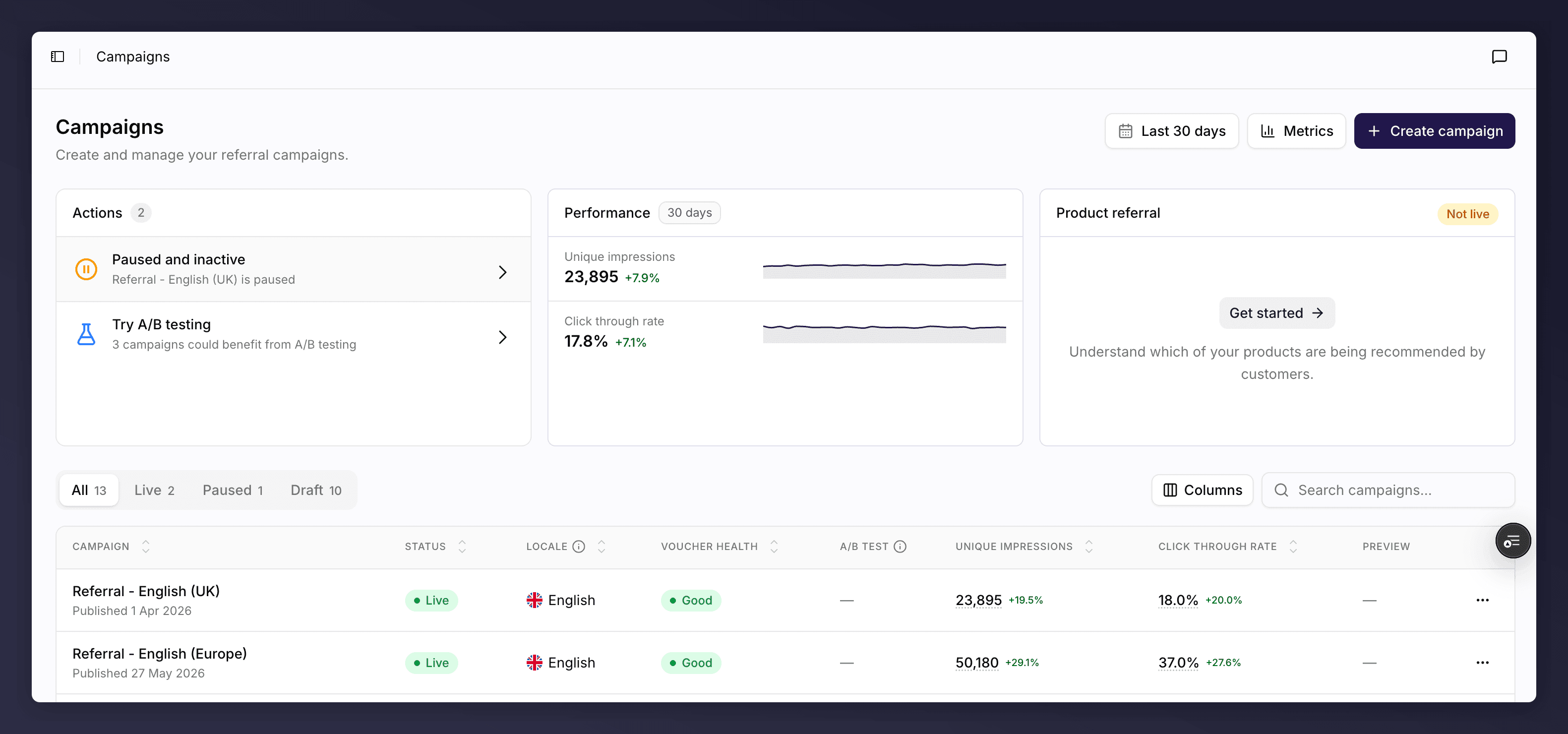
* **Summary cards**. Headline numbers across all your campaigns for the selected period, such as unique impressions, enrolled customers, click-through rate, referrals, conversion rate and revenue. Switch the metrics and turn on a comparison to see how they are trending.
* **Status tabs**. Filter the table by **All**, **Live**, **Paused** or **Draft**, each with a count.
* **Search and sort**. Find a campaign by name, and sort by any column.
* **Columns**. **Campaign** (name and date), **Status**, **Locale**, **Voucher health**, **A/B test** progress, your chosen **Performance** metrics, and a **Preview** of the offer. You can show or hide columns.
## Campaign Health
Each campaign shows a health pill so you can spot problems at a glance:
* **Healthy** (or "Live & healthy"). Running normally.
* **Needs attention**. Has warnings worth reviewing, such as low vouchers or low traffic.
* **Critical**. Has a blocking problem to fix.
* **Draft**. Not yet launched.
For what drives these and how to resolve them, see [troubleshooting](/knowledge-v2/referral/campaigns/browse/troubleshooting).
## Create a Campaign
Click **Create campaign**, give it a name and a locale, and Mention Me opens a first draft version ready to build. For the full steps, see [create a campaign](/knowledge-v2/referral/campaigns/common-tasks/create-a-campaign).
## Manage a Campaign from the List
Each row has an actions menu for campaign-level tasks:
## What's on the List
* **Summary cards**. Headline numbers across all your campaigns for the selected period, such as unique impressions, enrolled customers, click-through rate, referrals, conversion rate and revenue. Switch the metrics and turn on a comparison to see how they are trending.
* **Status tabs**. Filter the table by **All**, **Live**, **Paused** or **Draft**, each with a count.
* **Search and sort**. Find a campaign by name, and sort by any column.
* **Columns**. **Campaign** (name and date), **Status**, **Locale**, **Voucher health**, **A/B test** progress, your chosen **Performance** metrics, and a **Preview** of the offer. You can show or hide columns.
## Campaign Health
Each campaign shows a health pill so you can spot problems at a glance:
* **Healthy** (or "Live & healthy"). Running normally.
* **Needs attention**. Has warnings worth reviewing, such as low vouchers or low traffic.
* **Critical**. Has a blocking problem to fix.
* **Draft**. Not yet launched.
For what drives these and how to resolve them, see [troubleshooting](/knowledge-v2/referral/campaigns/browse/troubleshooting).
## Create a Campaign
Click **Create campaign**, give it a name and a locale, and Mention Me opens a first draft version ready to build. For the full steps, see [create a campaign](/knowledge-v2/referral/campaigns/common-tasks/create-a-campaign).
## Manage a Campaign from the List
Each row has an actions menu for campaign-level tasks:
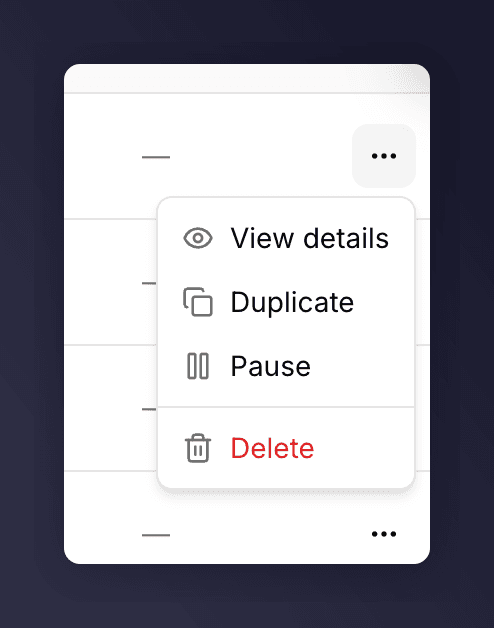 * **View details**. Open the campaign in the editor.
* **Duplicate**. Copy the campaign to a new draft, so you can adapt it without touching the original.
* **Pause** (live campaigns). Stop promoting the campaign to new customers. Existing customers' share links keep working and their friends can still sign up; only new promotion stops.
* **Resume** (paused campaigns). Start promoting again.
* **Delete**. Permanently remove the campaign. You are asked to confirm, as you will no longer have access to it.
Inside a campaign you can pause and resume it from the editor's **Settings** menu, and duplicate or rename a *version* from the version picker. Duplicating a whole campaign is done here on the list. See [campaign settings and gaming control](/knowledge-v2/referral/campaigns/manage/settings-and-gaming-control).
## See Also
Understanding campaigns, versions and promotions.
The campaign editor.
A common task: create a campaign.
A common task: duplicate a campaign or version.
A common task: pause or resume a campaign.
* **View details**. Open the campaign in the editor.
* **Duplicate**. Copy the campaign to a new draft, so you can adapt it without touching the original.
* **Pause** (live campaigns). Stop promoting the campaign to new customers. Existing customers' share links keep working and their friends can still sign up; only new promotion stops.
* **Resume** (paused campaigns). Start promoting again.
* **Delete**. Permanently remove the campaign. You are asked to confirm, as you will no longer have access to it.
Inside a campaign you can pause and resume it from the editor's **Settings** menu, and duplicate or rename a *version* from the version picker. Duplicating a whole campaign is done here on the list. See [campaign settings and gaming control](/knowledge-v2/referral/campaigns/manage/settings-and-gaming-control).
## See Also
Understanding campaigns, versions and promotions.
The campaign editor.
A common task: create a campaign.
A common task: duplicate a campaign or version.
A common task: pause or resume a campaign.