> ## Documentation Index
> Fetch the complete documentation index at: https://docs.mention-me.com/llms.txt
> Use this file to discover all available pages before exploring further.
# How to Monitor an A/B Test
> Follow a running A/B test, read the results, and switch traffic once it concludes.
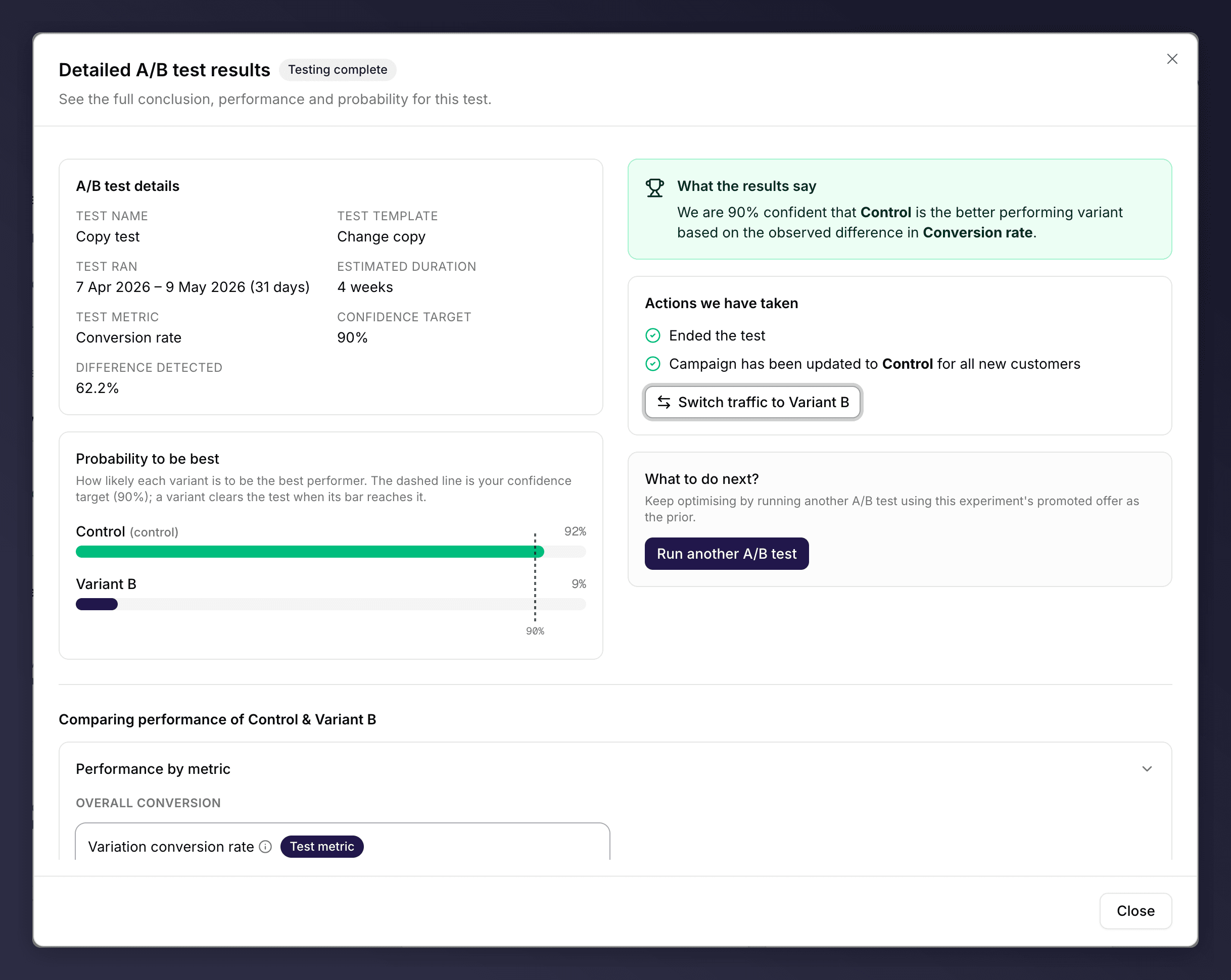
While an A/B test runs, you can follow its progress from the insights panel. Click **View results** to open the results view. For the concepts behind the numbers, see [how A/B tests work](/knowledge-v2/referral/campaigns/ab-testing/how-ab-tests-work).
 ## Read the Test Status
A status badge shows where the test is:
* **Scheduled**. The test is set up but not yet collecting data.
* **Testing live**. The test is running and splitting traffic 50/50.
* **Testing complete**. The test has concluded and a variant has been chosen.
* **Test stopped**. The test was ended before reaching a conclusion.
## Probability to be best
The **Probability to be best** chart shows how likely each variant is to be the better performer. A dashed line marks your confidence target; a variant clears the test when its bar reaches that line. The control variant is labelled accordingly.
## What the Results Say
A summary banner explains the current state in plain language. For example, when a winner is found: "We are \[X]% confident that \[variant] is the better performing variant based on the observed difference in \[metric]." While the test is still running, it tells you it is gathering data and will update once it reaches the confidence target.
## What Happens When a Test Concludes
When a test concludes, Mention Me applies the outcome you set during setup and moves all traffic to the chosen variant automatically. The **Actions we have taken** section confirms this, for example "Ended the test" and "Campaign has been updated to \[variant] for all new customers".
## Compare Performance
The **Comparing performance** section puts the variants side by side across the relevant metrics (share, customer, and revenue measures), with the deciding **test metric** marked. Use it to understand not just who won, but why.
## Switch Traffic After a Test
If you disagree with the automatic outcome, you can switch all traffic to the other variant once, using the **Switch traffic** button. This is a one-time action: after switching, the button disappears.
## View Results on a Past Version
A version that ran an A/B test keeps its results. Open the past version and click **View results** in the insights panel to revisit them at any time.
## See Also
Set up an A/B test.
Monitor a live version.
## Read the Test Status
A status badge shows where the test is:
* **Scheduled**. The test is set up but not yet collecting data.
* **Testing live**. The test is running and splitting traffic 50/50.
* **Testing complete**. The test has concluded and a variant has been chosen.
* **Test stopped**. The test was ended before reaching a conclusion.
## Probability to be best
The **Probability to be best** chart shows how likely each variant is to be the better performer. A dashed line marks your confidence target; a variant clears the test when its bar reaches that line. The control variant is labelled accordingly.
## What the Results Say
A summary banner explains the current state in plain language. For example, when a winner is found: "We are \[X]% confident that \[variant] is the better performing variant based on the observed difference in \[metric]." While the test is still running, it tells you it is gathering data and will update once it reaches the confidence target.
## What Happens When a Test Concludes
When a test concludes, Mention Me applies the outcome you set during setup and moves all traffic to the chosen variant automatically. The **Actions we have taken** section confirms this, for example "Ended the test" and "Campaign has been updated to \[variant] for all new customers".
## Compare Performance
The **Comparing performance** section puts the variants side by side across the relevant metrics (share, customer, and revenue measures), with the deciding **test metric** marked. Use it to understand not just who won, but why.
## Switch Traffic After a Test
If you disagree with the automatic outcome, you can switch all traffic to the other variant once, using the **Switch traffic** button. This is a one-time action: after switching, the button disappears.
## View Results on a Past Version
A version that ran an A/B test keeps its results. Open the past version and click **View results** in the insights panel to revisit them at any time.
## See Also
Set up an A/B test.
Monitor a live version.