> ## Documentation Index
> Fetch the complete documentation index at: https://docs.mention-me.com/llms.txt
> Use this file to discover all available pages before exploring further.
# Pending Rewards
> Approve or decline referral rewards that need a manual decision.
Pending Rewards is the queue of payouts that can't go out automatically, usually because the campaign requires manual approval, or because the reward got flagged on the way. Clear it regularly: rewards age, and a customer who waited too long is a customer who won't come back.
 ## Top-of-Page Panels
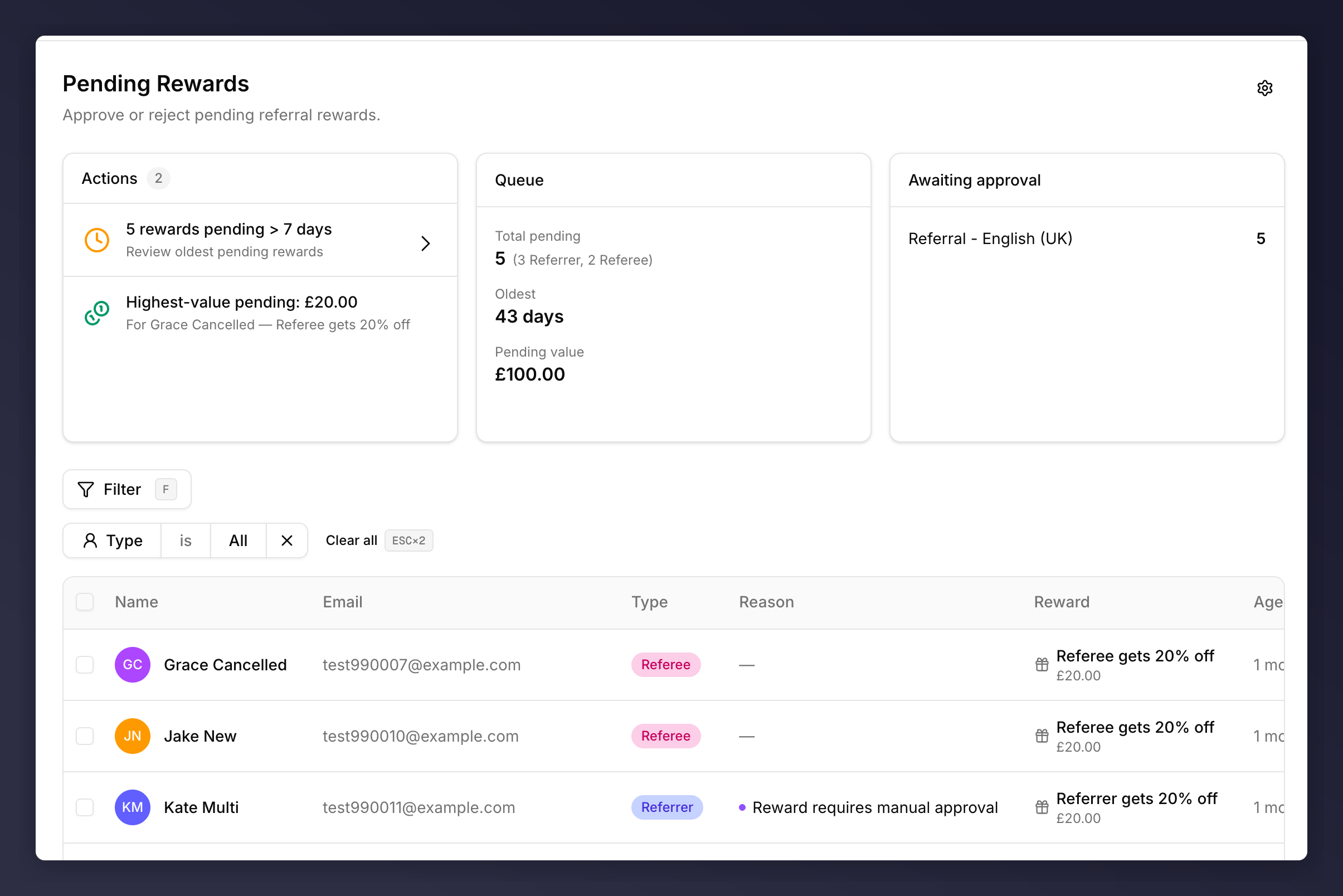
* **Actions**. Smart suggestions based on the current queue (for example "6 rewards pending > 7 days" or "Highest-value pending: £20.00"). Click an action to jump to a pre-filtered view.
* **Queue**. The numbers in aggregate: total pending (split by Referrer / Referee), age of the oldest, total monetary value waiting.
* **Awaiting approval**. Pending counts broken down by campaign.
## Reading the Table
| Column | What it shows |
| ----------------- | --------------------------------------------------------------------------------------------------------------------------------------- |
| Checkbox | Bulk select. Header checkbox toggles every visible row. |
| Name | Customer name + avatar. Multiple pending rewards stack as "2 rewards" with a disclosure caret. |
| Email | Email on file. |
| Type | Referrer / Referee. |
| Reason | Why the reward is held. Usually **Reward requires manual approval**, or blank if the reward is sitting in an auto-release delay window. |
| Reward | Reward description + value. |
| Age | How long it's been pending. |
| Flag icon | Pin a row for follow-up. |
| Approve / Decline | Per-row decision. |
Rewards held for any reason other than reward-side approval (fraud score, velocity, eligibility, etc.) go to [Fraud Review](/knowledge-v2/customers/fraud-review) instead. For the full catalogue of reward-side rules, see the [approval rules reference](/knowledge-v2/customers/reference/approval-rules).
## Approving a Reward
The [approval review sheet](/knowledge-v2/customers/approval-review-sheet) slides in from the right with the full context: customer profile, every fired reason, the underlying reward, and the linked referral.
Hit **Approve** in the sheet (or use the inline **Approve** button on the row if you don't need the detail). The reward fulfilment email is sent automatically and the row leaves the queue.
## Declining a Reward
Decline opens a confirmation dialog with a note field and a notification choice.
## Top-of-Page Panels
* **Actions**. Smart suggestions based on the current queue (for example "6 rewards pending > 7 days" or "Highest-value pending: £20.00"). Click an action to jump to a pre-filtered view.
* **Queue**. The numbers in aggregate: total pending (split by Referrer / Referee), age of the oldest, total monetary value waiting.
* **Awaiting approval**. Pending counts broken down by campaign.
## Reading the Table
| Column | What it shows |
| ----------------- | --------------------------------------------------------------------------------------------------------------------------------------- |
| Checkbox | Bulk select. Header checkbox toggles every visible row. |
| Name | Customer name + avatar. Multiple pending rewards stack as "2 rewards" with a disclosure caret. |
| Email | Email on file. |
| Type | Referrer / Referee. |
| Reason | Why the reward is held. Usually **Reward requires manual approval**, or blank if the reward is sitting in an auto-release delay window. |
| Reward | Reward description + value. |
| Age | How long it's been pending. |
| Flag icon | Pin a row for follow-up. |
| Approve / Decline | Per-row decision. |
Rewards held for any reason other than reward-side approval (fraud score, velocity, eligibility, etc.) go to [Fraud Review](/knowledge-v2/customers/fraud-review) instead. For the full catalogue of reward-side rules, see the [approval rules reference](/knowledge-v2/customers/reference/approval-rules).
## Approving a Reward
The [approval review sheet](/knowledge-v2/customers/approval-review-sheet) slides in from the right with the full context: customer profile, every fired reason, the underlying reward, and the linked referral.
Hit **Approve** in the sheet (or use the inline **Approve** button on the row if you don't need the detail). The reward fulfilment email is sent automatically and the row leaves the queue.
## Declining a Reward
Decline opens a confirmation dialog with a note field and a notification choice.
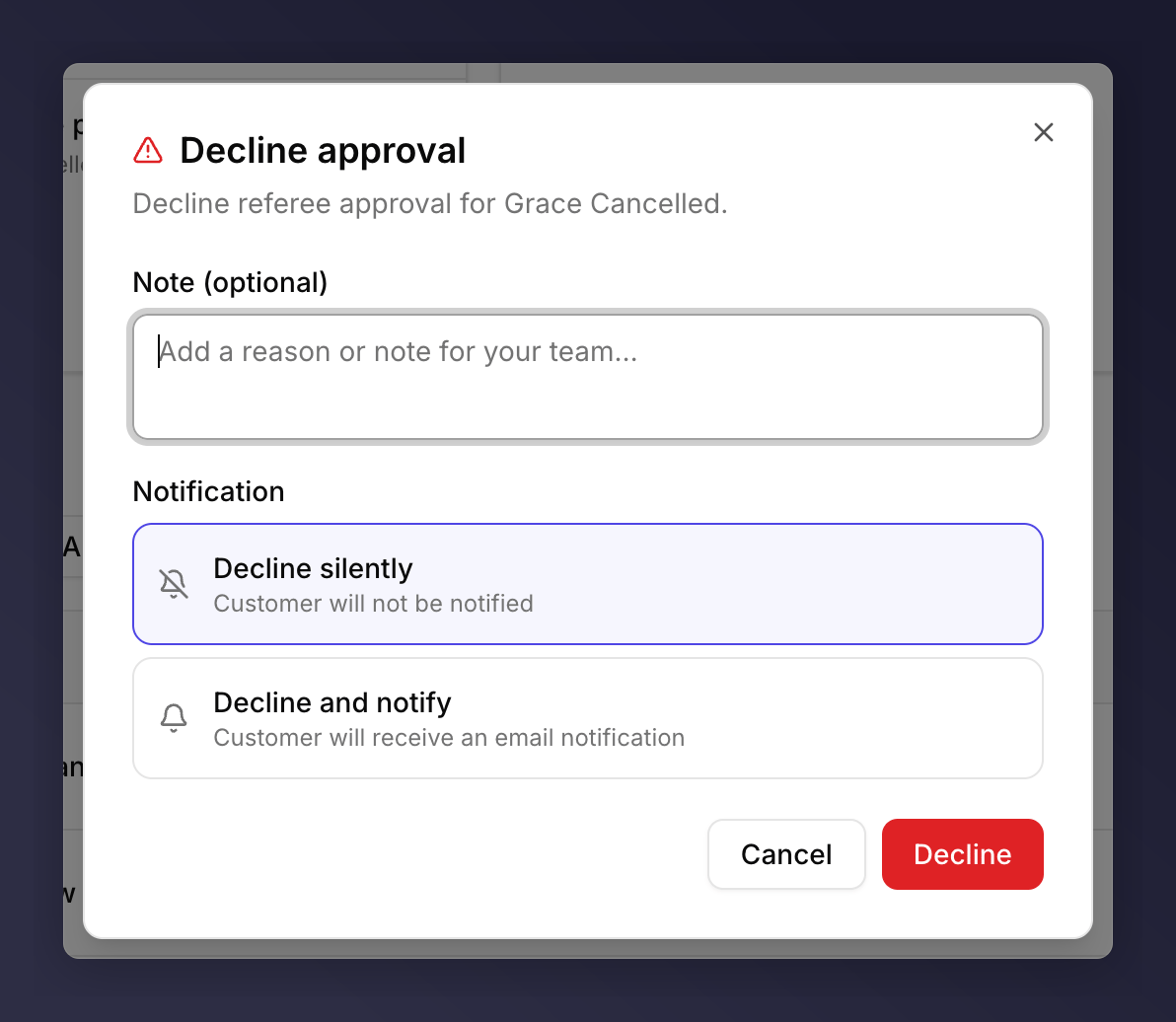 | Field | Required | Notes |
| ---------------------- | ------------ | ------------------------------------------------------------------------------------------------------------- |
| Note | No | Free-form context for your team. Stored on the customer's audit log. |
| **Decline silently** | (one of two) | The customer doesn't get an email. Use for fraud or policy declines where notifying them would tip them off. |
| **Decline and notify** | (one of two) | The customer gets a standard "your reward was declined" email. Use when the customer is expecting the reward. |
The destination of the note is visible to your team only, never to the customer.
Declining is not reversible from this page. The audit log records the decision and the note, but the reward can't be brought back without engineering involvement.
## Stacked Rewards
When a customer has more than one pending reward, the row collapses into a single line with a disclosure (e.g. "2 rewards"). Click the caret to expand; **Approve** / **Decline** apply to each underlying reward individually. Or open the [review sheet](/knowledge-v2/customers/approval-review-sheet) and act on the whole bundle with **Approve all** / **Decline all**.
## Bulk Approve or Decline
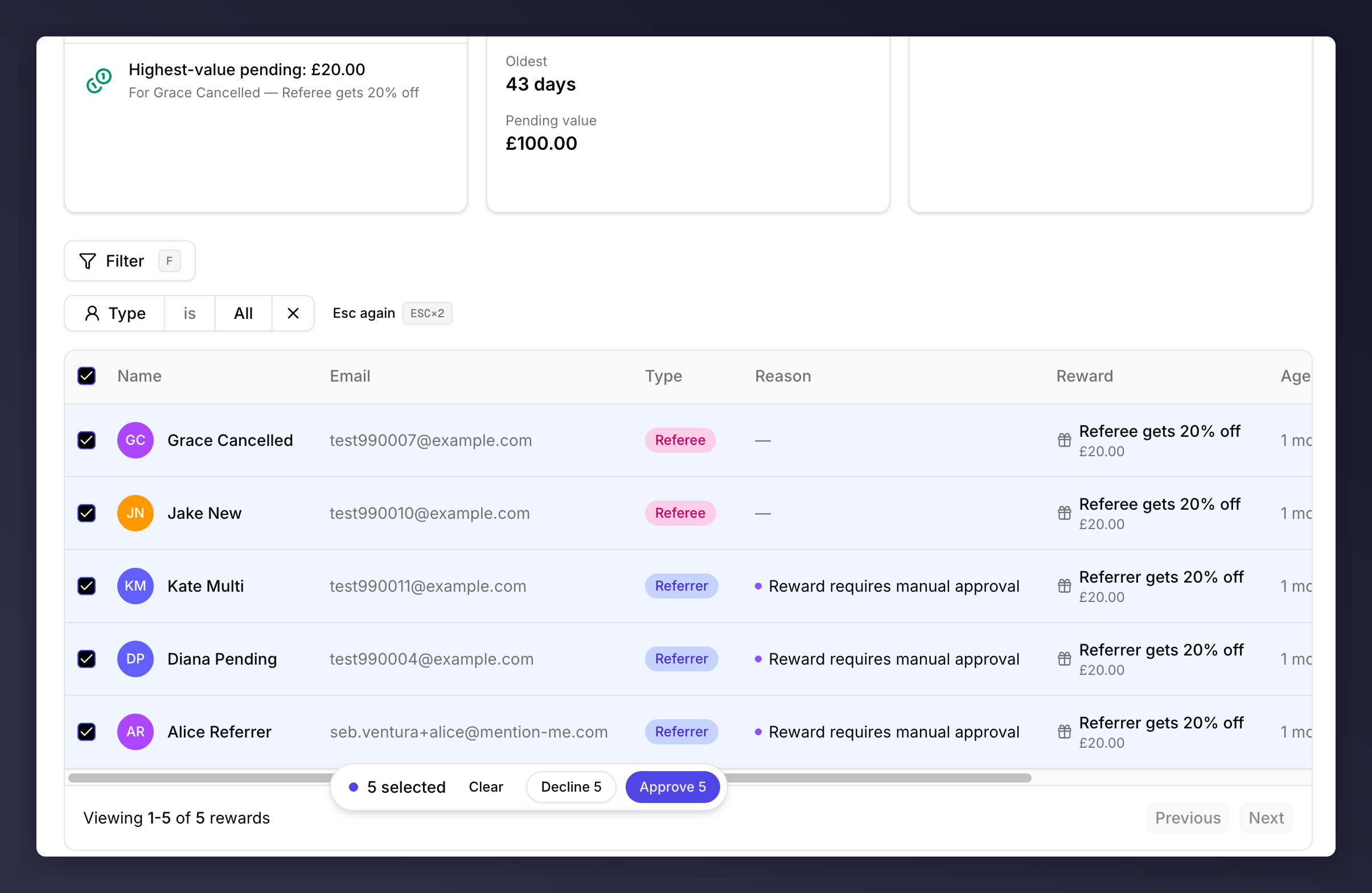
Tick multiple checkboxes to action rewards in bulk. A floating pill appears at the bottom centre of the screen showing `N selected · Clear · Decline N · Approve N`. **Decline** in bulk opens the same dialog (silently / notify) but applies the choice to every selected row.
| Field | Required | Notes |
| ---------------------- | ------------ | ------------------------------------------------------------------------------------------------------------- |
| Note | No | Free-form context for your team. Stored on the customer's audit log. |
| **Decline silently** | (one of two) | The customer doesn't get an email. Use for fraud or policy declines where notifying them would tip them off. |
| **Decline and notify** | (one of two) | The customer gets a standard "your reward was declined" email. Use when the customer is expecting the reward. |
The destination of the note is visible to your team only, never to the customer.
Declining is not reversible from this page. The audit log records the decision and the note, but the reward can't be brought back without engineering involvement.
## Stacked Rewards
When a customer has more than one pending reward, the row collapses into a single line with a disclosure (e.g. "2 rewards"). Click the caret to expand; **Approve** / **Decline** apply to each underlying reward individually. Or open the [review sheet](/knowledge-v2/customers/approval-review-sheet) and act on the whole bundle with **Approve all** / **Decline all**.
## Bulk Approve or Decline
Tick multiple checkboxes to action rewards in bulk. A floating pill appears at the bottom centre of the screen showing `N selected · Clear · Decline N · Approve N`. **Decline** in bulk opens the same dialog (silently / notify) but applies the choice to every selected row.
 ## Filter
The **Filter** button exposes **Type** (All / Referrer / Referee). Press **F** anywhere on the page to focus the filter button.
## See Also
Anything flagged for gaming goes there, not here.
The shared side sheet both queues use.
The catalogue behind the **Reason** column.
Open the profile to see the underlying activity before approving.
## Filter
The **Filter** button exposes **Type** (All / Referrer / Referee). Press **F** anywhere on the page to focus the filter button.
## See Also
Anything flagged for gaming goes there, not here.
The shared side sheet both queues use.
The catalogue behind the **Reason** column.
Open the profile to see the underlying activity before approving.