> ## Documentation Index
> Fetch the complete documentation index at: https://docs.mention-me.com/llms.txt
> Use this file to discover all available pages before exploring further.
# How to Confirm a Customer's Purchase
> Manually confirm a pending purchase so the referrer can be rewarded.
When a referee signs up via a referral link but the platform hasn't yet seen their purchase (or sees one it can't verify), the referrer's reward is held. Confirming the purchase manually releases the hold so the reward can be issued.
A typical reason this happens: the purchase email differs from the share or sign-up email, so Mention Me can't link the order to the right customer automatically.
## Two Entry Points
Confirm purchase appears in two places on the referee's profile when a purchase is held:
1. **Needs attention** card. A "Purchase awaiting confirmation" entry with an inline **Confirm →** button. The side panel also shows an **Unconfirmed referral** pill.
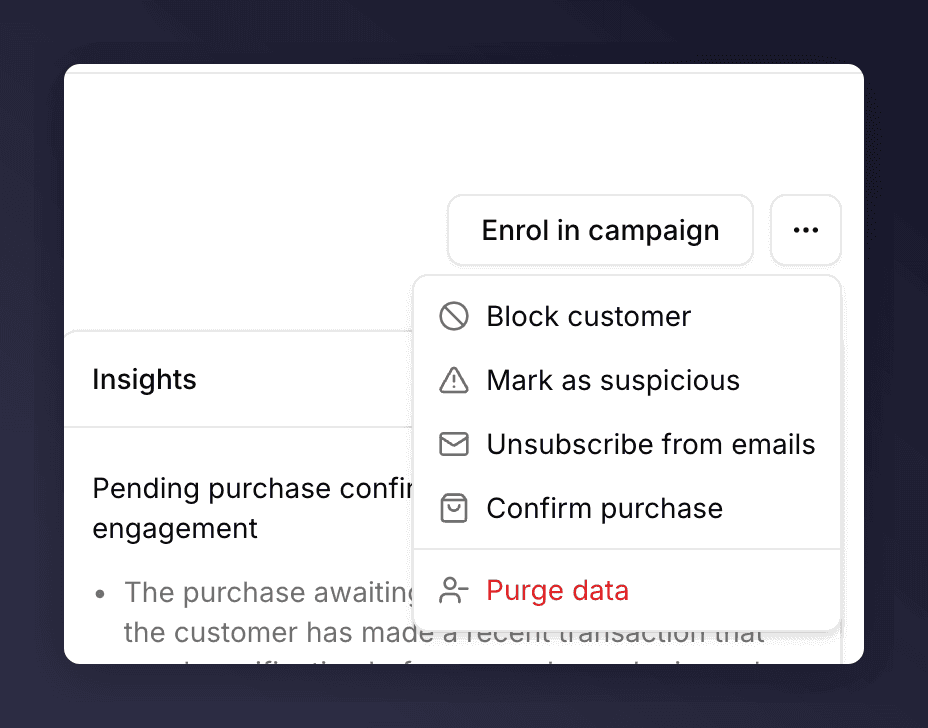
2. **Actions menu** (**…** next to Enrol in campaign). A **Confirm purchase** item appears when the customer has one or more referees waiting on purchase confirmation.
Both routes do the same thing.
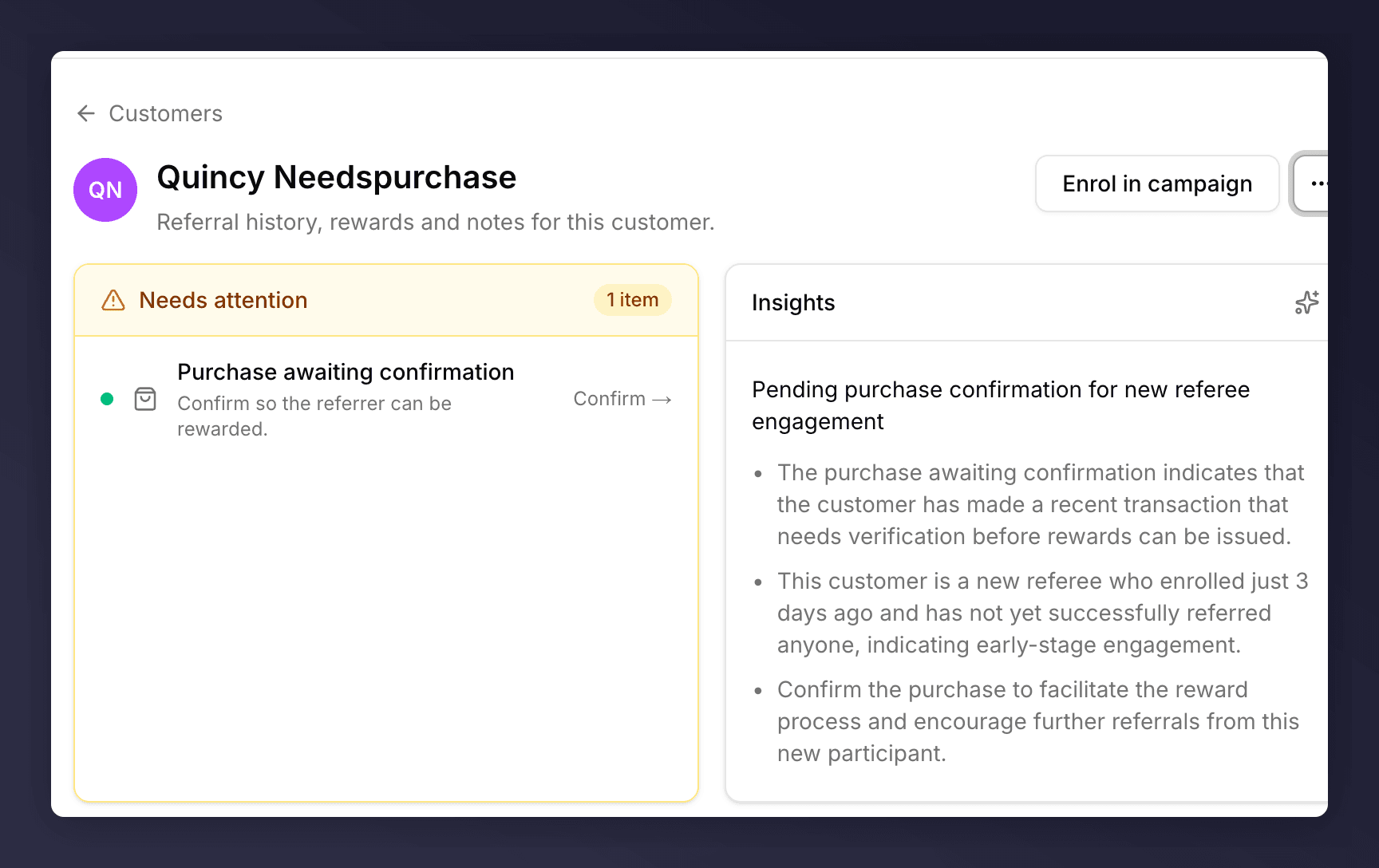 The same action is also available from the profile's actions menu:
 ## Steps
Find the customer via the [Customers list](/knowledge-v2/customers/browse/customer-list) or jump from the **Needs attention** panel on the landing page.
Either click **Confirm →** on the **Purchase awaiting confirmation** row, or open the **…** menu and choose **Confirm purchase**.
A **Purchase confirmed** toast appears at the bottom right. The **Unconfirmed referral** pill clears from the side panel, the referrer's reward moves out of the held state, and any reward fulfilment email goes out automatically.
A customer can have multiple unconfirmed purchases at the same time (one per outstanding referral). The **Confirm →** action only confirms one at a time, so you'll need to repeat the action until the **Needs attention** card is empty. Both entry points (the card and the **…** menu) work this way.
## When You Don't See Confirm Purchase
A few reasons:
* **The referral was attributed automatically.** No manual action needed.
* **The customer has no referees waiting on confirmation.** The action only appears when at least one referee's purchase is held.
* **The purchase data is still in flight.** Mention Me ingests purchase data on a schedule. Check back in a few hours or look at the activity timeline for the latest event.
If you're confident a purchase has happened and the button still isn't appearing, [open a Tech Ops ticket](https://help.mention-me.com/hc/en-gb/requests/new?ticket_form_id=8840645829405) with the customer ID.
## See Also
Rewards held for reasons other than purchase confirmation live here.
Anatomy of the Needs attention card.
## Steps
Find the customer via the [Customers list](/knowledge-v2/customers/browse/customer-list) or jump from the **Needs attention** panel on the landing page.
Either click **Confirm →** on the **Purchase awaiting confirmation** row, or open the **…** menu and choose **Confirm purchase**.
A **Purchase confirmed** toast appears at the bottom right. The **Unconfirmed referral** pill clears from the side panel, the referrer's reward moves out of the held state, and any reward fulfilment email goes out automatically.
A customer can have multiple unconfirmed purchases at the same time (one per outstanding referral). The **Confirm →** action only confirms one at a time, so you'll need to repeat the action until the **Needs attention** card is empty. Both entry points (the card and the **…** menu) work this way.
## When You Don't See Confirm Purchase
A few reasons:
* **The referral was attributed automatically.** No manual action needed.
* **The customer has no referees waiting on confirmation.** The action only appears when at least one referee's purchase is held.
* **The purchase data is still in flight.** Mention Me ingests purchase data on a schedule. Check back in a few hours or look at the activity timeline for the latest event.
If you're confident a purchase has happened and the button still isn't appearing, [open a Tech Ops ticket](https://help.mention-me.com/hc/en-gb/requests/new?ticket_form_id=8840645829405) with the customer ID.
## See Also
Rewards held for reasons other than purchase confirmation live here.
Anatomy of the Needs attention card.