> ## Documentation Index
> Fetch the complete documentation index at: https://docs.mention-me.com/llms.txt
> Use this file to discover all available pages before exploring further.
# Customer Profile
> Anatomy of a customer's profile, the actions you can take, and how to read the signals and AI insights.
The profile is where most operational work on a single customer happens. Every section on the page is either context (who this person is and what they've done) or action (something you can do next).
 ## Page Anatomy
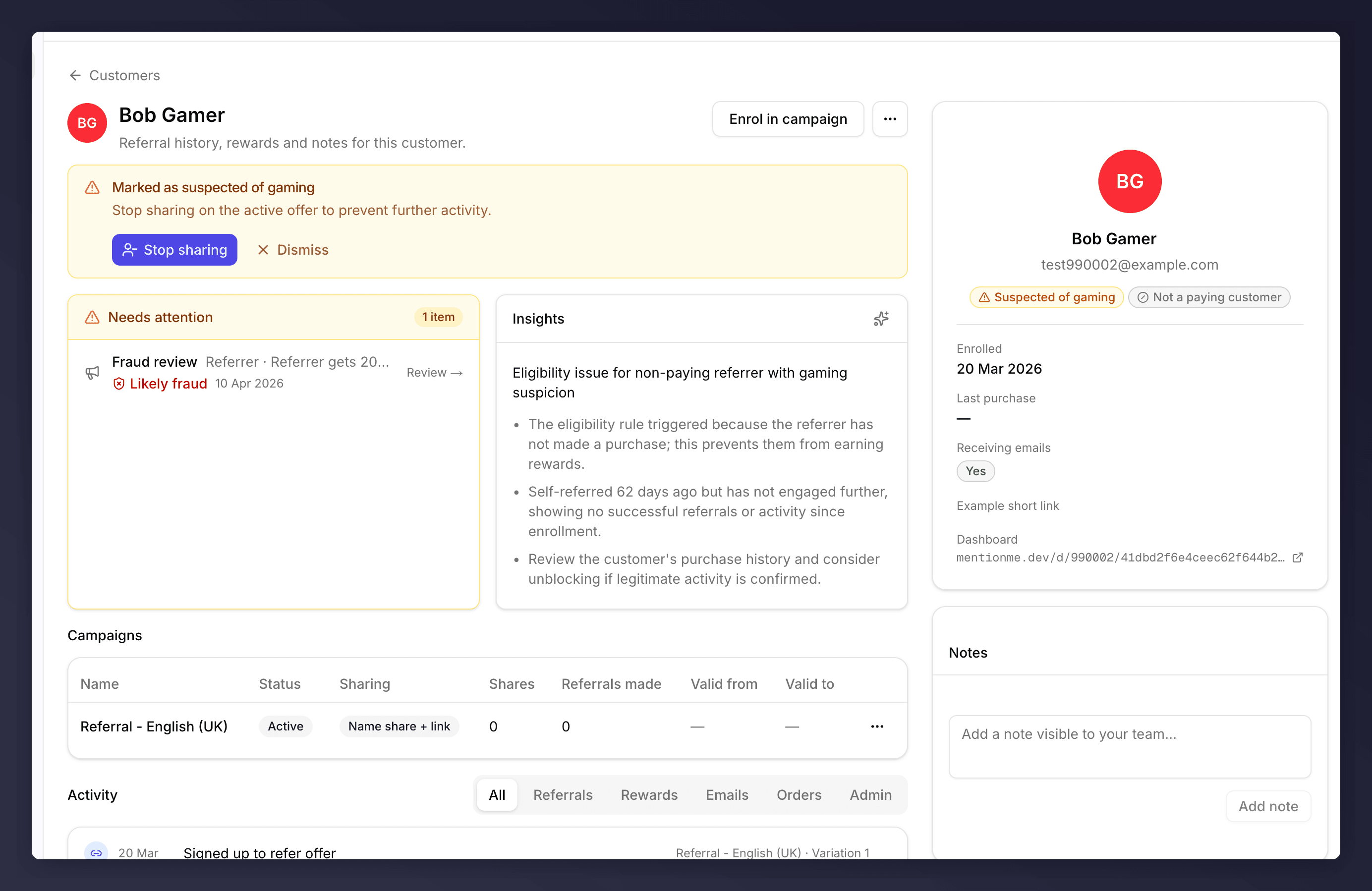
The layout has three columns:
* **Main** (left). Banners, attention queue, AI insights, campaigns, activity timeline.
* **Side panel** (right). Identity, status, key dates, programme URLs.
* **Notes** (bottom right). Free-form team notes.
Referees see a subset, no **Campaigns** table and no **Example short link** in the side panel, because they haven't shared yet.
## Top Banner: Signal
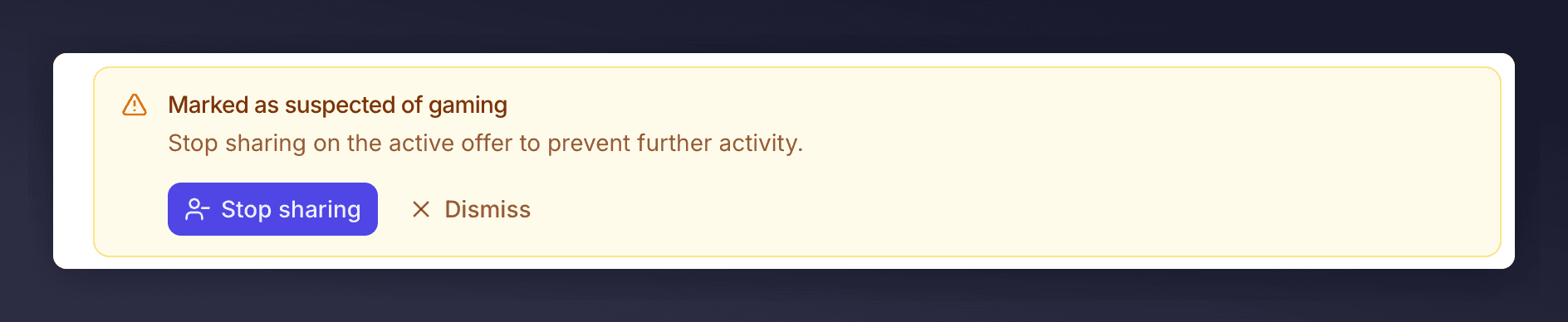
A coloured banner appears at the top of the profile whenever the customer is flagged. Today there are two flavours:
* **Suspected of gaming** (yellow). Comes with **Stop sharing** to disable the active offer immediately and **Dismiss** to clear the banner without acting.
* **Generic signal** (yellow). Customer is flagged but no recommended action is auto-attached. Use the **…** menu to decide what to do.
## Page Anatomy
The layout has three columns:
* **Main** (left). Banners, attention queue, AI insights, campaigns, activity timeline.
* **Side panel** (right). Identity, status, key dates, programme URLs.
* **Notes** (bottom right). Free-form team notes.
Referees see a subset, no **Campaigns** table and no **Example short link** in the side panel, because they haven't shared yet.
## Top Banner: Signal
A coloured banner appears at the top of the profile whenever the customer is flagged. Today there are two flavours:
* **Suspected of gaming** (yellow). Comes with **Stop sharing** to disable the active offer immediately and **Dismiss** to clear the banner without acting.
* **Generic signal** (yellow). Customer is flagged but no recommended action is auto-attached. Use the **…** menu to decide what to do.
 ## Needs attention
The card lists every open item that needs a human decision: pending rewards, fraud reviews, and unconfirmed referee purchases. A counter in the header shows how many items are open ("1 item", "3 items"), and each row carries a verdict pill (**Likely fraud**, **Possible fraud**, **Manual review**, etc.) so you can triage at a glance. Some rows link out to the right approval queue with the customer pre-filtered; others (like [Confirm a purchase](/knowledge-v2/customers/common-tasks/confirm-a-purchase)) are inline actions you complete on the profile itself.
## Insights
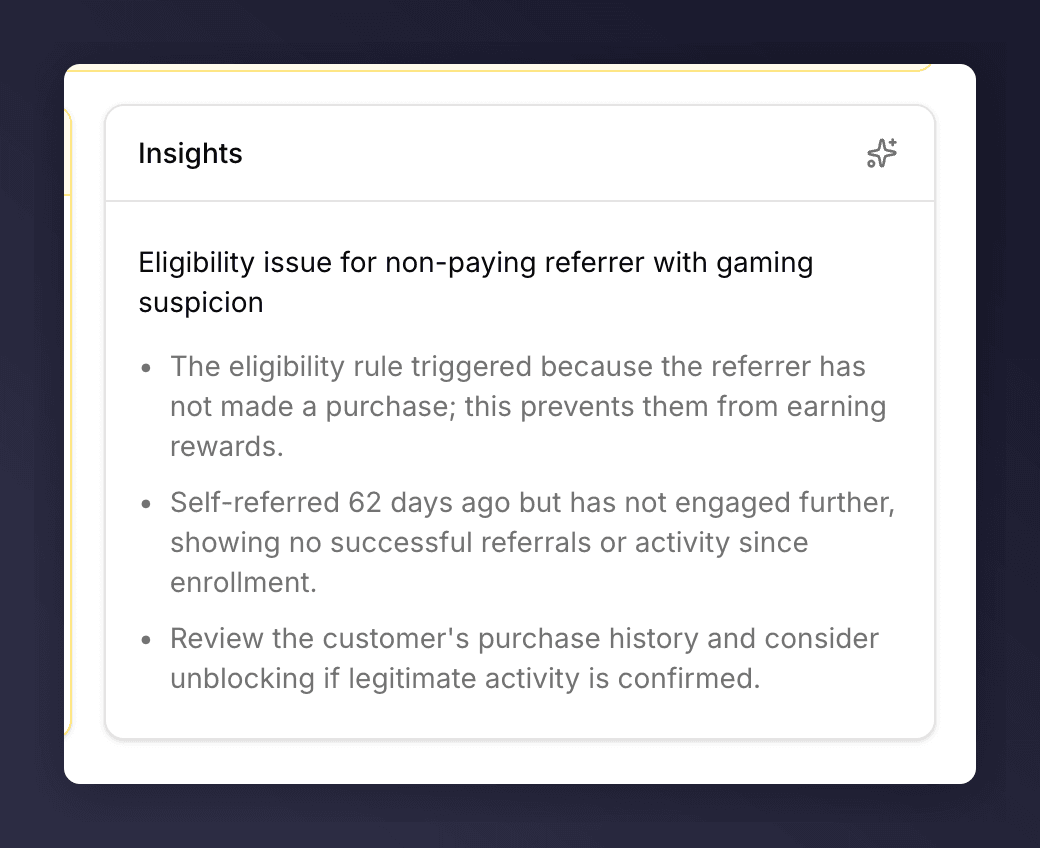
A short AI-generated read of who this customer is and what they've been doing. Use it as a first pass before you dig into the activity timeline. Click **About AI insights** to see how the summary is generated.
Insights are generated by a third-party LLM (OpenAI) from **anonymised** profile data only. We send counts, flags, status enums, and approval-rule labels. No names, emails, customer IDs, order numbers, coupon codes, or note content leave the system. Output may be inaccurate or out of date, verify before acting.
## Needs attention
The card lists every open item that needs a human decision: pending rewards, fraud reviews, and unconfirmed referee purchases. A counter in the header shows how many items are open ("1 item", "3 items"), and each row carries a verdict pill (**Likely fraud**, **Possible fraud**, **Manual review**, etc.) so you can triage at a glance. Some rows link out to the right approval queue with the customer pre-filtered; others (like [Confirm a purchase](/knowledge-v2/customers/common-tasks/confirm-a-purchase)) are inline actions you complete on the profile itself.
## Insights
A short AI-generated read of who this customer is and what they've been doing. Use it as a first pass before you dig into the activity timeline. Click **About AI insights** to see how the summary is generated.
Insights are generated by a third-party LLM (OpenAI) from **anonymised** profile data only. We send counts, flags, status enums, and approval-rule labels. No names, emails, customer IDs, order numbers, coupon codes, or note content leave the system. Output may be inaccurate or out of date, verify before acting.
 ## Campaigns (Referrers Only)
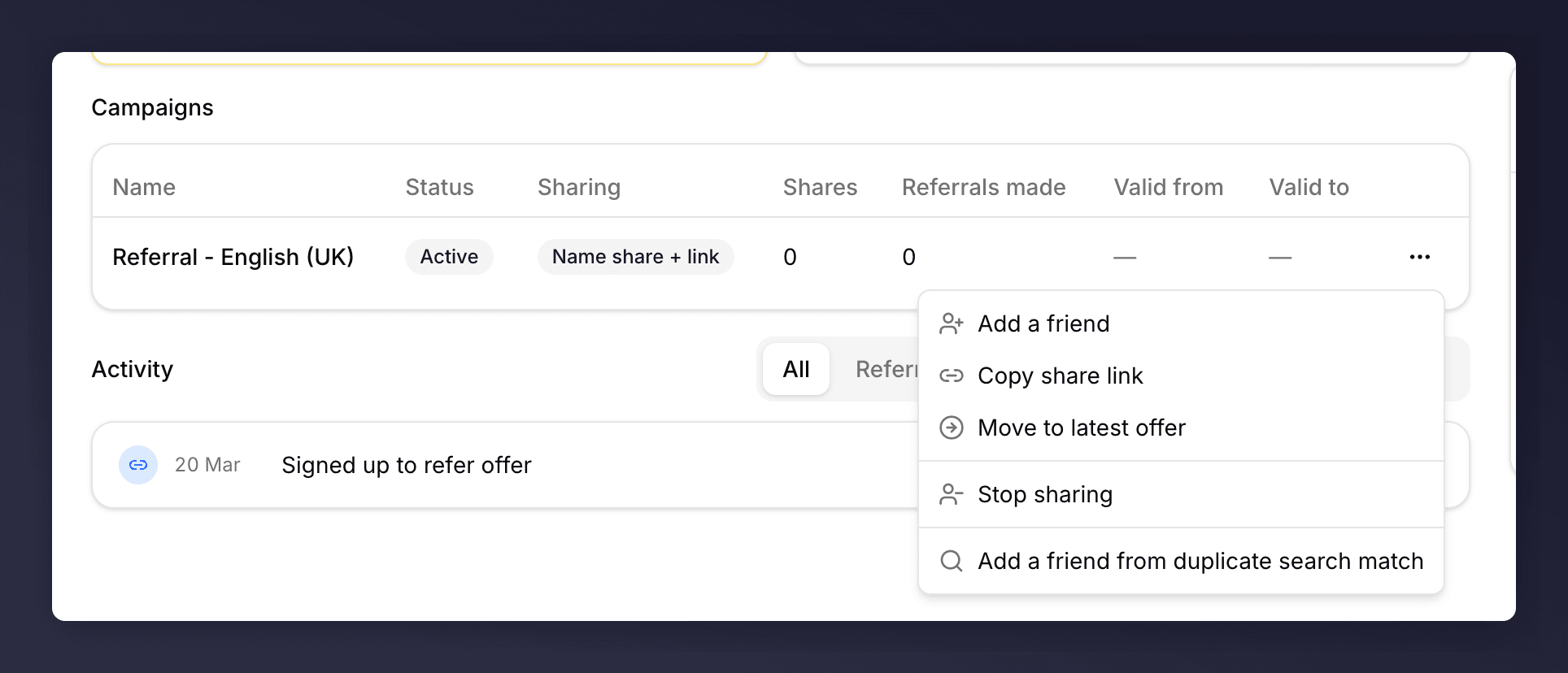
The Campaigns table lists every campaign this customer is sharing in. Columns:
| Column | What it shows |
| --------------------- | ------------------------------------------ |
| Name | The campaign name. |
| Status | Active / Stopped / Expired. |
| Sharing | The share method (e.g. Name share + link). |
| Shares | Number of times they've sent the offer. |
| Referrals made | Number of friends who actually arrived. |
| Valid from / Valid to | The window the offer is sharable in. |
Each row has a **…** menu with the campaign-level actions: [Add a friend](/knowledge-v2/customers/common-tasks/link-a-friend), Copy share link, [Move to latest offer](/knowledge-v2/customers/common-tasks/move-between-campaigns), Stop sharing, and **Add a friend from duplicate search match** (used when the friend already exists under a similar-looking record).
## Campaigns (Referrers Only)
The Campaigns table lists every campaign this customer is sharing in. Columns:
| Column | What it shows |
| --------------------- | ------------------------------------------ |
| Name | The campaign name. |
| Status | Active / Stopped / Expired. |
| Sharing | The share method (e.g. Name share + link). |
| Shares | Number of times they've sent the offer. |
| Referrals made | Number of friends who actually arrived. |
| Valid from / Valid to | The window the offer is sharable in. |
Each row has a **…** menu with the campaign-level actions: [Add a friend](/knowledge-v2/customers/common-tasks/link-a-friend), Copy share link, [Move to latest offer](/knowledge-v2/customers/common-tasks/move-between-campaigns), Stop sharing, and **Add a friend from duplicate search match** (used when the friend already exists under a similar-looking record).
 ## Activity Timeline
Below the campaigns, the **Activity** heading sits to the left and six tabs sit to the right. The tabs scope the timeline:
| Tab | Shows |
| ------------- | ------------------------------------------------------------------------------ |
| **All** | Everything in chronological order. The default view. |
| **Referrals** | Friends they introduced and the status of each. |
| **Rewards** | Rewards earned, pending, or declined. |
| **Emails** | Mention Me emails sent to this customer (registration, reminders, fulfilment). |
| **Orders** | Confirmed purchases linked to this account. |
| **Admin** | Audit log of changes (gaming flags, manual enrolments, notes). |
## Activity Timeline
Below the campaigns, the **Activity** heading sits to the left and six tabs sit to the right. The tabs scope the timeline:
| Tab | Shows |
| ------------- | ------------------------------------------------------------------------------ |
| **All** | Everything in chronological order. The default view. |
| **Referrals** | Friends they introduced and the status of each. |
| **Rewards** | Rewards earned, pending, or declined. |
| **Emails** | Mention Me emails sent to this customer (registration, reminders, fulfilment). |
| **Orders** | Confirmed purchases linked to this account. |
| **Admin** | Audit log of changes (gaming flags, manual enrolments, notes). |
 ## Side Panel
| Field | What it shows |
| ------------------ | ----------------------------------------------------------------------------------------------------------------------------------------------------------------------------------------------- |
| Avatar + name | The display name. Hover to reveal a pencil icon, click to [edit the name](/knowledge-v2/customers/common-tasks/edit-name-and-shortlink). |
| Email | Email on file. "Purged email" for purged accounts. Not editable. |
| Role pills | Referrer or Referee. See [Status pills](#status-pills) below for the full list. |
| Status pills | One or more state flags on the customer. See [Status pills](#status-pills) below. |
| Enrolled | Date of first enrolment. |
| Last purchase | Last confirmed purchase date, or blank if none. |
| NPS score | The customer's most recent Net Promoter Score, with the quote they left. Only shown if they've responded. |
| Origin survey | The "How did you hear about us?" answer captured at registration. Only shown if collected. |
| Receiving emails | Yes / No. |
| Example short link | The customer's personal share URL. Referrers only. Hover to reveal a pencil icon, click to [edit the suffix](/knowledge-v2/customers/common-tasks/edit-name-and-shortlink#edit-the-short-link). |
| Dashboard | Their referral dashboard URL, the link a customer would open to see their own progress. |
### Status Pills
A profile may show one or more pills under the name. Each pill maps to a specific flag on the customer record.
| Pill | What it means |
| ------------------------- | ------------------------------------------------------------------------------------------------------------------------------------------------------------------------ |
| **Referrer** | The customer has shared your programme at least once. |
| **Referee** | The customer arrived via someone else's share. |
| **Not a paying customer** | No confirmed purchase on file. |
| **Suspected of gaming** | The `isSuspicious` flag is set, either automatically by a fraud rule or manually via [Mark as suspicious](/knowledge-v2/customers/common-tasks/remove-gaming-suspicion). |
| **Under fraud review** | One or more of this customer's referrals is in the [Fraud Review queue](/knowledge-v2/customers/fraud-review) awaiting a decision. |
| **Not suspected** | The customer was explicitly cleared. |
| **Paying customer** | The customer has at least one confirmed purchase on file. |
| **Unconfirmed referral** | This customer is a referee whose purchase hasn't been confirmed. See [Confirm a purchase](/knowledge-v2/customers/common-tasks/confirm-a-purchase). |
| **Blocked** | The customer has been [blocked](/knowledge-v2/customers/common-tasks/block-customer). |
| **Unsubscribed** | The customer has been [unsubscribed](/knowledge-v2/customers/common-tasks/turn-off-emails) from emails. |
## Notes
Free-form notes visible to anyone on your team with access to this customer. Use them to record decisions, context, or escalations.
## Profile Actions Menu
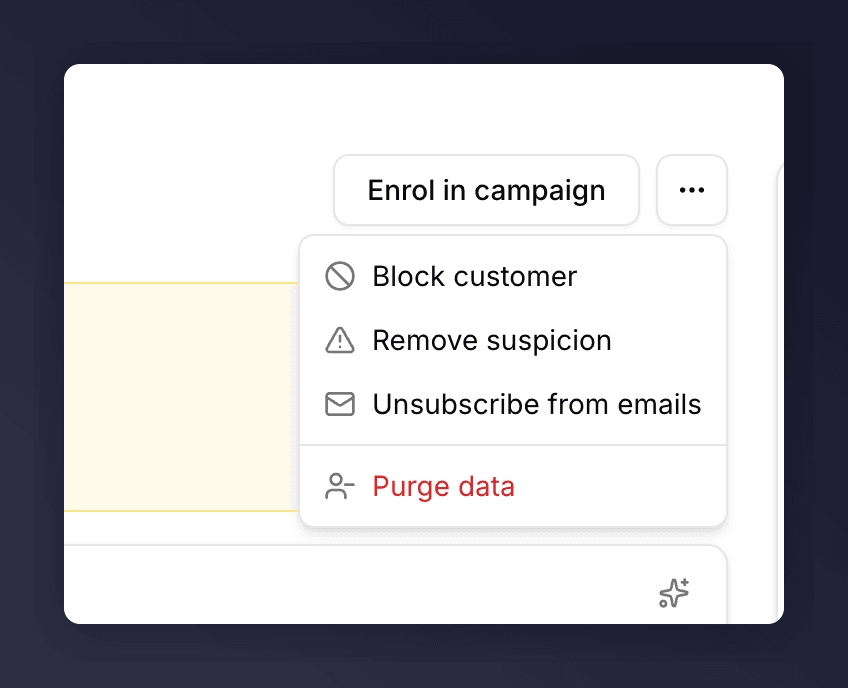
The **…** to the right of **Enrol in campaign** holds the customer-level destructive or status-changing actions. Every item flips between two labels (or appears/hides) depending on the customer's current state:
| Label A | Shown when A is shown | Label B | Shown when B is shown |
| -------------------------------------------------------------------------------------- | ------------------------------------------------------------------------ | --------------------------- | --------------------------------- |
| [**Block customer**](/knowledge-v2/customers/common-tasks/block-customer) | Customer is not blocked | **Unblock customer** | Customer is blocked |
| [**Mark as suspicious**](/knowledge-v2/customers/common-tasks/remove-gaming-suspicion) | Not flagged as suspicious | **Remove suspicion** | `isSuspicious` is set |
| [**Unsubscribe from emails**](/knowledge-v2/customers/common-tasks/turn-off-emails) | Emails are on | **Resubscribe to emails** | Emails are off |
| [**Confirm purchase**](/knowledge-v2/customers/common-tasks/confirm-a-purchase) | One or more referees of this customer are awaiting purchase confirmation | *(hidden)* | No referees awaiting confirmation |
| [**Purge data**](/knowledge-v2/customers/common-tasks/delete-customer-data) | Always | *(no inverse, destructive)* | n/a |
## Side Panel
| Field | What it shows |
| ------------------ | ----------------------------------------------------------------------------------------------------------------------------------------------------------------------------------------------- |
| Avatar + name | The display name. Hover to reveal a pencil icon, click to [edit the name](/knowledge-v2/customers/common-tasks/edit-name-and-shortlink). |
| Email | Email on file. "Purged email" for purged accounts. Not editable. |
| Role pills | Referrer or Referee. See [Status pills](#status-pills) below for the full list. |
| Status pills | One or more state flags on the customer. See [Status pills](#status-pills) below. |
| Enrolled | Date of first enrolment. |
| Last purchase | Last confirmed purchase date, or blank if none. |
| NPS score | The customer's most recent Net Promoter Score, with the quote they left. Only shown if they've responded. |
| Origin survey | The "How did you hear about us?" answer captured at registration. Only shown if collected. |
| Receiving emails | Yes / No. |
| Example short link | The customer's personal share URL. Referrers only. Hover to reveal a pencil icon, click to [edit the suffix](/knowledge-v2/customers/common-tasks/edit-name-and-shortlink#edit-the-short-link). |
| Dashboard | Their referral dashboard URL, the link a customer would open to see their own progress. |
### Status Pills
A profile may show one or more pills under the name. Each pill maps to a specific flag on the customer record.
| Pill | What it means |
| ------------------------- | ------------------------------------------------------------------------------------------------------------------------------------------------------------------------ |
| **Referrer** | The customer has shared your programme at least once. |
| **Referee** | The customer arrived via someone else's share. |
| **Not a paying customer** | No confirmed purchase on file. |
| **Suspected of gaming** | The `isSuspicious` flag is set, either automatically by a fraud rule or manually via [Mark as suspicious](/knowledge-v2/customers/common-tasks/remove-gaming-suspicion). |
| **Under fraud review** | One or more of this customer's referrals is in the [Fraud Review queue](/knowledge-v2/customers/fraud-review) awaiting a decision. |
| **Not suspected** | The customer was explicitly cleared. |
| **Paying customer** | The customer has at least one confirmed purchase on file. |
| **Unconfirmed referral** | This customer is a referee whose purchase hasn't been confirmed. See [Confirm a purchase](/knowledge-v2/customers/common-tasks/confirm-a-purchase). |
| **Blocked** | The customer has been [blocked](/knowledge-v2/customers/common-tasks/block-customer). |
| **Unsubscribed** | The customer has been [unsubscribed](/knowledge-v2/customers/common-tasks/turn-off-emails) from emails. |
## Notes
Free-form notes visible to anyone on your team with access to this customer. Use them to record decisions, context, or escalations.
## Profile Actions Menu
The **…** to the right of **Enrol in campaign** holds the customer-level destructive or status-changing actions. Every item flips between two labels (or appears/hides) depending on the customer's current state:
| Label A | Shown when A is shown | Label B | Shown when B is shown |
| -------------------------------------------------------------------------------------- | ------------------------------------------------------------------------ | --------------------------- | --------------------------------- |
| [**Block customer**](/knowledge-v2/customers/common-tasks/block-customer) | Customer is not blocked | **Unblock customer** | Customer is blocked |
| [**Mark as suspicious**](/knowledge-v2/customers/common-tasks/remove-gaming-suspicion) | Not flagged as suspicious | **Remove suspicion** | `isSuspicious` is set |
| [**Unsubscribe from emails**](/knowledge-v2/customers/common-tasks/turn-off-emails) | Emails are on | **Resubscribe to emails** | Emails are off |
| [**Confirm purchase**](/knowledge-v2/customers/common-tasks/confirm-a-purchase) | One or more referees of this customer are awaiting purchase confirmation | *(hidden)* | No referees awaiting confirmation |
| [**Purge data**](/knowledge-v2/customers/common-tasks/delete-customer-data) | Always | *(no inverse, destructive)* | n/a |
 For non-destructive actions like changing campaigns or adding a friend, use the campaign-row menu in the Campaigns table instead.