> ## Documentation Index
> Fetch the complete documentation index at: https://docs.mention-me.com/llms.txt
> Use this file to discover all available pages before exploring further.
# How to Set Voucher Stock Alerts
> Get alerted when referrer or referee voucher stock runs low.
export const ClassicCallout = ({children, href, linkLabel = "Open the Classic guide"}) =>
This finishes in Classic.
{children ? <> {children} : null}
{href ? <>
{" "}
For the setup steps, see {linkLabel}.
: null}
;
export const AdminOnly = () =>
This page is visible to organisation admins only. If you
see You do not have permission to view this page, ask an
admin to make the change, or to invite you with the Admin role.
;
Open **Settings > Rewards** to set how low available vouchers can run before Mention Me alerts you.
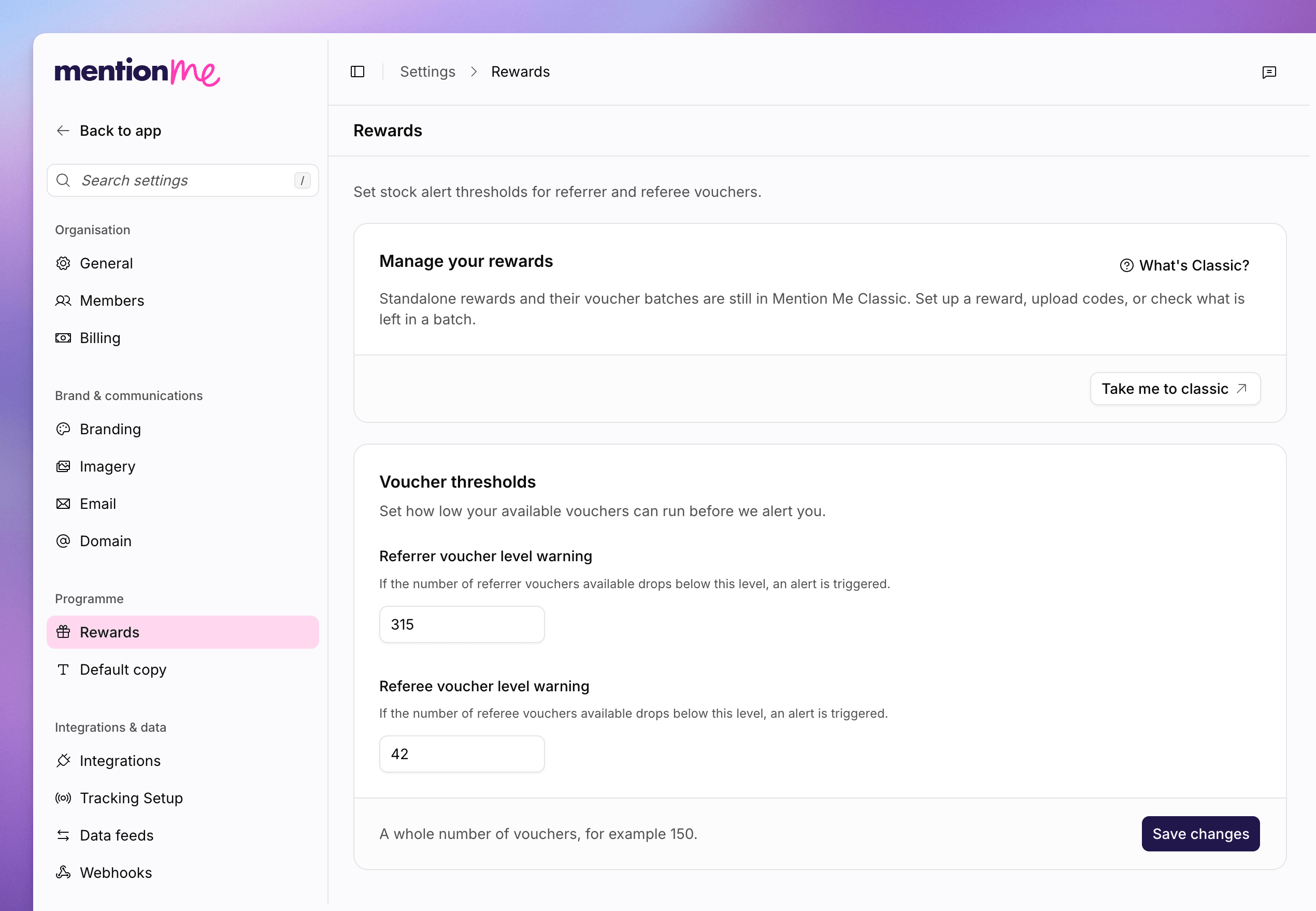 Standalone rewards and their voucher batches are still in Mention Me Classic.
Use **Take me to classic** on the **Manage your rewards** card to set up a
reward, upload codes, or check what is left in a batch.
That Classic card appears when Classic links are enabled and you have rewards permission.
## Set Thresholds
Use a whole number of vouchers, for example `150`. If the backend has no value yet, Mention Me suggests 200 for referrer stock and 150 for referee stock.
Go to **Settings > Rewards**.
In **Referrer voucher level warning**, enter the count that should trigger
an alert for referrer vouchers.
In **Referee voucher level warning**, enter the count that should trigger an
alert for referee vouchers.
Click **Save changes**.
To upload a list of codes rather than manage batches in Classic, see [How to Upload a CSV](/knowledge-app/data/uploads).
## See Also
How referrer and referee rewards fit the programme.
Bulk-upload voucher codes from Settings.
Standalone rewards and their voucher batches are still in Mention Me Classic.
Use **Take me to classic** on the **Manage your rewards** card to set up a
reward, upload codes, or check what is left in a batch.
That Classic card appears when Classic links are enabled and you have rewards permission.
## Set Thresholds
Use a whole number of vouchers, for example `150`. If the backend has no value yet, Mention Me suggests 200 for referrer stock and 150 for referee stock.
Go to **Settings > Rewards**.
In **Referrer voucher level warning**, enter the count that should trigger
an alert for referrer vouchers.
In **Referee voucher level warning**, enter the count that should trigger an
alert for referee vouchers.
Click **Save changes**.
To upload a list of codes rather than manage batches in Classic, see [How to Upload a CSV](/knowledge-app/data/uploads).
## See Also
How referrer and referee rewards fit the programme.
Bulk-upload voucher codes from Settings.