> ## Documentation Index
> Fetch the complete documentation index at: https://docs.mention-me.com/llms.txt
> Use this file to discover all available pages before exploring further.
# Settings
> Find every organisation and account setting on app.mention-me.com, grouped the same way as the app sidebar.
Settings is where you configure the workspace itself: the brand customers see, who can sign in, how tracking and data move, and the files you exchange with Mention Me.
There are two settings areas, and they are easy to mix up:
* **Organisation settings** live under **Settings** in the workspace sidebar. They apply to this brand. Open them from **Settings** while you are in a workspace.
* **Account settings** live under your avatar, then **Account settings**. They follow you across every workspace you belong to.
 ## Find a Page
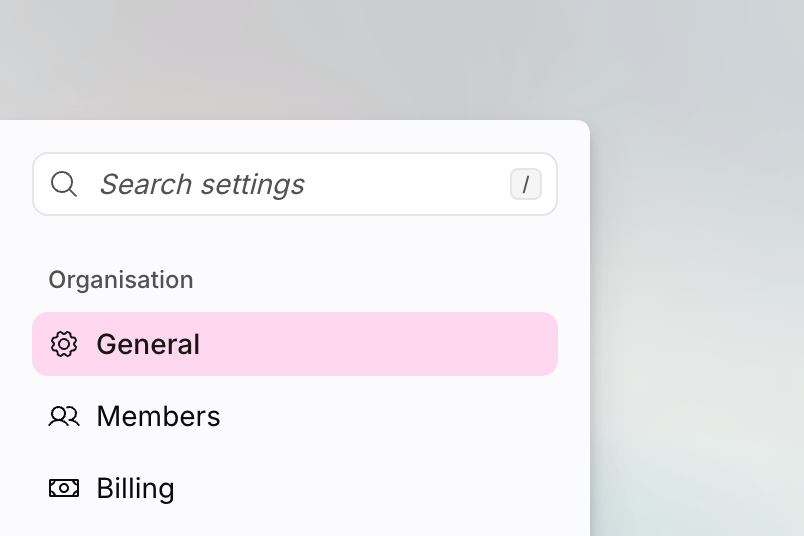
The organisation settings sidebar is grouped like the app:
| Group | What lives here |
| -------------------------- | ------------------------------------------------------------------ |
| **Organisation** | Workspace name, members, and billing |
| **Brand & communications** | Themes, fonts, imagery, reply-to email, and the referral subdomain |
| **Programme** | Voucher stock alerts, and default copy |
| **Integrations & data** | Tracking setup, data feeds, and webhooks |
| **Files & activity** | CSV uploads, secure files, and the integration log |
Type in **Search settings** at the top of that sidebar if you would rather jump than scan. Search matches page names and common synonyms. For example, typing `debug` finds **Logs**.
Account settings stay ungrouped: **General**, **Security**, and **Notifications**.
Some pages are **admin-only**. Direct links still open, but you will see **You do not have permission to view this page** until an admin helps. A few pages are **early access** and only appear when Mention Me has enabled them for your workspace.
## Organisation
Change the workspace name, URL slug, and homepage. Admin only.
Invite colleagues, change roles, and revoke access. Admin only.
See the plan, invoices, and payment details for the organisation. Admin
only.
## Brand & Communications
List themes and upload font packs. Theme editing still finishes in Classic.
Set the workspace logo and social sharing image, and use the Image Library.
Choose where customer replies to referral emails are delivered. Admin only.
Choose the subdomain customers use to reach referral pages. Admin only.
## Programme
Get alerted when referrer or referee voucher stock runs low. Admin only.
Open programme copy and tag copy. Early access. Editing finishes in Classic.
## Integrations & Data
Connect Shopify and reward automation from **Settings > Integrations**. Dedicated integration guides will live with that directory. The pages below are the rest of this group.
Choose how Mention Me tracks referrals, and find the snippets for your
method.
Configure inbound and outbound SFTP feeds. Admin only.
Control who can connect to sftp.mention-me.com. Admin only.
Generate, import, and rotate PGP keys for encrypted feeds. Admin only.
Send programme events to your own HTTPS endpoints. Early access.
## Files & Activity
Bulk-import existing customers, enrolments, and voucher codes.
Exchange encrypted files with Mention Me without using email.
Inspect tag fires, orders, and anything that Needs attention.
## Account Settings
These follow you, not the workspace.
Set your display name, language, and time zone.
Change your password, passkeys, and two-factor authentication.
Choose email and in-app notifications. Early access.
## Find a Page
The organisation settings sidebar is grouped like the app:
| Group | What lives here |
| -------------------------- | ------------------------------------------------------------------ |
| **Organisation** | Workspace name, members, and billing |
| **Brand & communications** | Themes, fonts, imagery, reply-to email, and the referral subdomain |
| **Programme** | Voucher stock alerts, and default copy |
| **Integrations & data** | Tracking setup, data feeds, and webhooks |
| **Files & activity** | CSV uploads, secure files, and the integration log |
Type in **Search settings** at the top of that sidebar if you would rather jump than scan. Search matches page names and common synonyms. For example, typing `debug` finds **Logs**.
Account settings stay ungrouped: **General**, **Security**, and **Notifications**.
Some pages are **admin-only**. Direct links still open, but you will see **You do not have permission to view this page** until an admin helps. A few pages are **early access** and only appear when Mention Me has enabled them for your workspace.
## Organisation
Change the workspace name, URL slug, and homepage. Admin only.
Invite colleagues, change roles, and revoke access. Admin only.
See the plan, invoices, and payment details for the organisation. Admin
only.
## Brand & Communications
List themes and upload font packs. Theme editing still finishes in Classic.
Set the workspace logo and social sharing image, and use the Image Library.
Choose where customer replies to referral emails are delivered. Admin only.
Choose the subdomain customers use to reach referral pages. Admin only.
## Programme
Get alerted when referrer or referee voucher stock runs low. Admin only.
Open programme copy and tag copy. Early access. Editing finishes in Classic.
## Integrations & Data
Connect Shopify and reward automation from **Settings > Integrations**. Dedicated integration guides will live with that directory. The pages below are the rest of this group.
Choose how Mention Me tracks referrals, and find the snippets for your
method.
Configure inbound and outbound SFTP feeds. Admin only.
Control who can connect to sftp.mention-me.com. Admin only.
Generate, import, and rotate PGP keys for encrypted feeds. Admin only.
Send programme events to your own HTTPS endpoints. Early access.
## Files & Activity
Bulk-import existing customers, enrolments, and voucher codes.
Exchange encrypted files with Mention Me without using email.
Inspect tag fires, orders, and anything that Needs attention.
## Account Settings
These follow you, not the workspace.
Set your display name, language, and time zone.
Change your password, passkeys, and two-factor authentication.
Choose email and in-app notifications. Early access.