> ## Documentation Index
> Fetch the complete documentation index at: https://docs.mention-me.com/llms.txt
> Use this file to discover all available pages before exploring further.
# Reporting
> Custom analytics dashboards for your referral programme.
export const ClassicCallout = ({children, href, linkLabel = "Open the Classic guide"}) =>
This finishes in Classic.
{children ? <> {children} : null}
{href ? <>
{" "}
For the setup steps, see {linkLabel}.
: null}
;
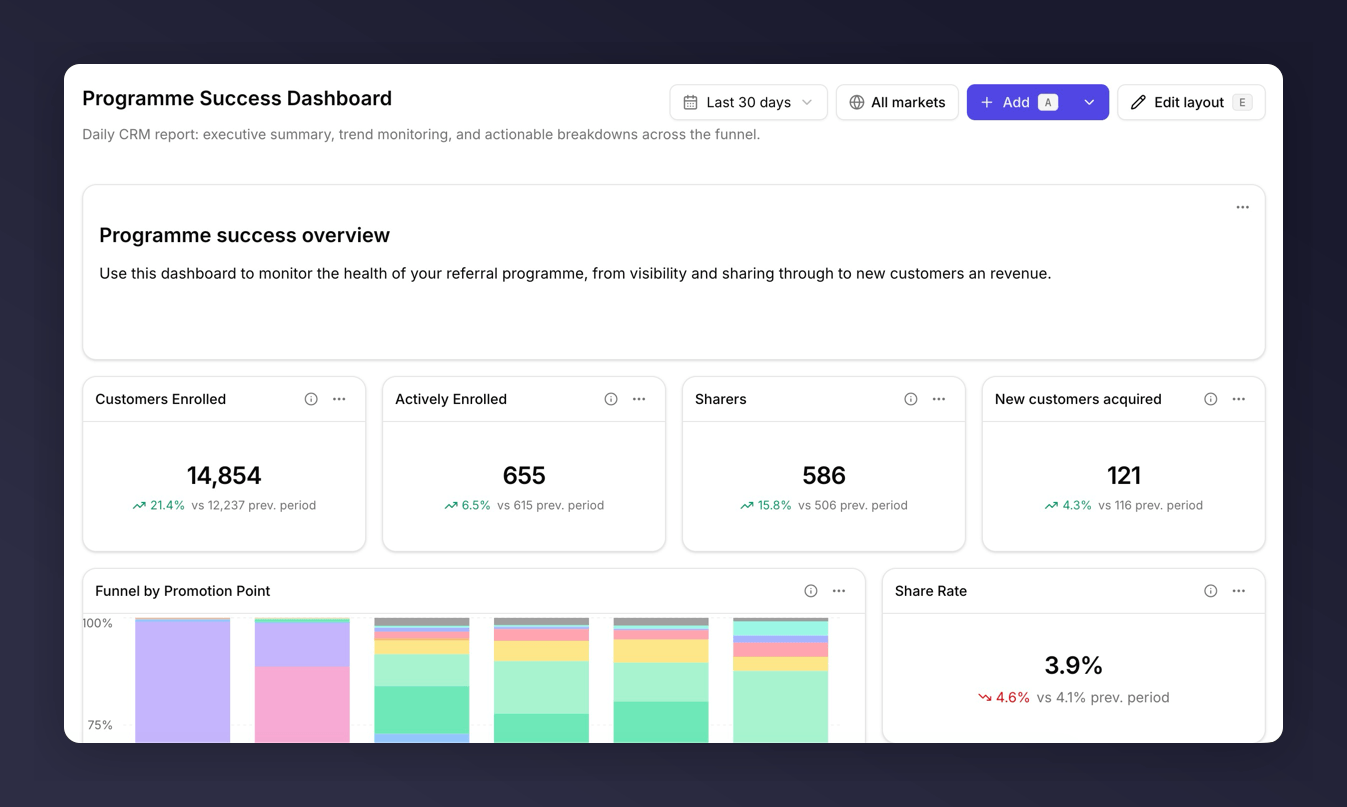
Reporting is where you find out whether referral is working, where it's leaking, and which campaigns to back. Build a dashboard around a question you care about, and the tiles on it give you the evidence.
 ## Three Ways to Start
Pick one of five ready-made dashboards. Fastest path to something useful.
Describe what you want. The AI builder assembles the dashboard for you.
Add tiles one at a time. Most control, most flexibility.
## What You Can Answer
Reporting is built around the questions teams actually ask:
* [Is referral revenue growing?](/knowledge-app/referral/reporting/common-tasks/monitor-revenue-quality)
* [Where is the funnel leaking?](/knowledge-app/referral/reporting/common-tasks/analyse-the-funnel)
* [Which campaigns are winning?](/knowledge-app/referral/reporting/common-tasks/track-campaign-performance)
* [Are we above or below industry average?](/knowledge-app/referral/reporting/common-tasks/compare-to-industry)
* [How do I get this in front of execs?](/knowledge-app/referral/reporting/common-tasks/report-to-stakeholders)
## Key Concepts
* **Dashboard**. A collection of tiles answering a single question. Shared across your team.
* **Tile**. A single metric, chart, table, or markdown note. See [tile types](/knowledge-app/referral/reporting/building-dashboards/tile-types).
* **Metric**. The thing being measured (e.g. New Customers, Share Rate). See the [metrics glossary](/knowledge-app/referral/reporting/reference/metrics-glossary).
* **Breakdown**. A way of splitting a metric (e.g. by Campaign or Market). See the [breakdowns glossary](/knowledge-app/referral/reporting/reference/dimensions-glossary).
* **Compare to**. Shows how a number has changed versus a previous period or the industry benchmark. See [comparisons](/knowledge-app/referral/reporting/building-dashboards/comparisons).
## Two Things to Know
Data refreshes once a day, overnight. A dashboard you build in the morning won't show today's activity until tomorrow.
Dashboards are shared across your team. Anyone with Reporting access sees every dashboard that has been created.
## Reports That Still Live in Classic
Custom dashboards live here. A handful of reports have not moved yet. When Classic links are on, Reporting lists them under the dashboards table. Downloadable programme reports also remain in Classic: see [Available Reports](/knowledge/reporting/referral/available-reports).
Extended customer revenue and NPS and sentiment still open Classic from the
Reporting page.
Stuck? Try [troubleshooting](/knowledge-app/referral/reporting/troubleshooting).
## Three Ways to Start
Pick one of five ready-made dashboards. Fastest path to something useful.
Describe what you want. The AI builder assembles the dashboard for you.
Add tiles one at a time. Most control, most flexibility.
## What You Can Answer
Reporting is built around the questions teams actually ask:
* [Is referral revenue growing?](/knowledge-app/referral/reporting/common-tasks/monitor-revenue-quality)
* [Where is the funnel leaking?](/knowledge-app/referral/reporting/common-tasks/analyse-the-funnel)
* [Which campaigns are winning?](/knowledge-app/referral/reporting/common-tasks/track-campaign-performance)
* [Are we above or below industry average?](/knowledge-app/referral/reporting/common-tasks/compare-to-industry)
* [How do I get this in front of execs?](/knowledge-app/referral/reporting/common-tasks/report-to-stakeholders)
## Key Concepts
* **Dashboard**. A collection of tiles answering a single question. Shared across your team.
* **Tile**. A single metric, chart, table, or markdown note. See [tile types](/knowledge-app/referral/reporting/building-dashboards/tile-types).
* **Metric**. The thing being measured (e.g. New Customers, Share Rate). See the [metrics glossary](/knowledge-app/referral/reporting/reference/metrics-glossary).
* **Breakdown**. A way of splitting a metric (e.g. by Campaign or Market). See the [breakdowns glossary](/knowledge-app/referral/reporting/reference/dimensions-glossary).
* **Compare to**. Shows how a number has changed versus a previous period or the industry benchmark. See [comparisons](/knowledge-app/referral/reporting/building-dashboards/comparisons).
## Two Things to Know
Data refreshes once a day, overnight. A dashboard you build in the morning won't show today's activity until tomorrow.
Dashboards are shared across your team. Anyone with Reporting access sees every dashboard that has been created.
## Reports That Still Live in Classic
Custom dashboards live here. A handful of reports have not moved yet. When Classic links are on, Reporting lists them under the dashboards table. Downloadable programme reports also remain in Classic: see [Available Reports](/knowledge/reporting/referral/available-reports).
Extended customer revenue and NPS and sentiment still open Classic from the
Reporting page.
Stuck? Try [troubleshooting](/knowledge-app/referral/reporting/troubleshooting).