> ## Documentation Index
> Fetch the complete documentation index at: https://docs.mention-me.com/llms.txt
> Use this file to discover all available pages before exploring further.
# Understanding Product Referral
> What product referral measures, how it differs from brand referral, and what a product referral campaign gives you.
Your customers already share products with friends: they copy a product page URL and send it by WhatsApp, text or email. Product referral makes that sharing visible, attributes the orders it drives, and, if you want, rewards the friend who arrives.
A **product referral campaign** is how you turn that on. It is a campaign type in its own right, with its own page under **Campaigns > Product referral campaigns**, alongside **Brand referral campaigns**.
For the concepts behind the two campaign types, and where holdouts fit, start with [Understanding Brand and Product Referral](/knowledge-app/concepts/brand-and-product-referral). This page and the ones beside it cover how to set product referral up and run it.
## Product Referral Versus Brand Referral
[Understanding Brand and Product Referral](/knowledge-app/concepts/brand-and-product-referral) covers why you would choose one over the other. The practical differences you will meet while setting a campaign up:
| | Product referral | Brand referral |
| ------------------------ | -------------------------------------------------------------------- | --------------------------------- |
| **What customers share** | An individual product | Your brand |
| **Who gets rewarded** | The referred customer only, and only if you choose to offer a reward | Both the referrer and the referee |
| **How sharing starts** | Copying the product URL, or a share link on the product page | Enrolling in your referral offer |
| **Enrolment needed?** | No | Yes |
| **Where it runs** | Your product pages | Your referral journey |
| **Emails** | None | Referrer and referee emails |
## How the Tracking Works
When a visitor lands on a product page, the Mention Me product tag gives them an anonymous visitor identifier and writes it into the page URL as an `mm_rf` parameter. If they copy that URL and a friend clicks it, Mention Me can connect the two visits. When either of them buys, the anonymous identifier is linked to a customer record and the order is attributed to the share.
No enrolment, sign-up or offer acceptance is involved, and nothing changes about how customers browse. For the technical detail of the tag itself, see the [product referral tag](/developer-docs/integration/entry-points/product-referral) documentation.
Product referral tracking depends on a live product referral campaign. The tag only injects the share link and rewrites the URL with `mm_rf` while a campaign is live for that language, so a campaign is a prerequisite for attributing any sharing at all. See [troubleshooting](/knowledge-app/referral/campaigns/product-referral/troubleshooting) if sharing has stopped.
## The Two Campaign Modes
A product referral campaign runs in one of two modes:
* **Non-incentivised**. Measures how customers share products and the orders their shares drive. No reward is offered to anyone. This is the default, and the fastest way to start.
* **Incentivised**. Shows an offer to the referred customer as soon as they land on the shared product page, and holds back a share of traffic as a control group so you can measure the difference the offer makes.
The mode belongs to the **version**, not the campaign, so you move between the two by launching a new version rather than creating a second campaign. You can switch in either direction. [Understanding Brand and Product Referral](/knowledge-app/concepts/brand-and-product-referral) explains the distinction; [campaign modes](/knowledge-app/referral/campaigns/product-referral/campaign-modes) covers how to move between them.
## When the Offer Is Shown
On an incentivised campaign, the offer is served **the moment a referred visitor lands on the shared product page**, not after they buy.
The sequence is:
1. A visitor arrives on a product page from a shared link.
2. Mention Me checks they qualify: they came from a genuine share, and they are not the person who shared it.
3. They are placed in either the offer group or the [holdout](/knowledge-app/referral/campaigns/product-referral/the-holdout), and that decision is remembered so a repeat visit gets the same answer.
4. If they are in the offer group, their reward code is issued there and then and the offer is rendered on the page.
5. They can apply it to the order they are already shopping for.
This matters for how you set the offer up. It is a conversion incentive on the current visit, not a thank-you after the fact, so the reward has to be worth acting on immediately.
The setup wizard's own wording for this mode reads "Reward referred customers when they buy a shared product". That describes when the reward is *earned*, not when it is *issued*. The code is allocated at the point the visitor arrives.
## One Campaign per Language
You can have exactly one product referral campaign per language, in either mode. If a language already has one, the setup flow sends you to it instead of creating a second.
This is different from brand referral, where you can run many campaigns per language in parallel. A product referral campaign is a one-off setup per market, not something you author repeatedly.
## What a Product Referral Campaign Contains
The campaign editor tailors itself to the campaign type, so a product referral campaign shows a smaller set of nodes than a brand one. For how the canvas works, see [the campaign editor](/knowledge-app/referral/campaigns/manage/the-campaign-editor).
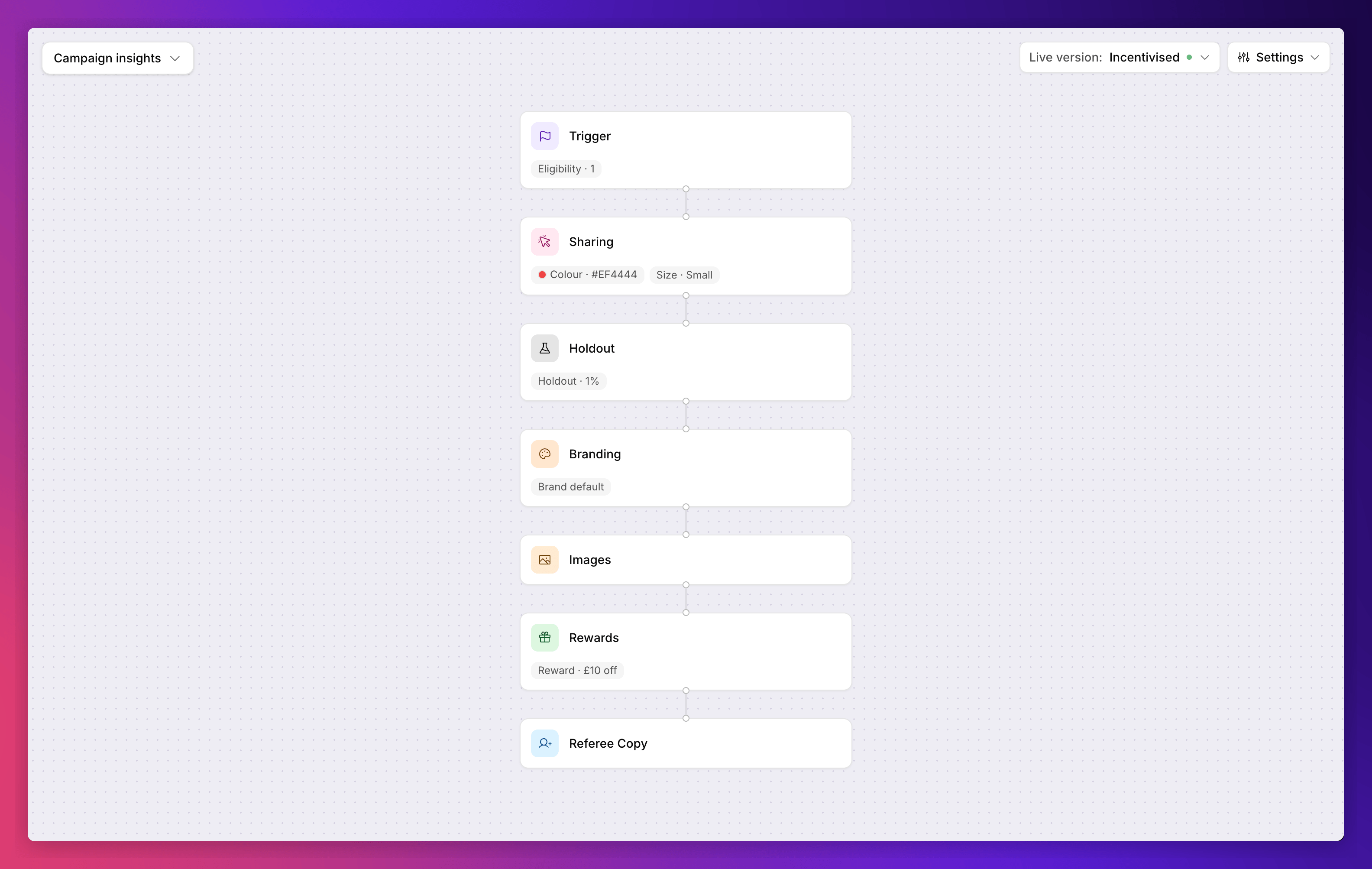 | Node | Applies to | What it controls |
| ---------------- | ----------------- | ------------------------------------------------------------------------------------------------------------------------------------------------------------------------------ |
| **Trigger** | Both modes | Which product page views the campaign applies to. Campaign-scoped, as with brand referral, and with a [narrower condition picker](#trigger-conditions-are-restricted). |
| **Sharing** | Both modes | Whether a share link appears on your product pages, and its wording, colour and size. See [the share link](/knowledge-app/referral/campaigns/product-referral/the-share-link). |
| **Holdout** | Incentivised only | The share of traffic held back from the reward, so you can measure what it adds. See [the holdout](/knowledge-app/referral/campaigns/product-referral/the-holdout). |
| **Branding** | Incentivised only | Colours, fonts and how the offer is displayed. Product referral offers Popup and Corner peel only. |
| **Images** | Incentivised only | Imagery for the on-page offer. Website only, because there is no email. |
| **Rewards** | Incentivised only | The single reward the referred customer receives. There is no referrer reward, so there is no role tab. |
| **Referee Copy** | Incentivised only | The wording of the on-page offer a referred visitor sees. |
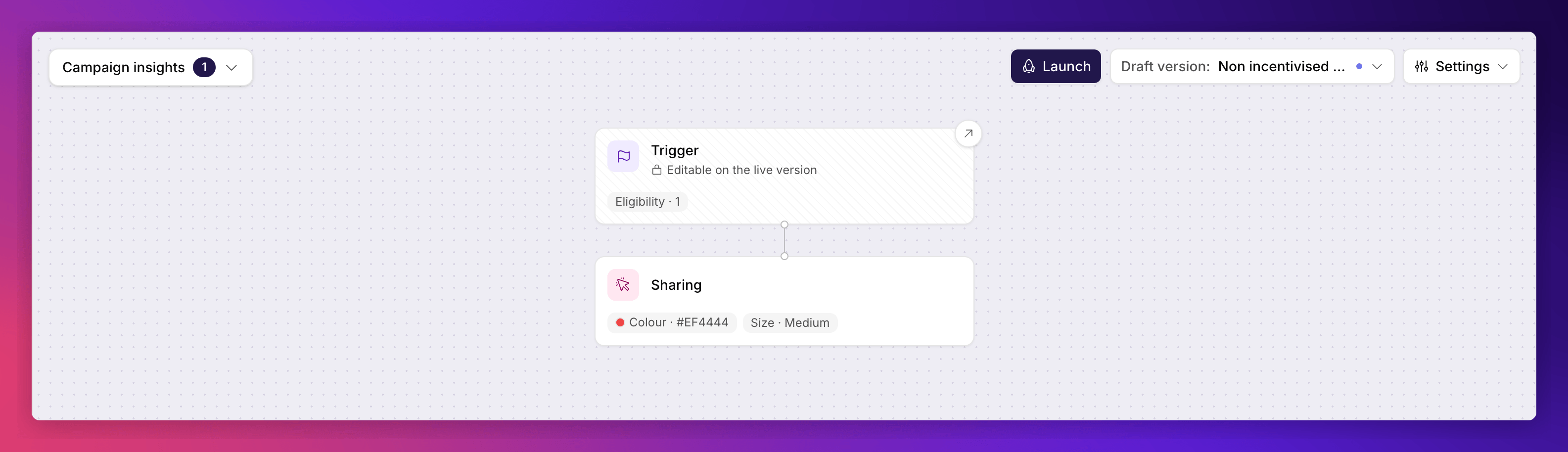
A **non-incentivised** version has the Trigger and Sharing nodes and nothing else. With no incentive there is no offer shown to anyone, so the holdout, branding, imagery, reward and copy nodes all drop out. The share link stays, because the tag injects it whether or not the version carries an incentive.
| Node | Applies to | What it controls |
| ---------------- | ----------------- | ------------------------------------------------------------------------------------------------------------------------------------------------------------------------------ |
| **Trigger** | Both modes | Which product page views the campaign applies to. Campaign-scoped, as with brand referral, and with a [narrower condition picker](#trigger-conditions-are-restricted). |
| **Sharing** | Both modes | Whether a share link appears on your product pages, and its wording, colour and size. See [the share link](/knowledge-app/referral/campaigns/product-referral/the-share-link). |
| **Holdout** | Incentivised only | The share of traffic held back from the reward, so you can measure what it adds. See [the holdout](/knowledge-app/referral/campaigns/product-referral/the-holdout). |
| **Branding** | Incentivised only | Colours, fonts and how the offer is displayed. Product referral offers Popup and Corner peel only. |
| **Images** | Incentivised only | Imagery for the on-page offer. Website only, because there is no email. |
| **Rewards** | Incentivised only | The single reward the referred customer receives. There is no referrer reward, so there is no role tab. |
| **Referee Copy** | Incentivised only | The wording of the on-page offer a referred visitor sees. |
A **non-incentivised** version has the Trigger and Sharing nodes and nothing else. With no incentive there is no offer shown to anyone, so the holdout, branding, imagery, reward and copy nodes all drop out. The share link stays, because the tag injects it whether or not the version carries an incentive.
 ### What Brand Referral Has That Product Referral Doesn't
A few things a brand referral campaign has work differently here, or are absent:
* **A referrer journey.** There isn't one. The sharer never leaves your product page, so there is no Referrer Copy node and no referrer reward.
* **A/B testing** is not offered. Product referral uses the holdout split instead, which answers a different question. See [the holdout](/knowledge-app/referral/campaigns/product-referral/the-holdout).
* **Campaign settings** exist, but they are a different set. Brand referral's destination URLs, reply-to address and voucher options do not apply, because product referral has no referrer sharing and sends no email. In their place you get link tracking and UTM tagging. See [tracking settings](/knowledge-app/referral/campaigns/product-referral/tracking-settings).
* **Email imagery** is not offered. There is no email anywhere in the product referral journey, so the Images node shows the Website tab alone.
* **Fraud controls** have no editing surface, because the protections are built into the campaign type rather than assembled from rules. Every referred arrival is checked automatically: it must have come from a genuine share, and self-referral is blocked, both when the visitor arrives and again against their email address once an order is placed. There is nothing to switch on or tune.
* **Duplicating the campaign** is not possible. Only one product referral campaign may exist per language, so new work is a new version inside the existing campaign.
### Trigger Conditions Are Restricted
A product referral campaign is matched from the product page tag, before anyone has identified themselves and before there is an order. Conditions that need order or customer context could never be evaluated, so the picker offers **Customer details** conditions only, and within those only the six a product page view can answer: **Currency**, **Custom data**, **Segment**, **Locale**, **Implementation** and **Situation**.
With a single category on offer, the picker flattens: there is no Recommended group and no category to drill into.
Not offered: **Order value**, **Order ID** and **Coupon code**, which describe an order that does not exist yet, and **Customer ID**, **Email address**, **City** and **Country**, which describe an identified customer, while the sharer on a product page is anonymous. Every other category (customer history, past segments, gender, NPS and so on) is out for the same reason.
Any rule already saved on a campaign still shows and can still be removed, whatever it checks.
There is also no **Qualifying purchases** section, because a product referral campaign has no referee purchase to qualify. The left nav keeps its frame, with Eligibility as the only entry.
## What Is Not Available Yet
The measurement side of incentivised product referral is still being built. You can configure a reward and a holdout today, and referred visitors will be shown the offer, but the offer-versus-control comparison is not yet available in reporting. Talk to your Mention Me contact before relying on it to prove incremental revenue.
Also not yet available:
* **Per-campaign performance figures**. The product referral list carries no metric columns, and the campaign insights panel says performance will appear there soon.
Programme-wide product referral performance **is** available, through the standard [Reporting](/knowledge-app/referral/reporting/overview) dashboards rather than a report of its own. Build a dashboard with the **Product Sharing** metrics: total product views, views from shared products, percentage of traffic from shared products, unique visitors from shared products, and the orders, revenue and AOV those shares drive.
## See Also
Create your first product referral campaign.
Non-incentivised and incentivised, and how to move between them.
Customise the share link on your product pages.
The technical integration for your product pages.
The concepts behind the two campaign types.
### What Brand Referral Has That Product Referral Doesn't
A few things a brand referral campaign has work differently here, or are absent:
* **A referrer journey.** There isn't one. The sharer never leaves your product page, so there is no Referrer Copy node and no referrer reward.
* **A/B testing** is not offered. Product referral uses the holdout split instead, which answers a different question. See [the holdout](/knowledge-app/referral/campaigns/product-referral/the-holdout).
* **Campaign settings** exist, but they are a different set. Brand referral's destination URLs, reply-to address and voucher options do not apply, because product referral has no referrer sharing and sends no email. In their place you get link tracking and UTM tagging. See [tracking settings](/knowledge-app/referral/campaigns/product-referral/tracking-settings).
* **Email imagery** is not offered. There is no email anywhere in the product referral journey, so the Images node shows the Website tab alone.
* **Fraud controls** have no editing surface, because the protections are built into the campaign type rather than assembled from rules. Every referred arrival is checked automatically: it must have come from a genuine share, and self-referral is blocked, both when the visitor arrives and again against their email address once an order is placed. There is nothing to switch on or tune.
* **Duplicating the campaign** is not possible. Only one product referral campaign may exist per language, so new work is a new version inside the existing campaign.
### Trigger Conditions Are Restricted
A product referral campaign is matched from the product page tag, before anyone has identified themselves and before there is an order. Conditions that need order or customer context could never be evaluated, so the picker offers **Customer details** conditions only, and within those only the six a product page view can answer: **Currency**, **Custom data**, **Segment**, **Locale**, **Implementation** and **Situation**.
With a single category on offer, the picker flattens: there is no Recommended group and no category to drill into.
Not offered: **Order value**, **Order ID** and **Coupon code**, which describe an order that does not exist yet, and **Customer ID**, **Email address**, **City** and **Country**, which describe an identified customer, while the sharer on a product page is anonymous. Every other category (customer history, past segments, gender, NPS and so on) is out for the same reason.
Any rule already saved on a campaign still shows and can still be removed, whatever it checks.
There is also no **Qualifying purchases** section, because a product referral campaign has no referee purchase to qualify. The left nav keeps its frame, with Eligibility as the only entry.
## What Is Not Available Yet
The measurement side of incentivised product referral is still being built. You can configure a reward and a holdout today, and referred visitors will be shown the offer, but the offer-versus-control comparison is not yet available in reporting. Talk to your Mention Me contact before relying on it to prove incremental revenue.
Also not yet available:
* **Per-campaign performance figures**. The product referral list carries no metric columns, and the campaign insights panel says performance will appear there soon.
Programme-wide product referral performance **is** available, through the standard [Reporting](/knowledge-app/referral/reporting/overview) dashboards rather than a report of its own. Build a dashboard with the **Product Sharing** metrics: total product views, views from shared products, percentage of traffic from shared products, unique visitors from shared products, and the orders, revenue and AOV those shares drive.
## See Also
Create your first product referral campaign.
Non-incentivised and incentivised, and how to move between them.
Customise the share link on your product pages.
The technical integration for your product pages.
The concepts behind the two campaign types.