> ## Documentation Index
> Fetch the complete documentation index at: https://docs.mention-me.com/llms.txt
> Use this file to discover all available pages before exploring further.
# The Share Link on Your Product Pages
> Turn the product page share link on or off and set its wording, colour and size, and understand when the tag shows it.
The **share link** is the visible call to action on your product pages that copies a tracked URL when a customer clicks it. It is optional: most product sharing happens through customers copying the page URL themselves, and tracking works either way.
You configure it in the **Sharing** node of the campaign editor. Both non-incentivised and incentivised versions have it, and on a non-incentivised version it is the only node besides the Trigger.
Brand referral has a node called Sharing too, but it is a different editor: the
sharing options on your referral pages. See [brand referral
sharing](/knowledge-app/referral/campaigns/brand-referral/sharing).
 ## The Settings
| Setting | Default | What it does |
| ----------------------- | ------------------------- | ------------------------------------------------------------------------------------------------------------------------------------------------------ |
| **Show share link** | On | Whether the link appears at all. When off, the link is hidden but customers can still copy the page URL to share, and referral tracking still applies. |
| **Link text** | "Share with your friends" | The wording customers see. Required, up to 255 characters. |
| **Copied confirmation** | "Copied!" | Shown briefly after a customer shares, then the link text returns. Required, up to 255 characters. |
| **Colour** | Inherit | A hex colour applied to the link text. Leave it unset to inherit your site's styling. |
| **Size** | Inherit from your site | A text-size preset: **Small**, **Medium** or **Large**, or **Inherit from your site**. |
The other fields are hidden while **Show share link** is off, since none of them apply.
Link text and copied confirmation are both required. The tag renders the link text directly, so a blank label leaves an invisible link on your product pages, and a blank confirmation leaves customers with no feedback after they share.
## The Editor
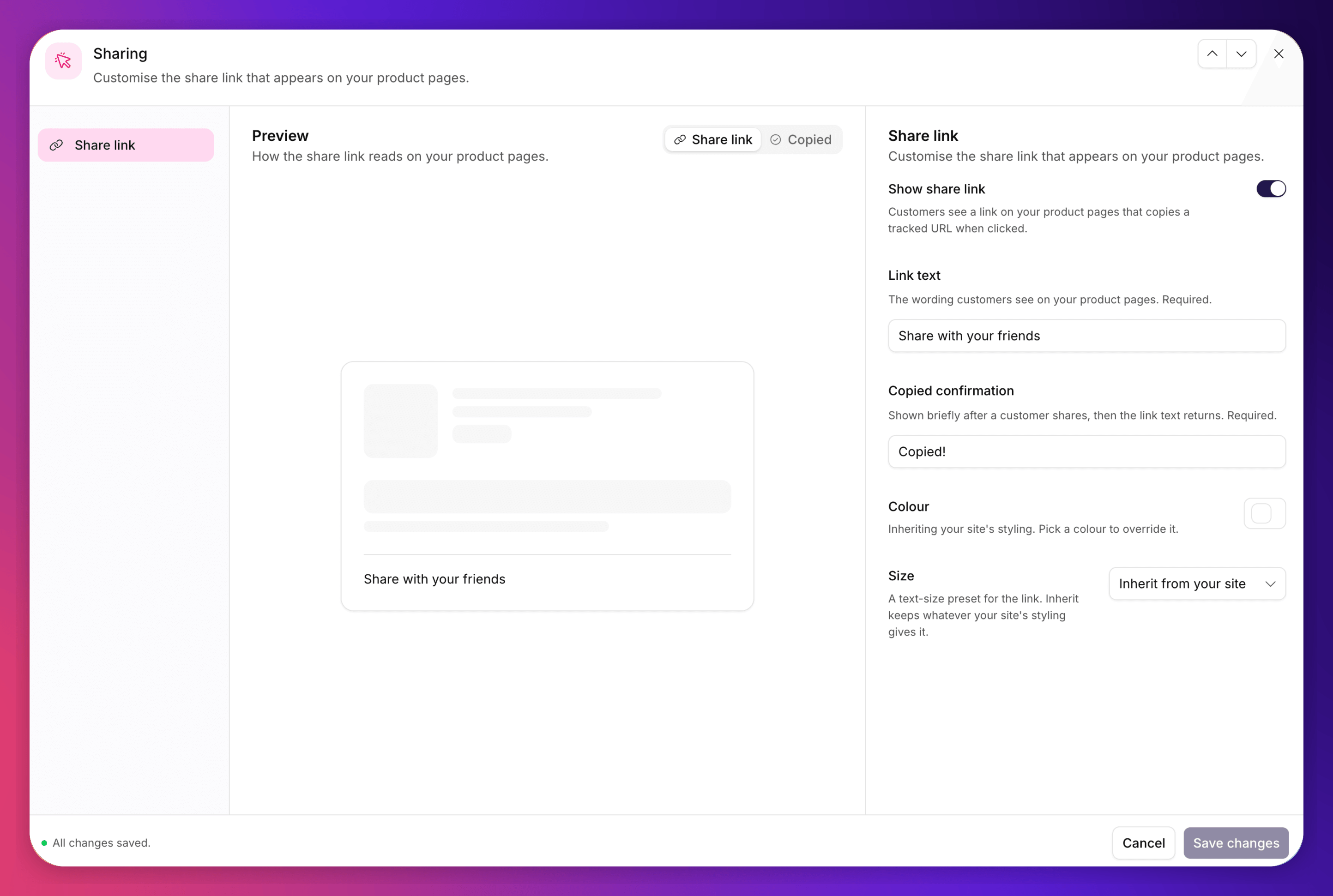
The node opens as three columns: an element nav on the left, the preview in the middle, and the fields on the right.
The nav selects an **element**, not a device: the link is one anchor on your own page, so there is no desktop and mobile split to preview. What varies is whether you are looking at the resting **Share link** or the **Copied** confirmation. Focusing the **Link text** field switches the preview to the link state; focusing **Copied confirmation** switches it to the confirmation state, so you are always looking at what you are typing.
The centre column is a mock rather than a real preview. The link is injected into your own storefront, which Mention Me cannot render, so the grey blocks stand in for your product content and only the link itself carries live configuration.
The canvas node summarises the current styling as pills, for example **Colour · Inherit** and **Size · Inherit**, when the link is enabled, and reads **Disabled** when it is off.
## Colour and Size Inheritance
Colour and size both default to inheriting your site's styling. The link is injected into your own page, so by default it picks up whatever CSS is already there.
Set a colour or size only where you want to override that. To go back to inheriting, clear the colour or set the size to **Inherit from your site**. The three size presets map to fixed pixel sizes, so a preset renders the same in the preview and on your page.
## Where the Settings Are Stored
Share link settings belong to the **offer**, which means each variant of a version can have its own. There is no merchant-level default to keep in sync.
In practice a single **Save** writes the change across every variant of the version you are editing, so you do not have to repeat yourself. As with every other node, only **drafts** are editable. Live and past versions are read-only.
Copy and styling save as two separate requests. If one fails, you can end up with saved wording against the old styling. Nothing breaks, the link still renders, but re-save if the result isn't what you expected.
## When the Tag Actually Shows It
Turning the setting on is necessary but not sufficient. The tag decides whether to inject the share link at the point a product page loads, and it will not do so unless there is a **live product referral campaign for that language** with a servable version.
Concretely:
| Your situation | Share link | `mm_rf` in the URL | Page view recorded |
| ---------------------------------------------------------------- | ---------- | ------------------ | ------------------ |
| A live campaign for that language | Shown | Yes | Yes |
| Your only campaign is draft, paused, ended or archived | Hidden | No | Yes |
| A live campaign, but in a different language | Hidden | No | Yes |
| The product injection configuration is disabled for your account | Hidden | No | Yes |
Page views and visitor registration continue in every case, so launching a campaign later does not leave you with a cohort of unregistered sharers.
The requirement exists to prevent a referral that looks like it worked and can never pay out: with no campaign to resolve against, a link a customer shares would refuse every friend who followed it.
The match is per language. A live `en_GB` campaign does not serve your French product pages. If you run product pages in several languages, set up a campaign for each.
## On Shopify
If you use the Mention Me Shopify app, the share link is rendered by the **Share Product** theme app block rather than by the tag, and the same requirement applies: no live campaign for that language means no share link.
The block controls **where** the link sits on your product page. Its wording and styling come from the **Sharing** node above, the same as any other integration. Installing the block and choosing its placement are covered in [how to set up product referral sharing](/knowledge/shopify/product-referral).
## See Also
URL hash tracking and UTM parameters.
When the share link doesn't appear.
Installing the tag on your product pages.
Installing the Share Product theme app block and choosing its placement.
## The Settings
| Setting | Default | What it does |
| ----------------------- | ------------------------- | ------------------------------------------------------------------------------------------------------------------------------------------------------ |
| **Show share link** | On | Whether the link appears at all. When off, the link is hidden but customers can still copy the page URL to share, and referral tracking still applies. |
| **Link text** | "Share with your friends" | The wording customers see. Required, up to 255 characters. |
| **Copied confirmation** | "Copied!" | Shown briefly after a customer shares, then the link text returns. Required, up to 255 characters. |
| **Colour** | Inherit | A hex colour applied to the link text. Leave it unset to inherit your site's styling. |
| **Size** | Inherit from your site | A text-size preset: **Small**, **Medium** or **Large**, or **Inherit from your site**. |
The other fields are hidden while **Show share link** is off, since none of them apply.
Link text and copied confirmation are both required. The tag renders the link text directly, so a blank label leaves an invisible link on your product pages, and a blank confirmation leaves customers with no feedback after they share.
## The Editor
The node opens as three columns: an element nav on the left, the preview in the middle, and the fields on the right.
The nav selects an **element**, not a device: the link is one anchor on your own page, so there is no desktop and mobile split to preview. What varies is whether you are looking at the resting **Share link** or the **Copied** confirmation. Focusing the **Link text** field switches the preview to the link state; focusing **Copied confirmation** switches it to the confirmation state, so you are always looking at what you are typing.
The centre column is a mock rather than a real preview. The link is injected into your own storefront, which Mention Me cannot render, so the grey blocks stand in for your product content and only the link itself carries live configuration.
The canvas node summarises the current styling as pills, for example **Colour · Inherit** and **Size · Inherit**, when the link is enabled, and reads **Disabled** when it is off.
## Colour and Size Inheritance
Colour and size both default to inheriting your site's styling. The link is injected into your own page, so by default it picks up whatever CSS is already there.
Set a colour or size only where you want to override that. To go back to inheriting, clear the colour or set the size to **Inherit from your site**. The three size presets map to fixed pixel sizes, so a preset renders the same in the preview and on your page.
## Where the Settings Are Stored
Share link settings belong to the **offer**, which means each variant of a version can have its own. There is no merchant-level default to keep in sync.
In practice a single **Save** writes the change across every variant of the version you are editing, so you do not have to repeat yourself. As with every other node, only **drafts** are editable. Live and past versions are read-only.
Copy and styling save as two separate requests. If one fails, you can end up with saved wording against the old styling. Nothing breaks, the link still renders, but re-save if the result isn't what you expected.
## When the Tag Actually Shows It
Turning the setting on is necessary but not sufficient. The tag decides whether to inject the share link at the point a product page loads, and it will not do so unless there is a **live product referral campaign for that language** with a servable version.
Concretely:
| Your situation | Share link | `mm_rf` in the URL | Page view recorded |
| ---------------------------------------------------------------- | ---------- | ------------------ | ------------------ |
| A live campaign for that language | Shown | Yes | Yes |
| Your only campaign is draft, paused, ended or archived | Hidden | No | Yes |
| A live campaign, but in a different language | Hidden | No | Yes |
| The product injection configuration is disabled for your account | Hidden | No | Yes |
Page views and visitor registration continue in every case, so launching a campaign later does not leave you with a cohort of unregistered sharers.
The requirement exists to prevent a referral that looks like it worked and can never pay out: with no campaign to resolve against, a link a customer shares would refuse every friend who followed it.
The match is per language. A live `en_GB` campaign does not serve your French product pages. If you run product pages in several languages, set up a campaign for each.
## On Shopify
If you use the Mention Me Shopify app, the share link is rendered by the **Share Product** theme app block rather than by the tag, and the same requirement applies: no live campaign for that language means no share link.
The block controls **where** the link sits on your product page. Its wording and styling come from the **Sharing** node above, the same as any other integration. Installing the block and choosing its placement are covered in [how to set up product referral sharing](/knowledge/shopify/product-referral).
## See Also
URL hash tracking and UTM parameters.
When the share link doesn't appear.
Installing the tag on your product pages.
Installing the Share Product theme app block and choosing its placement.