> ## Documentation Index
> Fetch the complete documentation index at: https://docs.mention-me.com/llms.txt
> Use this file to discover all available pages before exploring further.
# Non-Incentivised and Incentivised Campaigns
> How the two product referral campaign modes differ, why the mode belongs to the version, and how to move between them.
A product referral campaign runs in one of two modes. The mode is a property of the **version** that is live, not of the campaign, so a single campaign can move between them over its life.
[Understanding Brand and Product Referral](/knowledge-app/concepts/brand-and-product-referral#incentivised-and-non-incentivised-product-referral) explains what each mode is for. This page covers how to switch.
## The Two Modes
| | Non-incentivised | Incentivised |
| ----------------------- | ------------------------------------------------------- | ------------------------------------------------------------------------------------------------ |
| **What it does** | Measures product sharing and the orders it drives | Shows the referred customer an offer as they arrive, and measures the difference it makes |
| **Reward** | None | A single reward to the referred customer, issued the moment they land on the shared product page |
| **Holdout** | The whole audience, in effect: nobody is shown an offer | A share of traffic you set, from 1% to 99% |
| **Nodes in the editor** | Trigger and Sharing only | Trigger, Sharing, Holdout, Branding, Images, Rewards and Referee Copy |
| **What a shopper sees** | The share link on your product pages, if you enable it | The share link, plus an offer on the product page they arrive on |
Non-incentivised is the default in the setup wizard, and the quicker thing to get live. It is a complete product in its own right, not a half-configured incentivised campaign.
## Why the Mode Lives on the Version
You can only have one product referral campaign per language, so adding an incentive cannot mean creating a second campaign beside the first. Instead, you add a new **version** in the other mode and launch it. Launching a version of the opposite flavour switches the campaign.
This means:
* The **Incentive** column on the Product referral campaigns page reads the current mode per row, because a launch can change it.
* Switching works in **both directions**. You can add an incentive to a non-incentivised campaign, and you can go back.
* Going back is always a **fresh version**, never a reactivation of the old one. A version that has been live can never relaunch.
## Add an Incentive to a Non-Incentivised Campaign
From **Campaigns > Product referral campaigns**, open the campaign for the language you want.
In the insights panel, a recommendation reads **"This version doesn't offer an incentive"**, explaining that the version measures sharing without rewarding anyone. Click **Add an incentive**.
You can also create a version from the version picker in the usual way. In the **Create version** dialog, set **Version type** to **Incentivised**.
 Use the campaign's own create-version flow, not the **Create campaign** button on the Product referral campaigns page. That opens the setup wizard, which creates a whole new campaign, and the one-per-language rule will refuse it.
The new draft version has the full set of nodes. Set the reward in the **Rewards** node and the split in the **Holdout** node.
Codes are issued to every qualifying visitor outside the holdout, not only to those who buy, so avoid rewards with a cash value such as gift cards and third-party vouchers, and keep to an amount or percent off or free delivery. See [set up a campaign](/knowledge-app/referral/campaigns/product-referral/set-up-a-campaign).
Launch the version. It replaces the live one, and the campaign's **Incentive** column changes to **Incentivised**.
## Go Back to Non-Incentivised
Yes, you can withdraw an incentive as well as add one. Open the campaign, create a new version with **Version type** set to **Non-incentivised**, and launch it. It replaces the live incentivised version and the **Incentive** column changes back.
Two things differ from adding an incentive:
* **There is no "Start from" step.** An incentivised version offers to copy a previous version's setup; a non-incentivised one is always built fresh, because there is no incentive to copy.
* **The new version is created with a 100% holdout**, which is what "nobody is shown an offer" means internally. You will not see a Holdout node on it, because the editor's field only accepts 1% to 99%.
Existing referred visitors who were already shown an offer keep the code they were given, since codes are issued on arrival. The change applies to visitors arriving from that point on.
Going back is always a brand new version, never a reactivation of the old non-incentivised one: a version that has been live cannot be relaunched. That is what makes the switch safe to make in either direction.
## What the Editor Hides on a Non-Incentivised Version
A non-incentivised version has no offer to show anyone, so the editor hides every node that would configure one. Only the campaign-level **Trigger** and the **Sharing** node remain.
Use the campaign's own create-version flow, not the **Create campaign** button on the Product referral campaigns page. That opens the setup wizard, which creates a whole new campaign, and the one-per-language rule will refuse it.
The new draft version has the full set of nodes. Set the reward in the **Rewards** node and the split in the **Holdout** node.
Codes are issued to every qualifying visitor outside the holdout, not only to those who buy, so avoid rewards with a cash value such as gift cards and third-party vouchers, and keep to an amount or percent off or free delivery. See [set up a campaign](/knowledge-app/referral/campaigns/product-referral/set-up-a-campaign).
Launch the version. It replaces the live one, and the campaign's **Incentive** column changes to **Incentivised**.
## Go Back to Non-Incentivised
Yes, you can withdraw an incentive as well as add one. Open the campaign, create a new version with **Version type** set to **Non-incentivised**, and launch it. It replaces the live incentivised version and the **Incentive** column changes back.
Two things differ from adding an incentive:
* **There is no "Start from" step.** An incentivised version offers to copy a previous version's setup; a non-incentivised one is always built fresh, because there is no incentive to copy.
* **The new version is created with a 100% holdout**, which is what "nobody is shown an offer" means internally. You will not see a Holdout node on it, because the editor's field only accepts 1% to 99%.
Existing referred visitors who were already shown an offer keep the code they were given, since codes are issued on arrival. The change applies to visitors arriving from that point on.
Going back is always a brand new version, never a reactivation of the old non-incentivised one: a version that has been live cannot be relaunched. That is what makes the switch safe to make in either direction.
## What the Editor Hides on a Non-Incentivised Version
A non-incentivised version has no offer to show anyone, so the editor hides every node that would configure one. Only the campaign-level **Trigger** and the **Sharing** node remain.
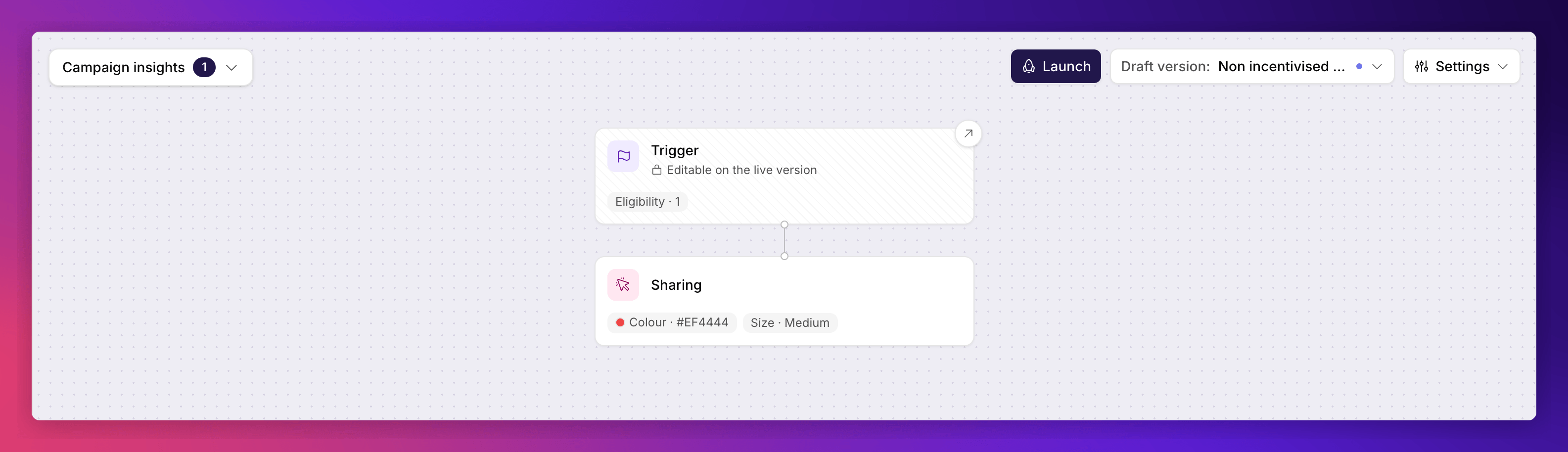 The share link survives because the tag injects it on your product pages whether or not the version carries an incentive. Everything else, rewards, branding, images and journeys, would be configuring an experience nobody can reach.
The editor decides this from the version's own mode, not from whether a reward happens to be set. A draft with no reward yet is not the same thing as a non-incentivised version, and the holdout field only accepts 1% to 99%, so it can never represent the 100% holdout a non-incentivised version runs at.
## See Also
How the control group works and how to size it.
What each mode is for, and where holdouts fit.
The one node both modes share.
Take a draft version live.
The share link survives because the tag injects it on your product pages whether or not the version carries an incentive. Everything else, rewards, branding, images and journeys, would be configuring an experience nobody can reach.
The editor decides this from the version's own mode, not from whether a reward happens to be set. A draft with no reward yet is not the same thing as a non-incentivised version, and the holdout field only accepts 1% to 99%, so it can never represent the 100% holdout a non-incentivised version runs at.
## See Also
How the control group works and how to size it.
What each mode is for, and where holdouts fit.
The one node both modes share.
Take a draft version live.