> ## Documentation Index
> Fetch the complete documentation index at: https://docs.mention-me.com/llms.txt
> Use this file to discover all available pages before exploring further.
# How to Monitor a Live Version
> Track a live version's performance, act on recommendations, and pause or resume the campaign from the insights panel.
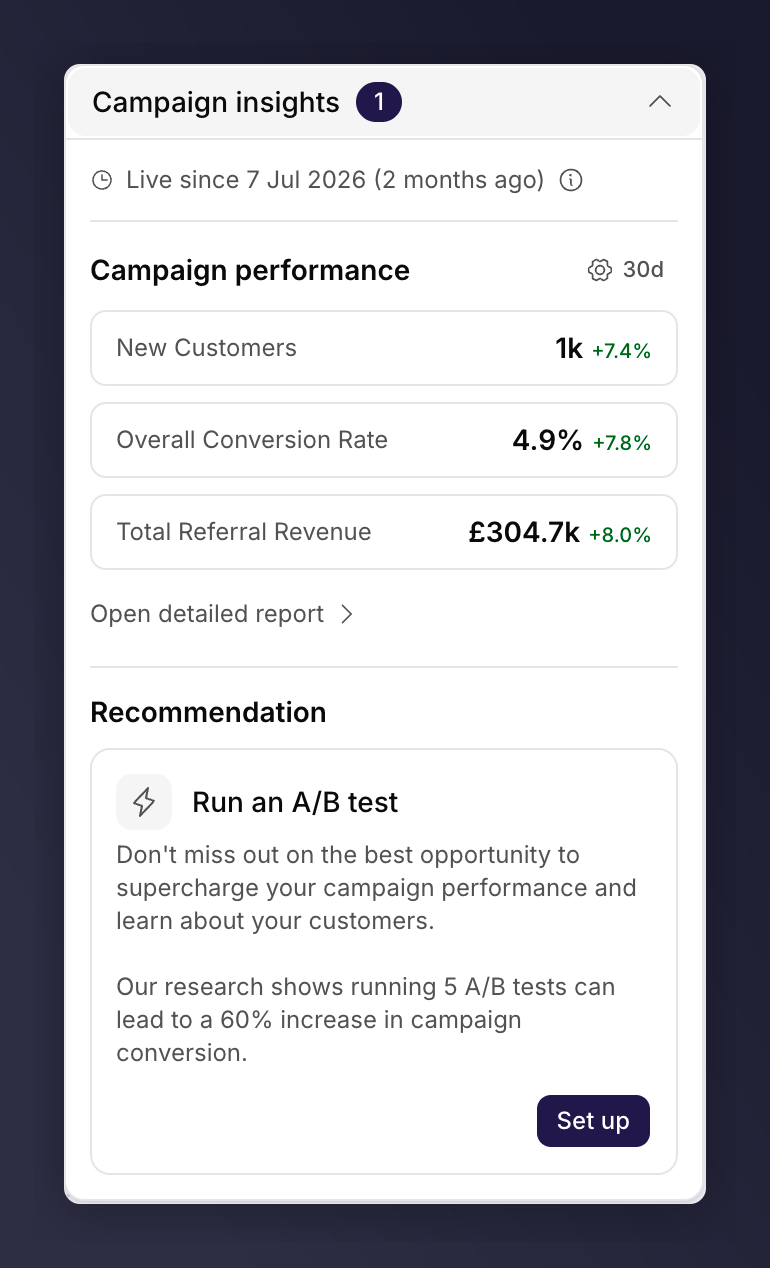
Once a version is live, the **insights panel** on the right of the editor is your home for keeping an eye on it. It shows the version's status, headline performance, and anything that needs your attention.
The panel starts **collapsed**, as a pill in the top left of the canvas reading **Campaign insights** with a count of outstanding recommendations. Click it to expand, and the editor remembers your choice.
 ## Read the Status Badge
The badge at the top of the expanded panel tells you what state the version is in:
* **Live since \[date]**. The version is serving customers.
* **Paused**. The campaign is paused, so no new customers see the offer.
* **Scheduled**. The version is queued to go live later.
* **Draft**. The version is still being built and shows a Launch button instead of metrics.
* **Past version** / **Past promotion**. The version has ended.
For how versions move between these states, see [campaigns, versions and promotions](/knowledge-app/referral/campaigns/manage/campaigns-versions-and-promotions).
## Track Performance
The **Campaign performance** section shows headline metrics for the version, each with its movement against the period before. The settings control beside the section title sets the time period (7, 30 or 60 days), turns that comparison on or off, and picks which metrics appear. Available metrics include:
* **Overall conversion rate**. New customers as a share of enrolled customers.
* **Enrolment rate**. Enrolled customers as a share of offer impressions.
* **Share rate**. How often enrolled customers share with friends.
* **Purchase rate**. How often referred friends make a purchase.
* **Unique impressions** and **Customers enrolled**. Reach into the top of the funnel.
* **Total referral revenue** and **New customer revenue**. The money the version is generating.
For deeper analysis, charting and breakdowns, click **Open detailed report**. Mention Me opens a [Reporting](/knowledge-app/referral/reporting/overview) dashboard scoped to this campaign, creating one the first time and reusing it after that, with the campaign filter pinned so it always reports on this campaign.
On a **product referral** campaign this section reads "Performance for product
referral campaigns will appear here soon" instead of metrics. Product referral
figures are not campaign-scoped yet, which is also why the product referral
list shows no metric columns. Programme-wide product sharing performance is
available in [Reporting](/knowledge-app/referral/reporting/overview).
## Act on Recommendations
When a live version needs attention, recommendations appear beneath the metrics, each with a button to act on it. The count on the collapsed pill matches what you find here.
* **Rewards awaiting approval**. Approve or decline pending rewards so referrers get paid on time. Click **Review** to open the [Pending Rewards](/knowledge-app/customers/pending-rewards) queue, filtered to this campaign.
* **Referrals to review for fraud**. Check flagged referrals before they are rewarded. Click **Review** to open the [Fraud Review](/knowledge-app/customers/fraud-review) queue, filtered to this campaign.
* **Run an A/B test**. Click **Set up** to start an A/B test against the live version. Brand referral only. See [set up an A/B test](/knowledge-app/referral/campaigns/ab-testing/set-up-an-ab-test).
* **Add an incentive**. On a non-incentivised product referral version, a prompt to create an incentivised version. See [campaign modes](/knowledge-app/referral/campaigns/product-referral/campaign-modes).
## Monitor an A/B Test
If a brand referral version has an A/B test running, the panel shows its status and a **View results** button. See [monitor an A/B test](/knowledge-app/referral/campaigns/ab-testing/monitor-an-ab-test).
## Pause or Resume the Campaign
Pausing stops the campaign from being promoted to new customers. Open the **Settings** control at the top of the campaign page and choose **Pause campaign**, or use the **Pause** action on the campaign's row in the [campaigns list](/knowledge-app/referral/campaigns/browse/the-campaigns-list).
Pausing only stops new promotion. Existing customers' share links keep working,
and their friends can still sign up to the referral offer. Pausing does not
stop in-flight referrals.
When a campaign is paused, a banner appears at the top of the editor on every version. Click **Resume** on the banner to start promoting again.
## View Results on a Past Version
On a past version, the panel shows the final metrics, a **View detailed report** link, and, if the version ran an A/B test, a **View results** button.
## See Also
Launch a campaign and version.
Brand referral campaign settings.
Approval, auto-decline and fraud score weights.
Full dashboards and breakdowns.
## Read the Status Badge
The badge at the top of the expanded panel tells you what state the version is in:
* **Live since \[date]**. The version is serving customers.
* **Paused**. The campaign is paused, so no new customers see the offer.
* **Scheduled**. The version is queued to go live later.
* **Draft**. The version is still being built and shows a Launch button instead of metrics.
* **Past version** / **Past promotion**. The version has ended.
For how versions move between these states, see [campaigns, versions and promotions](/knowledge-app/referral/campaigns/manage/campaigns-versions-and-promotions).
## Track Performance
The **Campaign performance** section shows headline metrics for the version, each with its movement against the period before. The settings control beside the section title sets the time period (7, 30 or 60 days), turns that comparison on or off, and picks which metrics appear. Available metrics include:
* **Overall conversion rate**. New customers as a share of enrolled customers.
* **Enrolment rate**. Enrolled customers as a share of offer impressions.
* **Share rate**. How often enrolled customers share with friends.
* **Purchase rate**. How often referred friends make a purchase.
* **Unique impressions** and **Customers enrolled**. Reach into the top of the funnel.
* **Total referral revenue** and **New customer revenue**. The money the version is generating.
For deeper analysis, charting and breakdowns, click **Open detailed report**. Mention Me opens a [Reporting](/knowledge-app/referral/reporting/overview) dashboard scoped to this campaign, creating one the first time and reusing it after that, with the campaign filter pinned so it always reports on this campaign.
On a **product referral** campaign this section reads "Performance for product
referral campaigns will appear here soon" instead of metrics. Product referral
figures are not campaign-scoped yet, which is also why the product referral
list shows no metric columns. Programme-wide product sharing performance is
available in [Reporting](/knowledge-app/referral/reporting/overview).
## Act on Recommendations
When a live version needs attention, recommendations appear beneath the metrics, each with a button to act on it. The count on the collapsed pill matches what you find here.
* **Rewards awaiting approval**. Approve or decline pending rewards so referrers get paid on time. Click **Review** to open the [Pending Rewards](/knowledge-app/customers/pending-rewards) queue, filtered to this campaign.
* **Referrals to review for fraud**. Check flagged referrals before they are rewarded. Click **Review** to open the [Fraud Review](/knowledge-app/customers/fraud-review) queue, filtered to this campaign.
* **Run an A/B test**. Click **Set up** to start an A/B test against the live version. Brand referral only. See [set up an A/B test](/knowledge-app/referral/campaigns/ab-testing/set-up-an-ab-test).
* **Add an incentive**. On a non-incentivised product referral version, a prompt to create an incentivised version. See [campaign modes](/knowledge-app/referral/campaigns/product-referral/campaign-modes).
## Monitor an A/B Test
If a brand referral version has an A/B test running, the panel shows its status and a **View results** button. See [monitor an A/B test](/knowledge-app/referral/campaigns/ab-testing/monitor-an-ab-test).
## Pause or Resume the Campaign
Pausing stops the campaign from being promoted to new customers. Open the **Settings** control at the top of the campaign page and choose **Pause campaign**, or use the **Pause** action on the campaign's row in the [campaigns list](/knowledge-app/referral/campaigns/browse/the-campaigns-list).
Pausing only stops new promotion. Existing customers' share links keep working,
and their friends can still sign up to the referral offer. Pausing does not
stop in-flight referrals.
When a campaign is paused, a banner appears at the top of the editor on every version. Click **Resume** on the banner to start promoting again.
## View Results on a Past Version
On a past version, the panel shows the final metrics, a **View detailed report** link, and, if the version ran an A/B test, a **View results** button.
## See Also
Launch a campaign and version.
Brand referral campaign settings.
Approval, auto-decline and fraud score weights.
Full dashboards and breakdowns.