> ## Documentation Index
> Fetch the complete documentation index at: https://docs.mention-me.com/llms.txt
> Use this file to discover all available pages before exploring further.
# The Campaigns List
> Where you see every campaign at a glance, what each column tells you, and the actions you can take on a campaign.
The campaigns list is your home for the programme: every campaign in one table, so you can see what is running, spot what needs attention, and open the one you want to work on.
There is a page per campaign type, each a sub-item under **Campaigns** in the sidebar:
| Page | Lists | Create campaign opens |
| ------------------------------ | --------------------------------------------------- | --------------------------------------------------------------------------------------------------------- |
| **Brand referral campaigns** | Campaigns where customers recommend your brand | A [name and language dialog](/knowledge-app/referral/campaigns/common-tasks/create-a-campaign) |
| **Product referral campaigns** | Campaigns where customers share individual products | The [product referral setup wizard](/knowledge-app/referral/campaigns/product-referral/set-up-a-campaign) |
Click any campaign to open it in [the campaign editor](/knowledge-app/referral/campaigns/manage/the-campaign-editor).
## What's on the Page
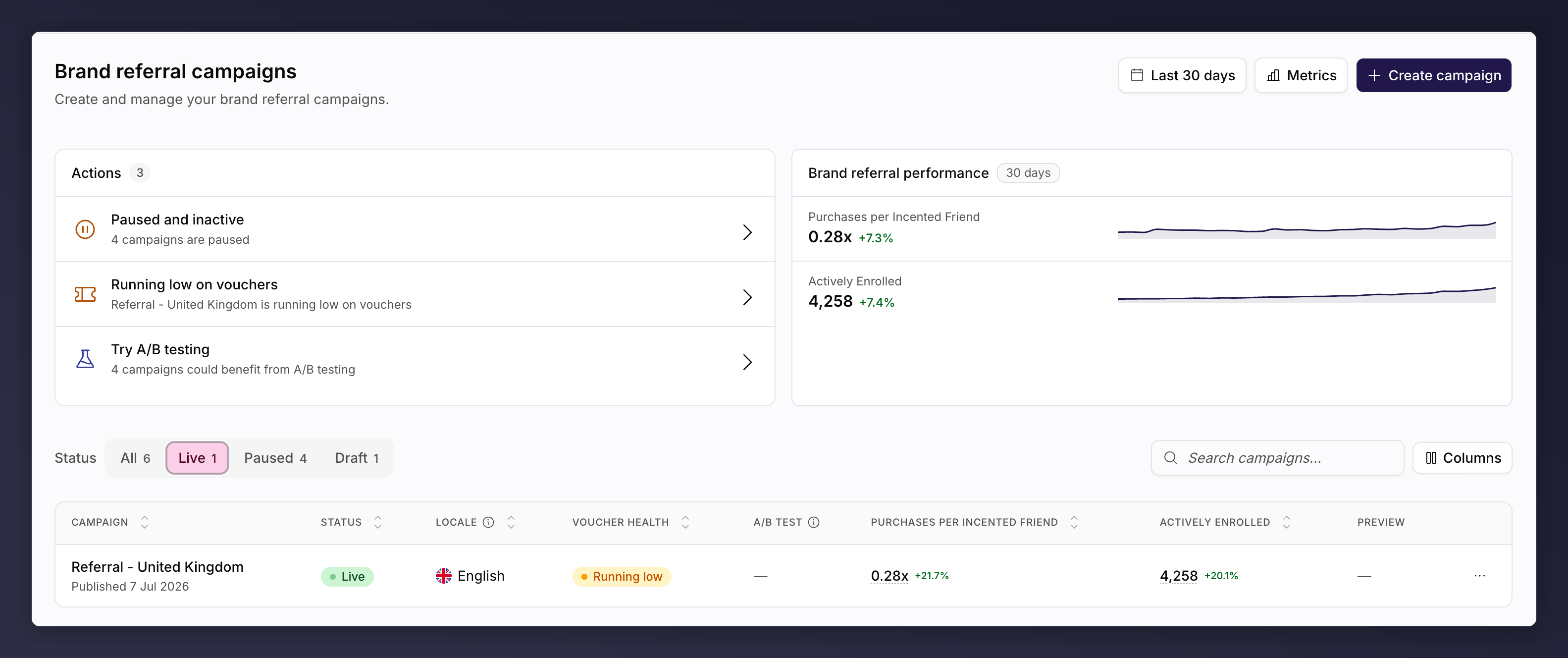 Top to bottom:
* **Actions card**. Everything worth acting on across your campaigns, most urgent first. See [troubleshooting](/knowledge-app/referral/campaigns/browse/troubleshooting).
* **Performance card**. Headline numbers for this campaign type. On the brand page you choose the metrics and the period; on the product page it is programme-wide product sharing over the last 30 days.
* **Toolbar**. **Status** tabs (All, Live, Paused, Draft) with a count each, a search box, and **Columns** to show or hide columns. Each page remembers its own column choice.
* **The table**. One row per campaign, with an actions menu at the end of each row.
## Columns
Each list shows the details of its campaigns at a glance, from how they are set up to how they are performing. Turn columns on and off with **Columns** in the toolbar.
### Brand referral
| Column | What it tells you |
| ------------------ | ------------------------------------------------------------------------------------ |
| **Campaign** | The name, and when it was published or created. |
| **Status** | The state the campaign is in: **Live**, **Paused** or **Draft**. |
| **Locale** | The language and region this campaign targets. |
| **Voucher health** | Whether the reward codes behind it are healthy. See [below](#voucher-health-values). |
| **A/B test** | The progress of any test running on it. See [below](#ab-test-values). |
| **Performance** | The metrics you picked, each against the previous period. |
| **Preview** | A thumbnail of the offer customers see. |
The header carries a period picker and a **Metrics** picker, which set both the performance card and these columns. Sort by any column.
#### A/B test values
A/B testing is a brand referral feature, so this column appears on this page only.
| Value | What it means |
| ------------------- | --------------------------------------------------------- |
| **Scheduled** | A test is queued and starts on its scheduled date. |
| **Testing** | A test is running. |
| **Winner found** | The test concluded with a clear winner. |
| **Marginal winner** | The test hit its maximum duration with a marginal winner. |
| **No winner** | The test concluded without a clear winner. |
| **Concluded** | An older-style test has finished. |
A dash means no test has run. See [monitor an A/B test](/knowledge-app/referral/campaigns/ab-testing/monitor-an-ab-test).
### Product referral
Top to bottom:
* **Actions card**. Everything worth acting on across your campaigns, most urgent first. See [troubleshooting](/knowledge-app/referral/campaigns/browse/troubleshooting).
* **Performance card**. Headline numbers for this campaign type. On the brand page you choose the metrics and the period; on the product page it is programme-wide product sharing over the last 30 days.
* **Toolbar**. **Status** tabs (All, Live, Paused, Draft) with a count each, a search box, and **Columns** to show or hide columns. Each page remembers its own column choice.
* **The table**. One row per campaign, with an actions menu at the end of each row.
## Columns
Each list shows the details of its campaigns at a glance, from how they are set up to how they are performing. Turn columns on and off with **Columns** in the toolbar.
### Brand referral
| Column | What it tells you |
| ------------------ | ------------------------------------------------------------------------------------ |
| **Campaign** | The name, and when it was published or created. |
| **Status** | The state the campaign is in: **Live**, **Paused** or **Draft**. |
| **Locale** | The language and region this campaign targets. |
| **Voucher health** | Whether the reward codes behind it are healthy. See [below](#voucher-health-values). |
| **A/B test** | The progress of any test running on it. See [below](#ab-test-values). |
| **Performance** | The metrics you picked, each against the previous period. |
| **Preview** | A thumbnail of the offer customers see. |
The header carries a period picker and a **Metrics** picker, which set both the performance card and these columns. Sort by any column.
#### A/B test values
A/B testing is a brand referral feature, so this column appears on this page only.
| Value | What it means |
| ------------------- | --------------------------------------------------------- |
| **Scheduled** | A test is queued and starts on its scheduled date. |
| **Testing** | A test is running. |
| **Winner found** | The test concluded with a clear winner. |
| **Marginal winner** | The test hit its maximum duration with a marginal winner. |
| **No winner** | The test concluded without a clear winner. |
| **Concluded** | An older-style test has finished. |
A dash means no test has run. See [monitor an A/B test](/knowledge-app/referral/campaigns/ab-testing/monitor-an-ab-test).
### Product referral
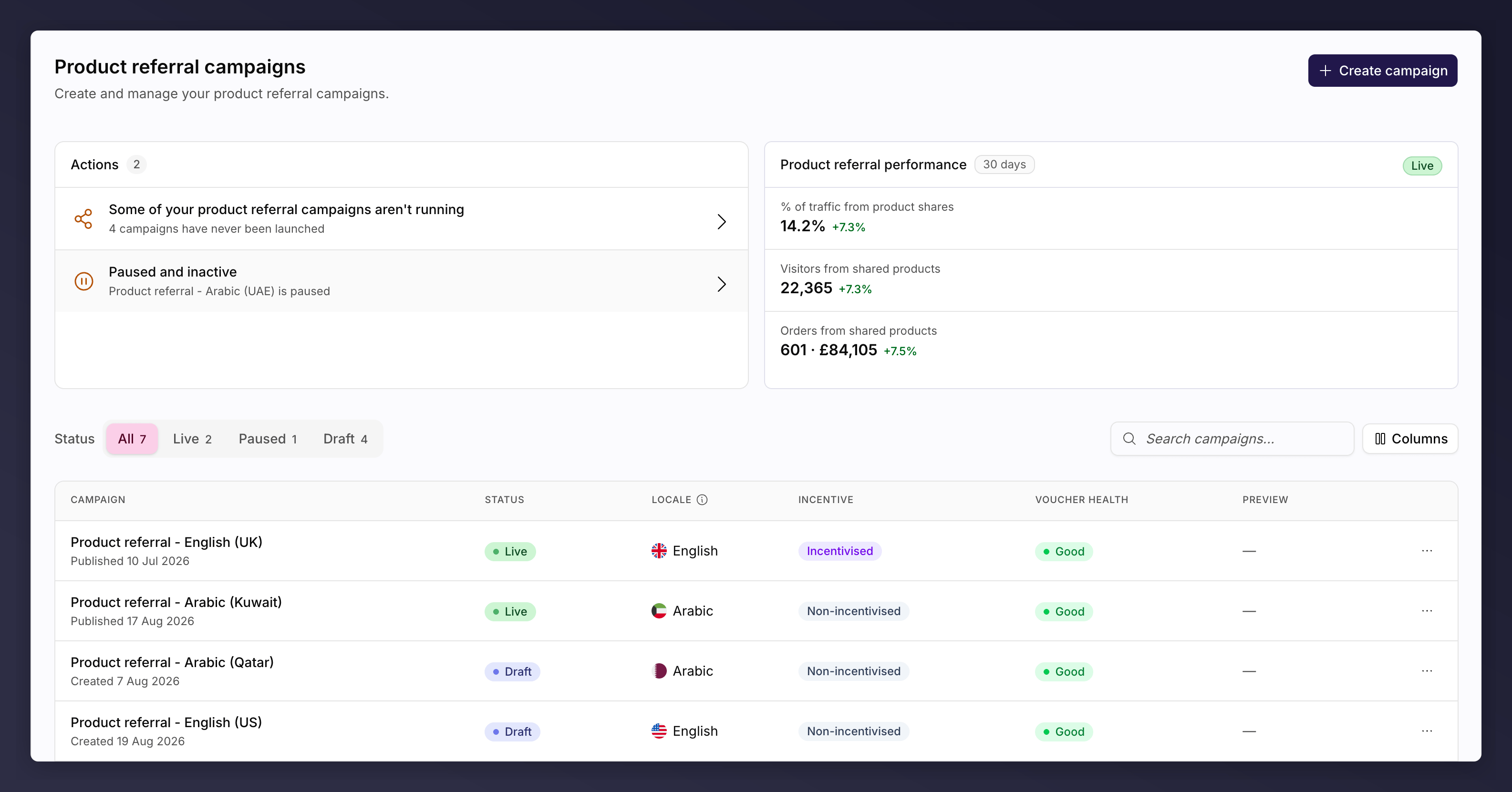 | Column | What it tells you |
| ------------------ | --------------------------------------------------------------------------------------------------------------------------------------------------------------------- |
| **Campaign** | The name, and when it was published or created. |
| **Status** | The state the campaign is in: **Live**, **Paused** or **Draft**. |
| **Locale** | The language and region this campaign targets. |
| **Incentive** | Whether the campaign is running an incentivised or non-incentivised version. See [campaign modes](/knowledge-app/referral/campaigns/product-referral/campaign-modes). |
| **Voucher health** | Whether the reward codes behind it are healthy. See [below](#voucher-health-values). |
| **Preview** | A thumbnail of the offer customers see. Empty when a non-incentivised version is running. |
### Voucher health values
Shown on both pages.
| Value | What it means |
| -------------------------------- | -------------------------------------------------- |
| **Good** | Plenty of codes, none expiring soon. |
| **Sufficient** | Enough for now. |
| **Running low** | Top up before you run out. |
| **None left** | The reward cannot be fulfilled. Upload more codes. |
| **Expiring** / **Expiring soon** | Codes are nearing their expiry date. |
| **Expired** | The codes can no longer be redeemed. |
## Actions
Each row ends with an actions menu. You only see the actions the campaign can take in its current state, so anything listed will work.
| Column | What it tells you |
| ------------------ | --------------------------------------------------------------------------------------------------------------------------------------------------------------------- |
| **Campaign** | The name, and when it was published or created. |
| **Status** | The state the campaign is in: **Live**, **Paused** or **Draft**. |
| **Locale** | The language and region this campaign targets. |
| **Incentive** | Whether the campaign is running an incentivised or non-incentivised version. See [campaign modes](/knowledge-app/referral/campaigns/product-referral/campaign-modes). |
| **Voucher health** | Whether the reward codes behind it are healthy. See [below](#voucher-health-values). |
| **Preview** | A thumbnail of the offer customers see. Empty when a non-incentivised version is running. |
### Voucher health values
Shown on both pages.
| Value | What it means |
| -------------------------------- | -------------------------------------------------- |
| **Good** | Plenty of codes, none expiring soon. |
| **Sufficient** | Enough for now. |
| **Running low** | Top up before you run out. |
| **None left** | The reward cannot be fulfilled. Upload more codes. |
| **Expiring** / **Expiring soon** | Codes are nearing their expiry date. |
| **Expired** | The codes can no longer be redeemed. |
## Actions
Each row ends with an actions menu. You only see the actions the campaign can take in its current state, so anything listed will work.
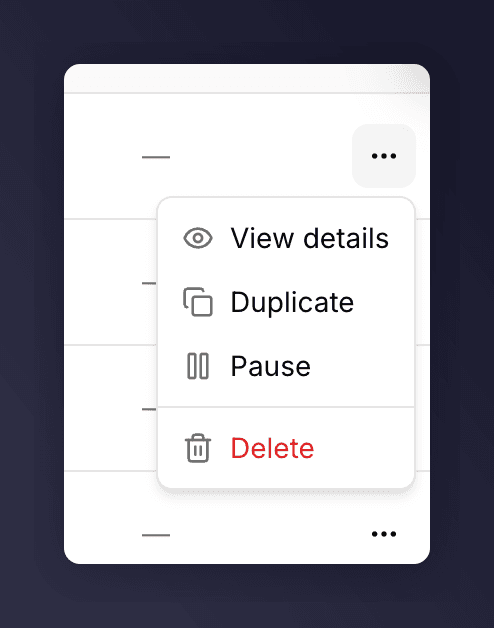 | Action | What it does | When it appears |
| ---------------- | -------------------------------------------------------------------------------------------------- | --------------------------------------------------------------------------------- |
| **View details** | Opens the campaign in the editor. | Always |
| **Duplicate** | Copies the campaign to a new draft you can adapt without touching the original. | Brand referral only, as only one product referral campaign may exist per language |
| **Pause** | Stops promoting to new customers. Existing share links keep working and friends can still sign up. | Live campaigns |
| **Resume** | Starts promoting again. | Paused campaigns |
| **Delete** | Permanently removes the campaign, after a confirmation. | Campaigns that have never launched |
Inside a campaign, pause and resume live under the **Settings** control, and
the version picker handles renaming and duplicating a *version*. Duplicating a
whole campaign happens here on the list.
## See Also
How campaigns, versions and promotions fit together.
What you get when you open a campaign.
A common task: create a campaign.
The Actions card, and finding a campaign.
| Action | What it does | When it appears |
| ---------------- | -------------------------------------------------------------------------------------------------- | --------------------------------------------------------------------------------- |
| **View details** | Opens the campaign in the editor. | Always |
| **Duplicate** | Copies the campaign to a new draft you can adapt without touching the original. | Brand referral only, as only one product referral campaign may exist per language |
| **Pause** | Stops promoting to new customers. Existing share links keep working and friends can still sign up. | Live campaigns |
| **Resume** | Starts promoting again. | Paused campaigns |
| **Delete** | Permanently removes the campaign, after a confirmation. | Campaigns that have never launched |
Inside a campaign, pause and resume live under the **Settings** control, and
the version picker handles renaming and duplicating a *version*. Duplicating a
whole campaign happens here on the list.
## See Also
How campaigns, versions and promotions fit together.
What you get when you open a campaign.
A common task: create a campaign.
The Actions card, and finding a campaign.