> ## Documentation Index
> Fetch the complete documentation index at: https://docs.mention-me.com/llms.txt
> Use this file to discover all available pages before exploring further.
# Rewards
> Set the incentives for the referrer and the referee: reward type, value, fulfilment, validity and more.
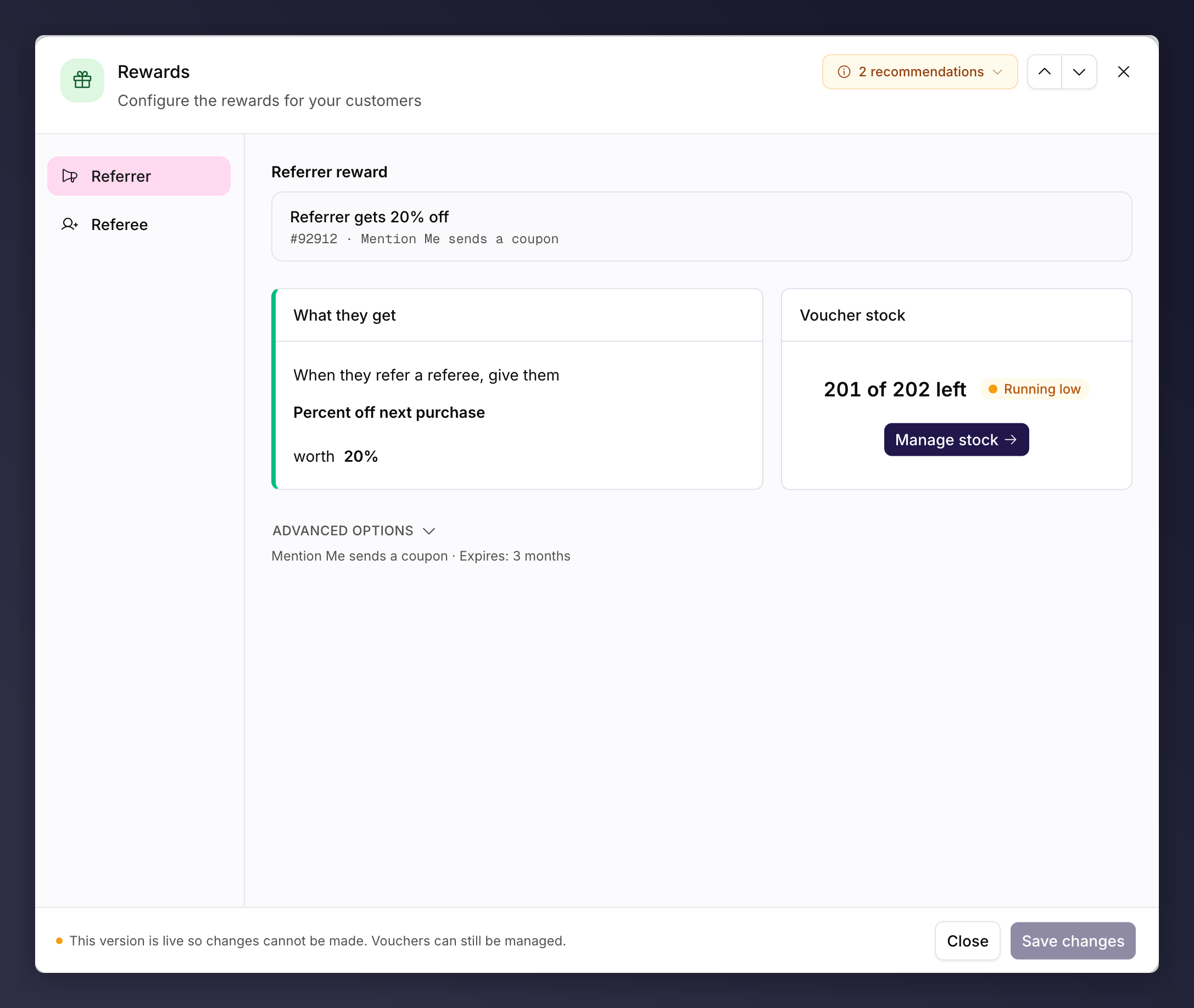
The **Rewards** node sets what the referrer and the referee receive. Each is configured on its own tab, and each is saved on its own.
 ## Reward Both Sides
A reward does two jobs: it thanks the referrer for advocating, and it gives the referee a genuine reason to take up the offer so the referrer feels they are helping a friend. Most programmes reward both sides. You can [reward the referee only](#reward-the-referee-only), but the referee reward is always required.
## Reward Types
| Reward type | Good for |
| ------------------------------------------------------ | -------------------------------------------------------------------------------------------------------------- |
| Amount off / Percent off next purchase | Frequent, repeat-purchase brands (fashion, food, beauty) where a discount drives a quick next order |
| Gift card / Third-party voucher | Infrequent or high-value purchases (travel, finance, furniture) where an external reward feels more worthwhile |
| Account credit | Subscriptions and ongoing services |
| Free gift / Free item / Set-price item / Free delivery | Adding a tangible extra to an order |
| Charity donation | Brands whose customers are motivated by giving |
## Configuring a Reward
For each reward you set:
* **Type** and **value**.
* **Fulfilment**: how the reward reaches the customer (a coupon code or link, Shopify, a webhook to your own systems, or uploaded voucher codes). Where codes are uploaded, a **Voucher stock** card lets you **Manage stock** and upload batches.
* **Validity**: how long the reward can be used.
* **Minimum spend** (optional): protects margin on low-value orders.
* **Issuing delay** (optional): hold the reward for a set time, for example past a returns window, until a subscription's second month, or after a trip has taken place.
* **Purchase type** (Shopify-managed rewards only): whether the discount is eligible on a one-time purchase, a subscription order, or both. See [Shopify-managed rewards](/knowledge-app/integrations/shopify/managed-rewards#what-you-can-set).
* **Duplicate to Recharge** (optional, shown when Recharge is connected): also push this reward's discount code into Recharge, so it can be redeemed against an existing subscription. See [Connecting Recharge](/knowledge-app/integrations/reward-automation/recharge).
## Each Role Is Saved on Its Own
The referrer and referee rewards are independent. Saving one leaves the other's saved reward untouched, so you can change the referrer reward without touching what referees get.
* A tab with unsaved work carries an **amber dot**.
* Switching tabs with unsaved changes asks you to discard first.
* A role with nothing set yet shows a **No reward assigned** empty state, offering **Create reward** or, where you already have rewards, picking one from your catalogue.
"No reward assigned" is not the same as deliberately choosing no referrer
reward. The first means you have not set one yet; the second is a saved choice
that clears any reward previously in place.
## Choosing a Reward
* **Make it your best offer.** If customers can find a better deal elsewhere on your site, they are unlikely to refer. The referral reward should stand out.
* **Keep it fair on both sides.** The referrer and referee rewards do not have to be identical, but the value should feel balanced, or performance suffers.
* **Match it to how people buy.** Discounts suit frequent purchases; vouchers and gift cards suit rare or high-value ones.
* **Make sure you can fulfil it.** Decide how the reward reaches the customer before you launch.
## Reward the Referee Only
You can reward only the referee. On the referrer tab, choose **No referrer reward** ("Referrers receive no reward in this version."). The referee reward is always required and cannot be removed, so every offer keeps at least one reward.
## Personalised Shopify Discount Codes
When a reward uses the **Created in Mention Me** Shopify option (Mention Me creates the discount in your store), you can choose between two code formats:
* **Prefix and random code** (the default) - a prefix you choose followed by a random string.
* **Personalised template** - a code built from the referrer's details, producing memorable codes like `SUMMER-SARAH20` instead of random ones.
For how to set up a Shopify reward, see the [Shopify fulfilment guide](/knowledge/referral/offers/shopify-fulfilment). Mention Me can also [create the discount in your store](/knowledge-app/integrations/shopify/managed-rewards).
Build the template from free text and these tokens:
| Token | Resolves to | Example |
| ----------------------- | ------------------------- | ------------ |
| `{REFERRER_FIRST_NAME}` | The referrer's first name | `SARAH` |
| `{REFERRER_LAST_NAME}` | The referrer's last name | `JONES` |
| `{REFERRER_NAME}` | The referrer's full name | `SARAHJONES` |
| `{AMOUNT}` | The discount value | `20` |
Codes are converted to uppercase, spaces and special characters (other than hyphens and underscores) are removed, and templates are limited to 128 characters. If a generated code clashes with an existing Shopify discount, a random suffix is added to keep it unique.
Referee (friend) name tokens are not available because the standard Shopify
checkout flow only captures the friend's email address. Personalised templates
do not apply to the **Managed in Shopify** option (where you pre-create the
discount).
The Rewards node can be A/B tested, for example money off versus a percentage
discount. See [set up an A/B
test](/knowledge-app/referral/campaigns/ab-testing/set-up-an-ab-test).
## Reward Both Sides
A reward does two jobs: it thanks the referrer for advocating, and it gives the referee a genuine reason to take up the offer so the referrer feels they are helping a friend. Most programmes reward both sides. You can [reward the referee only](#reward-the-referee-only), but the referee reward is always required.
## Reward Types
| Reward type | Good for |
| ------------------------------------------------------ | -------------------------------------------------------------------------------------------------------------- |
| Amount off / Percent off next purchase | Frequent, repeat-purchase brands (fashion, food, beauty) where a discount drives a quick next order |
| Gift card / Third-party voucher | Infrequent or high-value purchases (travel, finance, furniture) where an external reward feels more worthwhile |
| Account credit | Subscriptions and ongoing services |
| Free gift / Free item / Set-price item / Free delivery | Adding a tangible extra to an order |
| Charity donation | Brands whose customers are motivated by giving |
## Configuring a Reward
For each reward you set:
* **Type** and **value**.
* **Fulfilment**: how the reward reaches the customer (a coupon code or link, Shopify, a webhook to your own systems, or uploaded voucher codes). Where codes are uploaded, a **Voucher stock** card lets you **Manage stock** and upload batches.
* **Validity**: how long the reward can be used.
* **Minimum spend** (optional): protects margin on low-value orders.
* **Issuing delay** (optional): hold the reward for a set time, for example past a returns window, until a subscription's second month, or after a trip has taken place.
* **Purchase type** (Shopify-managed rewards only): whether the discount is eligible on a one-time purchase, a subscription order, or both. See [Shopify-managed rewards](/knowledge-app/integrations/shopify/managed-rewards#what-you-can-set).
* **Duplicate to Recharge** (optional, shown when Recharge is connected): also push this reward's discount code into Recharge, so it can be redeemed against an existing subscription. See [Connecting Recharge](/knowledge-app/integrations/reward-automation/recharge).
## Each Role Is Saved on Its Own
The referrer and referee rewards are independent. Saving one leaves the other's saved reward untouched, so you can change the referrer reward without touching what referees get.
* A tab with unsaved work carries an **amber dot**.
* Switching tabs with unsaved changes asks you to discard first.
* A role with nothing set yet shows a **No reward assigned** empty state, offering **Create reward** or, where you already have rewards, picking one from your catalogue.
"No reward assigned" is not the same as deliberately choosing no referrer
reward. The first means you have not set one yet; the second is a saved choice
that clears any reward previously in place.
## Choosing a Reward
* **Make it your best offer.** If customers can find a better deal elsewhere on your site, they are unlikely to refer. The referral reward should stand out.
* **Keep it fair on both sides.** The referrer and referee rewards do not have to be identical, but the value should feel balanced, or performance suffers.
* **Match it to how people buy.** Discounts suit frequent purchases; vouchers and gift cards suit rare or high-value ones.
* **Make sure you can fulfil it.** Decide how the reward reaches the customer before you launch.
## Reward the Referee Only
You can reward only the referee. On the referrer tab, choose **No referrer reward** ("Referrers receive no reward in this version."). The referee reward is always required and cannot be removed, so every offer keeps at least one reward.
## Personalised Shopify Discount Codes
When a reward uses the **Created in Mention Me** Shopify option (Mention Me creates the discount in your store), you can choose between two code formats:
* **Prefix and random code** (the default) - a prefix you choose followed by a random string.
* **Personalised template** - a code built from the referrer's details, producing memorable codes like `SUMMER-SARAH20` instead of random ones.
For how to set up a Shopify reward, see the [Shopify fulfilment guide](/knowledge/referral/offers/shopify-fulfilment). Mention Me can also [create the discount in your store](/knowledge-app/integrations/shopify/managed-rewards).
Build the template from free text and these tokens:
| Token | Resolves to | Example |
| ----------------------- | ------------------------- | ------------ |
| `{REFERRER_FIRST_NAME}` | The referrer's first name | `SARAH` |
| `{REFERRER_LAST_NAME}` | The referrer's last name | `JONES` |
| `{REFERRER_NAME}` | The referrer's full name | `SARAHJONES` |
| `{AMOUNT}` | The discount value | `20` |
Codes are converted to uppercase, spaces and special characters (other than hyphens and underscores) are removed, and templates are limited to 128 characters. If a generated code clashes with an existing Shopify discount, a random suffix is added to keep it unique.
Referee (friend) name tokens are not available because the standard Shopify
checkout flow only captures the friend's email address. Personalised templates
do not apply to the **Managed in Shopify** option (where you pre-create the
discount).
The Rewards node can be A/B tested, for example money off versus a percentage
discount. See [set up an A/B
test](/knowledge-app/referral/campaigns/ab-testing/set-up-an-ab-test).