> ## Documentation Index
> Fetch the complete documentation index at: https://docs.mention-me.com/llms.txt
> Use this file to discover all available pages before exploring further.
# Fraud Controls
> Decide which referrals are held for review, which are declined automatically, and how much each fraud signal counts towards the score.
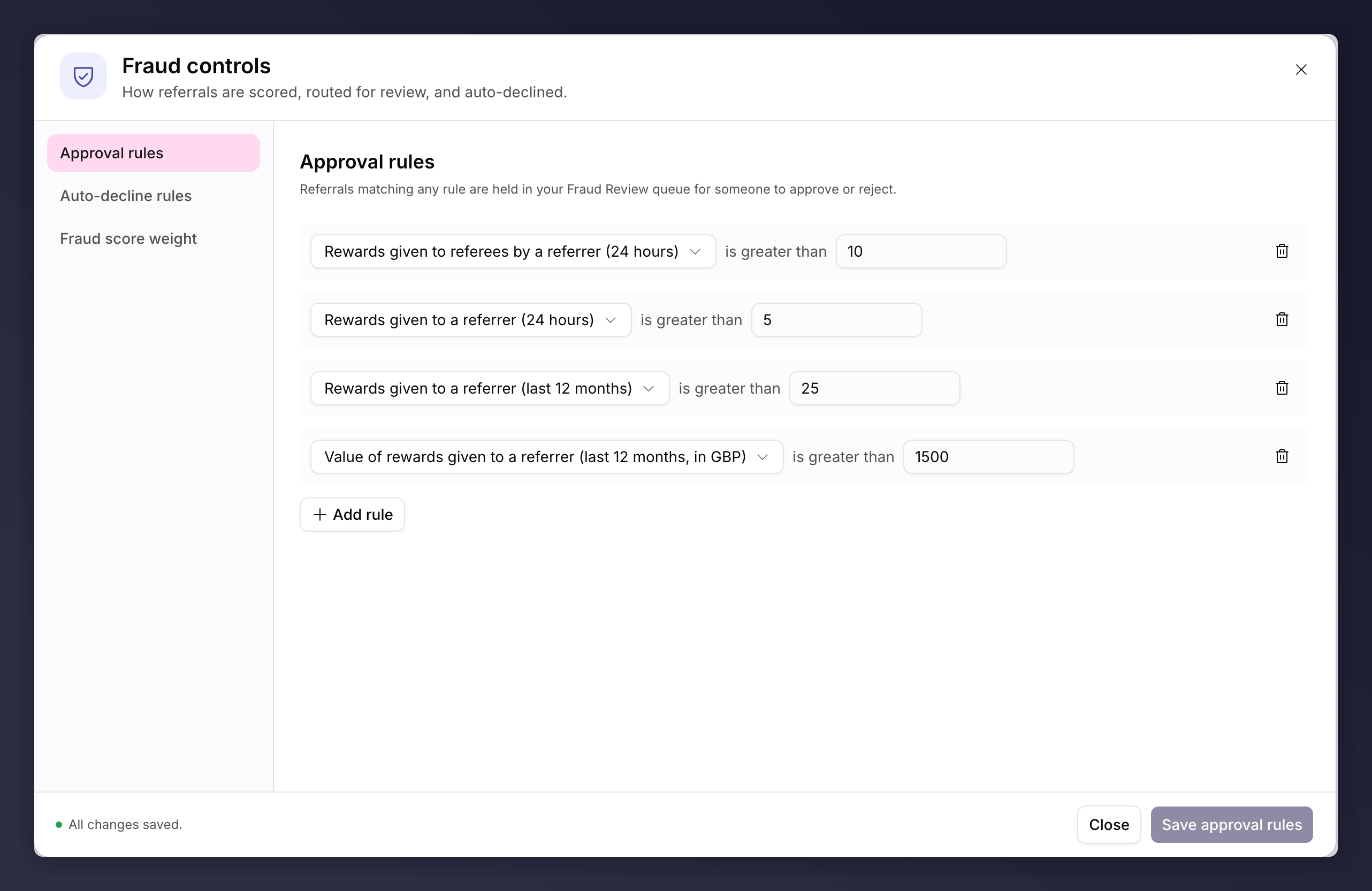
**Fraud controls** decide how referrals on a brand referral campaign are scored, routed for review, and auto-declined. Open the **Settings** control at the top of the campaign page and choose **Fraud controls**.
 ## Understanding Fraud
Fraud is when customers try to earn referral rewards without referring genuine new customers, for example through self-referrals, fake accounts, collusion between friends, or posting links on coupon sites. A small amount is normal: across programmes, roughly 15% of referrals can look suspicious, and most brands accept a low level that still drives real purchases. The aim is to catch the worst cases without adding friction that suppresses genuine referrals.
These controls work in layers:
* **Approval rules** hold risky referrals for a human to check.
* **Auto-decline rules** reject the clearest cases automatically.
* **Fraud score weights** decide how much each signal contributes to the score those rules read.
The rules come first in the dialog because the weights do nothing until a rule reads the score.
## Approval Rules
Hold a referral back for a human to look at before it is rewarded. Anything matching a rule lands in your [Fraud Review](/knowledge-app/customers/fraud-review) queue to approve or reject.
Use these for referrals you want a second opinion on rather than an outright refusal. Add a rule, choose what it checks (fraud score, activity volume, referral value, or identity signals), set the comparison and value, and save.
## Auto-Decline Rules
Reject a referral outright, with no review. Built the same way as approval rules.
Reserve these for signals you are confident about: anything caught here never reaches a person, so a rule that is too broad quietly turns away genuine referrals.
## Fraud Score Weight
Sets how much each signal adds to a referral's fraud score. These weights apply to the whole campaign. Signals are grouped into four categories:
| Category | What it covers |
| ------------------------------ | ------------------------------------------------------------------------------------------------------------------------------------------------ |
| **Identity overlap** | Referrer and referee share suspicious overlaps in name, address, IP, postcode or browser, or the referee closely matches another recent referee. |
| **Suspicious timing** | The referee purchased or registered unusually quickly after being referred (within 10 minutes, an hour, or 24 hours). |
| **Purchase value** | The referred purchase is unusually low or high against the campaign's default order total value. |
| **Email and referrer signals** | The email address or referrer URL looks suspicious. |
For each signal you can toggle it on or off and set its weight in points. The combined score feeds your approval and auto-decline rules.
The score section is hidden on a draft of a launched campaign, where the
campaign-wide score cannot be edited. Open the live version to change the
weights.
## Velocity and Eligibility
Beyond the score, you can limit how many rewards a single referrer or referee earns in a window (velocity), and hold rewards until a business condition is met, such as a utility supply starting or a trip completing (eligibility).
## Saving
Each section saves on its own (for example **Save approval rules**, **Save auto-decline rules**, **Save scoring**). If you close or switch sections with unsaved work, you are asked to discard or keep editing.
Approval and auto-decline rules are set per variant. If a version has more than
one variant, use the variant selector to set rules that apply to each.
Not sure where to start? Leave the default signals enabled, then add approval
rules that hold a referral when its **fraud score** is high (a common starting
point is around 55 for existing customers and 49 for new customers) or when
**activity volume** is unusual (for example more than 5 referrer rewards in 24
hours, or 25 in a month). Reserve auto-decline for the clearest cases, and
review the held referrals regularly in [Fraud
Review](/knowledge-app/customers/fraud-review).
## Where Reviews Happen
Fraud controls decide how referrals are scored and routed. The actual review and approval happens in the Customers area:
* [Fraud Review](/knowledge-app/customers/fraud-review). The queue of referrals flagged as suspicious.
* [Fraud signals reference](/knowledge-app/customers/reference/fraud-signals). What each signal means.
* [Approval rules reference](/knowledge-app/customers/reference/approval-rules). How rules hold referrals for review.
For the same subject in Classic docs, see [Managing Gaming](/knowledge/referral/gaming/managing-gaming).
## See Also
Destination URLs, email, purchase details and advanced options.
The concepts behind the controls.
## Understanding Fraud
Fraud is when customers try to earn referral rewards without referring genuine new customers, for example through self-referrals, fake accounts, collusion between friends, or posting links on coupon sites. A small amount is normal: across programmes, roughly 15% of referrals can look suspicious, and most brands accept a low level that still drives real purchases. The aim is to catch the worst cases without adding friction that suppresses genuine referrals.
These controls work in layers:
* **Approval rules** hold risky referrals for a human to check.
* **Auto-decline rules** reject the clearest cases automatically.
* **Fraud score weights** decide how much each signal contributes to the score those rules read.
The rules come first in the dialog because the weights do nothing until a rule reads the score.
## Approval Rules
Hold a referral back for a human to look at before it is rewarded. Anything matching a rule lands in your [Fraud Review](/knowledge-app/customers/fraud-review) queue to approve or reject.
Use these for referrals you want a second opinion on rather than an outright refusal. Add a rule, choose what it checks (fraud score, activity volume, referral value, or identity signals), set the comparison and value, and save.
## Auto-Decline Rules
Reject a referral outright, with no review. Built the same way as approval rules.
Reserve these for signals you are confident about: anything caught here never reaches a person, so a rule that is too broad quietly turns away genuine referrals.
## Fraud Score Weight
Sets how much each signal adds to a referral's fraud score. These weights apply to the whole campaign. Signals are grouped into four categories:
| Category | What it covers |
| ------------------------------ | ------------------------------------------------------------------------------------------------------------------------------------------------ |
| **Identity overlap** | Referrer and referee share suspicious overlaps in name, address, IP, postcode or browser, or the referee closely matches another recent referee. |
| **Suspicious timing** | The referee purchased or registered unusually quickly after being referred (within 10 minutes, an hour, or 24 hours). |
| **Purchase value** | The referred purchase is unusually low or high against the campaign's default order total value. |
| **Email and referrer signals** | The email address or referrer URL looks suspicious. |
For each signal you can toggle it on or off and set its weight in points. The combined score feeds your approval and auto-decline rules.
The score section is hidden on a draft of a launched campaign, where the
campaign-wide score cannot be edited. Open the live version to change the
weights.
## Velocity and Eligibility
Beyond the score, you can limit how many rewards a single referrer or referee earns in a window (velocity), and hold rewards until a business condition is met, such as a utility supply starting or a trip completing (eligibility).
## Saving
Each section saves on its own (for example **Save approval rules**, **Save auto-decline rules**, **Save scoring**). If you close or switch sections with unsaved work, you are asked to discard or keep editing.
Approval and auto-decline rules are set per variant. If a version has more than
one variant, use the variant selector to set rules that apply to each.
Not sure where to start? Leave the default signals enabled, then add approval
rules that hold a referral when its **fraud score** is high (a common starting
point is around 55 for existing customers and 49 for new customers) or when
**activity volume** is unusual (for example more than 5 referrer rewards in 24
hours, or 25 in a month). Reserve auto-decline for the clearest cases, and
review the held referrals regularly in [Fraud
Review](/knowledge-app/customers/fraud-review).
## Where Reviews Happen
Fraud controls decide how referrals are scored and routed. The actual review and approval happens in the Customers area:
* [Fraud Review](/knowledge-app/customers/fraud-review). The queue of referrals flagged as suspicious.
* [Fraud signals reference](/knowledge-app/customers/reference/fraud-signals). What each signal means.
* [Approval rules reference](/knowledge-app/customers/reference/approval-rules). How rules hold referrals for review.
For the same subject in Classic docs, see [Managing Gaming](/knowledge/referral/gaming/managing-gaming).
## See Also
Destination URLs, email, purchase details and advanced options.
The concepts behind the controls.