> ## Documentation Index
> Fetch the complete documentation index at: https://docs.mention-me.com/llms.txt
> Use this file to discover all available pages before exploring further.
# Onboarding
> Work through the Onboarding Hub in Mention Me, from branding and tracking through to launching your first campaign.
**Early access.** This section documents the Onboarding Hub in **Mention Me**,
currently available as a beta. For Classic docs, see
[Onboarding](/knowledge/onboarding/overview).
The **Onboarding Hub** is the checklist that takes you from signup to a launched programme. Open it from **Onboarding** in the sidebar. The page title is **Get your referral programme live**, and nothing goes live until you say so.
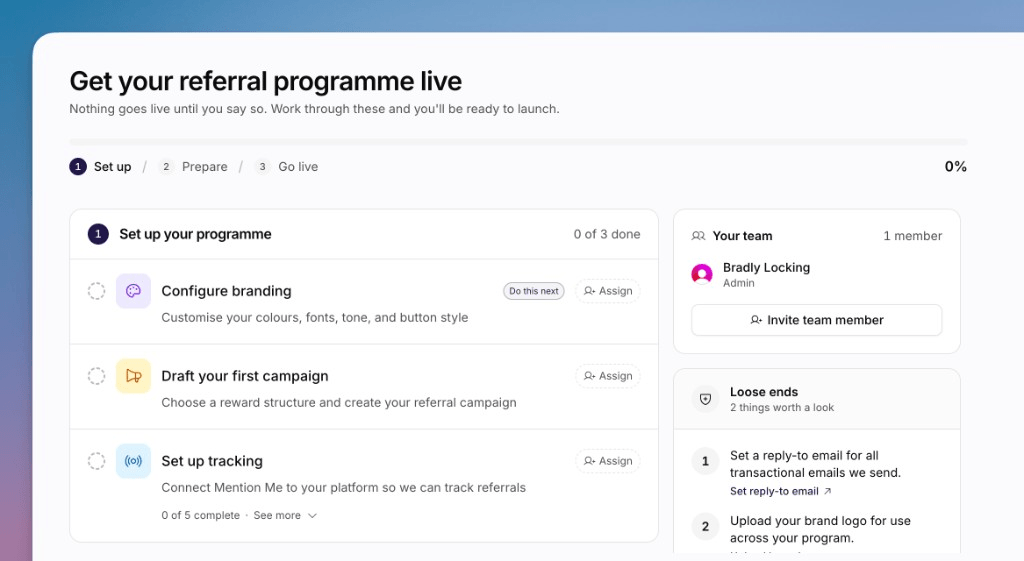 The hub stays visible until [live tracking](/knowledge-app/onboarding/enable-live-tracking) is confirmed.
## The Three Stages
The hub is split into three numbered stages. A progress bar at the top shows how far you are.
| Stage | What it is for |
| ----------- | ----------------------------------------------------------------------------------------------------------------------------------------------------- |
| **Set up** | Branding, your first campaign draft, and tracking |
| **Prepare** | [Prepare to launch](/knowledge-app/onboarding/prepare-to-launch): unlock the launch checklist. Nothing customer-facing goes live yet |
| **Go live** | The launch checklist: live tracking, customers, vouchers, and [launching](/knowledge-app/onboarding/activate-your-first-campaign) your first campaign |
The launch checklist stays locked until you prepare to launch. Finish setup to unlock that stage.
## Work Through the Hub
Each row is an **onboarding step**. Click a row to open its page or dialog. A **Do this next** badge marks the first incomplete step.
You can **Assign** a step to a teammate. Completed steps show who finished them.
The hub stays visible until [live tracking](/knowledge-app/onboarding/enable-live-tracking) is confirmed.
## The Three Stages
The hub is split into three numbered stages. A progress bar at the top shows how far you are.
| Stage | What it is for |
| ----------- | ----------------------------------------------------------------------------------------------------------------------------------------------------- |
| **Set up** | Branding, your first campaign draft, and tracking |
| **Prepare** | [Prepare to launch](/knowledge-app/onboarding/prepare-to-launch): unlock the launch checklist. Nothing customer-facing goes live yet |
| **Go live** | The launch checklist: live tracking, customers, vouchers, and [launching](/knowledge-app/onboarding/activate-your-first-campaign) your first campaign |
The launch checklist stays locked until you prepare to launch. Finish setup to unlock that stage.
## Work Through the Hub
Each row is an **onboarding step**. Click a row to open its page or dialog. A **Do this next** badge marks the first incomplete step.
You can **Assign** a step to a teammate. Completed steps show who finished them.
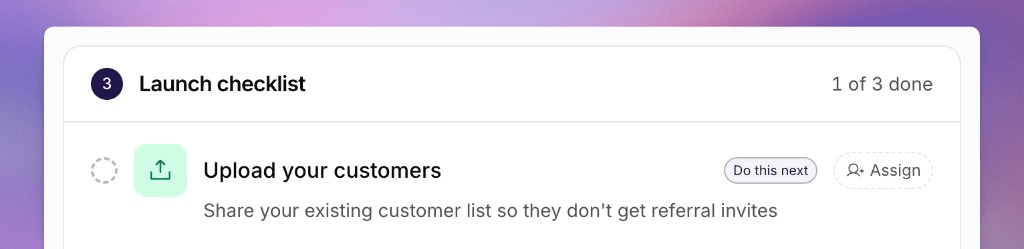 ### Set up your programme
Set colours, fonts, tone and button style so the journey matches your brand.
Create the campaign you will launch later.
Connect Mention Me to your site so referrals can be tracked.
### Prepare to launch
Get the programme ready. This unlocks the launch checklist. It does not
launch the campaign.
Why nothing is live yet, and what you can do during setup.
### Launch checklist
These steps appear after you prepare to launch.
Point your tags at live. Mention Me confirms the first live fire.
Share your existing customer list so they are not treated as new referees.
Stock the reward codes your campaign needs before you launch.
Launch the campaign so referrers can start sharing.
## Key Concepts
* **Onboarding Hub**. The checklist page. Not the same as the Setup Wizard you completed at signup.
* **Onboarding step**. One row on the hub, with a status such as pending, complete, locked or detecting.
* **Tracking integration method**. How you install the tag: Shopify, Google Tag Manager, JavaScript or API. It changes the copy you see on later steps.
* **Prepare to launch**. Unlocks the launch checklist. Once only, and you cannot go back.
* **Launch**. Turning on a campaign so customers can share.
For why those last two are different, see [Understanding Prepare to Launch and Campaign Launch](/knowledge-app/onboarding/understanding-prepare-and-launch).
## Where to Go Next
Start with the first setup step.
Read this before you prepare to launch.
The editor you will use to finish and launch the campaign.
From sign-up to a live campaign, then into the rest of the docs.
### Set up your programme
Set colours, fonts, tone and button style so the journey matches your brand.
Create the campaign you will launch later.
Connect Mention Me to your site so referrals can be tracked.
### Prepare to launch
Get the programme ready. This unlocks the launch checklist. It does not
launch the campaign.
Why nothing is live yet, and what you can do during setup.
### Launch checklist
These steps appear after you prepare to launch.
Point your tags at live. Mention Me confirms the first live fire.
Share your existing customer list so they are not treated as new referees.
Stock the reward codes your campaign needs before you launch.
Launch the campaign so referrers can start sharing.
## Key Concepts
* **Onboarding Hub**. The checklist page. Not the same as the Setup Wizard you completed at signup.
* **Onboarding step**. One row on the hub, with a status such as pending, complete, locked or detecting.
* **Tracking integration method**. How you install the tag: Shopify, Google Tag Manager, JavaScript or API. It changes the copy you see on later steps.
* **Prepare to launch**. Unlocks the launch checklist. Once only, and you cannot go back.
* **Launch**. Turning on a campaign so customers can share.
For why those last two are different, see [Understanding Prepare to Launch and Campaign Launch](/knowledge-app/onboarding/understanding-prepare-and-launch).
## Where to Go Next
Start with the first setup step.
Read this before you prepare to launch.
The editor you will use to finish and launch the campaign.
From sign-up to a live campaign, then into the rest of the docs.