> ## Documentation Index
> Fetch the complete documentation index at: https://docs.mention-me.com/llms.txt
> Use this file to discover all available pages before exploring further.
# How to Add a Referral Landing Page in Shopify
> Create a Mention Me referral landing page in Shopify, test it with the Demo tag, then switch to Live and launch in Mention Me.
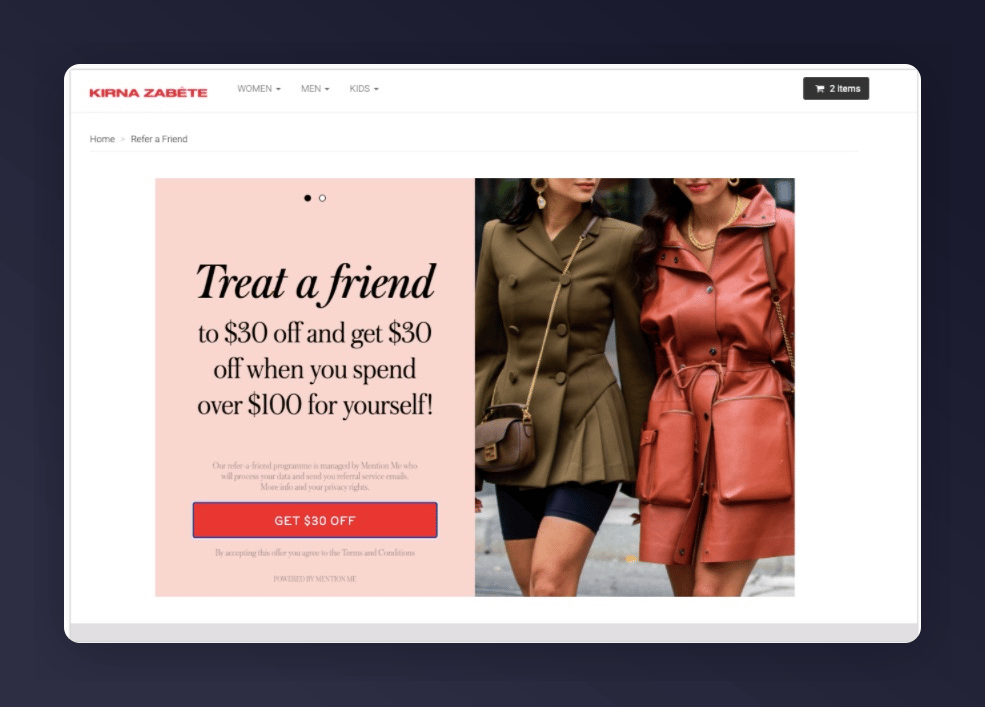
A landing page lets customers engage with your referral programme without requiring a purchase.
Using the Classic dashboard? Follow the [Classic landing page guide](/knowledge/shopify/additional-tags/landing-page) instead.
 ## Creating a Landing Page
Use a Liquid page template rather than pasting code into the Shopify Pages HTML editor. This keeps the script intact and gives you full control over the markup.
Build and check the page with the **Demo** tag while it is hidden, then switch to the **Live** tag and launch your programme before you make the page visible.
In Shopify Admin, go to **Online Store > Pages > Add page** and title it (e.g., **Referral Landing Page**). Set **Visibility** to **Hidden** so customers can't find the page while you set it up. Leave the content area blank. The template supplies it.
Go to **Online Store > Themes > Edit code**. Under Templates, create **page.referral-landing.liquid**.
Start with the **Demo** tag. Use the tabs to compare the Demo and Live versions. The only difference is the tag host: `tag-demo.mention-me.com` for Demo and `tag.mention-me.com` for Live.
```liquid Demo theme={null}
```
```liquid Live theme={null}
```
Replace `INSERT_PARTNERCODE` with your actual partner code. To customise how locale is determined, see [Shopify: Locales](/knowledge/shopify/locales).
Go back to the page, under **Theme Template** select **referral-landing**, then click **Save**. Keep the page **Hidden**.
Preview the hidden page from Shopify Admin. Check the referral offer is embedded on the page and looks visually correct.
In **page.referral-landing.liquid**, change only `tag-demo.mention-me.com` to `tag.mention-me.com` in the saved code, keeping your partner code and any custom locale changes, then save. See [How to Enable Live Tracking](/knowledge-app/onboarding/enable-live-tracking) for the rest of your integration.
In Mention Me, open your campaign and click **Launch** on the version you want to go live. Follow [How to Launch a Campaign and Version](/knowledge-app/referral/campaigns/manage/launch-a-version) for the full launch wizard. The Live tag only shows an offer once your programme is live.
Preview the hidden page again and check the live referral offer is embedded and looks visually correct.
Set the page's **Visibility** to **Visible** and click **Save**. Link to it from your navigation, emails or social posts so customers can find it.
This documentation is built and hosted on [Mintlify](https://mintlify.com), a developer documentation platform.
## Creating a Landing Page
Use a Liquid page template rather than pasting code into the Shopify Pages HTML editor. This keeps the script intact and gives you full control over the markup.
Build and check the page with the **Demo** tag while it is hidden, then switch to the **Live** tag and launch your programme before you make the page visible.
In Shopify Admin, go to **Online Store > Pages > Add page** and title it (e.g., **Referral Landing Page**). Set **Visibility** to **Hidden** so customers can't find the page while you set it up. Leave the content area blank. The template supplies it.
Go to **Online Store > Themes > Edit code**. Under Templates, create **page.referral-landing.liquid**.
Start with the **Demo** tag. Use the tabs to compare the Demo and Live versions. The only difference is the tag host: `tag-demo.mention-me.com` for Demo and `tag.mention-me.com` for Live.
```liquid Demo theme={null}
```
```liquid Live theme={null}
```
Replace `INSERT_PARTNERCODE` with your actual partner code. To customise how locale is determined, see [Shopify: Locales](/knowledge/shopify/locales).
Go back to the page, under **Theme Template** select **referral-landing**, then click **Save**. Keep the page **Hidden**.
Preview the hidden page from Shopify Admin. Check the referral offer is embedded on the page and looks visually correct.
In **page.referral-landing.liquid**, change only `tag-demo.mention-me.com` to `tag.mention-me.com` in the saved code, keeping your partner code and any custom locale changes, then save. See [How to Enable Live Tracking](/knowledge-app/onboarding/enable-live-tracking) for the rest of your integration.
In Mention Me, open your campaign and click **Launch** on the version you want to go live. Follow [How to Launch a Campaign and Version](/knowledge-app/referral/campaigns/manage/launch-a-version) for the full launch wizard. The Live tag only shows an offer once your programme is live.
Preview the hidden page again and check the live referral offer is embedded and looks visually correct.
Set the page's **Visibility** to **Visible** and click **Save**. Link to it from your navigation, emails or social posts so customers can find it.
This documentation is built and hosted on [Mintlify](https://mintlify.com), a developer documentation platform.