> ## Documentation Index
> Fetch the complete documentation index at: https://docs.mention-me.com/llms.txt
> Use this file to discover all available pages before exploring further.
# Understanding Reward Automation
> How a third-party provider fulfils a referral reward, and what you can do from Settings > Integrations.
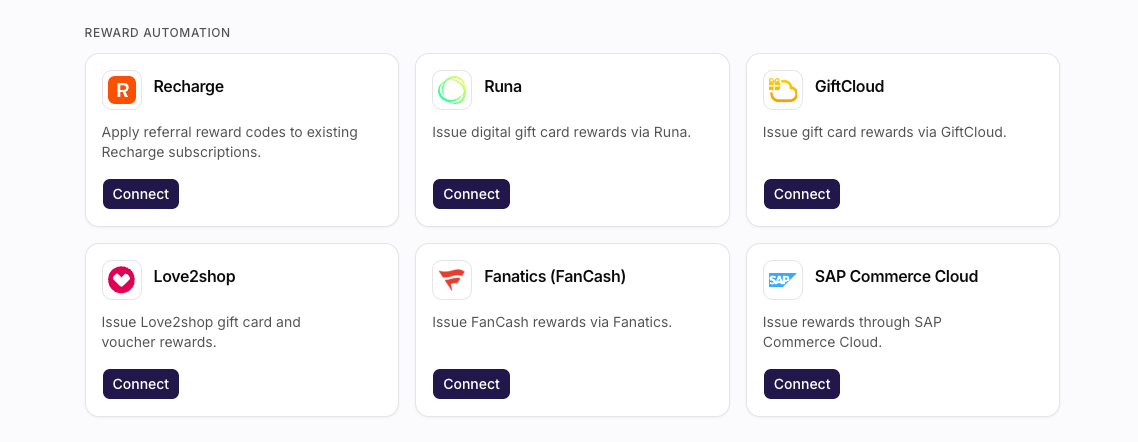
Reward automation is how a third-party provider fulfils a referral reward, typically a gift card, instead of a voucher batch you upload. The providers appear as cards in the **Reward automation** section of **Settings > Integrations**: GiftCloud, Love2shop, SAP Commerce Cloud, Runa, and Fanatics.
Recharge's card lives in the same section, but it doesn't fulfil a reward - it duplicates an already-created Shopify referrer discount into the customer's Recharge portal. See [Connecting Recharge](/knowledge-app/integrations/reward-automation/recharge).
 For how this sits next to voucher batches, see [Understanding Rewards and Vouchers](/knowledge-app/concepts/rewards-and-vouchers). Connecting needs a merchant admin role.
## What You Can Do
* **Connect** a provider you have not used yet. That opens a dialog for the first set of credentials.
* **Manage** a provider that already has connections. The sheet lists each connection. From there you **Edit** one, or **Add another**.
* Hold **several connections per provider**. Use that for separate territories or accounts.
* You **cannot delete** most connections - to stop using one, stop pointing rewards at it.
Secret fields (passwords, API keys, client secrets) are masked when you edit. Click **Replace** only when you need to send a new value.
## See Also
Steps and credentials for every provider, including Recharge.
The directory these cards live in.
How reward automation fulfils a campaign reward.
Point a campaign reward at a connected provider.
For how this sits next to voucher batches, see [Understanding Rewards and Vouchers](/knowledge-app/concepts/rewards-and-vouchers). Connecting needs a merchant admin role.
## What You Can Do
* **Connect** a provider you have not used yet. That opens a dialog for the first set of credentials.
* **Manage** a provider that already has connections. The sheet lists each connection. From there you **Edit** one, or **Add another**.
* Hold **several connections per provider**. Use that for separate territories or accounts.
* You **cannot delete** most connections - to stop using one, stop pointing rewards at it.
Secret fields (passwords, API keys, client secrets) are masked when you edit. Click **Replace** only when you need to send a new value.
## See Also
Steps and credentials for every provider, including Recharge.
The directory these cards live in.
How reward automation fulfils a campaign reward.
Point a campaign reward at a connected provider.