{date} {type} {area}
; }; ## At a glance
* **Campaigns:** take a campaign from idea to launch, with guidance and pre-launch checks along the way
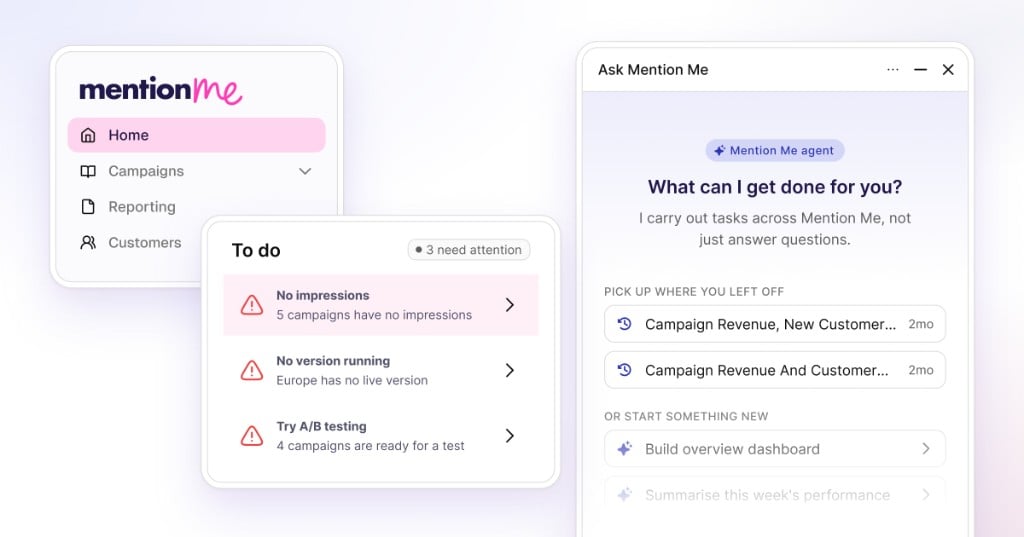
* **Home:** see how your programme is performing and what needs attention as soon as you log in
* **Reporting:** build reporting around the questions your team needs to answer, with AI helping you create each view
* **Customers:** resolve enquiries with the full referral history and the actions you need in one view
* **Branding:** shape the campaign experience to fit your brand and preview changes as you make them
## Build and update campaigns directly
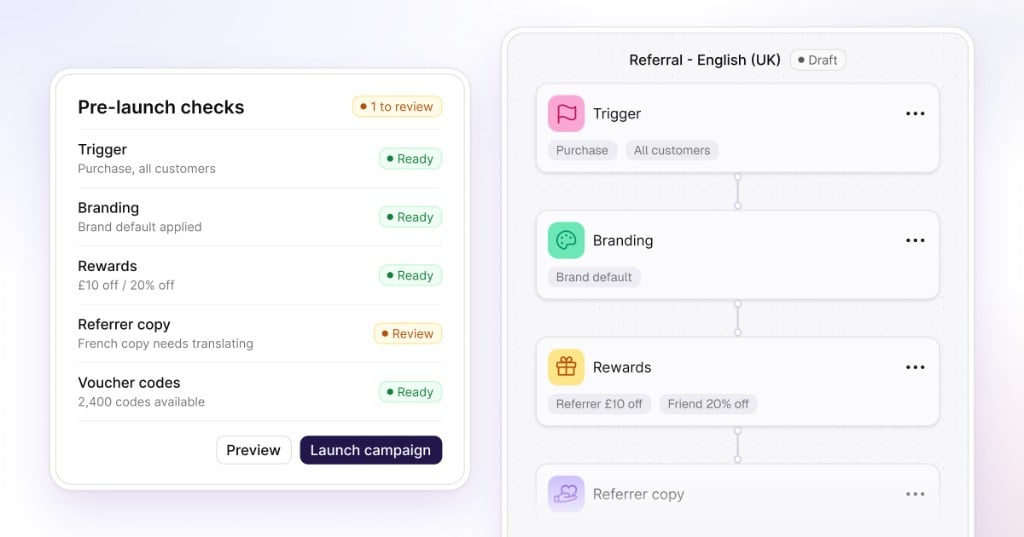
The campaign builder lays out the main parts of a campaign on one canvas, including the trigger, branding, imagery, rewards, sharing and customer-facing copy.
Open any step to make a change and preview the result. Where testing is available, create a variation without rebuilding the campaign from the beginning. Before launch, the actions panel and pre-launch checks highlight anything that still needs attention.
For teams managing several markets, campaigns can also be duplicated across languages, giving you a faster starting point for local versions.
## At a glance
* **Campaigns:** take a campaign from idea to launch, with guidance and pre-launch checks along the way
* **Home:** see how your programme is performing and what needs attention as soon as you log in
* **Reporting:** build reporting around the questions your team needs to answer, with AI helping you create each view
* **Customers:** resolve enquiries with the full referral history and the actions you need in one view
* **Branding:** shape the campaign experience to fit your brand and preview changes as you make them
## Build and update campaigns directly
The campaign builder lays out the main parts of a campaign on one canvas, including the trigger, branding, imagery, rewards, sharing and customer-facing copy.
Open any step to make a change and preview the result. Where testing is available, create a variation without rebuilding the campaign from the beginning. Before launch, the actions panel and pre-launch checks highlight anything that still needs attention.
For teams managing several markets, campaigns can also be duplicated across languages, giving you a faster starting point for local versions.
 ## See programme performance and priorities from the first screen
The home page gives you a view of programme health as soon as you log in. See the referral funnel, key metrics, active campaigns and a to-do list in one place.
Programme health is visible from the first screen, with direct routes into rewards, content and performance.
## Build reporting dashboards with AI assistance
Create custom dashboards for different teams and reporting needs. Add metrics, charts, tables and commentary, or describe the insight you need and use AI-assisted tile creation to get started. Set the reporting period once, compare performance over time and explore results by market, customer type (subscribers or one-time buyers), currency and conversion stage.
## Resolve customer enquiries from one place
Customers brings search, filtering and flagged activity into one area. Open a customer profile to see their referral timeline, rewards, emails and codes together.
Depending on your permissions, you can also take supported service actions such as reviewing activity or resending information. The customer's history and the actions available to you stay in the same view.
## Manage your brand experience with a live preview
Colours, fonts, corner styles, layouts and imagery can be managed from the branding step. Changes appear in the preview as you make them, so you can see the customer experience before it goes live.
Every visual setting can be managed in the platform and previewed instantly.
## A guided tour of the updated experience
See how the main areas work together, from spotting an opportunity to making a campaign change and reviewing its impact.
## Where to find it
The updated experience is available at `app.mention-me.com`. Your existing programmes and data are already there. Some less frequently used capabilities may still open in Classic while they are reviewed or rebuilt.
## See programme performance and priorities from the first screen
The home page gives you a view of programme health as soon as you log in. See the referral funnel, key metrics, active campaigns and a to-do list in one place.
Programme health is visible from the first screen, with direct routes into rewards, content and performance.
## Build reporting dashboards with AI assistance
Create custom dashboards for different teams and reporting needs. Add metrics, charts, tables and commentary, or describe the insight you need and use AI-assisted tile creation to get started. Set the reporting period once, compare performance over time and explore results by market, customer type (subscribers or one-time buyers), currency and conversion stage.
## Resolve customer enquiries from one place
Customers brings search, filtering and flagged activity into one area. Open a customer profile to see their referral timeline, rewards, emails and codes together.
Depending on your permissions, you can also take supported service actions such as reviewing activity or resending information. The customer's history and the actions available to you stay in the same view.
## Manage your brand experience with a live preview
Colours, fonts, corner styles, layouts and imagery can be managed from the branding step. Changes appear in the preview as you make them, so you can see the customer experience before it goes live.
Every visual setting can be managed in the platform and previewed instantly.
## A guided tour of the updated experience
See how the main areas work together, from spotting an opportunity to making a campaign change and reviewing its impact.
## Where to find it
The updated experience is available at `app.mention-me.com`. Your existing programmes and data are already there. Some less frequently used capabilities may still open in Classic while they are reviewed or rebuilt.